
FEATURE: IPv6 clients bypass Omada DNS proxy and Omada LAN DNS function

To recreate this issue, enable the DNS Proxy and LAN DNS on an Omada Gateway following the instructions here:
"How to configure DNS Proxy on the Omada Gateway"
https://support.omadanetworks.com/ae/document/13244/
"How to Configure LAN DNS on Omada Gateway"
https://www.tp-link.com/us/support/faq/4504/
At this point clients using DHCP should be given the IP addresses of the DNS Proxy and be able to resolve LAN DNS addresses.
However in out testing this only works for clients with no IPv6 support. Even with DNS Proxy enabled, the DHCP server continues to give IPv6 clients the external IPv6 DNS server addresses (as well as the IPv4 address for the DNS proxy).
We tried to fix this by overriding the IPv6 DNS to the IPv6 address of the Gateway, but we found the DNS Proxy doesn't respond on the Gateway's IPv6 address.
We tried to fix this by overriding the IPv6 DNS to the (mapped) IPv4 address of the Gateway, but that didn't work either.
This means any IPv6 clients bypass the proxy, so secure DoH/DoT cannot be used and also IPv6 client can't resolve LAN DNS domain names.
- Copy Link
- Subscribe
- Bookmark
- Report Inappropriate Content


Thanks for the detailed info.
After confirmation, this is because Omada gateways doesn't support the DNS proxy/LAN DNS over IPv6 addresses.
So strictly speaking, this is not a bug — it’s just that support hasn’t been added yet.
You may change the BUG in the title to Feature request, and I can transfer this post to the feature request block, so there will be more users who join in and cast their votes.
Or you may go to the feature request block to start a new post regarding this feature. Thanks.
- Copy Link
- Report Inappropriate Content
Thanks for posting here.
Before we say it's a bug, please share the config pages mentioned with us.
Do you use Omada controller? If yes, please also let us know the type and firmware version number of the controller you are using. Thanks.
- Copy Link
- Report Inappropriate Content
> Before we say it's a bug, please share the config pages mentioned with us.
Do you use Omada controller? If yes, please also let us know the type and firmware version number of the controller you are using. Thanks.
Oh sure. Sorry for not including that detail. I am using an OC300 controller with latest firmware:
1.33.10 Build 20260408 Rel.53393 (Stable)
The DNS Proxy and LAN DNS are configured as per the Omada documentation I linked in my original post and below:
"How to configure DNS Proxy on the Omada Gateway"
https://support.omadanetworks.com/ae/document/13244/
"How to Configure LAN DNS on Omada Gateway"
https://www.tp-link.com/us/support/faq/4504/
I am testing with DHCP clients running Windows 11 Pro (latest) with wired connection using Omada switches with latest firmware under the same controller (SG3210X-M2 & SG2210XMP-M2 all on 1.0.21 firmware). The gateway is an ER7412-M2 also on the latest firmware (1.1.0) . I am checking the assigned DNS servers on the clients with "ipconfig /all" and testing DNS lookup with "nslookup".
With DNS Proxy disabled, the Windows clients get the IPv4 and IPv6 DNS servers automatically configured by the ISP. With DNS Proxy enabled, the Windows clients get the Gateway IP address for IPv4 DNS, but the IPv6 DNS is still the IPv6 DNS servers automatically configured by the ISP.
Does that help recreate this result?
- Copy Link
- Report Inappropriate Content
Thank you for your reply. The two instructions only provided configuration steps. Could you share how you configured them? For example, was the proxy set to an IPv6 address?
Please share screenshots of the key information for these two configurations. To protect your privacy, feel free to blur or mask any sensitive information. Thank you!
whereisaaron wrote
> Before we say it's a bug, please share the config pages mentioned with us.
Do you use Omada controller? If yes, please also let us know the type and firmware version number of the controller you are using. Thanks.
Oh sure. Sorry for not including that detail. I am using an OC300 controller with latest firmware:
1.33.10 Build 20260408 Rel.53393 (Stable)
The DNS Proxy and LAN DNS are configured as per the Omada documentation I linked in my original post and below:
"How to configure DNS Proxy on the Omada Gateway"
https://support.omadanetworks.com/ae/document/13244/
"How to Configure LAN DNS on Omada Gateway"
https://www.tp-link.com/us/support/faq/4504/
I am testing with DHCP clients running Windows 11 Pro (latest) with wired connection using Omada switches with latest firmware under the same controller (SG3210X-M2 & SG2210XMP-M2 all on 1.0.21 firmware). The gateway is an ER7412-M2 also on the latest firmware (1.1.0) . I am checking the assigned DNS servers on the clients with "ipconfig /all" and testing DNS lookup with "nslookup".
With DNS Proxy disabled, the Windows clients get the IPv4 and IPv6 DNS servers automatically configured by the ISP. With DNS Proxy enabled, the Windows clients get the Gateway IP address for IPv4 DNS, but the IPv6 DNS is still the IPv6 DNS servers automatically configured by the ISP.
Does that help recreate this result?
- Copy Link
- Report Inappropriate Content
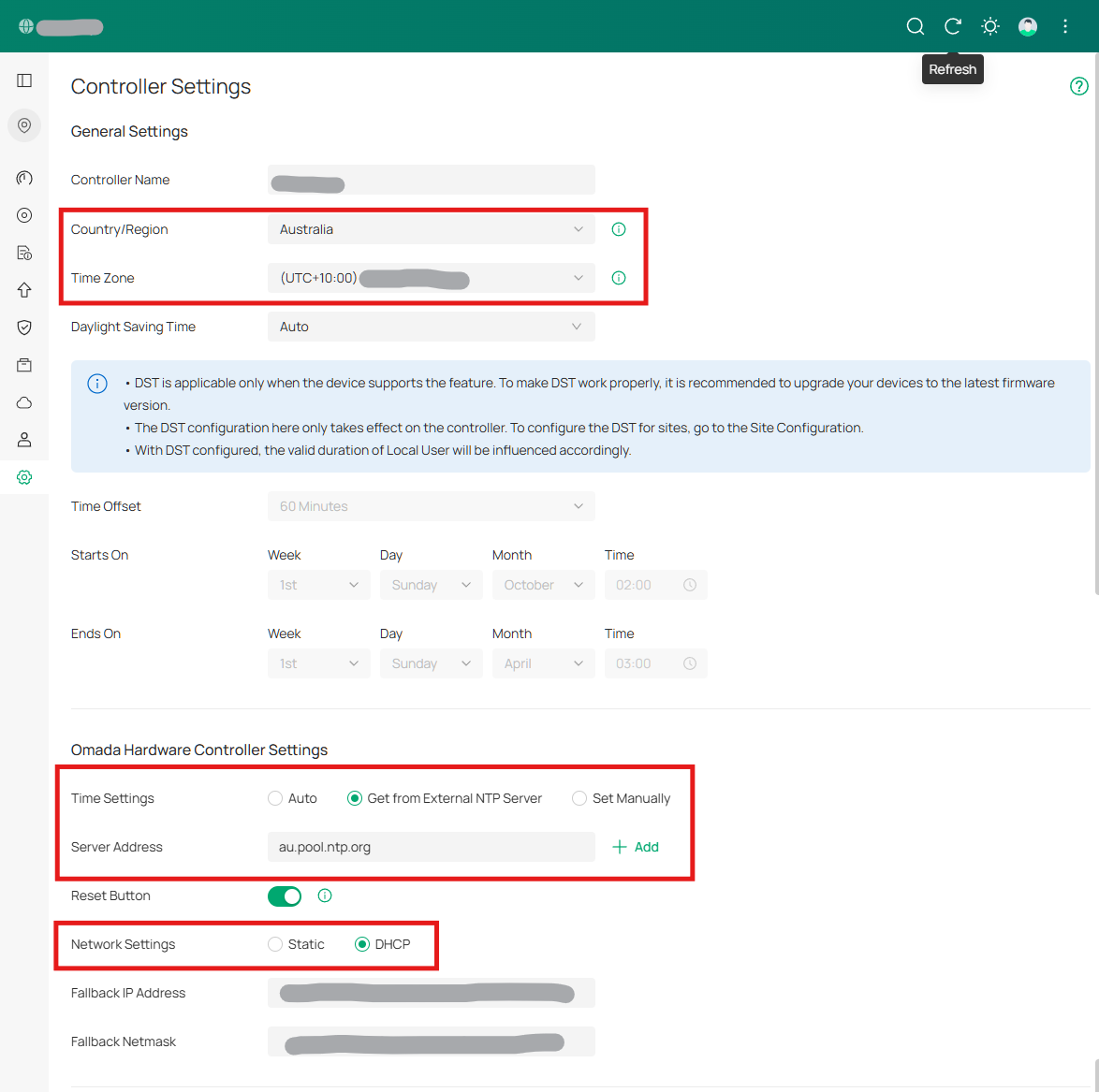
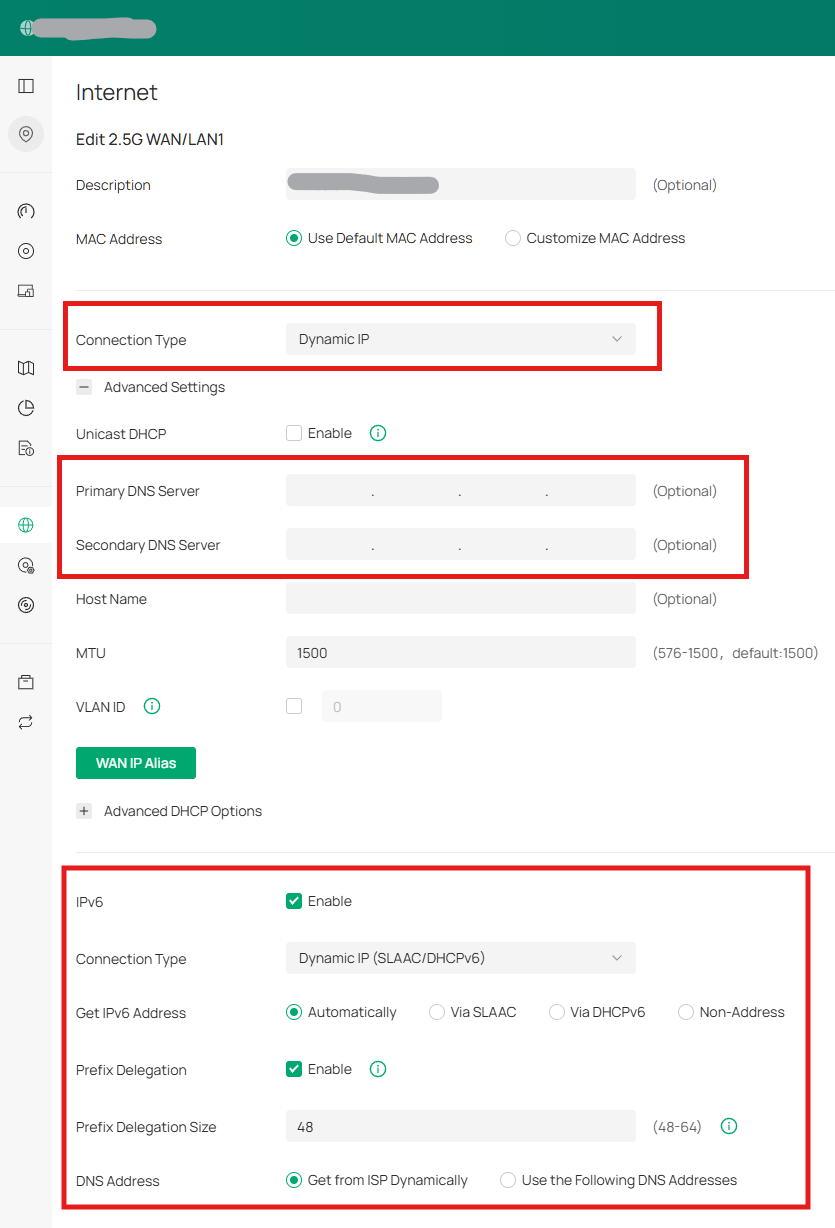
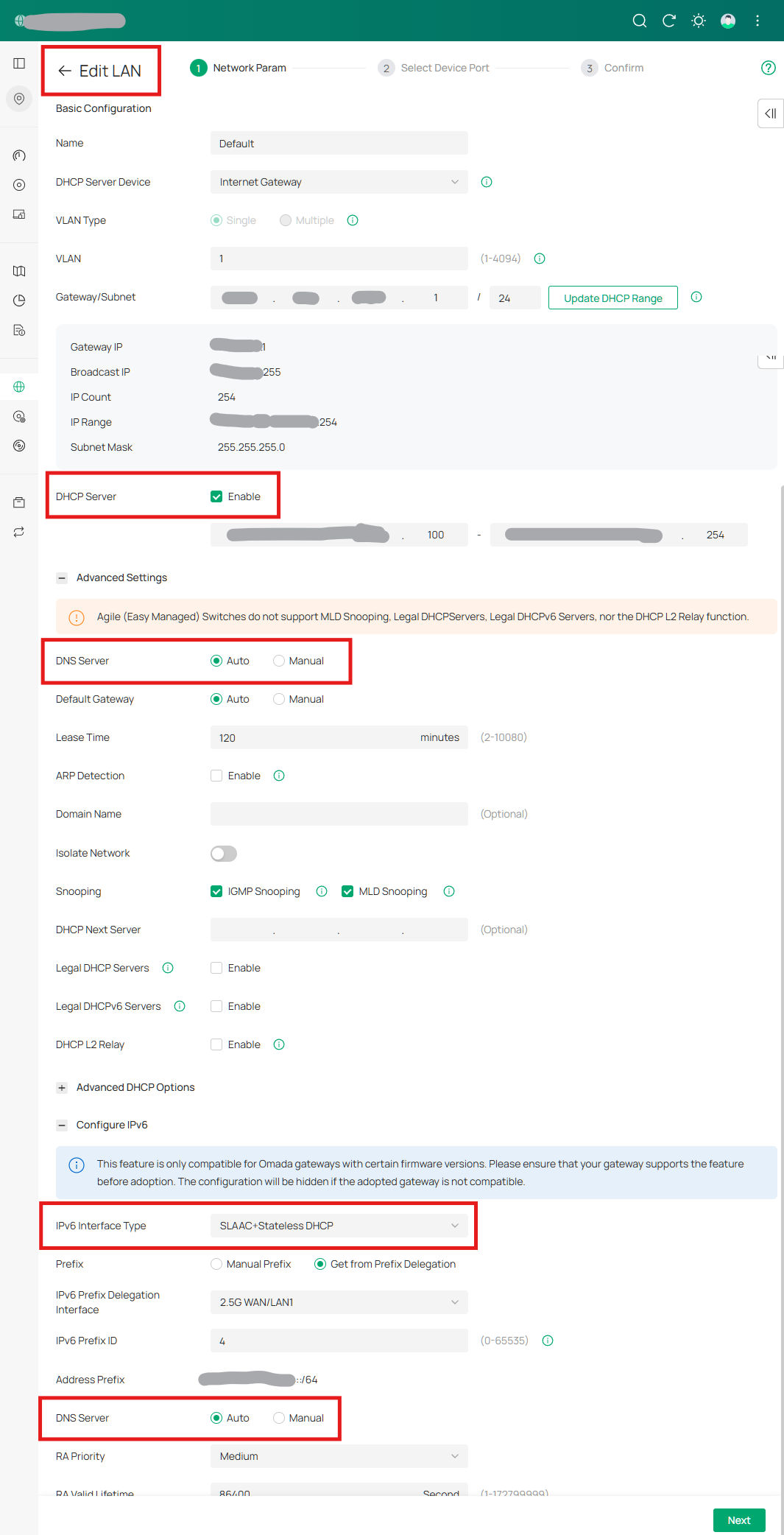
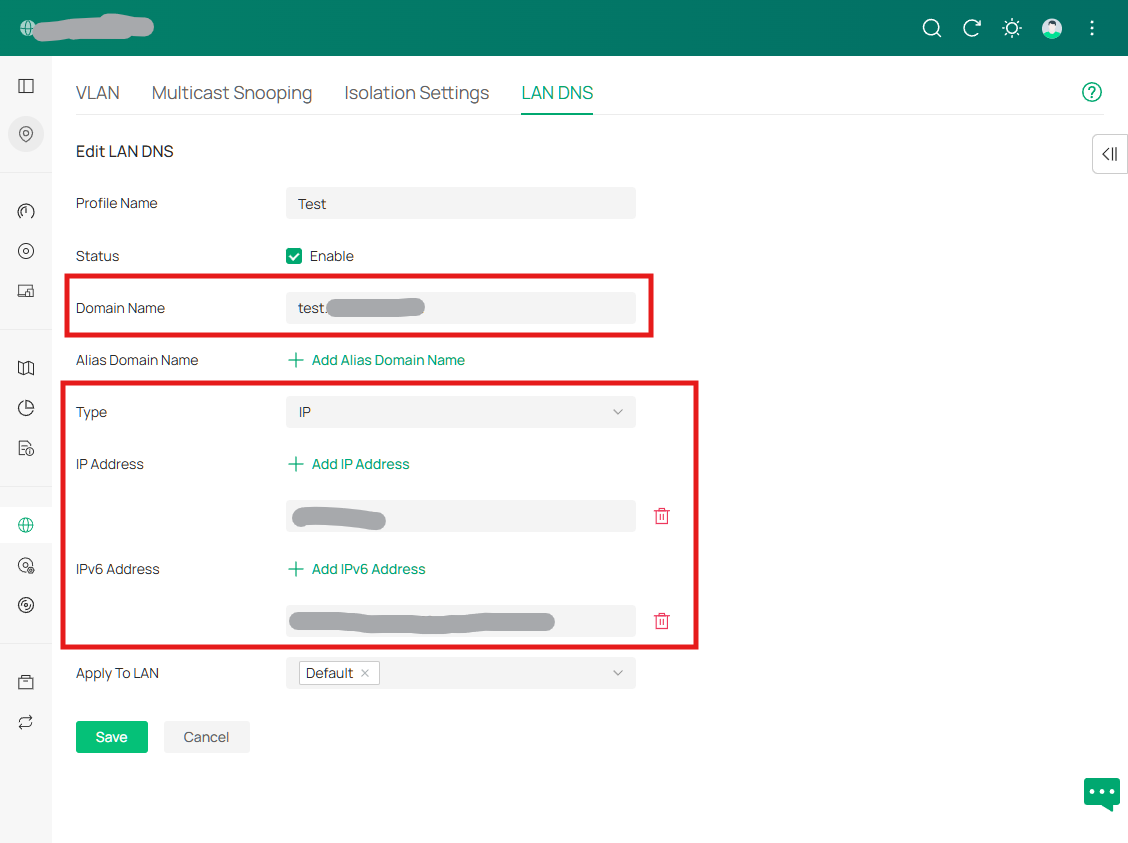
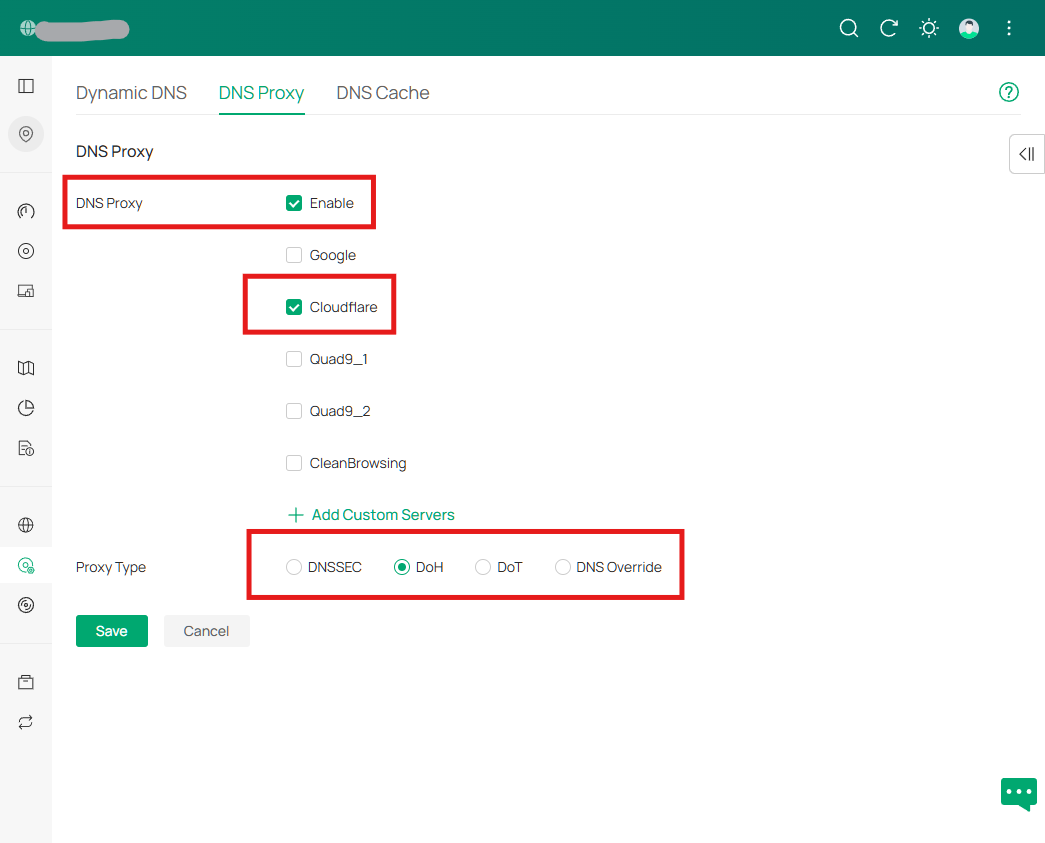
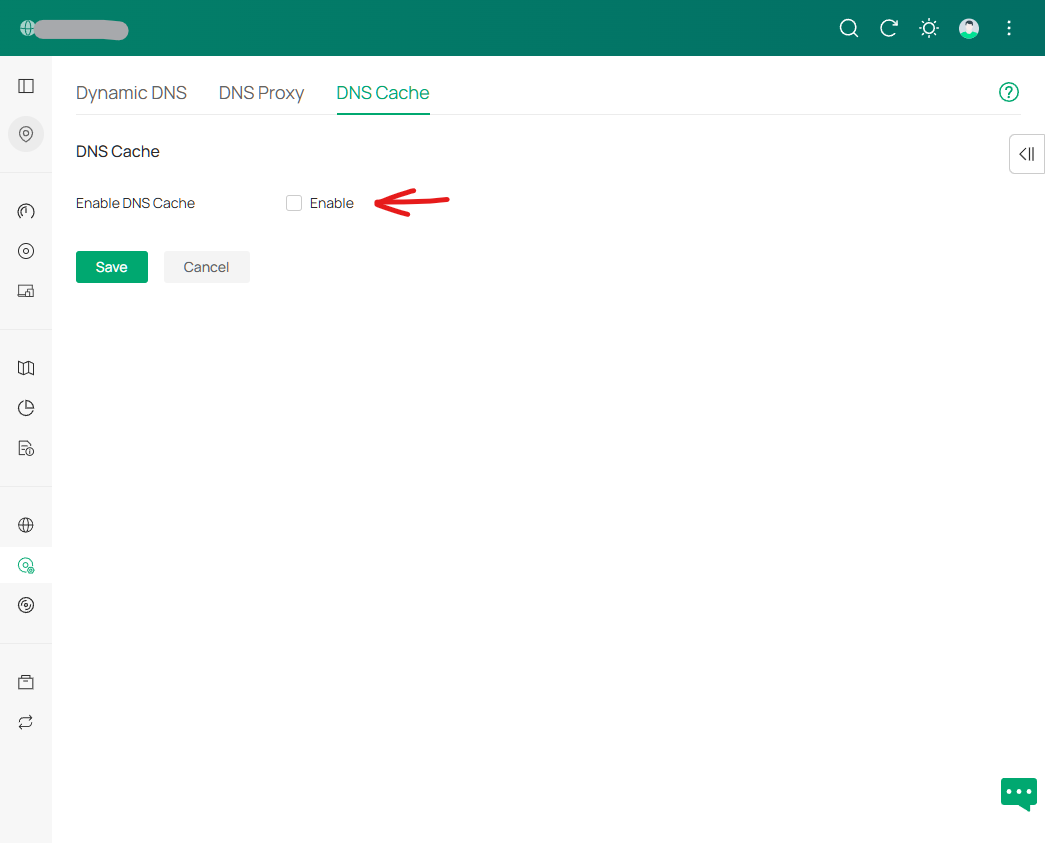
Sure @Vincent-TP please find screen shots for all the screens mentioned in the instruction below you can click on.
The DNS Proxy does not have any option to specify IPv6 addresses. It is automatically the address of the Gateway.
The WAN settings let you manually specify IPv6 DNS servers, and I tried that, but I could find no IPv6 address for the DNS Proxy on the Gateway.
In the LAN setting you can configure the IPv4 address of the Gateway (where the proxy is) but there is no option to specify the IPv6 address of the Gateway. I assumed the Gateway would use a IPv6 SLAAC-generated address or an IPv6 link-local address - and I tested with both these addresses, but neither allowed access the DNS Proxy. I even trying IPv6 mapped address for IPv4 (::ffff:1.2.3.4).
Timezone
WAN (IPv4 & IPv6)
LAN Config (IPv4 and IPv6)
LAN DNS Entry:
DNS Proxy:
DNS Cache:
- Copy Link
- Report Inappropriate Content
Thanks for the detailed info.
After confirmation, this is because Omada gateways doesn't support the DNS proxy/LAN DNS over IPv6 addresses.
So strictly speaking, this is not a bug — it’s just that support hasn’t been added yet.
You may change the BUG in the title to Feature request, and I can transfer this post to the feature request block, so there will be more users who join in and cast their votes.
Or you may go to the feature request block to start a new post regarding this feature. Thanks.
- Copy Link
- Report Inappropriate Content
Thanks @Vincent-TP - but why did you ask for all the model numbers, and to have me prepare all those screen shots for a feature that didn't exist 😂 Next time, could you please check first? 🙏
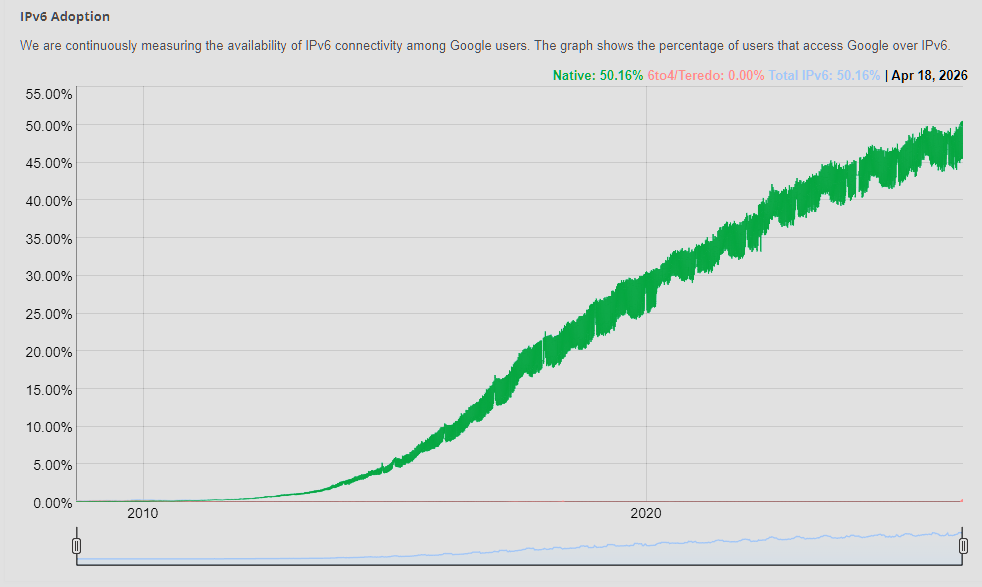
IPv6 is not new. It's 15+ years old! Older than any Omada product. IMO no business product should be adding features with only legacy IPv4 support. More that 50% of Internet traffic is IPv6, we should able to use Omada products with IPv6.
DNS proxy for DoT / DoH is a security feature. If using IPv6 bypasses that security, that's not good right?
I'll change this to "feature request" for you to move. Thank you. But, to me, it is more accurate to say the DNS proxy feature was launched unfinished 😅
- Copy Link
- Report Inappropriate Content
Initially, I only suspected that it might be due to a lack of IPv6 support, but I couldn’t confirm it.
Therefore, your model information and screenshots were crucial in helping me verify whether the feature exists.
It was our oversight not to clarify this in advance, and I sincerely apologize for any inconvenience caused. I’m truly sorry for taking up your valuable time, and we will definitely improve our process to ensure that internal verification is completed before asking for your assistance. Thank you very much for your patient feedback!
BTW, I had moved this post to the Requests & Suggestions block; you may cast your vote.
- Copy Link
- Report Inappropriate Content
Information
Helpful: 2
Views: 697
Replies: 7
Voters 2