ER-7206 constantly using back-up WAN link instead of primary WAN link

This thread has been locked for further replies. You can start a new thread to share your ideas or ask questions.

ER-7206 constantly using back-up WAN link instead of primary WAN link

This thread has been locked for further replies. You can start a new thread to share your ideas or ask questions.

ER-7206 constantly using back-up WAN link instead of primary WAN link
2022-08-29 15:17:19 - last edited 2022-08-30 00:53:56
Model: ER7206 (TL-ER7206)  
Hardware Version: V1
Firmware Version: 1.2.1 Build 20220512 Rel.77113

My ER-7206 constantly switches the primary WAN connection to a cable modem (300mbits, 7ms latency) from my fiber WAN connection (1gbps, 2ms latency).  No matter which ports I configure them on (SFP, WAN, WAN1/LAN, etc.) or how I configure the back-up link, I constantly find the connection using the cable modem instead of the Fiber line.  This is pretty stupid and its driving me crazy.  Is this a bug, a feature, by design????  How do I work around this?

  0      
  0      
#1
Options
1 Reply
Re:ER-7206 constantly using back-up WAN link instead of primary WAN link
2022-08-30 04:34:37

Dear  @ehubb 


For troubleshooting, could you please share us the screenshot of your Load Balance/Link Backup and Online deteciton settings?

How you know the router is using backup WAN? Via router web interface?


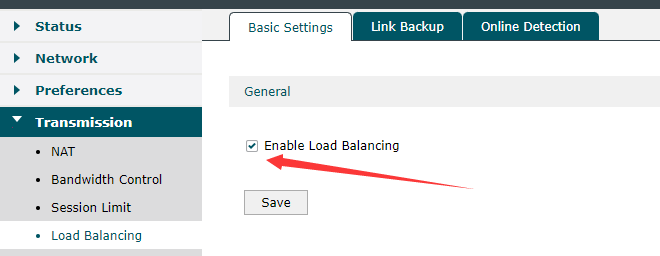
Please make sure the Load Balance is Enable:


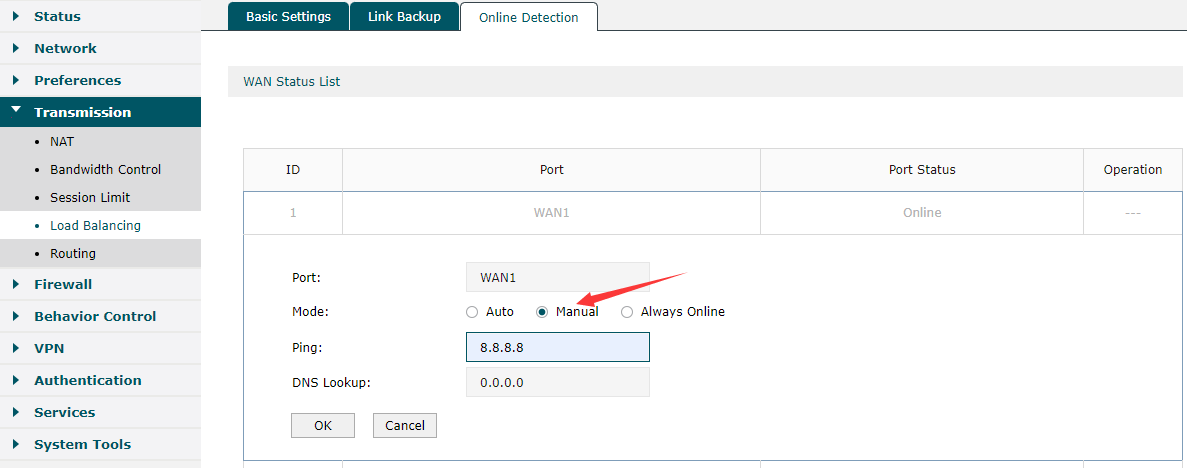
Please try change the online detection method for both of the primary WAN and backup WAN (under Online detection settings). Make it manually detection and ping 8.8.8.8


Best Regards! >> Omada EAP Firmware Trial Available Here << >> Get the Latest Omada SDN Controller Releases Here << *Try filtering posts on each forum by Label of [Early Access]*
  0  
  0  
#2
Options