
Severe CPU bottleneck when forwarding traffic

This thread has been locked for further replies. You can start a new thread to share your ideas or ask questions.

Severe CPU bottleneck when forwarding traffic

This thread has been locked for further replies. You can start a new thread to share your ideas or ask questions.

Severe CPU bottleneck when forwarding traffic
2022-12-29 15:59:19
Tags: #NAT #Firmware Update #performance
Model: ER8411  
Hardware Version: V1
Firmware Version: 1.0.1 Build 20221110 Rel.64164

Hi,


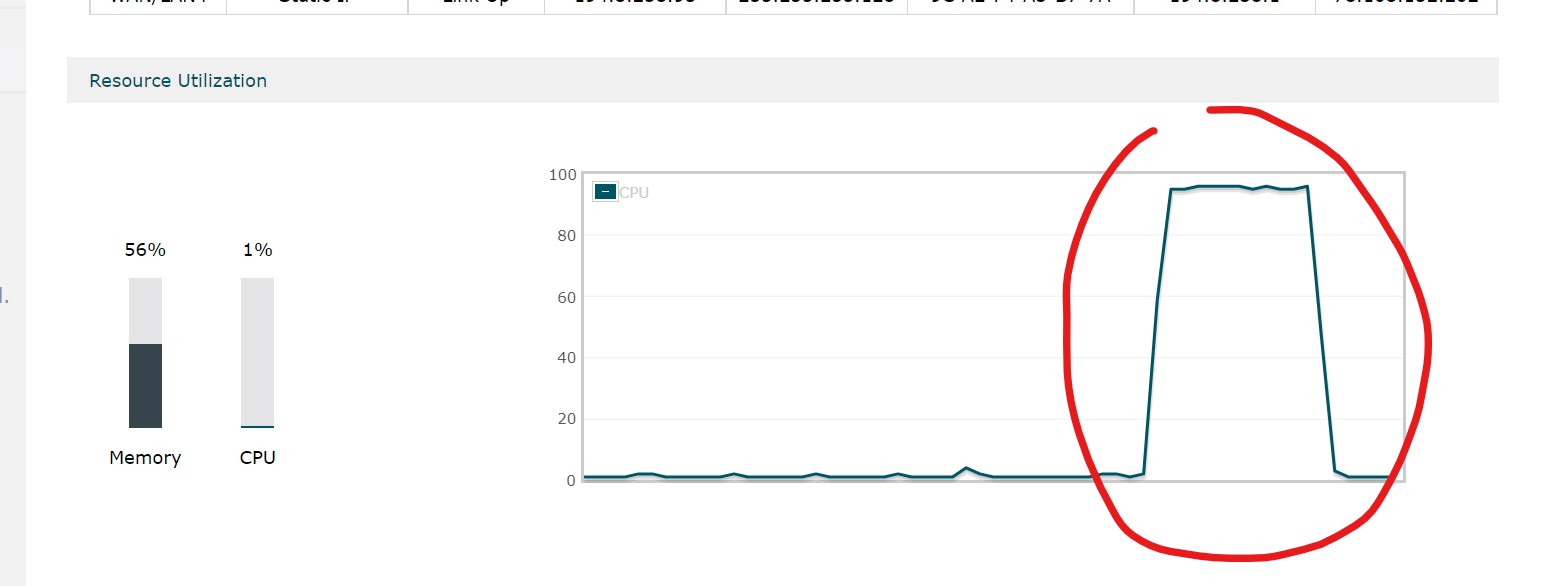
we are experiencing severe performance bottleneck when forwarding traffic. The CPU utilization jumps from nothing to 100% every time the traffic is forwaded. We are using virtual servers and we have about 21 active entries in the virtual servers list, but this is happening regardless of the amount of entries. We have tried disabling firewall, load balancing, bandwidth control, tried different forwarding techniques, but nothing helped.


With the maxed out CPU the bandwidth speed becomes extremely limited. The router is using 10Gb SFP+ ports. The underlying local network is split using high performance switch with 2.5Gb/s ports for local devices and itself is connected to the router via the 10Gb SFP+. Direct transfer Device - Switch - Device (2.5Gb/s ports) gave us ~2.4 Gb/s, but when port forwarding we are getting ~400Mb/s on average. Previously we were using ER7206 that gave us max 200Mb/s when forwarding. We thought that this was due to the slow CPU, but after upgrading to ER8411 and seeing the exact same problem, we think it might be something with the firmware.
 

  1      
  1      
#1
Options
2 Reply
Re:Severe CPU bottleneck when forwarding traffic
2022-12-29 16:42:39 - last edited 2022-12-29 16:52:50

  @PerunCreative 

According to TP-Link, this appears to be completely normal, I don't fully trust this, it's not normal with such a high cpu.

there are also major problems with IPsec together with OpenVPN and SSL VPN on this router, they cannot be used at the same time without the router slowing everything down.


here is a bug report I posted earlier

ER8411 High CPU 24/7 Bug Report


the last two weeks, the router is at between 27-30% CPU all the time.  I dont think this is normal.

  0  
  0  
#2
Options
Re:Severe CPU bottleneck when forwarding traffic
2022-12-30 09:21:35

Dear @PerunCreative ,


PerunCreative wrote

With the maxed out CPU the bandwidth speed becomes extremely limited. The router is using 10Gb SFP+ ports. The underlying local network is split using high performance switch with 2.5Gb/s ports for local devices and itself is connected to the router via the 10Gb SFP+. Direct transfer Device - Switch - Device (2.5Gb/s ports) gave us ~2.4 Gb/s, but when port forwarding we are getting ~400Mb/s on average. Previously we were using ER7206 that gave us max 200Mb/s when forwarding. We thought that this was due to the slow CPU, but after upgrading to ER8411 and seeing the exact same problem, we think it might be something with the firmware.

 

Thank you so much for taking the time to post the issue on TP-Link community!


To better assist you, I've created a support ticket via your registered email address, and escalated it to our support engineer to look into the issue. 

The ticket ID is TKID221253620, please check your email box and ensure the support email is well received. Thanks!

Once the issue is addressed or resolved, welcome to update this topic thread with your solution to help others who may encounter the same issue as you did.


Many thanks for your great cooperation and patience!

Best Regards! >> Omada EAP Firmware Trial Available Here << >> Get the Latest Omada SDN Controller Releases Here << *Try filtering posts on each forum by Label of [Early Access]*
  0  
  0  
#3
Options