
[2024] Tp-Link R600VPN can't connect to Malaysia Maxis Fiber PPPoe

This thread has been locked for further replies. You can start a new thread to share your ideas or ask questions.

[2024] Tp-Link R600VPN can't connect to Malaysia Maxis Fiber PPPoe

This thread has been locked for further replies. You can start a new thread to share your ideas or ask questions.

[2024] Tp-Link R600VPN can't connect to Malaysia Maxis Fiber PPPoe
[2024] Tp-Link R600VPN can't connect to Malaysia Maxis Fiber PPPoe
2024-01-30 11:52:05
Model: TL-R600VPN  
Hardware Version: V4
Firmware Version: 4.0.4 Build 20200313 Rel.41831

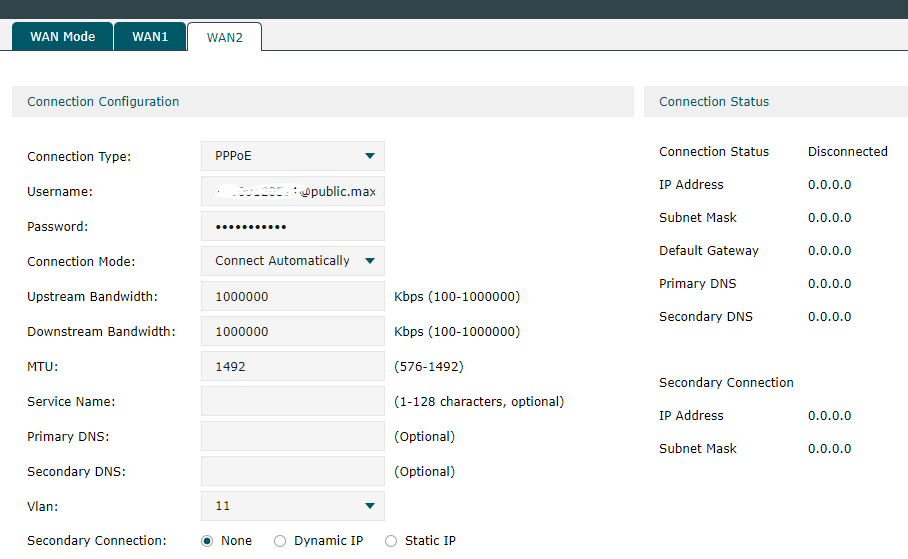
Hi, I can't connect to Malaysia Maxis Fiber PPPoe


I have the Tp-link r600vpn connected to a Huawei ONT (HG8240H5), i confirm that the PPPoe Username and Password are correct. Did i set anything wrong?

Any assistance would be appreciated. Thanks
 

  0      
  0      
#1
Options
3 Reply
Re:[2024] Tp-Link R600VPN can't connect to Malaysia Maxis Fiber PPPoe
2024-01-31 01:40:07

Hi @SSJV 

Thanks for posting in our business forum.

Don't get any suggestions based on your description.

Have you changed the ONT recently? If yes, you might wanna reboot your ONT. This might be a MAC address issue.


But anyway, I would recommend you consult with your ISP about what should be done. Rebooting would be a very common step in fixing a new router/ONT. MAC clone basically equals rebooting because it flushes the existing MAC address on the router.

  0  
  0  
#2
Options
Re:[2024] Tp-Link R600VPN can't connect to Malaysia Maxis Fiber PPPoe
2024-01-31 10:28:59

  @Clive_A Thanks for your reply.


From where I can check the ONT setting? 


I did the reboot for all the router, but it still not working. 

  0  
  0  
#3
Options
Re:[2024] Tp-Link R600VPN can't connect to Malaysia Maxis Fiber PPPoe
2024-02-01 01:19:09

Hi @SSJV 

Thanks for posting in our business forum.

SSJV wrote

  @Clive_A Thanks for your reply.


From where I can check the ONT setting? 


I did the reboot for all the router, but it still not working. 

Then you might contact the tech support of the ONT or your ISP to check this.

The router is only dialing the Internet and if we need to dig into this, I might need a result of the Wireshark, which seems not proper in your case. I don't think we should go into this so deeply and make you confused.

Just contact your ISP and ask about this.

  0  
  0  
#4
Options