
How to separate two networks sharing a single cable?
 This thread has been locked for further replies. You can start a new thread to share your ideas or ask questions.
Hi folks,
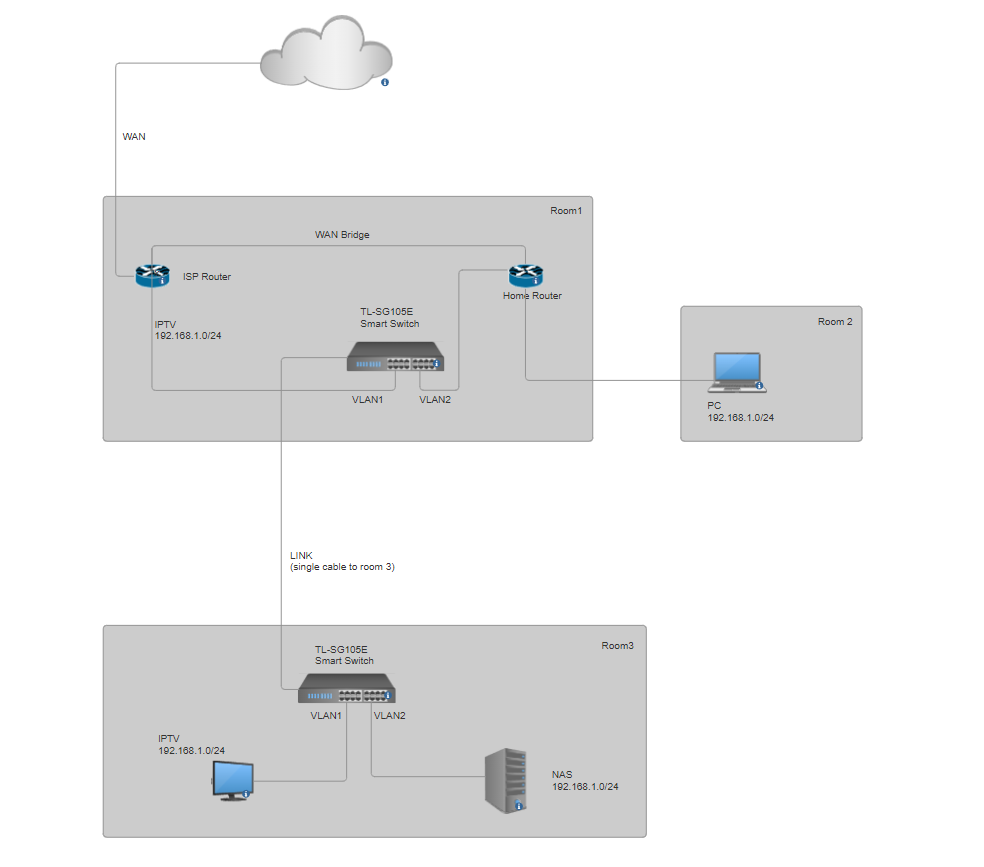
As shown here, I have an IPTV receiver and a NAS in the same room sharing only a single cable. I'm unable to connect the NAS device directly to my home router.
I'm experiencing loops or other problems if I somehow don't separate traffic individually for IPTV and Home network devices.
So can you please help me how to configure my two smart switches to separate two networks having same subnet in one single cable? IPTV traffic and NAS/Laptops traffic should be isolated from each other.
I have no access to ISP router. I can set home network to be different subnet if it's important. I have configured home router to not reach ISP router for DHCP requests. If I just set both switches in default mode (no VLANs) everything is still working but for some time, then because of the TTL errors I have to unplug the cable going from the home router to the switch to let devices access the internet again.
Any advice?

