IPsec VPN Failure After ER8411 Firmware Upgrade to 1.3.1

This thread has been locked for further replies. You can start a new thread to share your ideas or ask questions.

12

IPsec VPN Failure After ER8411 Firmware Upgrade to 1.3.1

This thread has been locked for further replies. You can start a new thread to share your ideas or ask questions.
IPsec VPN Failure After ER8411 Firmware Upgrade to 1.3.1
2025-06-03 16:54:45
Model: ER8411  
Hardware Version: V1
Firmware Version: 1.3.1

Hello, 


I manage a large Omada deployment across various networks. My primary network uses an ER8411 gateway, and several remote sites connect to it via IPsec VPN.

Yesterday, I upgraded the ER8411 to firmware version 1.3.1, and since then, the IPsec VPN connection to one of my remote sites — which uses an ER707-M2 v1.0 — has stopped working.
 

I've confirmed that the VPN settings on both ends remain unchanged from before the upgrade, and I’ve also tried creating a new VPN configuration and testing various setting combinations. Despite this, the VPN tunnel still fails to establish.
 

The following error appears in the event log on the ER8411:


WAN/LAN4: Phase 1 of IKE negotiation failed. (Peers=xxx.xxx.xxx.xxx<->xxx.xxx.xxx.xxx, Error=NO_PROPOSAL_CHOSEN[14])

On the ER707-M2, a similar error is logged:

2.5G WAN1: Phase 1 of IKE negotiation failed. (Peers=xxx.xxx.xxx.xxx<->xxx.xxx.xxx.xxx, Error=14)
 

(Note: IP addresses have been obfuscated for privacy.)
 

This issue only began after upgrading to firmware 1.3.1 on the ER8411. Is there anything else I can try or logs to look at to inform what might be happening? Could this be a regression or compatibility issue introduced in the latest firmware? If so, is it possible to downgrade the ER8411 to the previous firmware version?


Thanks!

  2      
  2      
#1
Options
11 Reply
Re:IPsec VPN Failure After ER8411 Firmware Upgrade to 1.3.1
2025-06-03 17:25:18

We also have two sites connected via IPSec. I performed the firmware update beforehand. I’m experiencing the same problem as the poster above me. I have already tried recreating the IPSec connection with various configurations.

Please help. Thank you!

  0  
  0  
#2
Options
Re:IPsec VPN Failure After ER8411 Firmware Upgrade to 1.3.1
2025-06-03 18:26:43

  @jonmaxey 


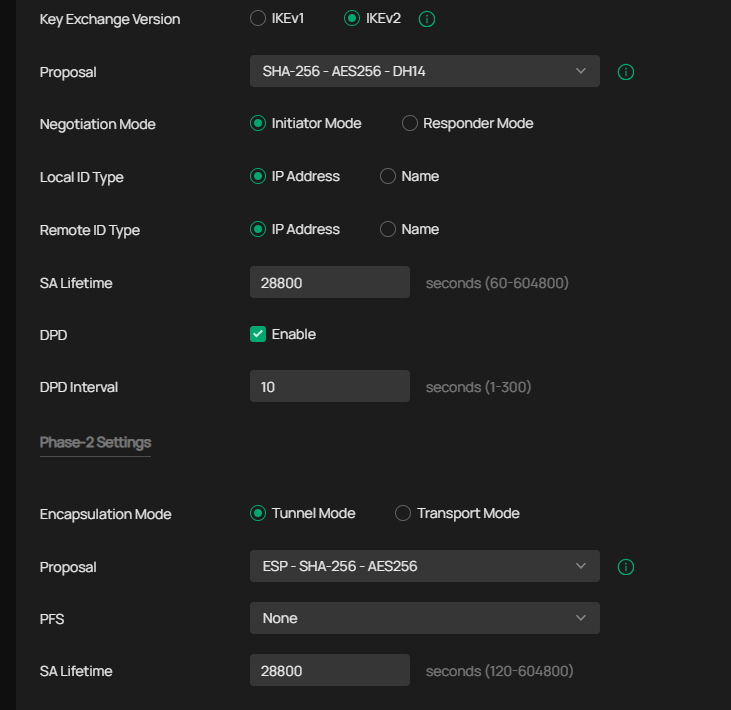
I have ER8411 with VPN to two ER707-M2 and various other routers all with the new firmware, working without problems with both IPsec site to site and SD-WAN
My IPsec settings look like this


  0  
  0  
#3
Options
Re:IPsec VPN Failure After ER8411 Firmware Upgrade to 1.3.1
2025-06-03 18:52:49

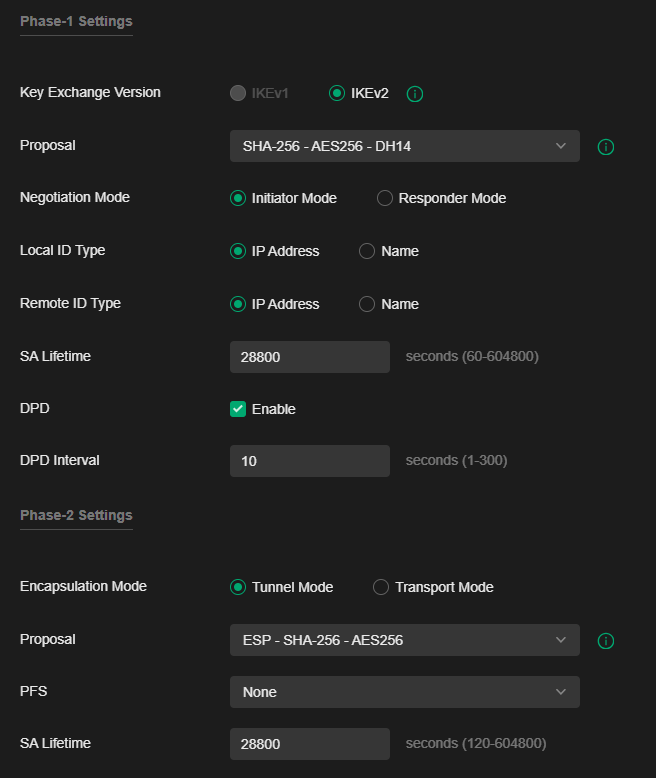
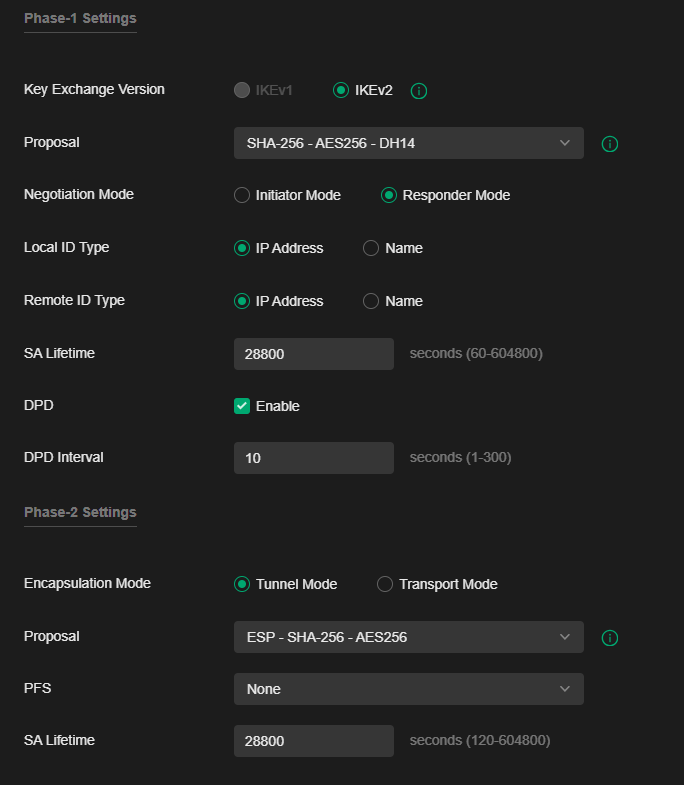
  @MR.S Thanks for your screenshots. Here’s how my configuration looks:

HQ:

HQ

Branch:


Any other Ideas?

  0  
  0  
#4
Options
Re:IPsec VPN Failure After ER8411 Firmware Upgrade to 1.3.1
2025-06-03 18:56:33

  @Danielteuschl 


exactly the same :-) except that I use both routers as initiator unless there is a good reason to have it as responder. It seems very strange, I have not had any problems with VPN, I have VPN for both Cisco and Unifi and several types of Omada routers.


  0  
  0  
#5
Options
Re:IPsec VPN Failure After ER8411 Firmware Upgrade to 1.3.1
2025-06-03 19:12:37

  @Danielteuschl 


but you can test if you have the same problem with SD-WAN then, it's a 120sec job to set up, disable the existing vpn tunnels on all sites. before configuring SD-WAN you don't need to delete. I only use SD-WAN now and it works very well.

The prerequisite is that all routers are configured on the same controller.

  0  
  0  
#6
Options
Re:IPsec VPN Failure After ER8411 Firmware Upgrade to 1.3.1
2025-06-03 19:29:31

  @MR.S How i can configure this for testing?

  0  
  0  
#7
Options
Re:IPsec VPN Failure After ER8411 Firmware Upgrade to 1.3.1
2025-06-03 19:37:54

  @Danielteuschl 


it's pretty simple, go to global view, go to SD-WAN press add, enter an SD-WAN IP range. there I have used 172.31.254.1-172.31.254.254 follow the wizard. I did a test now set up a full mesh SD-WAN with 6 routers in 49 seconds. you will probably take a little longer since it's your first time doing it.

I use ER8411 as HUB, and all the other routers are spokes. HUB must have public ip. The others can be behind a NAT.


If you want full mesh, click here and select all routers. You cannot have mesh between two routers with private IP, but you will see that when you configure.


  0  
  0  
#8
Options
Re:IPsec VPN Failure After ER8411 Firmware Upgrade to 1.3.1
2025-06-03 19:39:07

  @Danielteuschl 


But remember, disable IPsec VPN befor you configure SD.WAN

  0  
  0  
#9
Options
Re:IPsec VPN Failure After ER8411 Firmware Upgrade to 1.3.1
2025-06-05 09:46:36

  @MR.S Thank you very much, and it really works better. Thanks again for your help.

  0  
  0  
#10
Options
Re:IPsec VPN Failure After ER8411 Firmware Upgrade to 1.3.1
2025-06-21 09:15:21
Bonjour J'ai également le même problème, j'ai la version 1.3.2 Y a t-il une solution sans le sd-wan ? Merci
  0  
  0  
#11
Options