
No DPI and Application Control on Hardware Controller OC300

This thread has been locked for further replies. You can start a new thread to share your ideas or ask questions.

No DPI and Application Control on Hardware Controller OC300

This thread has been locked for further replies. You can start a new thread to share your ideas or ask questions.

No DPI and Application Control on Hardware Controller OC300
2025-08-04 03:11:25 - last edited 2025-08-05 06:18:47
Model: OC300  
Hardware Version: V1
Firmware Version: 1.25.3 Build 20240620 Rel.80854

Model:  OC300 1.0

Controller Version: 5.14.26.23


As we're checking online regarding Application Control, we saw a thread showing us a guide.

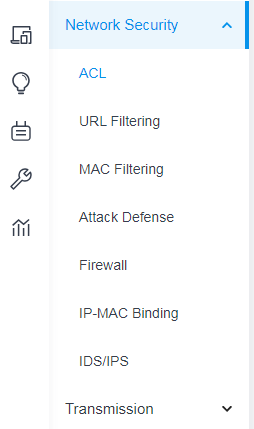
However, we found no APPLICATION CONTROL and DPI on our OC300 Hardware Controller.


Please assist.


Do we  need to setup as pre-requisite to enable this?
Kindly let us know.


Thank you!


Here's the link to the guide: How to configure DPI on Omada Gateway via Omada Controller | TP-Link Philippines


and here's our oc300.. no APPLICATION CONTROL.
  0      
  0      
#1
Options
2 Accepted Solutions
Re:No DPI and Application Control on Hardware Controller OC300-Solution
2025-08-04 15:41:44 - last edited 2025-08-06 00:36:09

  @YBWCLI first update to the latest version

Recommended Solution
  0  
  0  
#2
Options
Re:No DPI and Application Control on Hardware Controller OC300-Solution
2025-08-04 17:44:17 - last edited 2025-08-05 06:18:47

  @YBWCLI 


you need to upgrade the controller, you also need to have an Omada router that supports DPI


Recommended Solution
  0  
  0  
#3
Options
4 Reply
Re:No DPI and Application Control on Hardware Controller OC300-Solution
2025-08-04 15:41:44 - last edited 2025-08-06 00:36:09

  @YBWCLI first update to the latest version

Recommended Solution
  0  
  0  
#2
Options
Re:No DPI and Application Control on Hardware Controller OC300-Solution
2025-08-04 17:44:17 - last edited 2025-08-05 06:18:47

  @YBWCLI 


you need to upgrade the controller, you also need to have an Omada router that supports DPI


Recommended Solution
  0  
  0  
#3
Options
Re:No DPI and Application Control on Hardware Controller OC300
2025-08-05 06:19:51

Hi  @YBWCLI 


Below is the latest firmware for the OC300:

https://static.tp-link.com/upload/firmware/2025/202507/20250731/OC300v1_un_1.30.7_20250704_rel78617_up.zip


Do you have an Omada gateway? What's the model?

  0  
  0  
#4
Options
Re:No DPI and Application Control on Hardware Controller OC300
2025-08-06 00:35:59

Thanks guys!

I saw it after the update.

  0  
  0  
#5
Options
