
Early Access EAP773 | EAP783 v1.1.1 Pre-release Firmware_Closed
 This thread has been locked for further replies. You can start a new thread to share your ideas or ask questions.

This Article Applies to:
EAP783 V1, Fully Adapted to Omada SDN Controller v5.14 or above;
EAP773 V1, Fully Adapted to Omada SDN Controller v5.14 or above;
Release Notes:
New Feature/ Enhancement:
- Supported Portal Logout.
- Supported cluster deployment in Local Controller mode (Omada Central doesn’t support).
- Supported RADIUS Proxy(Global View> Server Settings> Radius Proxy Server).
- Supported OWE.
- Supported upgrading firmware through cloud in standalone mode.
- Supported Rate Limit with Portal Authentication.
- Supported disabling HTTP protocol in Standalone mode.
- Supported DHCP Option43.
- Supported multiple Radius servers when using MAC-Based Authentication (Site View Settings>MAC-Based Authentication).
- Added support for configuring NAS ID with WPA-Enterprise encryption.
- Supported DNS Queries (Network Tools>Network Check>DNSLookup).
- Supported DNS Adoption.
- Supported configuring the Device Name in Controller mode.
- Supported viewing status information and simple configuration through standalone management page when devices managed by the Controller.
- Supported displaying the maximum associated clients range in Controller mode(EAP Config>Advanced>Load Balance).
- Supported displaying the bandwidth of the EAP in Controller mode.
- Added Support for 11 a/n mixed mode for 5GHz radio in Controller mode.
- Supported multicast and broadcast data statistics.
- Supported disabling HTTP, HTTPS and APP discovery in Controller mode (Only with Pro controller).
- Supported Non-stick Roaming function.
- Supported authentication type of EKMS and Generic Radius with Unbound MAC for PPSK with Radius.
- Supports 1024 PPSK entries.
- Supported Multicast Filtering with IPv6 address.
- Supported Multicast/Broadcast Rate Limit
- Supported displaying Configuration Result.
- Optimized roaming function.
- Optimized Automatic Power Optimization function.
- Optimized the configuration of Beacon Interval.
- Optimized Portal Function.
- Optimized MLO connection stability.
- Improved Device and Network security.
- Improved time to configure SSID.
- Improved stability.
Bug Fixed:
- Fixed the issue that RSSI display error in WLAN Optimization.
- Fixed the issue that URL Filtering cannot work properly after TLS1.3 is enabled in the browser.
- Fixed the issue that HTTPS Redirection and Pre-Authentication Access don’t take effect when use portal.
- Fixed the issue that IPv4 multicast packets can’t be transmitted from mesh AP to root AP.
- Fixed the issue that one hop mesh AP’s client on SSID with VLAN would have slow Network speed.
- Fixed the issue that CoA doesn’t take effect with some MLO clients.
Pre-release Firmware Download
Attention
Please be sure you have read the Beta Test Agreement before upgrading the Beta firmware!
EAP783_V1_1.1.1_20251103 (Pre-release)
EAP773_V1_1.1.1_20250818 (Pre-release)
EAP783_V1_1.1.1_20250818 (Pre-release)
Notes:
(1) The above firmware is applied to EAP783 V1.
(2) Your device’s configuration won’t be lost after upgrading.
(3) The above firmware is fully adapted to Omada SDN Controller v5.14 and above
Update Log
4th Nov, 2025
Provide the pre-release link for EAP783
EAP783_V1_1.1.1_20251103 (Pre-release)
31th Oct, 2025
Remove the download links.
19th Aug, 2025
Provide the following pre-release link:
EAP773_V1_1.1.1_20250818 (Pre-release)
EAP783_V1_1.1.1_20250818 (Pre-release)
19th Aug, 2025
Update the release note.
Feedback
Any further feedback on the new firmware, please feel free to comment below or start a new thread from HERE.
To get better assistance, you may check Tips For Efficiently Reporting an Issue In The Community.
When reporting an issue, especially it's about firmware upgrade, it's suggested to include the following info:
- Management mode (Controller or Standalone)
- Device Model(s) and Hardware
- Device Firmware (previous and current)
Thank you in advance for your great cooperation and support.
Recommended Threads
Experience the Latest Omada EAP Firmware - Trial Available Here, Subscribe for Updates!
Current Available Solutions to Omada EAP Related Issues [Constantly Updated]
Get the Latest Omada SDN Controller Releases Here - Subscribe for Updates
- Copy Link
- Subscribe
- Bookmark
- Report Inappropriate Content
Hi @nikisima
Thanks for the feedback.
MLO is also still broken (ping timeouts/packet loss, with good signal).
>>>Did you test this with a Samsung phone?
- Copy Link
- Report Inappropriate Content

@Vincent-TP I can not say with 100% confidence that there is an issue with a Samsung Tablet S9 Ultra (I think it was).
But, I can confirm that the issue is present with multiple Google Pixel 9 devices.
- Copy Link
- Report Inappropriate Content
Hi @nikisima
Thanks for the info. We will dig more about this.
Just to verify:
but MLO is also still broken (ping timeouts/packet loss, with good signal).
>>>Did the internet affected?
The official latest EAP783 (1.1.4 Build 20251030) firmware, does not only still have the non-VLAN (default 1) to VLAN bug,
>>>With MLO enabled, did you use VLAN1?
- Copy Link
- Report Inappropriate Content
> Just to verify:
> but MLO is also still broken (ping timeouts/packet loss, with good signal).
> >>>Did the internet affected?
Yes, the timeouts were to external servers. The same servers were reachable over non-MLO Wi-Fi.
> The official latest EAP783 (1.1.4 Build 20251030) firmware, does not only still have the non-VLAN (default 1) to VLAN bug,
> >>>With MLO enabled, did you use VLAN1?
If you’re referring to the ping timeouts: those occurred on VLAN1 and on a "real" VLAN.
If you mean the VLAN bug: if I remember correctly, the same bug occurred on both MLO and non-MLO networks. To clarify further, based on my testing, I consistently saw about 13-16 KB of data transferred back from servers connected via a Wi-Fi VLAN. After that, the connection would break (the server never received ACKs, as far as I could tell), eventually timing out.
I reviewed tcpdumps from both my firewall and the server, which confirmed that neither ever saw the packets. That left the access point as the only remaining culprit.
- Copy Link
- Report Inappropriate Content

Hello,
I just created an account to report the v1.1.4 has effectively a VLAN bug.
My setup:
SSID3 = VLAN 3, 2.4GHz
SSID2 = VLAN 2, 5GHz
SSID1 = no VLAN (Disabled), 6GHz
Mgnt UI: no VLAN
From SSID2 I can target SSID3, no problem.
From SSID1, I'm experiencing TCP drops targeting SSID2 or SSID3. Devices never received ACK so it retransmits TCP packets in loop.
And from a wired trunk network, no problem to contact SSID2 or SSID3.
It's a critical problem, please provide a correction soon.
Edit, new try:
SSID3 = VLAN 3, 2.4GHz
SSID2 = VLAN 2, 5GHz
SSID1 = VLAN99, 6GHz
Mgnt UI: no VLAN
VLAN99, DHCP OK but no internet, no access to SSID2 & SSID3. If I switch Management UI to VLAN99, everything works.
- Copy Link
- Report Inappropriate Content

Since 1.1.4 firmware, noticed that roaming does not work anymore. Sometimes phone sitting with -82 dBm, and not switching to closest AP, which would be like 2m away. Anyone else observing the same?
802.11r ON
Fast Roaming ON
Non-stick Roaming ON
AI Roaming ON
MLO OFF
6 Ghz OFF
5 Ghz ON
2.4 Ghz ON
Iphone 17 pro

- Copy Link
- Report Inappropriate Content
Hi @liviu2004
Thanks for the feedback. Do you mean this only happens with this iPhone? What about other wireless clients?
Please try the following:
1. update the iPhone to the latest version;
2. Disable 802.11r
liviu2004 wrote
Since 1.1.4 firmware, noticed that roaming does not work anymore. Sometimes phone sitting with -82 dBm, and not switching to closest AP, which would be like 2m away. Anyone else observing the same?
802.11r ON
Fast Roaming ON
Non-stick Roaming ON
AI Roaming ON
MLO OFF
6 Ghz OFF
5 Ghz ON
2.4 Ghz ON
Iphone 17 pro
- Copy Link
- Report Inappropriate Content
Hi @Benoit2r
Thank you for your feedback. We have already resolved this issue in the next version.
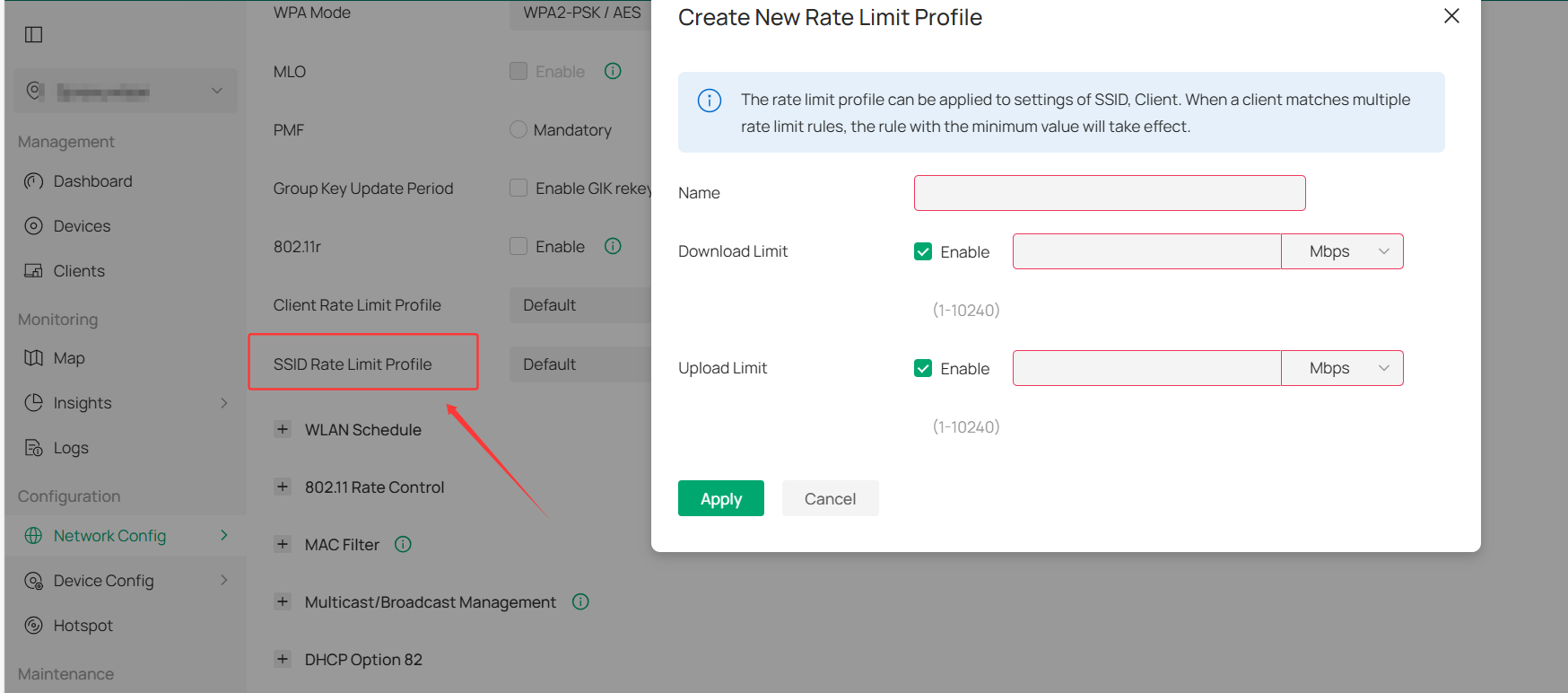
Before the next version is released, you can work around this problem by setting SSID rate limits. The SSID rate limit can be set up to 10G, so it should not affect your normal usage. Note that this setting will slightly increase the device’s CPU usage, but it will not affect the product’s functionality.
Once the next version is released, you can remove this configuration.
If you prefer not to do this, please let me know.
Benoit2r wrote
Hello,
I just created an account to report the v1.1.4 has effectively a VLAN bug.
My setup:
SSID3 = VLAN 3, 2.4GHzSSID2 = VLAN 2, 5GHz
SSID1 = no VLAN (Disabled), 6GHz
Mgnt UI: no VLAN
From SSID2 I can target SSID3, no problem.
From SSID1, I'm experiencing TCP drops targeting SSID2 or SSID3. Devices never received ACK so it retransmits TCP packets in loop.
And from a wired trunk network, no problem to contact SSID2 or SSID3.
It's a critical problem, please provide a correction soon.
Edit, new try:
SSID3 = VLAN 3, 2.4GHz
SSID2 = VLAN 2, 5GHz
SSID1 = VLAN99, 6GHz
Mgnt UI: no VLAN
VLAN99, DHCP OK but no internet, no access to SSID2 & SSID3. If I switch Management UI to VLAN99, everything works.
- Copy Link
- Report Inappropriate Content
@Vincent-TP Thanks for coming back to me, I tested with another Iphone, version 15, this works OK, with 802.11r enabled. No issues moving from AP to AP, one does not even notice the roaming moment. 
Next test:
802.11r OFF
Iphone 17 Pro still does not roam, lowest signal seen -82dBm.
- Copy Link
- Report Inappropriate Content
Hi @liviu2004
Thanks for the info.
Do you mean iphone17 pro still can't roam with 802.11r off?
Or you haven't tested it yet?
liviu2004 wrote
@Vincent-TP Thanks for coming back to me, I tested with another Iphone, version 15, this works OK, with 802.11r enabled. No issues moving from AP to AP, one does not even notice the roaming moment.
Next test:
802.11r OFF
Iphone 17 Pro still does not roam, lowest signal seen -82dBm.
- Copy Link
- Report Inappropriate Content
Information
Helpful: 0
Views: 22357
Replies: 119
Voters 0
No one has voted for it yet.