
Early Access EAP65x | EAP67x Pre-release Firmware Adapted to Omada Controller v6.0 (Closed on 23st Oct, 2025)


This Article Applies To:
EAP670v1 1.3.50 Fully Adapted to Omada SDN Controller v6.0.
EAP650v1 1.3.50 Fully Adapted to Omada SDN Controller v6.0.
EAP670v2 1.3.50 Fully Adapted to Omada SDN Controller v6.0.
EAP673-Extenderv1 1.3.50 Fully Adapted to Omada SDN Controller v6.0.
EAP650-0utdoorv1 13.50 Fully Adapted to Omada SDN Controller v6.0.
EAP673v1 1.3.50 Fully Adapted to Omada SDN Controller v6.0.
EAP650D30-0utdoorv1 1.3.50 Fully Adapted to Omada SDN Controller v6.0.
EAP650D120-0utdoorv1 13.50 Fully Adapted to Omada SDN Controller v6.0.
EAP653v1 1.3.50 Fully Adapted to Omada SDN Controller v6.0.
Release Notes:
1. Supported Omada APs of new VI.
2. Adapted to CE-RED certification.
3. Optimized DFS switching mechanism and radar wave conflict handling.
4. Optimized automatic bandwidth selection mechanism.
5. Optimized CoA-ACK/NAK message cache mechanism.
6. Supported EAP CLI command system.
7. Supported terminal device identification
8. Solved the Blast-RADIUS security vulnerability and added a message-authenticator attribute verification switch
9. Supported configuration of WPA3 Enterprise on the Standalone page.
10. Supported configuration of DNS adoption switch (Remote Adoption) on the Standalone page.
11. Modified the verification rules for static IP configuration items on the Standalone page
12. Optimized memory fluctuations under high load
13. Supported EO-GRE function
Beta Firmware Download
Attention
Please be sure you have read the Beta Test Agreement before upgrading the Beta firmware!
EAP670v1 1.3.50_20250819 (Pre-release version)
EAP650v1 1.3.50)_20250819 (Pre-release version)
EAP670v2 1.3.50_20250819 (Pre-release version)
EAP673-Extenderv1 1.3.50_20250819 (Pre-release version)
EAP650-Outdoorv1 13.50_20250819 (Pre-release version)
EAP673v1 1.3.50_20250819 (Pre-release version)
EAP650D30-0utdoorv1 1.3.50_20250819 (Pre-release version)
EAP650D120-0utdoorv1 13.50_20250819 (Pre-release version)
EAP653v1 1.3.50_20250819 (Pre-release version)
Update Log
23rd Oct, 2025
Remove all beta links. Since these betas need further optimization.
26th Sep, 2025
Remove the beta link for EAP650-outdoor and EAP653 V1.
For the latest firmware, please go to the official website.
21st Aug, 2025
Provide the pre-release link:
EAP670v1 1.3.50_20250819 (Pre-release version)
EAP650v1 1.3.50)_20250819 (Pre-release version)
EAP670v2 1.3.50_20250819 (Pre-release version)
EAP673-Extenderv1 1.3.50_20250819 (Pre-release version)
EAP650-0utdoorv1 13.50_20250819 (Pre-release version)
EAP673v1 1.3.50_20250819 (Pre-release version)
EAP650D30-0utdoorv1 1.3.50_20250819 (Pre-release version)
EAP650D120-0utdoorv1 13.50_20250819 (Pre-release version)
EAP653v1 1.3.50_20250819 (Pre-release version)
Feedback
Any further feedback on the new firmware, please feel free to comment below or start a new thread from HERE.
To get better assistance, you may check Tips For Efficiently Reporting an Issue In The Community.
When reporting an issue, especially it's about firmware upgrade, it's suggested to include the following info:
- Management mode (Controller or Standalone)
- Device Model(s) and Hardware
- Device Firmware (previous and current)
Thank you in advance for your great cooperation and support.
Recommended Threads
Experience the Latest Omada EAP Firmware - Trial Available Here, Subscribe for Updates!
Current Available Solutions to Omada EAP Related Issues [Constantly Updated]
Get the Latest Omada SDN Controller Releases Here - Subscribe for Updates
- Copy Link
- Subscribe
- Bookmark
- Report Inappropriate Content
any1 got that 1.3.50 fw for EAP670 ??
- Copy Link
- Report Inappropriate Content

Friend.
I have two here for the EAP670 V1.
EAP670v1_1.3.0_[20250609-rel35129]_up_signed and EAP670v1_1.3.50_[20250819-rel57463].
Which one do you need?
- Copy Link
- Report Inappropriate Content
- Copy Link
- Report Inappropriate Content

@Vincent-TP Hello. Not asking for an ETA, but any news regarding fw for these EAP models?
Thank you
- Copy Link
- Report Inappropriate Content

It will be coming, but not yet. I have reported a few bugs with this firmware, and that probably delayed things a bit, then having to update them with 6.1 and 6.2 adaptations as well on top.
I havent had any functional issues with 1.3.50 and i dont think there is much missing on controller 6.1 / 6.2 support anyway
- Copy Link
- Report Inappropriate Content
Although version 1.3.50 is quite stable, the initiative to use DFS channels still needs many adjustments. I experienced a lot of incompatibility and stability issues when using it. Back in version 1.1.1 or a little later, the problem was using DFS channels on 5GHz antennas.
I had to disable these channels at that time. Firmware 1.3.0 came out and I even felt some stability. However, I felt that the smartphone was constantly disconnecting from the antenna. And I felt this with other devices.
Version 1.3.50 improved very little.
I tried to persist, even with the optimizations, I realized it was something like a surprise. Another problem I noticed was that the optimizations do something I don't like, causing me to lose channel power, channels that are deactivated in this process, range, and effective use of the bandwidth in these channels.
I simply gave up using the optimizations and the DFS channels, and with that I gained stability, full channel coverage at 160Hz, range, and full use of the bands. Now I'm getting almost 500Mbps. With the use of DFS channels + optimizations, I only had 220Mbps to 250Mbps.
My recommendation to TP-Link would be to create optimization profiles. Low, medium, high, and aggressive.
I'm dissatisfied because I bought a device to have many channels, which helps a lot with the AP, but I never asked for DFS. I had a simple router, the AX73, and it seemed much better and more effective than the EAP670 in that regard. I still have it, actually.
These details and others are making me reconsider my future with Omada. Other options are cheaper and have many more features and technologies. Especially with 2.5 GbEth and 5GbEth ports.
I hope they improve this in a short period of time.
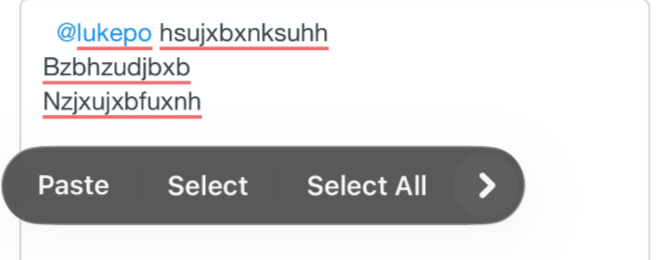
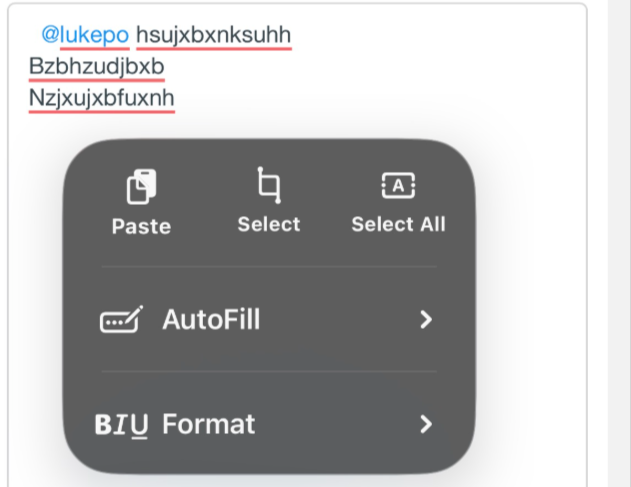
A suggestion for TP-Link with this form. Using it on a smartphone is a huge pain. When we use text that didn't turn out well and need to fix it, a submenu with "cut" and "copy" options keeps popping up when we select the text. Just leave the browser's own menu, which is more functional. When I try to select all the text to delete it, this menu appears, disables the browser's selection options, and disables the keyboard. I'm forced to delete the text manually. It's a pain.
- Copy Link
- Report Inappropriate Content
Thanks for the feedback.
My recommendation to TP-Link would be to create optimization profiles. Low, medium, high, and aggressive.
>>>Every change to wireless settings requires a restart of the wireless antenna to take effect, which means that all clients connected at the time of the change will lose network connectivity. Additionally, I believe situations requiring frequent adjustments to wireless settings are relatively rare.
I hope they improve this in a short period of time.
A suggestion for TP-Link with this form. Using it on a smartphone is a huge pain. When we use text that didn't turn out well and need to fix it, a submenu with "cut" and "copy" options keeps popping up when we select the text. Just leave the browser's own menu, which is more functional. When I try to select all the text to delete it, this menu appears, disables the browser's selection options, and disables the keyboard. I'm forced to delete the text manually. It's a pain.
>>>May I know what's the phone and the browser you are using? Below is the avalaible options on Safari:
- Copy Link
- Report Inappropriate Content

Hi Vincent,
I'm looking for a newer version than 1.1.1 Build 20250326 for my EAP673 v1. I found this beta entry here. Nothing has happened since October 2025?
When will the update be available again?
BR
- Copy Link
- Report Inappropriate Content
@Vincent-TP UP!
- Copy Link
- Report Inappropriate Content
Dear All,
We are awaiting firmware updates for the Omada 6.2 environment for the 670 EAPs and other models that have not yet received updates.
I understand that WiFi 7 devices are being prioritized, but please do not forget that WiFi 6 devices remain essential to our environments.
Thank you.
- Copy Link
- Report Inappropriate Content
Information
Helpful: 1
Views: 13766
Replies: 74
Voters 0
No one has voted for it yet.