
Browser not saving password of controller login
 This thread has been locked for further replies. You can start a new thread to share your ideas or ask questions.
Login page of Omada Controller does not saving passwords on my chrome / firefox browsers.
How can we fix this? I tried everything, but it doesnt want to save the password.
Many Thanks
- Copy Link
- Subscribe
- Bookmark
- Report Inappropriate Content


Hi @Barry1980
Thanks for posting here.
Restricting browsers from automatically saving passwords is primarily based on the following security considerations:
1. Preventing credential leaks:
- Passwords stored in browsers could be stolen by malware or other users on the same device, especially in shared environments like workplaces.
2. Enforcing strong authentication habits:
- Discouraging reliance on autofill reduces the use of weak or reused passwords, encouraging users to manually enter credentials to improve memory and security.
3. Controlling security boundaries:
- Since Omada Controller manages critical network devices (e.g., routers, APs), developers prefer users to log in via two-factor authentication (2FA) or dedicated clients (e.g., Omada App) rather than relying on insecure browser storage.
4. Mitigating CSRF/phishing risks:
- Autofill can be exploited by malicious pages (e.g., fake login forms), whereas manual entry forces users to verify the legitimacy of the login page.
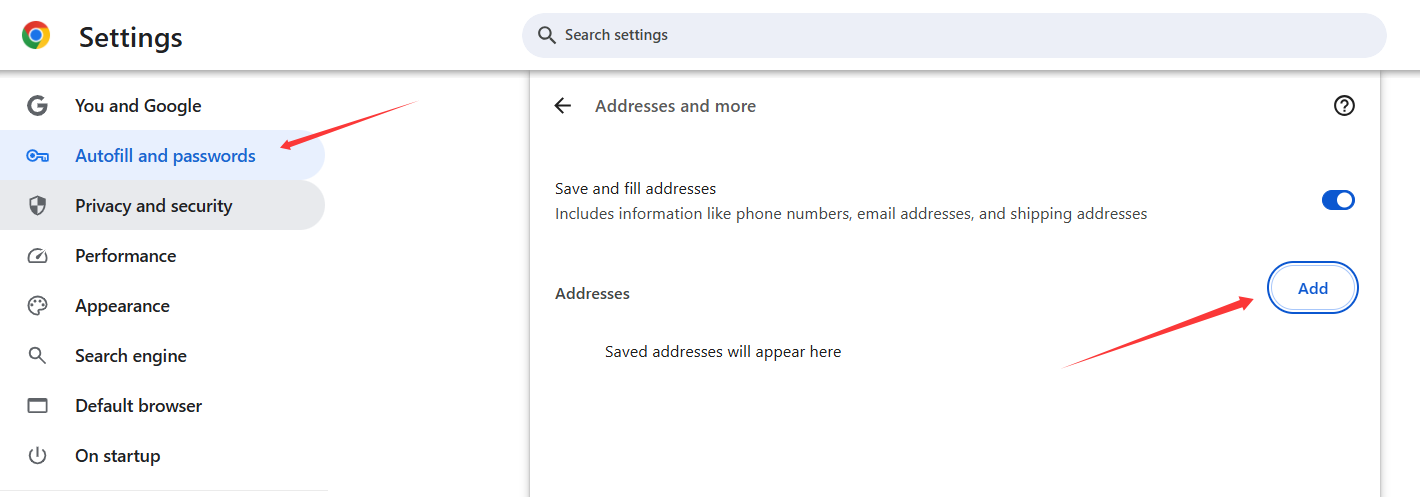
If you really want to save your account automatically, you can try this feature in Chrome:
- Copy Link
- Report Inappropriate Content

None of the controllers allow password to be saved.
Do you really want someone to use your unattended computer to log in to the controller?
- Copy Link
- Report Inappropriate Content
@GRL our Unifi controller does save its password (for 9 years already) and also our mikrotik and other services does, so why not our omada controller? We have to login with our password that is 24 credentials long , and that is not funny. I repeat, not funny.
We have our omada controller running on Ubuntu with a lot of sites, the same for our Unifi in that same server. So Yes other controllers are saving its password correctly.
- Copy Link
- Report Inappropriate Content
- Copy Link
- Report Inappropriate Content
Hi @Barry1980
Thanks for posting here.
Restricting browsers from automatically saving passwords is primarily based on the following security considerations:
1. Preventing credential leaks:
- Passwords stored in browsers could be stolen by malware or other users on the same device, especially in shared environments like workplaces.
2. Enforcing strong authentication habits:
- Discouraging reliance on autofill reduces the use of weak or reused passwords, encouraging users to manually enter credentials to improve memory and security.
3. Controlling security boundaries:
- Since Omada Controller manages critical network devices (e.g., routers, APs), developers prefer users to log in via two-factor authentication (2FA) or dedicated clients (e.g., Omada App) rather than relying on insecure browser storage.
4. Mitigating CSRF/phishing risks:
- Autofill can be exploited by malicious pages (e.g., fake login forms), whereas manual entry forces users to verify the legitimacy of the login page.
If you really want to save your account automatically, you can try this feature in Chrome:
- Copy Link
- Report Inappropriate Content
@Vincent-TP Thanks for answering, but i already added that into our chrome and its still not working. Its a mess.
- Copy Link
- Report Inappropriate Content

- Copy Link
- Report Inappropriate Content

- Copy Link
- Report Inappropriate Content
@MR.S i know there are other (cloud) based password managers, but thats exactly NOT what i ever want to use... The only manager i use is Chrome (Google) and do this for 14 years already. I never ever want to use another things to keep my passwords save.
- Copy Link
- Report Inappropriate Content
Information
Helpful: 0
Views: 741
Replies: 8
Voters 0
No one has voted for it yet.