
OC300 - no internet connection
 This thread has been locked for further replies. You can start a new thread to share your ideas or ask questions.
Hi!
I found the new controller 6 while having a look at youtube and decided to install it.
Doing so I saw that my controller cannot get the new version.
Error: Failed to check the Omada Controller’s software version.
There was another error to check my network...
Where do I check it? It seems that there is no setting for a gateway etc.
Btw the controller cannot check the firmware for the switches also.
Where do I have the settings to enable internet access?
Kind regards,
Tom
- Copy Link
- Subscribe
- Bookmark
- Report Inappropriate Content

- Copy Link
- Report Inappropriate Content

You are correct, fallback is IP only, no gateway is set so it cannot route to anything other than the lan IP range
- Copy Link
- Report Inappropriate Content
... Is it a stupid question? What is it that I haven't read?
- Copy Link
- Report Inappropriate Content
I don't have an OC300 myself but look in global settings and one of the menus you have available there. system settings or controller settings maybe.
- Copy Link
- Report Inappropriate Content
another thing, what router and switcher do you have? OC300 is a network controller to manage omada routers and switches, access points. it doesn't have any of this built in
- Copy Link
- Report Inappropriate Content
I do use two switches:
- SG3428XPP-M2
- SX3008
This are my settings:
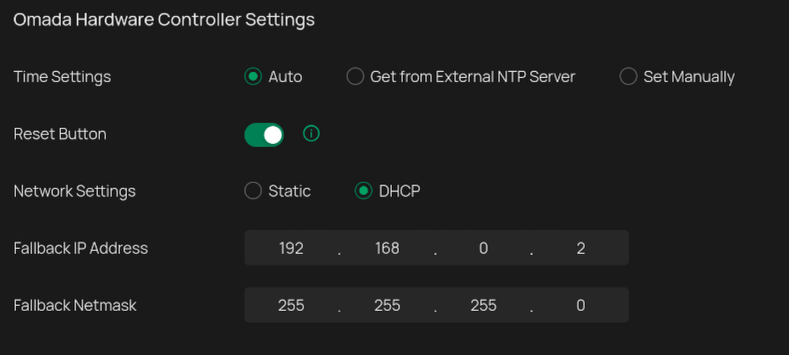
The OC300 gets the IP etc. by dhcp (opnsense).
As there is no more information available, I don't know what to do. Every device being at this lan is having access to the internet...
- Copy Link
- Report Inappropriate Content
Funny thing... seeing my settings I changed it to 'static', added the values and that did it.
Is it a bug that dhcp isn't working?
- Copy Link
- Report Inappropriate Content
- Copy Link
- Report Inappropriate Content
- Copy Link
- Report Inappropriate Content

@DerTom, can you confirm that your oc300 was able to get it's IP from the DHCP server? The "fallback" settings do not include a way to specify a gateway address so I think if the fallback is actually used, it wouldn't be able to reach other networks.
- Copy Link
- Report Inappropriate Content
You are correct, fallback is IP only, no gateway is set so it cannot route to anything other than the lan IP range
- Copy Link
- Report Inappropriate Content
- Copy Link
- Report Inappropriate Content
Information
Helpful: 0
Views: 622
Replies: 10
Voters 0
No one has voted for it yet.