Does Profinet I/O-Equipment interfere with the topology map?

Does Profinet I/O-Equipment interfere with the topology map?

Does Profinet I/O-Equipment interfere with the topology map?
2025-11-09 11:58:27 - last edited a week ago

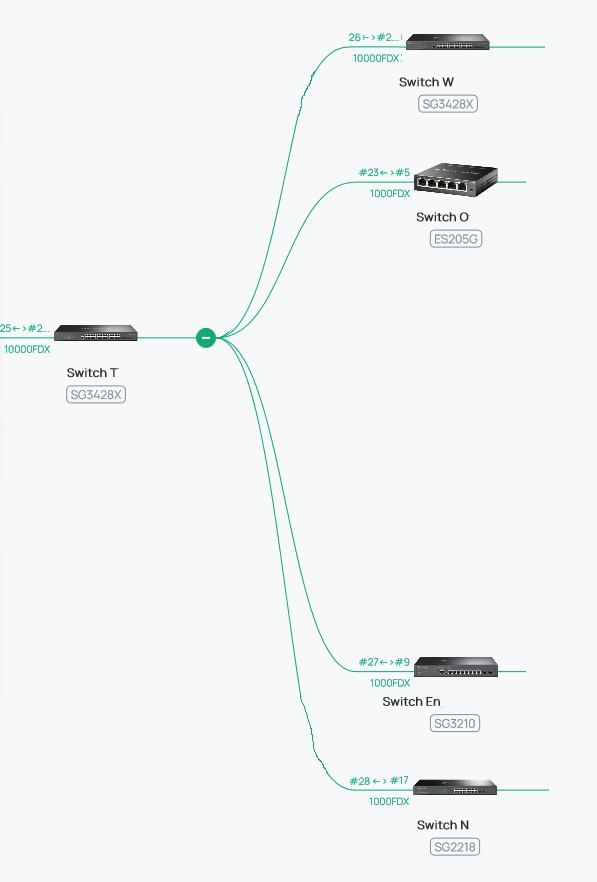
We recently replaced some more regular switches with Omada switches. However, there is a serious flaw with the topology which might have become clearer (altthough it existed before). Let's have a view to a part of our topology as it is in real life: There are four downlink switches directly connected to the switch T, mostly connected via SFP/SFP+ and fiber:
 

However, the topology shown in Software Controller 5.15.24.19 is as follows:
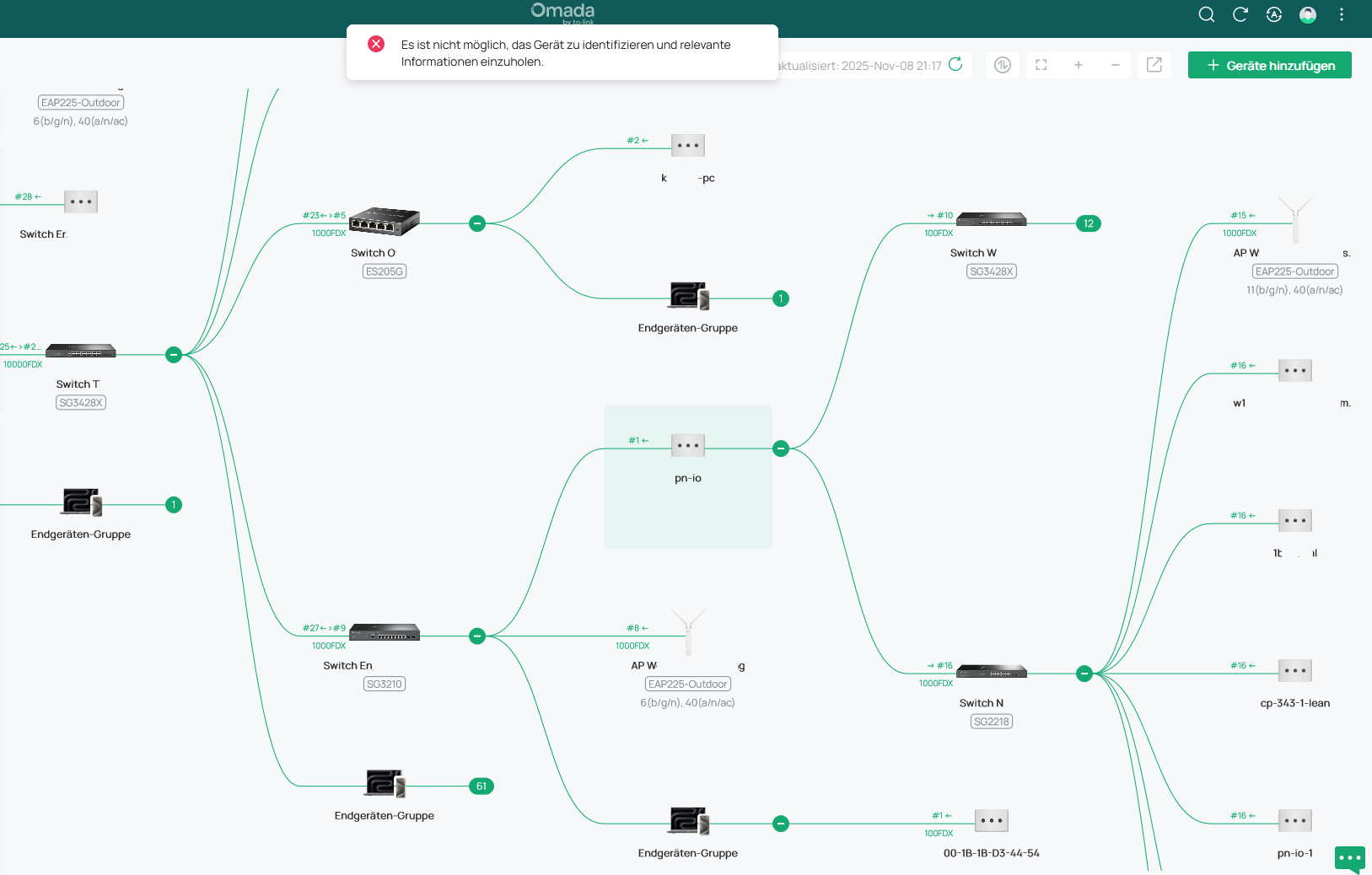
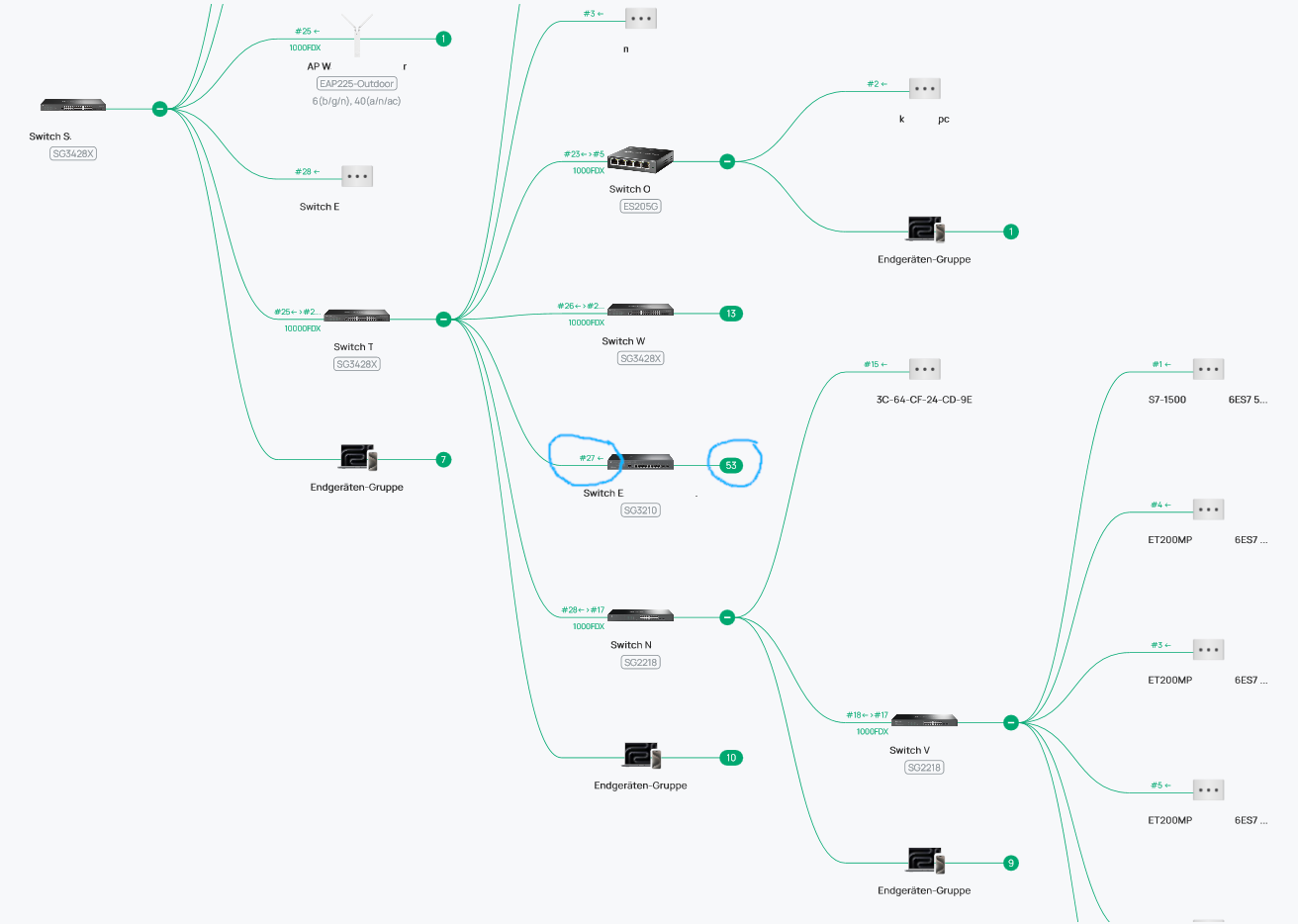
shown topology

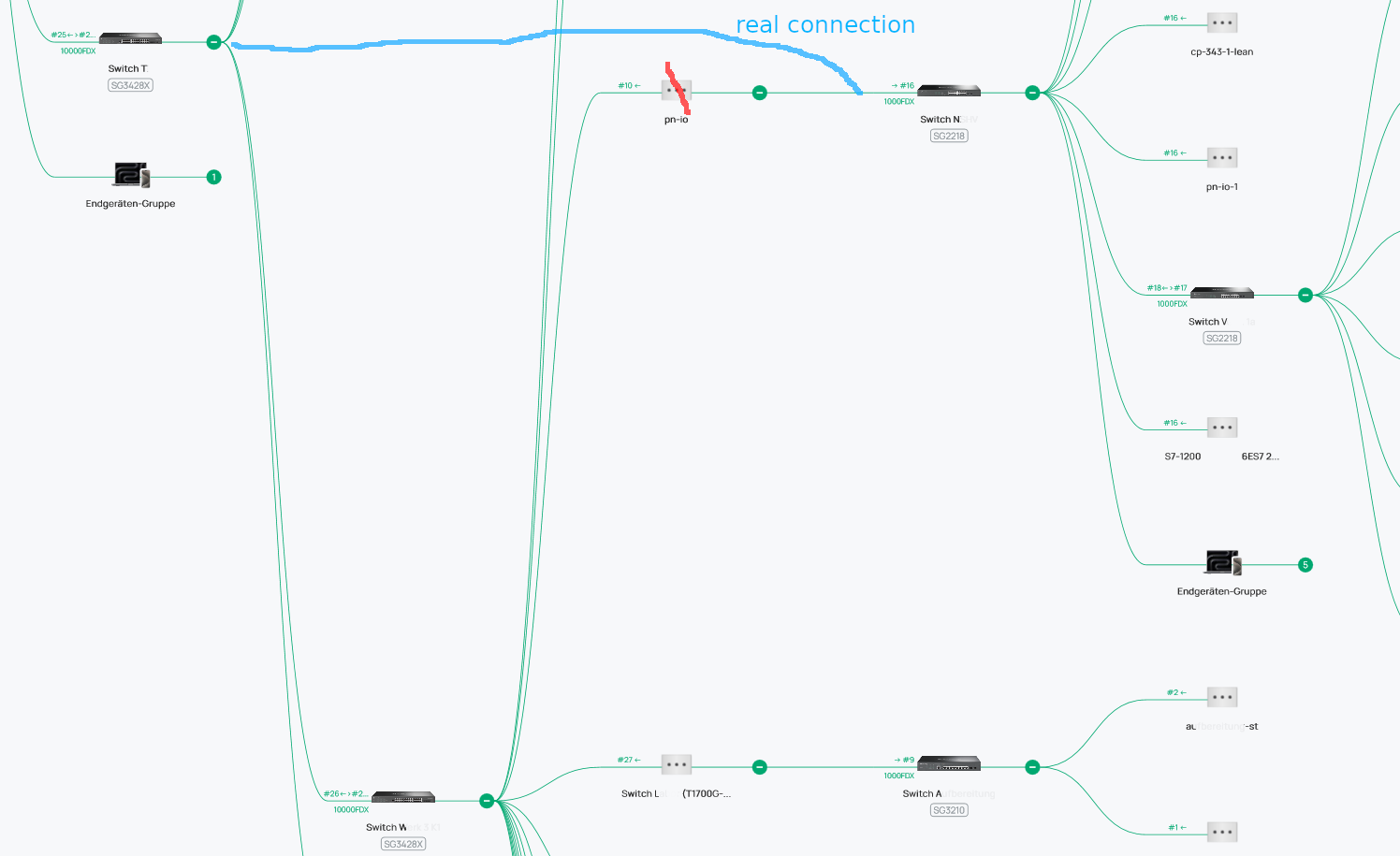
It implies that switch W and switch N were connected via the unmanaged switch in the Profinet I/O device (->Siemens S7 / TIA Portal) as a subset of switch En. But the thing is, every of the four downstream-switches has „its own“ Profinet I/O device attached, which don't have another connection to each other beside of this network structure.
Additionally, „pn-io“, “pn-io-1“ and „k...pc“ (Computer with Siemens Network Card) are shown twice: one is probably the LLDP broadcast name, but device details cannot be retrieved. The device is shown additionally in the end device group (under another name) where device details can be retrieved. (However, when installing some Siemens Software like Tia Portal, it adds LLDP capability to Windows computers, but devices are not shown twice. These computers are typically only shown as regular end device. This really seems to be an issue with those I/O devices).


While the end devices of Switch En (one AP and one Profinet IO card) are shown correctly, all the other end devices beginning with switch T are mostly incorrect. I really wonder what's the problem with devices directly connected to an Omada switch. I understand it might be a bit tricky when using non-Omada switches in-between (although they have LLDP enabled). But in fact, the more non-Omada switches between the Omada switches, the less problems in shown the correct topology. At least in my experience. We do not use a separate SNMP server.


Does anyone have experiences with Profinet devices in their topology? What might cause the wrong assignment and the double entries? May be the LLDP broadcast name of some Profinet I/O devices are the same, but this does not explain why Profinet devices are shown twice with one entry that cannot retrieve details. How to get rid of this? (well, restarting the devices does not help)


As far as I know, Profinet does not use one of Omada's Ports.


Thank you.

  0      
  0      
#1
Options
1 Accepted Solution
Re:Does Profinet I/O-Equipment interfere with the topology map?-Solution
a week ago - last edited a week ago

Hello everyone, since today, SDN 6.0 is finally available in Germany, so we could give it a shot. Short version: working now. yes


Long version:

It is definitely a problem how the Profinet I/O-Cards are regognized in Omada.


What we tried so far:

1.) Isolated Switch E. This way, the connection Switch T<->Switch W was recognized correctly, but Switch N was still listed to be connected via pn-io device to switch W:


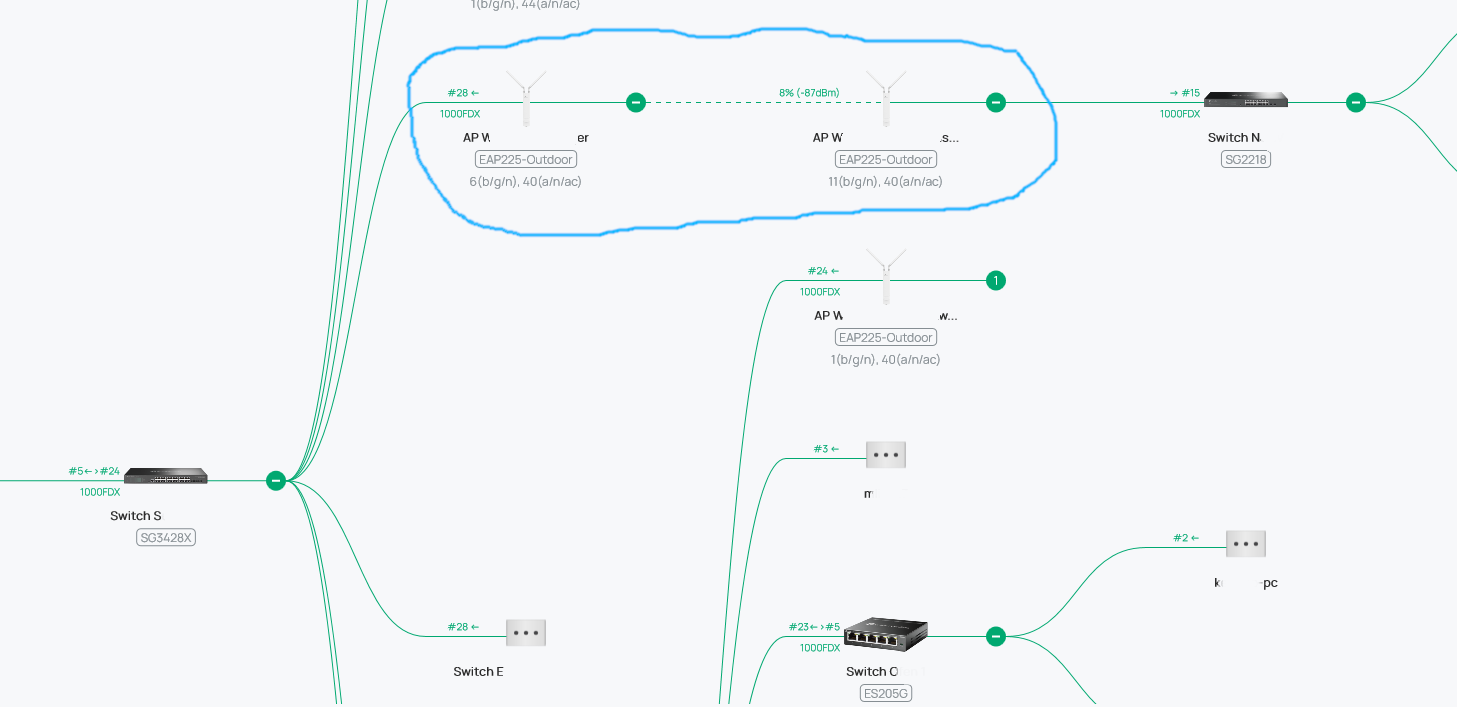
2.) Also tried to isolate Switch N at the same time. Well, this was...difficult, since two of our Access Points just made an Ad-hoc bridge to keep Switch N connected. Did not expect that. However, pn-io seemed not to be a problem at this state.


3.) The reconnection of both switches gave us several blocked SFP ports due to "loop detection", not just on Switch T, but also on upstream-switch S. However, for the first minutes (rebuilding the topology), the four downstream-switches were shown to be connected correctly to switch T in the map. Note that the connection ports between Switch T and Switch E were not fully recognized at this state, and plenty of network devices were wrongly assigned to Switch E. But after this short period, the topology shown in the SDN was just as before, with three switches "connected" via pn-io, and all other connected devices totally mixed up.


So there is definitely a problem with the way the pn-io cards are recognized. Unfortunately, we haven't had the time to look into the preferences of the Siemens pn-io cards, whether its broadcast name was assigned to all pn-io cards and not changed to individual values.

Switch firmwares were:

SG3428X: 1.30.10

SG3210: 3.20.13

SG2218: 1.20.13

(ES205G: 1.04)


Referring to the firmware realease notes, some changes were made in spanning tree detection. Our SG3210 and SG2218 already got this update, while SG3428X havent had this update that time. Since SDN 6.0.0 is recommended for their current firmwares 1.13.14, we waited till its availability today. So we cannot really say whether the spanning tree updates solved the problem or whether it is SDN 6.0.0.25 or both together.


But, as for now, the topology looks alright, all shown devices are assigned to their "real" switch and port. There are no longer some "ghost" devices like "k...pc" where one cannot acces their device page. I fact, all Siemens devices like pn-io, S7-1500..., S71200... CP343... are no longer shown with their broadcast name but only with their MAC address (apparently no longer phantom devices shown). To be honest, we can live with that, MAC-address is fine for these devices.

Recommended Solution
  1  
  1  
#3
Options
2 Reply
Re:Does Profinet I/O-Equipment interfere with the topology map?
3 weeks ago - last edited a week ago

Hi  @_be_ 


Thanks for posting here. 

Here are some suggestions you may try:


  1. Verify LLDP Settings:

    • Ensure LLDP is enabled on all switches (including non-Omada ones).
    • Disable and re-enable LLDP in the Omada Controller to force a topology rediscovery.
  2. Test Without Profinet Devices:

    • Temporarily disconnect Profinet I/O devices to check if the topology displays correctly.
  3. Update Firmware/Controller:

    • Upgrade Omada Controller and switch firmware to the latest version for bug fixes.
  4. Contact Support:

    • Report the issue to TP-Link/Siemens with topology details and device models for further troubleshooting.


  0  
  0  
#2
Options
Re:Does Profinet I/O-Equipment interfere with the topology map?-Solution
a week ago - last edited a week ago

Hello everyone, since today, SDN 6.0 is finally available in Germany, so we could give it a shot. Short version: working now. yes


Long version:

It is definitely a problem how the Profinet I/O-Cards are regognized in Omada.


What we tried so far:

1.) Isolated Switch E. This way, the connection Switch T<->Switch W was recognized correctly, but Switch N was still listed to be connected via pn-io device to switch W:


2.) Also tried to isolate Switch N at the same time. Well, this was...difficult, since two of our Access Points just made an Ad-hoc bridge to keep Switch N connected. Did not expect that. However, pn-io seemed not to be a problem at this state.


3.) The reconnection of both switches gave us several blocked SFP ports due to "loop detection", not just on Switch T, but also on upstream-switch S. However, for the first minutes (rebuilding the topology), the four downstream-switches were shown to be connected correctly to switch T in the map. Note that the connection ports between Switch T and Switch E were not fully recognized at this state, and plenty of network devices were wrongly assigned to Switch E. But after this short period, the topology shown in the SDN was just as before, with three switches "connected" via pn-io, and all other connected devices totally mixed up.


So there is definitely a problem with the way the pn-io cards are recognized. Unfortunately, we haven't had the time to look into the preferences of the Siemens pn-io cards, whether its broadcast name was assigned to all pn-io cards and not changed to individual values.

Switch firmwares were:

SG3428X: 1.30.10

SG3210: 3.20.13

SG2218: 1.20.13

(ES205G: 1.04)


Referring to the firmware realease notes, some changes were made in spanning tree detection. Our SG3210 and SG2218 already got this update, while SG3428X havent had this update that time. Since SDN 6.0.0 is recommended for their current firmwares 1.13.14, we waited till its availability today. So we cannot really say whether the spanning tree updates solved the problem or whether it is SDN 6.0.0.25 or both together.


But, as for now, the topology looks alright, all shown devices are assigned to their "real" switch and port. There are no longer some "ghost" devices like "k...pc" where one cannot acces their device page. I fact, all Siemens devices like pn-io, S7-1500..., S71200... CP343... are no longer shown with their broadcast name but only with their MAC address (apparently no longer phantom devices shown). To be honest, we can live with that, MAC-address is fine for these devices.

Recommended Solution
  1  
  1  
#3
Options