
a list of specific channels on Omada Controller

Hello,
I’m using Omada Controller version 5.14.32.2.
There are several Sites in the controller, each with multiple EAP access points.
I need to limit the set of Wi-Fi channels available for access points on one specific Site.
For example, on the Office_1 Site, I want the APs to use only channels 36, 40, 44, and 48, while APs on other Sites should continue working with their default channel settings
Is it possible in Omada Controller 5.14.32.2 to define a list of allowed channels at the Site level instead of configuring each AP individually?
If not, can this be done centrally, so that it doesn’t require manual configuration on every access point?
- Copy Link
- Subscribe
- Bookmark
- Report Inappropriate Content

The access point must also support this function, for example if you have EAP225-Outdoor or EAP225 then you will not be able to select channels. If the access point does not support this function it is best to set the channels manually to avoid overlaps from other access point.
- Copy Link
- Report Inappropriate Content


@Axicee It looks like your Controller Version doesn't support setting a channel range for the AP (only setting one specific channel for the radio). You will need to update the controller version to 5.15.X.X or higher. Shown here is the UI in Controller V6.
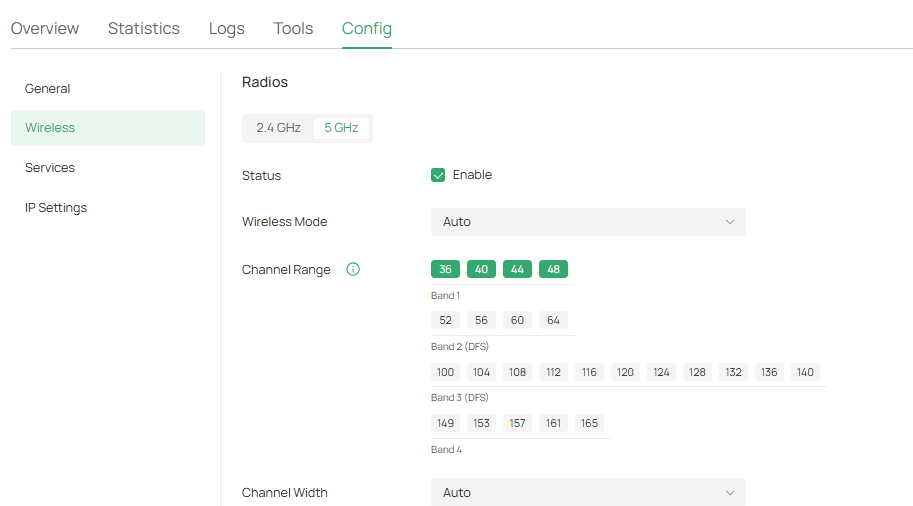
As for setting the channel list across the site, it doesn't seem that feature is supported. However, you can copy configurations between EAPs of the same model to help make setting up your network easier.
- Copy Link
- Report Inappropriate Content
The access point must also support this function, for example if you have EAP225-Outdoor or EAP225 then you will not be able to select channels. If the access point does not support this function it is best to set the channels manually to avoid overlaps from other access point.
- Copy Link
- Report Inappropriate Content
Could you please point me to the exact path where these settings are located?
I tried to find this section in the controller emulator, but unfortunately I wasn't able to locate it.
- Copy Link
- Report Inappropriate Content
@Axicee With the controller updated to the proper version, it's within the Device's Config settings (assuming your AP is compatible with it).
Device Settings > Config > Radios
The emulator version is actually slightly behind the version I was able to confirm has the feature; I can confirm 5.15.24.21 has it for sure, assuming your AP is compatible of course.
- Copy Link
- Report Inappropriate Content
I have more than 100 access points of the EAP245 model.
Some of them automatically select channel 100, which is prohibited for broadcasting in my country, and many client devices do not support this channel.
I need to remove this channel from the list of channels the access point can choose for broadcasting
- Copy Link
- Report Inappropriate Content
I doubt if you can disable DFS channels on ER245, if you had you would have to go into each individual access point as well, so my suggestion is to set all the access points manually. 100 pieces are done in a couple of hours, :-)
- Copy Link
- Report Inappropriate Content

Hi @Axicee
Thanks for posting here.
Our products strictly comply with local wireless regulations, so the situation you mentioned should not exist. May I ask which country you are from and which version of EAP you are using? If convenient, could you also share the link to the relevant regulations you mentioned regarding the prohibition? Thank you.
Axicee wrote
I have more than 100 access points of the EAP245 model.
Some of them automatically select channel 100, which is prohibited for broadcasting in my country, and many client devices do not support this channel.
I need to remove this channel from the list of channels the access point can choose for broadcasting
- Copy Link
- Report Inappropriate Content
Information
Helpful: 0
Views: 544
Replies: 7
Voters 0
No one has voted for it yet.