
ER8411 v1.0 Firmware 1.3.6 issues

Hello,
I had my ER8411 v1.0 on 1.2.3 Firmware for a long while. I decided to upgrade today to the latest (1.3.6) and since the update i have connectivity issues. On my mac and iphone AppStore login, iCloud login, PeperLess vToken app are not connecting and giving me a timeout. I did a full restart, not helped, no issues in the logs of my OC200. This issue was not a problem on 1.2.3. If i connect my mac to a hotspot it works, i connected it directly to the ISP router all fine. Any advice? can i downgrade back to 1.2.3 even if it says its ireversable?
- Copy Link
- Subscribe
- Bookmark
- Report Inappropriate Content

Many thanks for the reply.
I think we'll stay on the firmware that is working.
My concern was (is) that there are potential security issues with such an old version of firmware.
But do you patch the security, only to lose functionality?
We also have an issue with a WR940N V6 that won't accept firmware upgrades.
Maybe we need to consider alternatives such as Ubiquiti?
Any thoughts 🤔
- Copy Link
- Report Inappropriate Content

I use an ER8411 V1 with 2 internet connections and as a Wireguard VPN server. Since updating to the latest firmware version 1.3.6, my ER8411 freezes every 3 or 4 days... I had to schedule a daily reboot; even a weekly reboot isn't saving me from the freezes.
I disabled all other options: load balancing features, firewall protection, leaving only what I really need, which is the functionality to receive 2 internet connections and establish a VPN session with Wireguard, but I still have the freezes. During the freezes, the ER completely stops responding, the web interface doesn't load, and even pinging its local IP doesn't work. The interface lights remain on during the freeze. The only way to resolve it is by removing both power cables.
- Copy Link
- Report Inappropriate Content


We have released a pre-release firmware for ER8411 fully adapted to Omada 6.2.10. Please update and check if the issue would be fixed. Thanks.
ER8411 V1 1.4.0 Build 20260603 Rel Pre-Release Firmware (Release on June 5th, 2026)
If yes, please leave your comment under the pre-release post. Thanks.
- Copy Link
- Report Inappropriate Content

@Vincent-TP This fixed my port 3 LED illuminated (with nothing connected) and data showing in the router ports page issue! I got my router replaced under warranty because TP-Link thought it was a hardware failure. The issue came back on the replacement. This firmware fixed it!
- Copy Link
- Report Inappropriate Content
for me this fixed the issue, everything is working and I am not confident in updating :) I will not update for a very long time now ER8411_v1 _1.3.6_20251230-rel61614
- Copy Link
- Report Inappropriate Content
Thanks. I just updated to firmware beta 1.4.0 - I'll be monitoring the device.
- Copy Link
- Report Inappropriate Content
Many thanks, updated to beta 1.4.0 successfully. After the first 24hrs, it looks fine for me.
- Copy Link
- Report Inappropriate Content

@Vincent-TP This update does not have the MTU problem HOWEVER my IPv6 is now broken. it wont connect anymore. Might this be related to the MTU fix you applied?
- Copy Link
- Report Inappropriate Content
Hi @-CyRaX-
Thanks for your feedback.
What specific issue are you having with IPv6? Could you provide us with more details, such as a screenshot of your IPv6 configuration? How exactly is it not working—is the entire router unable to connect to the internet, or is it failing to obtain the correct IPv6 address, or is there some other problem?
To help more people see and discuss this issue with the new firmware, please provide more details by replying in the trial thread. Thank you.
ER8411 V1 1.4.0 Build 20260603 Rel Pre-Release Firmware (Release on June 5th, 2026)
-CyRaX- wrote
@Vincent-TP This update does not have the MTU problem HOWEVER my IPv6 is now broken. it wont connect anymore. Might this be related to the MTU fix you applied?
- Copy Link
- Report Inappropriate Content
EDIT: It seems that my provider changed a configuration its not the update. its now solved.
@Vincent-TP It will not connect any more. Settings are still as they where before the update and according to spec of my provider (PPOE, 48 prefix and DHCPv6).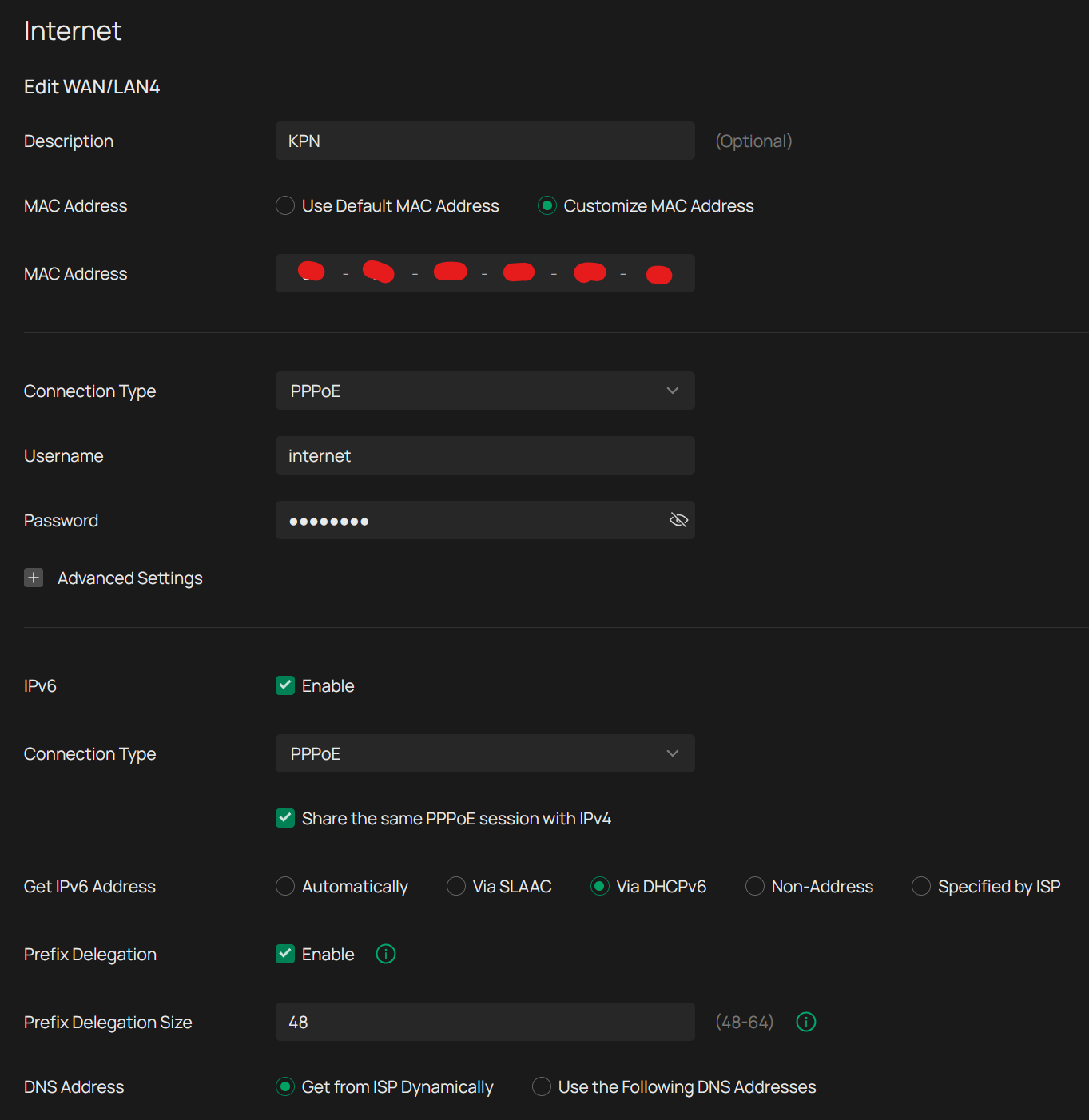
Here it shows that it wont connect:
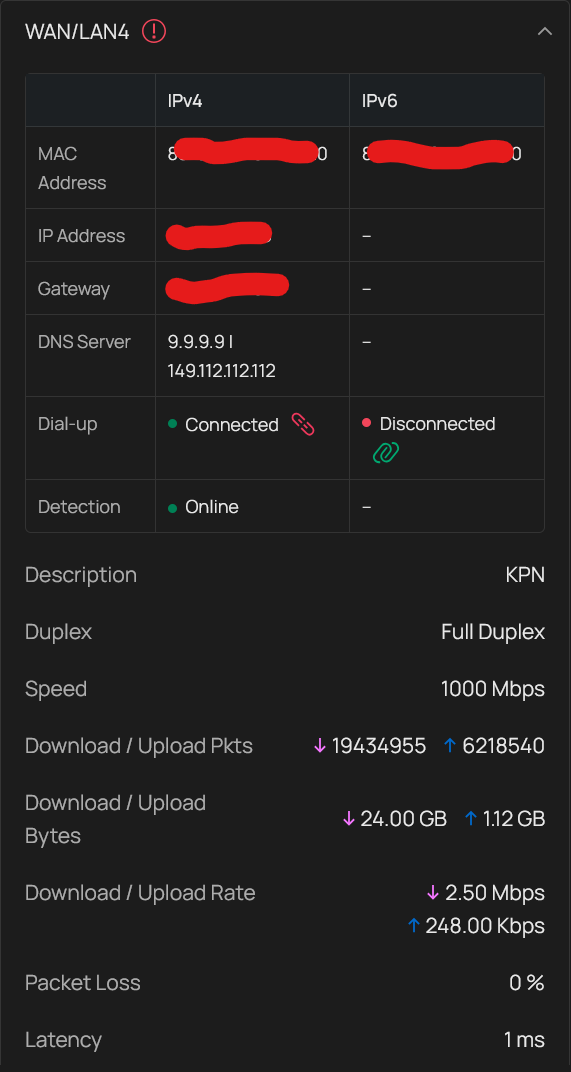
I tried to restart the ipv4 PPOE connection as the IPV6 connection is carried over it. and restart the gateway itselves but to no succes.... When i plug in the router of my provider it just works as it used to on my TP-Link gateway...
- Copy Link
- Report Inappropriate Content
Information
Helpful: 3
Views: 7957
Replies: 54
Voters 1
