EAP650 intermittent lags

EAP650 intermittent lags

EAP650 intermittent lags
3 weeks ago - last edited Friday
Model: EAP650  
Hardware Version: V1
Firmware Version: 1.1.3 Build 20250326 Rel. 54048(4555)

I have a TP-Link EAP650 V1.20 (the GUI shows 1.0 but the box and the back sticker show 1.20) Wi-Fi access point that I use in standalone configuration. It is using both 2.4 Ghz and 5 Ghz bands for 3 SSID providing Wi-Fi for 3 different VLANs.

The access point is wired for data and PoE into a TP-Link TL-SG2210P V3.20 switch which also use standalone configuration. The switch itself is wired to an OPNsense box.


I experience intermittent lags when using my Dell Precision 5530 laptop which uses a Intel(R) Wireless-AC 9260 160MHz (firmware 23.170.0.1) adapter.


The lags seem to only happen when combining my Dell Precision 5530 laptop with my TP-Link EAP650 access point. When using my laptop with other Wi-Fi access point, it works normally. Also, when other devices are connected to my TP-Link EAP650, they seem to work normally as well. It is therefore difficult to find the culprit. 


The lags can happen every 5 minutes during a whole day but something nothing happens for days. That renders the troubleshooting process difficult and frustrating which is why I post here in hope to get some help.


Below is a ping resulting from these lags, I ping the gateway of the VLAN used by my laptop (i.e. 10.10.10.1) and the time is extremely long. After I turned my laptop airplane mode on and off (a temporary workaround that does not last very long), you can notice at the end (after "General failure.") that the ping responses come back to normal. 


> ping -t 10.10.10.1

Pinging 10.10.10.1 with 32 bytes of data:
Reply from 10.10.10.1: bytes=32 time=1951ms TTL=64
Reply from 10.10.10.1: bytes=32 time=2561ms TTL=64
Reply from 10.10.10.1: bytes=32 time=3278ms TTL=64
Request timed out.
Request timed out.
Reply from 10.10.10.1: bytes=32 time=2045ms TTL=64
Reply from 10.10.10.1: bytes=32 time=19ms TTL=64
Reply from 10.10.10.1: bytes=32 time=131ms TTL=64
Reply from 10.10.10.1: bytes=32 time=700ms TTL=64
Reply from 10.10.10.1: bytes=32 time=806ms TTL=64
Reply from 10.10.10.1: bytes=32 time=814ms TTL=64
Reply from 10.10.10.1: bytes=32 time=999ms TTL=64
Reply from 10.10.10.1: bytes=32 time=916ms TTL=64
Reply from 10.10.10.1: bytes=32 time=915ms TTL=64
Reply from 10.10.10.1: bytes=32 time=1449ms TTL=64
Reply from 10.10.10.1: bytes=32 time=1514ms TTL=64
Reply from 10.10.10.1: bytes=32 time=2757ms TTL=64
Reply from 10.10.10.1: bytes=32 time=2955ms TTL=64
Request timed out.
Request timed out.
Request timed out.
Request timed out.
Request timed out.
Request timed out.
Request timed out.
Reply from 10.10.10.1: bytes=32 time=1807ms TTL=64
Reply from 10.10.10.1: bytes=32 time=1809ms TTL=64
Reply from 10.10.10.1: bytes=32 time=1872ms TTL=64
Reply from 10.10.10.1: bytes=32 time=1542ms TTL=64
Reply from 10.10.10.1: bytes=32 time=1682ms TTL=64
Reply from 10.10.10.1: bytes=32 time=1650ms TTL=64
Reply from 10.10.10.1: bytes=32 time=1808ms TTL=64
Reply from 10.10.10.1: bytes=32 time=1272ms TTL=64
Reply from 10.10.10.1: bytes=32 time=762ms TTL=64
Reply from 10.10.10.1: bytes=32 time=966ms TTL=64
Reply from 10.10.10.1: bytes=32 time=1027ms TTL=64
Reply from 10.10.10.1: bytes=32 time=773ms TTL=64
Reply from 10.10.10.1: bytes=32 time=1070ms TTL=64
Reply from 10.10.10.1: bytes=32 time=1009ms TTL=64
Reply from 10.10.10.1: bytes=32 time=779ms TTL=64
Reply from 10.10.10.1: bytes=32 time=971ms TTL=64
Reply from 10.10.10.1: bytes=32 time=1057ms TTL=64
Reply from 10.10.10.1: bytes=32 time=2571ms TTL=64
Request timed out.
Reply from 10.10.10.1: bytes=32 time=2963ms TTL=64
Reply from 10.10.10.1: bytes=32 time=1628ms TTL=64
Reply from 10.10.10.1: bytes=32 time=1342ms TTL=64
Reply from 10.10.10.1: bytes=32 time=1822ms TTL=64
Reply from 10.10.10.1: bytes=32 time=1525ms TTL=64
Reply from 10.10.10.1: bytes=32 time=1606ms TTL=64
Reply from 10.10.10.1: bytes=32 time=3377ms TTL=64
Reply from 10.10.10.1: bytes=32 time=1361ms TTL=64
Reply from 10.10.10.1: bytes=32 time=1404ms TTL=64
Reply from 10.10.10.1: bytes=32 time=1379ms TTL=64
Reply from 10.10.10.1: bytes=32 time=1544ms TTL=64
Request timed out.
Request timed out.
Request timed out.
Request timed out.
Request timed out.
Request timed out.
Reply from 10.10.10.1: bytes=32 time=3ms TTL=64
Reply from 10.10.10.1: bytes=32 time=2862ms TTL=64
Reply from 10.10.10.1: bytes=32 time=2944ms TTL=64
Reply from 10.10.10.1: bytes=32 time=3192ms TTL=64
Reply from 10.10.10.1: bytes=32 time=2249ms TTL=64
Reply from 10.10.10.1: bytes=32 time=1797ms TTL=64
Reply from 10.10.10.1: bytes=32 time=1463ms TTL=64
Reply from 10.10.10.1: bytes=32 time=3012ms TTL=64
Reply from 10.10.10.1: bytes=32 time=3130ms TTL=64
Reply from 10.10.10.1: bytes=32 time=3396ms TTL=64
Reply from 10.10.10.1: bytes=32 time=1987ms TTL=64
Reply from 10.10.10.1: bytes=32 time=866ms TTL=64
Reply from 10.10.10.1: bytes=32 time=800ms TTL=64
Reply from 10.10.10.1: bytes=32 time=1312ms TTL=64
Reply from 10.10.10.1: bytes=32 time=1008ms TTL=64
Reply from 10.10.10.1: bytes=32 time=1322ms TTL=64
Reply from 10.10.10.1: bytes=32 time=1840ms TTL=64
Reply from 10.10.10.1: bytes=32 time=1834ms TTL=64
Reply from 10.10.10.1: bytes=32 time=1901ms TTL=64
Reply from 10.10.10.1: bytes=32 time=1677ms TTL=64
Reply from 10.10.10.1: bytes=32 time=269ms TTL=64
Reply from 10.10.10.1: bytes=32 time=1727ms TTL=64
Reply from 10.10.10.1: bytes=32 time=1766ms TTL=64
Reply from 10.10.10.1: bytes=32 time=1581ms TTL=64
Reply from 10.10.10.1: bytes=32 time=291ms TTL=64
Reply from 10.10.10.1: bytes=32 time=1649ms TTL=64
Reply from 10.10.10.1: bytes=32 time=1693ms TTL=64
Reply from 10.10.10.1: bytes=32 time=1680ms TTL=64
Reply from 10.10.10.1: bytes=32 time=1675ms TTL=64
Reply from 10.10.10.1: bytes=32 time=1574ms TTL=64
Reply from 10.10.10.1: bytes=32 time=1751ms TTL=64
Request timed out.
General failure.
Reply from 10.10.10.1: bytes=32 time=4ms TTL=64
Reply from 10.10.10.1: bytes=32 time=5ms TTL=64
Reply from 10.10.10.1: bytes=32 time=2ms TTL=64
Reply from 10.10.10.1: bytes=32 time=1ms TTL=64
Reply from 10.10.10.1: bytes=32 time=2ms TTL=64
Reply from 10.10.10.1: bytes=32 time=1ms TTL=64
Reply from 10.10.10.1: bytes=32 time=2ms TTL=64
Reply from 10.10.10.1: bytes=32 time=3ms TTL=64
Reply from 10.10.10.1: bytes=32 time=4ms TTL=64
Reply from 10.10.10.1: bytes=32 time=11ms TTL=64
Reply from 10.10.10.1: bytes=32 time=9ms TTL=64
Reply from 10.10.10.1: bytes=32 time=5ms TTL=64
Reply from 10.10.10.1: bytes=32 time=8ms TTL=64


Last month, everything started to work normally after I disabled "Airtime Fairness" in both 2.4 GHz and 5 GHz bands. I left it that way during 3 weeks and in order to confirm that it was the cause of the lags, I re-enabled "Airtime Fairness" and expected to experience the lags again. However, no lags during a week. So I disabled "Airtime Fairness" again thinking nothing would change but then lags started again.


At that point I factory reset the EAP650 and reconfigured the access point while leaving "Airtime Fairness" disabled. Lags are still happening.


Considering my tests, I think the EAP650 is unreliable at this point but I cannot exactly prove it. Is there a troubleshooting path that could confirm or deny my thoughts?


Did you experience the same? How did you solve this?


Thank you for your help!

  0      
  0      
#1
Options
8 Reply
Re:EAP650 intermittent lags
3 weeks ago

Hi  @fw_clear 


Thanks for posting here.

As you mentioned, only this Dell is experiencing this issue, while other devices are unaffected. I don’t think the problem lies with the EAP itself.


To understand the situation better, please share with us some more details:

After I turned my laptop airplane mode on and off (a temporary workaround that does not last very long), you can notice at the end (after "General failure.") that the ping responses come back to normal.

>>>Will the lag reoccur after this? If yes, around how long? 

>>>Is the laptop connecting to a specific SSID? Or this lag happens with all the three SSIDs?

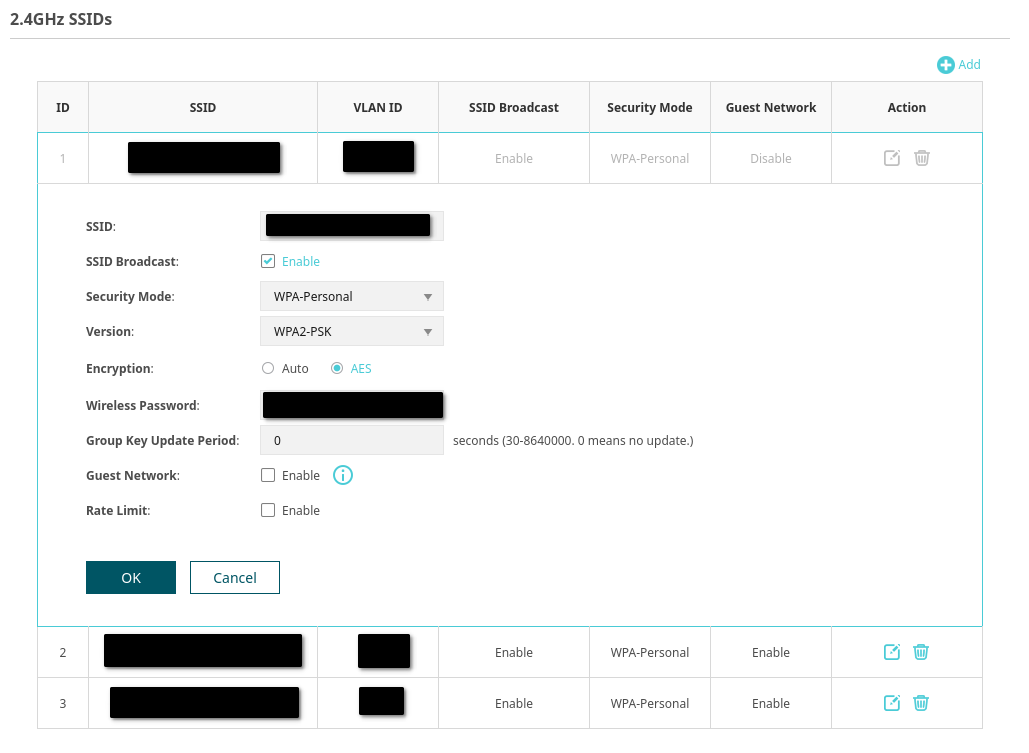
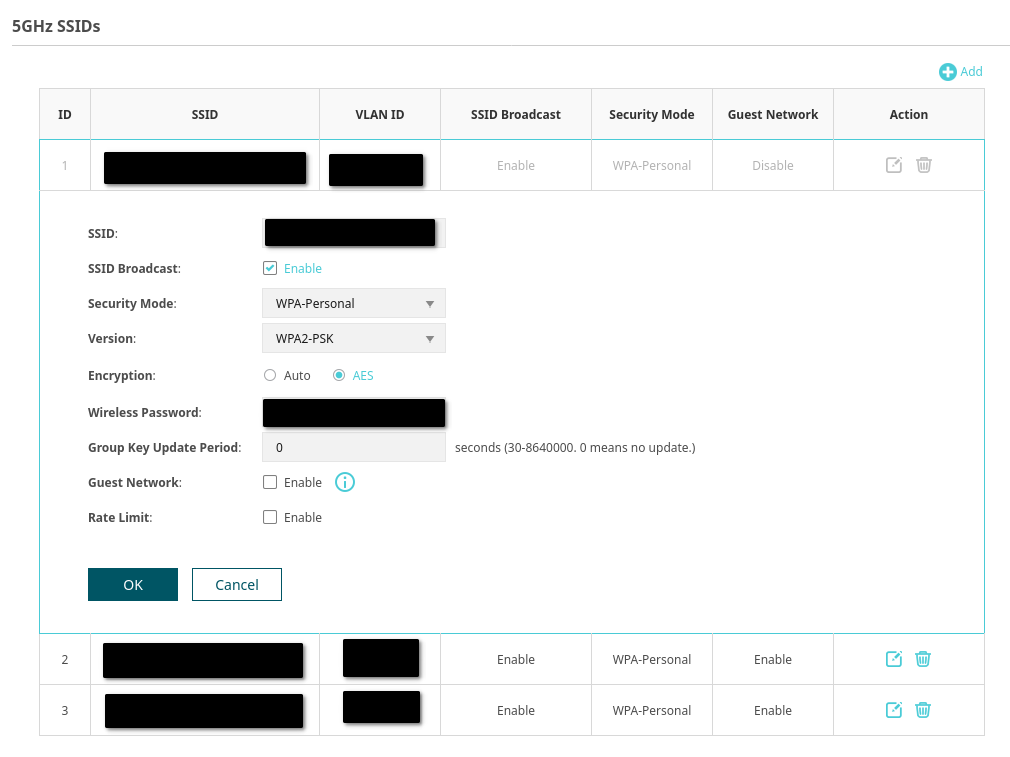
>>>Please share some screenshots of the related SSID configs.


In the meantime, please try the following:

1. Try disabling the “802.11ax mode” on the 5GHz band (switch to AC mode only) and temporarily set the channel bandwidth to 80MHz (Intel 9260 may have unstable support for 160MHz). Also, disable the “Airtime Fairness” feature.

2. Use the Omada controller or WiFi Analyzer tool to scan for surrounding channel interference and use a spare channel.

How to optimize wireless performance of EAP products


3. You may create a new test SSID without VLAN config to observe whether the issue recurs, thereby ruling out potential VLAN processing issues.

  0  
  0  
#2
Options
Re:EAP650 intermittent lags
3 weeks ago

Hi @Vincent-TP,


> As you mentioned, only this Dell is experiencing this issue, while other devices are unaffected. I don’t think the problem lies with the EAP itself.


To be exact, I wrote "The lags seem to only happen when combining …", I do most of my work from this Dell laptop so I am not entirely sure other devices are exempt of problem but "they seem to work normally".


I am trying to be careful with my choice of words to be as accurate as possible.


>Will the lag reoccur after this? If yes, around how long? 


Yes, lags reoccur after turning my laptop airplane mode on and off, it can be after 1 min or 30 minutes. This issue has been lasting for months now and so far, nothing is reproducible and all durations are random.


>Is the laptop connecting to a specific SSID? Or this lag happens with all the three SSIDs?


The laptop is always connected to the same SSID out of the 3. All SSIDs use the same name on both 2.4 Ghz and 5 Ghz bands. So I do not explicitly choose which band to use.

I have not tested on the other SSIDs, the only config difference other than SSID and Wireless Password is that Guest Network is enabled on the other 2 SSIDs.


>Please share some screenshots of the related SSID configs.


> 1. Try disabling the “802.11ax mode” on the 5GHz band (switch to AC mode only) and temporarily set the channel bandwidth to 80MHz (Intel 9260 may have unstable support for 160MHz). Also, disable the “Airtime Fairness” feature.


Will do


> 2. Use the Omada controller or WiFi Analyzer tool to scan for surrounding channel interference and use a spare channel.


I tried a WiFi Analyzer tool and could not see any problem.


> 3. You may create a new test SSID without VLAN config to observe whether the issue recurs, thereby ruling out potential VLAN processing issues.


I may try but keep in mind the durations for the lags to happen is totally random so there would be no conclusive results if no lags would happen in, let's says, the next hour (proof by example fallacy).

  0  
  0  
#3
Options
Re:EAP650 intermittent lags
2 weeks ago

Hi  @fw_clear 


Thank you for your response. You can continue testing.

The next time the issue occurs, you can refer to the link below to capture the wireless packets and send them to us, or share the packets with the support team. They will try to analyze the cause.

How to Capture the Wireless Packets on MacBook

  0  
  0  
#4
Options
Re:EAP650 intermittent lags
2 weeks ago

I wanted to know if the issue is linked to a certain band so, last Friday, I disabled the 5 GHz band entirely and rebooted the EAP650. I experienced lags all day long. Even after rebooting my switch, EAP650 and laptop. So I can definitively write that the issue happens on the 2.4 GHz band.


Moreover, just to be sure the lags were not due to my OPNsense box (which I was using to ping to), I decided to ping another device in the same VLAN as my laptop: a NAS wired to the switch. I can confirm by pinging both my gateway and my NAS that the lags were noticeable in the ping responses (or lack thereof) at the same time.


But before that, I turned on my Wi-Fi connected Xerox C235 printer (which is 2.4 GHz-only), it successfully had an IP address assigned by the DHCP server (in the same VLAN as my laptop) but … it did not respond to pings (and was not visible by my laptop scanning software). Only after a reboot of the printer it responded to pings. And then I recalled that I always had connectivity problems with this printer since I bought it earlier this year. I seldom use it so I did not investigate the issue but I believe it is due to the issue of this post. That now makes 2 devices which are having problems with the EAP650 and that reinforces my thoughts that the issue is with my EAP650, not with my laptop.


Naturally, I have now disabled the 2.4 GHz band since Friday evening and I am testing the 5 GHz band only. So far, no issue observed.

  1  
  1  
#5
Options
Re:EAP650 intermittent lags
2 weeks ago - last edited Friday

  @fw_clear 


Thank you for your response. That's a great finding. Currently, the 2.4GHz band is highly congested, so I still recommend trying multiple channels.

Alternatively, you can separate the 2.4GHz and 5GHz bands and refer to the following configuration guide to modify the 2.4GHz SSID.

Troubleshooting Guide for Unstable IoT Device Connections


If the 2.4GHz band continues to experience issues regardless of adjustments, we cannot rule out the possibility of a problem with the 2.4GHz antenna.

In that case, I suggest you contact your retailer to check the warranty.

  0  
  0  
#6
Options
Re:EAP650 intermittent lags
2 weeks ago

I would like to share the results of today's testing.


The issue is still noticeable with a single SSID in the 2.4 Ghz band (Wireless Mode configured as b/g/n mixed) and no SSID in the 5 GHz band. Changing Channel Width from Auto (which is always using 20 MHz so far) to 40 MHz did not help.


With the limited configuration described above, I did notice that moving my laptop away from my external monitor (about 50 cm closer to the EAP650) seemed to help. I use the external monitor exclusively so the laptop screen is closed and the laptop is sitting next to the external monitor stand and underneath the external monitor screen. This was not entirely conclusive but it did seem better. Opening the laptop screen (which hold the Wi-Fi antenna, I believe) also seemed to help. At this point, I should probably mention that my laptop as well my printer are sitting on my desk at the opposite corner of the house but still on the same floor as the ceiling-mounted EAP650, at approximately 11 meters, with 2 thin (non structural) walls in between.


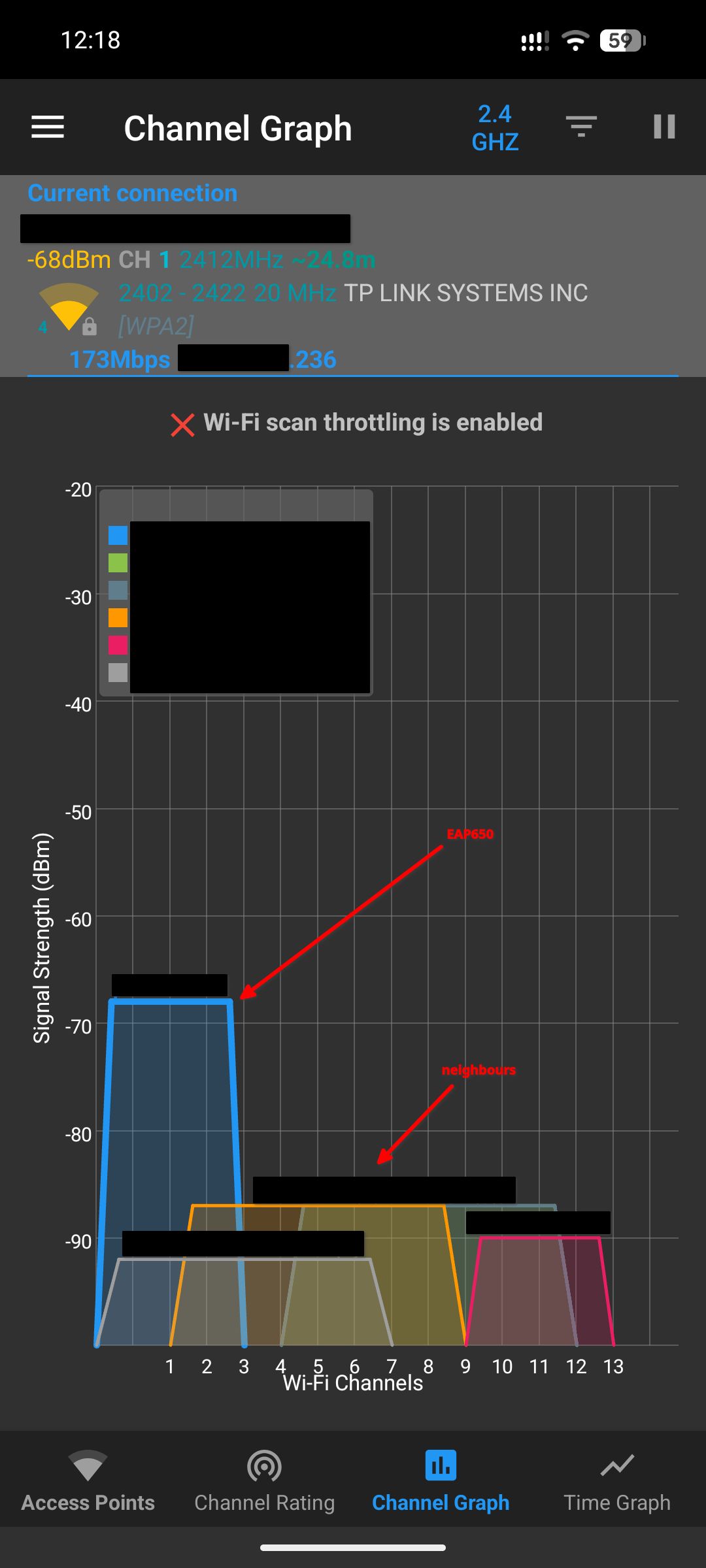
I do not think 2.4 GHz congestion is an issue in my case. This setup in the countryside of Norway and I only have a few neighbours around. Anyway I did manually select Channel 1 and here is the result scan from WiFi Analyzer on my smartphone sitting next to my laptop:


While there are a few others Wi-Fi access points around, their signal strengths are noticeably weaker than my EAP650. I myself do not have enough experience to know if this represents highly congested band or not. Please share your thoughts on this.


Also, is -68 dBm in the expected range for a device that is situated like described above (approximately 11 meters, with 2 thin walls in between)?


Lowering the Tx Power(EIRP) from the default 20 dBm (maximum) to 12 dBm seemed to help to reproduce the issue. This led me to think the problem may be due to a weak signal.


So I did new tests with an ASUS RT-AC87U configured as a 2.4 GHz-only access point. This is the access point I was using before getting the TP-Link EAP650 and never had any problem with it. I managed to reproduce this issue by putting the RT-AC87U at the same distance as the EAP650 and lowering the Tx power: I could notice slow pings responses and time outs.


Are slow pings and time outs the typical consequence of a weak Wi-Fi signal? For information, the Wi-Fi icon in Windows 11 is showing between 2 and 3 "bars" out of 4 so I never considered my Wi-Fi signal to be weak.


Could a weak Wi-Fi signal be the cause of my issue? This would be surprising though, because a 2.4 GHz signal is supposed to penetrate obstacles better than 5 GHz and I did not observe the issue on the 5 GHz band during my tests.


  0  
  0  
#7
Options
Re:EAP650 intermittent lags
Friday - last edited Friday

This issue is not resolved and it seems I am not the only one with these problems using 2.4 GHz (see https://community.tp-link.com/en/home/forum/topic/673720).


Any idea anyone? Perhaps @erv23 @Fae?

  0  
  0  
#8
Options
Re:EAP650 intermittent lags
Yesterday

Hi  @fw_clear 


fw_clear wrote

I do not think 2.4 GHz congestion is an issue in my case. This setup in the countryside of Norway and I only have a few neighbours around. Anyway I did manually select Channel 1 and here is the result scan from WiFi Analyzer on my smartphone sitting next to my laptop:


While there are a few others Wi-Fi access points around, their signal strengths are noticeably weaker than my EAP650. I myself do not have enough experience to know if this represents highly congested band or not. Please share your thoughts on this.

>>> Please check the Channel Rating page and choose the most spare channel.


Also, is -68 dBm in the expected range for a device that is situated like described above (approximately 11 meters, with 2 thin walls in between)?


Are slow pings and time outs the typical consequence of a weak Wi-Fi signal? 

Could a weak Wi-Fi signal be the cause of my issue? This would be surprising though, because a 2.4 GHz signal is supposed to penetrate obstacles better than 5 GHz and I did not observe the issue on the 5 GHz band during my tests.

>>> Yes. Are there any other wireless interferences in the trial environment? It’s not just obstacles that can affect wireless signals; other wireless interferences can also have a significant impact, such as microwaves, Bluetooth speakers, etc.  To be honest, a -68dBm signal is not particularly strong.


  0  
  0  
#9
Options