
APs (EAP673) dropping 2.4 GHz clients after a few days while maintaining high Rx errors
APs (EAP673) dropping 2.4 GHz clients after a few days while maintaining high Rx errors

I am experiencing a severe and recurring stability issue affecting the 2.4 GHz radio on both of my EAP673 units (Ground and First Floor). Every few days, clients connecting to the 2.4 GHz SSID (both IoT devices connected to the dedicated 2.4Ghz IoT SSID but also clients connected in the 2.4 GHz band of main vlan) broadcasted from these EAPs lose internet connectivity entirely, while 5 GHz and ethernet connections remain unaffected. The issue requires either a reboot, a forced provision, or simply disabling/re-enabling the 2.4 GHz broadcast to instantly restore service. Based on the EAP statistics logged just prior to failure, the radio exhibits an extremely high rate of Receive (Rx) errors. In the most recent failure of the first floor EAP673, the radio accumulated about 2% Rx Dropped Packets/Errors whereas currently my ground floor EAP673 sits at 3%. There is 0 errors or dropped packets on the 5Ghz band of either EAP. Although I have already attempted basic fixes, including disabling 802.11ax and setting the channel width to 20 MHz, the problem persists. Has anyone found a permanent solution (firmware or configuration) for this 2.4GHz crash? It is highly unlikely to lose connectivity of IoT devices that I rely for home entry, alarm sensors etc every week. Frustratingly, there is nothing in the logs of the controller while the issue is ongoing, even when I try to connect my iphone to the IoT wifi the connection fails and reverts to mobile data but there is no entry in the logs about it.
- Copy Link
- Subscribe
- Bookmark
- Report Inappropriate Content


@Tournas Are the EAPs meshed together? Also, if possible, can you set one up in standalone mode instead to see if the issue persists in standalone? This will help figure out if it is a problem with your configuration or if it is something along the lines of interference.
- Copy Link
- Report Inappropriate Content
no they are not meshed, each has its own cabling back to the main switch. i doubt it is configuration related as there is nothing particularly custom going on and the issue has been constant between several configuration changes, firmware updates across all devices and even between eap physical device swaps (there was an eap655-wall in the same location on ground floor before which was experiencing the same issue). I have even tried different ports back to the main switch and also replaced cabling with brand new. Even if it is related to interference, which I doubt again because there isnt much interference shown in the charts or scans, why do the 2.4ghz ssids come to the point where they dont provide connectivity/refuse new client connections? Why by just re enabling the ssid (not even rebooting the eap) the issue gets resolved? It feels like some internal table/ stuck process is flushed? I used to have several brands before broadcasting 2.4ghz iot ssid that never had this issue, including Deco products. The absence of logs is also frustrating.
- Copy Link
- Report Inappropriate Content
@Tournas Is it possible to run a packet capture from the controller on one of the EAPs to see if there's a device/devices flooding the band with requests?
How to Capture Wireless Packets via EAP and Omada Controller | TP-Link
If it's only on the 2.4Ghz band and not the 5GHz band, it's likely there's a device on the 2.4GHz band flooding the network, especially if the issue persists with hardware replacement.
- Copy Link
- Report Inappropriate Content
@NeilR_M
Thanks for the suggesion.I ran local packet capture test on both EAP673s while everything is working, selecting specifically interface type = wireless and band = 2.4ghz and ssid/interface =Tournalimos 2.0_IoT (the IoT ssid), but in the downloaded logs I see all traffic not just traffic generated by 2.4GHz IoT clients. How can I share the results? Would it be more useful to repeat that test when the issue manifests itself and there is no connectivity on the 2.4Ghz band?
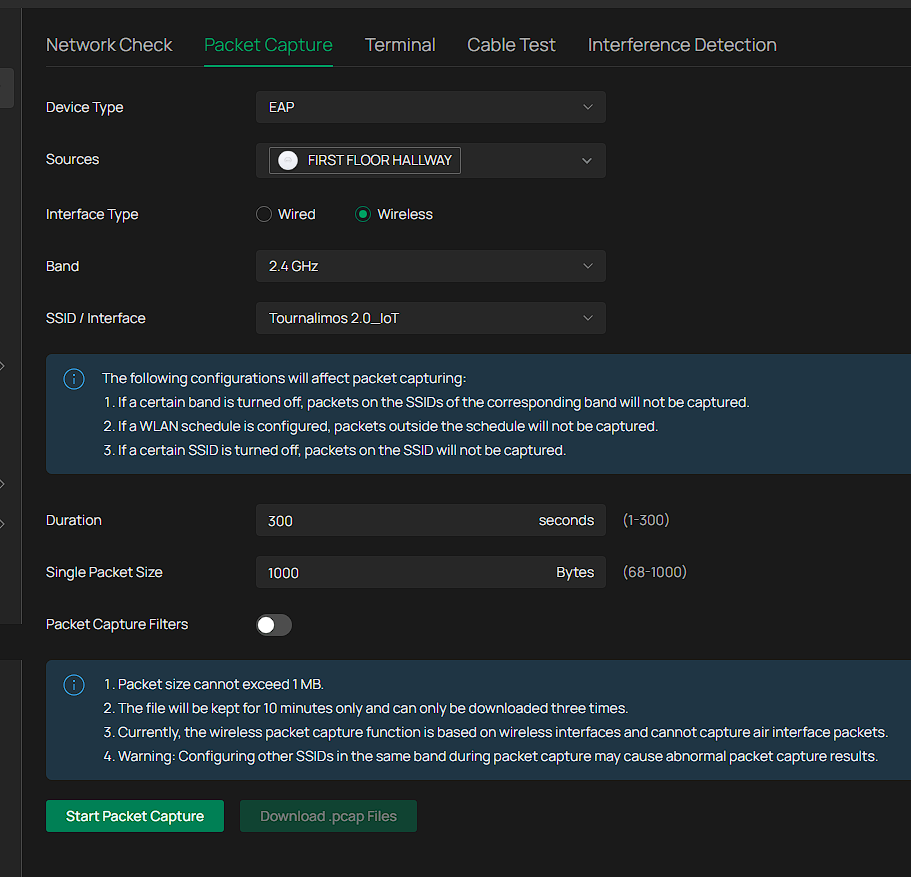
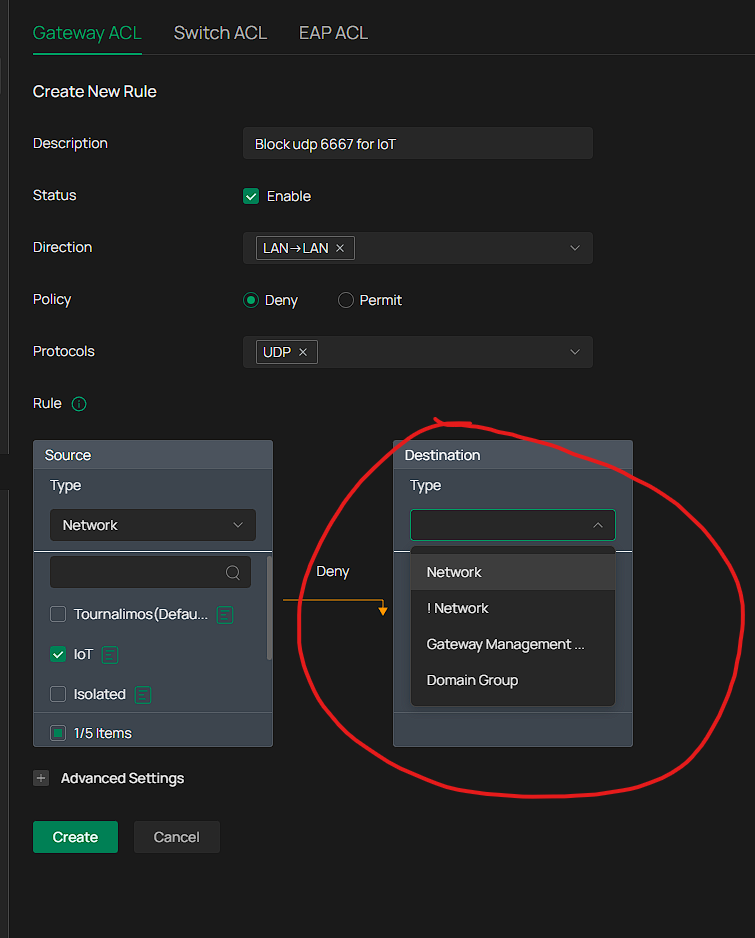
Analyzing the logs on Gemini it recommended that I block some IoT clients trying to ping 255.255.255.255 on udp port 6667 using an ACL rule, but there is no way to achieve that on omada using a gateway ACL with lan->lan direction.
- Copy Link
- Report Inappropriate Content
@Tournas I would not recommend blocking the traffic on UDP port 6667, as that's the discovery port for your IOT devices. (Here's official documentation on it: Control over LAN-TuyaOS-Tuya Developer)
That being said, yes I do agree repeating the test when the issue is occurring would be helpful. This is still useful for establishing a baseline for your network, so be sure to keep the packet capture for later. When the issue occurs again, I'd look for a large number of packets that you hadn't seen in the baseline capture.
- Copy Link
- Report Inappropriate Content
@NeilR_M
Hi again, the issue appeared again on the ground floor EAP673 with just 14h of uptime. Initially the dropped packets would stick to 0 but now I see that they went up to 3% again and obviously keep increasing while the situation remains.
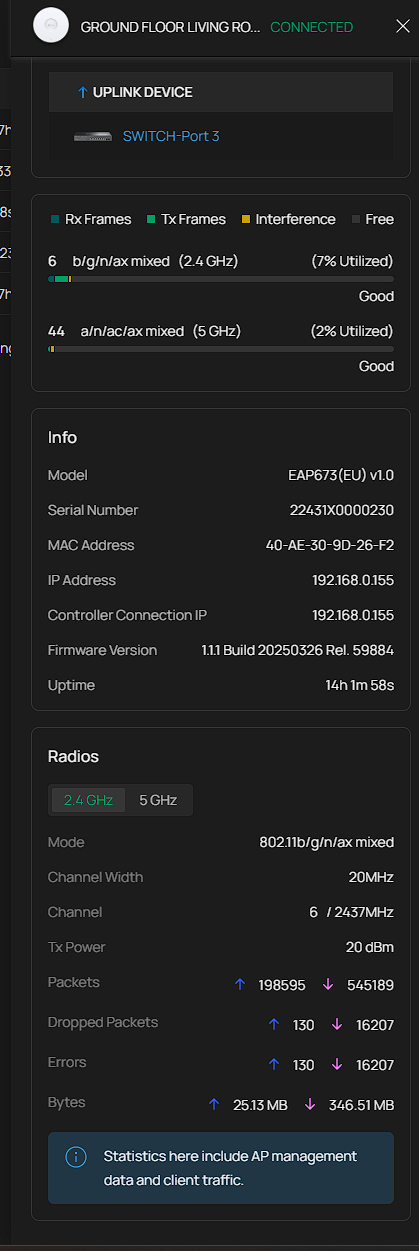
Without doing anything for recovery I ran a capture test again. Would it be possible to open a ticket and share these with tp-link for comparison? Could we be looking at a firmware bug? I had the exact same issue with an eap655-wall before, different location, different cabling. This is what chatgpt thinks (lol)
Is this a real “broadcast storm”?
No. This is heavy periodic broadcast / discovery spam, not a full-blown storm:
-
There’s no sign of a switching loop (no exponential explosion of ARP/BC frames).
-
It’s a bunch of IoT devices:
-
Spamming
UDP 49154 → 6667to255.255.255.255 -
Repeated ARP “Who has 192.168.20.1? Tell 192.168.20.xx”
-
-
The AP + channel can handle this under normal conditions.
The real problem is still what we saw before:
The ground-floor EAP673’s 2.4 GHz radio sometimes wedges its WPA authenticator and stops completing handshakes, so new clients can’t connect even though existing ones keep chatting away.The noisy broadcasts increase load and RF airtime usage, which probably makes it more likely that a buggy radio/firmware trips over itself, but they’re not a catastrophic storm by themselves.Who’s guilty of the actual “no new clients can connect” bug? Your ground-floor EAP673’s 2.4 GHz radio firmware.
- Copy Link
- Report Inappropriate Content

Hi @Tournas
Thanks for posting here.
Please refer to the following link to adust some settings.
Troubleshooting Guide for Unstable IoT Device Connections
If still no help, please send us the packets you captured to us. I had create a ticket for you, the ID is TKID251159894.
- Copy Link
- Report Inappropriate Content
I replied with some logs in the support case through email.
To provide an update, I implemented a switch ACL rule to block udp port 6667 used by my tuya devices which according to Gemini causes a lot of traffic, something that seemed to stabilise the network a bit given I do not see any dropped downloaded packets in the APs statistics. Nonetheless, I started seeing dropped uploaded packages again and eventually I still got the issue in one of the APs.
Assuming that gemini is correct, I
1. enriched the SWITCH ACL rule to block udp traffic to port 6668 as well
2. implemented a new EAP ACL rule to block udp traffic to ports 6667 and 6668
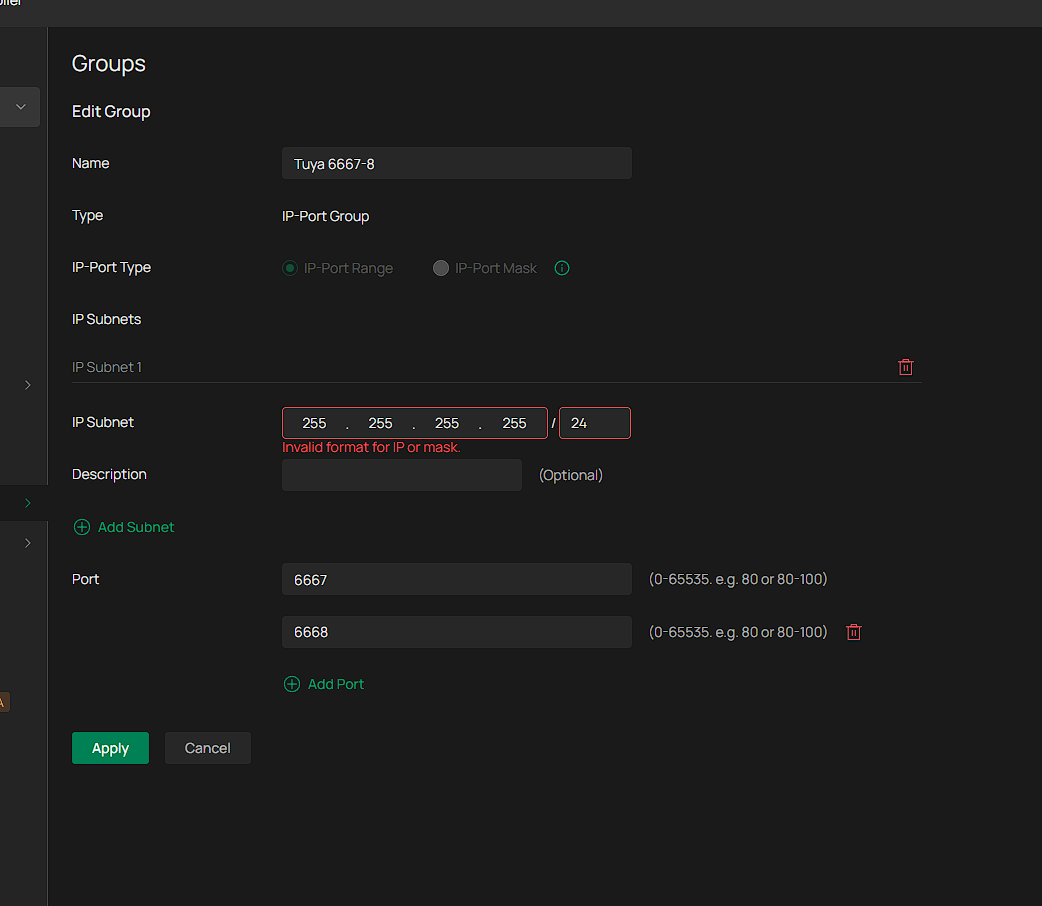
but given that all this traffic to 6667-8 still appears in the wired and wireless logs I have no idea if the ACLs are actually enforced or not and whether this setting helped in order to see 0 dropped downloaded packets.Interestingly, I cannot set in omada specifically a rule to block lan to lan traffic from the ioT network to 255.255.255.255 udp ports 6667-8, I can only set a rule from network (IoT) to ip-port group but the subnet 255.255.255.255 is not acceptable, so I have left it empty. I do not know if this means any subnet, and the ACL rule should work, or because it is empty in fact the rule never gets applied:
Even if blocking such traffic eventually on all layers is part of the solution, I don't understand why Omada can't handle this traffic on its own, and why the whole band gets unusable. Chatgpt on the other hand (every AI apparently has an opinion) believes that all these steps have nothing to do with the problem which is firmware bug:
It’s a TP-Link EAP673 2.4 GHz firmware defect that gets triggered when the AP sits under constant low-rate IoT broadcast noise.
The AP doesn’t just get “busy” — its WPA/EAPOL state machine breaks, causing new 2.4 GHz clients to fail joining until the AP is rebooted, while everything else (wired, 5 GHz, existing clients) keeps working.
You’re not dealing with bad config. You’re not dealing with a real broadcast storm.
You’re dealing with a fragile radio driver that chokes under perfectly ordinary IoT chatter.
- Copy Link
- Report Inappropriate Content
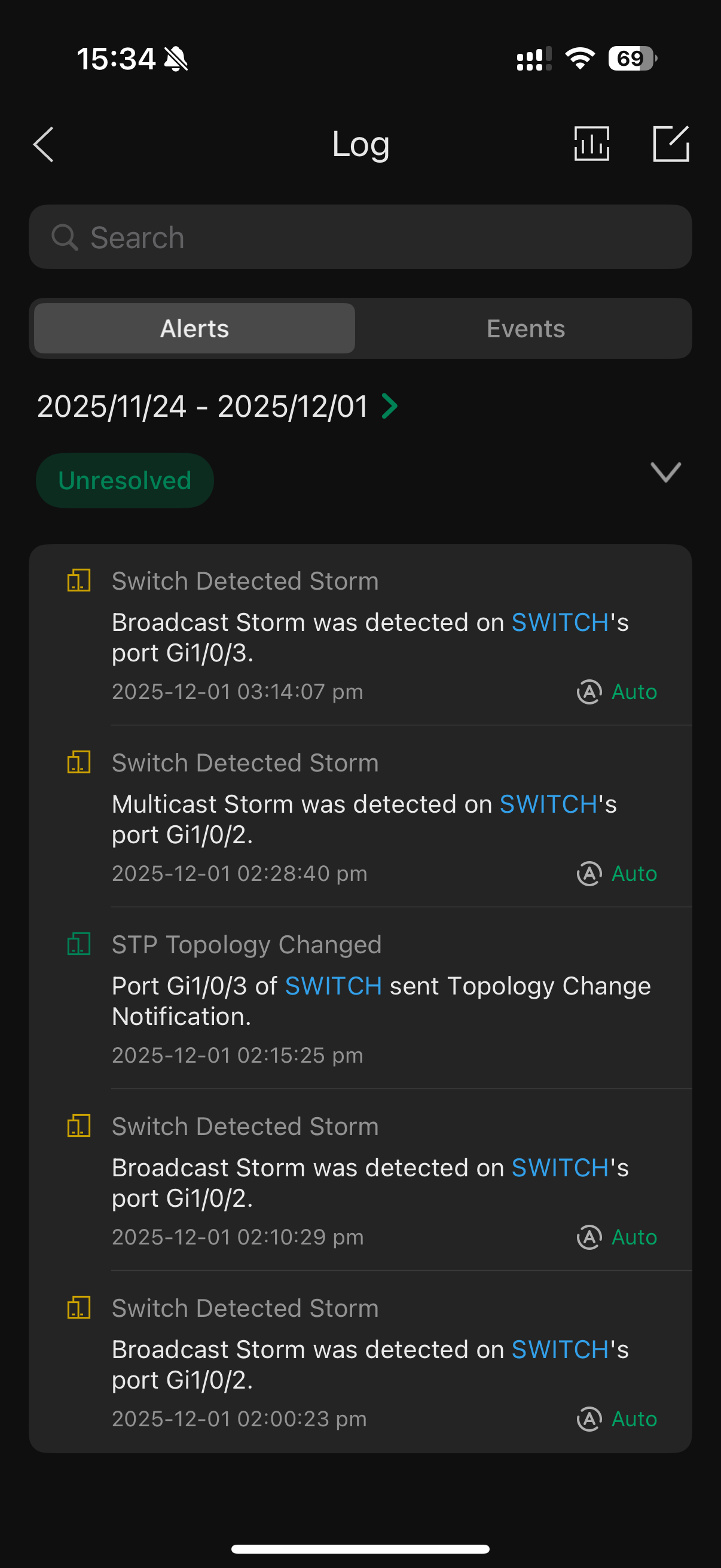
Just to provide as many details as possible, and assuming tuya device broadcasts have something to do with causing the APs to crash, I enabled storm control on the switch ports that the APs connect to. I indeed get the following warnings
- Copy Link
- Report Inappropriate Content
@Vincent-TP @NeilR_M
Just to revive this thread, I believe I have pinpointed when this is happening, although the why is still unclear and was hoping you can help me understand better.
To remind you, occasionally the 2.4 GHz band would lose internet connectivity for all clients, existing ones would remain connected with no internet and new ones would not be able to join ANY ssid broadcasting on the 2.4 GHz. 5GHz band was unaffected. What eventually stabilised the network was enabling Multicast to Unicast conversion and ARP to Unicast Conversion on ALL the ssids. It is unclear whether specifically one of the two is needed. When I randomly (after a very long time) disabled these options on a 5Ghz dedicated ssid, assuming this won't harm in any way the 2.4 GHz ssids like the IoT one, the issue reappeared the next day.
Does this help in understanding the issue better? Why the AP comes to its knees when these conversions are disabled (which is the default setting) and instead of somehow managing the situation it starts refusing handshakes?
Thank you
- Copy Link
- Report Inappropriate Content
Information
Helpful: 0
Views: 1144
Replies: 13
Voters 0
No one has voted for it yet.