Wireless Speed

Wireless Speed

Wireless Speed
Wireless Speed
2 weeks ago
Model: EAP773  
Hardware Version: V1
Firmware Version:

Hello All,


Hoping I can get a bit of advice as I am not sure what to try next.


I have 1gb internet via ISP Router connected to a TPLINK SG2428P Switch.


I have 2 x EAP773 access points (one upstairs and one downstairs) connected to switch and powered via POE.


This is all being managed by Omada Cloud Managment Cloud Essentials - which is my first use of it and its amazing.


All working fine in that I connect to the single SSD upstairs or downstairs and it all just works - connecting to the AP closest etc.


But I have noticed that when connected if I do a speed test I am only getting between 80 and 130 on the speed test.


Using my mobile I can see Wifi 5,6 and 7 options - all give me almost the same speed even when stood right next to the AP.


I have checked and both are showing as connected at 1GB to the switch - I have even unplugged them from ethernet and plugged laptop in and I can get almost 900mb wired down the same cable to the switch so dont think its a cable issue - have also tried AP into the switch using a new ethernet to rule out the cable runs and same result.


If I turn on the wifi on the ISP router I get nearly 800 on a wifi speed test. (wifi 6)


Any suggestions as to why the connection speed on the EAP773's seems so low?


I did wonder is there an "overhead" from using the Omada Cloud Managment? I couldnt be bothered resetting AP and using them standalone but will try if people think it would be helpful.


I tried plugging in older TPLink AP's that I have and it was a similar result.


Appreciate any thoughts/input as I have run out if ideas at this point.


Thanks


FS

  0      
  0      
#1
Options
4 Reply
Re:Wireless Speed
2 weeks ago

  @FartingSpartan 


di'o you have a screenshot og SSID settings and same on radio settings on the access point?

  0  
  0  
#2
Options
Re:Wireless Speed
2 weeks ago

  @FartingSpartan 


Hello,


Thanks for your reply.


I've made some progressed... I realised I had an old WiFi 5 AP still online, removing this and only having the 2 X EAP773's operating has increased speeds to 700-800.


I'm assuming when Using roaming APs you are bottlenecked by your slowest AP?


  0  
  0  
#3
Options
Re:Wireless Speed
2 weeks ago - last edited 2 weeks ago

Hi  @FartingSpartan 

Thanks for posting here.

Having lower-specification devices on the network won't affect the performance of high-specification devices.

Do you mean that the speed is normal when there are only these two EAP773s? But once this WiFi 5 AP is added, the speed drops again?


Please give us the following info to understand the situation:

1. What's the model number, hardware version and firmware version of the wifi 5 AP?

2. What's the model number of the POE switch you are using to power on the EAP773?

3. The whole topology of the network, including the wifi5 AP and the EAP773s;

4. If add the wifi5 AP into the network, will the wifi speed drop again?

5. Some screenshots of the SSID settings;

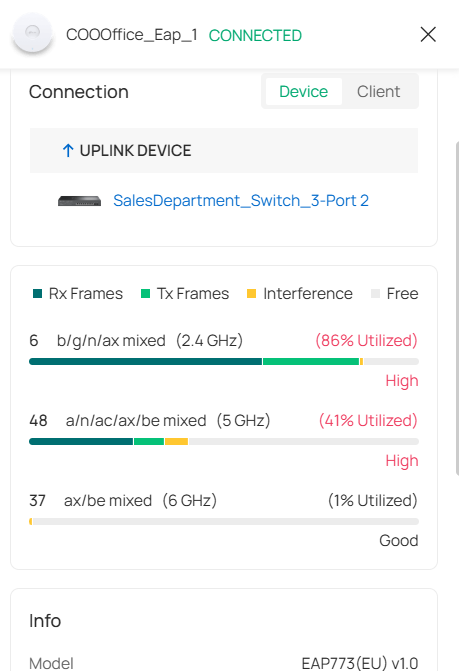
6. Screenshots of the three APs' channel utilization page:


  0  
  0  
#4
Options
Re:Wireless Speed
a week ago

Hi  @FartingSpartan 


We are very concerned about your feedback. Has the issue been resolved? 
If not, please send us the information mentioned in the last reply for further investigation. Thanks.

  0  
  0  
#5
Options