

PVID not working

PVID not working

PVID not working
PVID not working
23 hours ago
Model: TL-SG108PE  
Hardware Version: V5
Firmware Version: 5.0_20230218

Hey, I've got a problem with my TL-SG108PE switch.


I have a router connected to port 8 and a access point, using PoE on port 1.

The network has currently three VLANs set up: 5, 99 and 101. I enabled 802.1q and configured the switch ports:
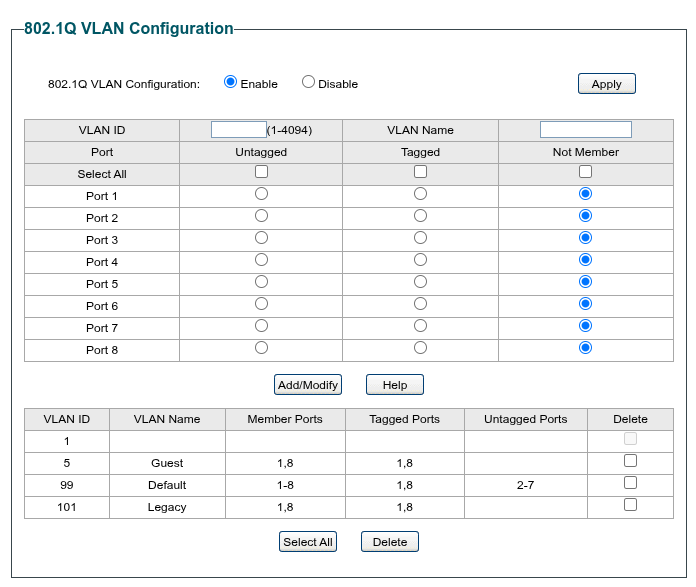
 

I set the PVID on all ports to 99
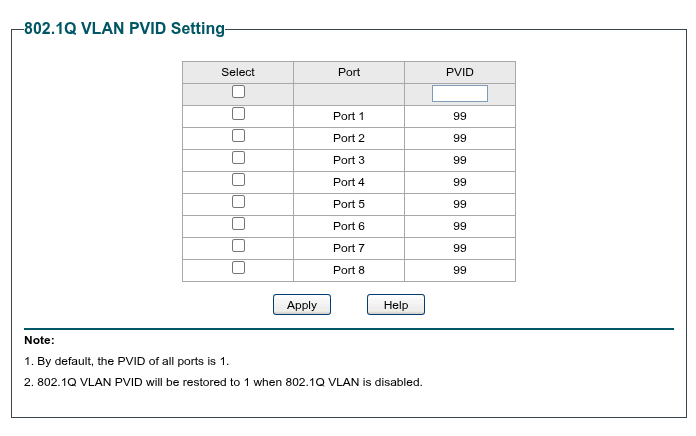


The router and the access point seem to have a connection, If I attach myself to the router directly I can access the access point, but not the Switch IP.

If I attach myself to any swirt port 2-7 I cannot access the Router nor the access point, but the Switch admin UI (the Switch has a static IP configured, DHCP is also not working, as I cannot reach the router).


Did I oversee something in my configuration, or is this a bog of the device/firmware itself?


--

Best regards

  0      
  0      
#1
Options
2 Reply
Re:PVID not working
20 hours ago

  @GeorS 


try untagged port 1-8

  0  
  0  
#2
Options
Re:PVID not working
15 hours ago - last edited 15 hours ago

  @GeorS 


At first glance, your switch configuration is incorrect.  Ports 1 and 8 have no untagged VLAN configured.  Each port should have one (and only one) untagged VLAN.  There are also several questions that need to be answered if you are looking for guidance.  Those questions are:


1.  Is your router VLAN capable?

2.  Is your access point VLAN capable?

3.  What is the IP address of the router?

4.  What is the IP address of the switch?

5.  What subnets are you assigning to the different VLANs?


1x ER7406 1x OC300 4x SG2008 1x EAP610 3x EAP650-Desktop
  0  
  0  
#3
Options