
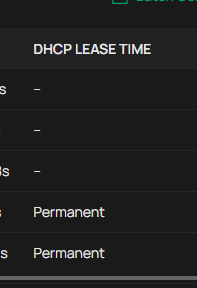
ER7212PC Reserved Address clients cannot be given any lease durations except infinite

All Clients for whom I specify Reserved Addresses are forced to get infinite lease durations, not ones I specify. I need to change client Reserved Addresses from time to time and for some devices, such as security cameras, the only way to get them to release their IP addresses is to power cycle them, which means crawling around the attic or power cycling my entire building. DHCP Option 58 might solve this but neither I nor Business support knows if or how that can be programmed into my Gateway. Has anyone else solved this?
ER7212PC is supposed to be an Omada Controller but Business Community forum rejected this post saying it belonged in Gateways. So I'm not allowed to specify my device's Model.
- Copy Link
- Subscribe
- Bookmark
- Report Inappropriate Content


The device reserves address entries with an infinite lease time by default, and this cannot be controlled through options or other parameters.
- Copy Link
- Report Inappropriate Content

When you set a fixed IP on a device, it becomes permanent, I don't think the devices get updated IP until there is a restart of the device that has a fixed IP. I assume you have cameras that get power from the switch on many poe swithers you have the option to restart powe on a port. Alternatively restart the entire switch and the devices will get the new IP address.
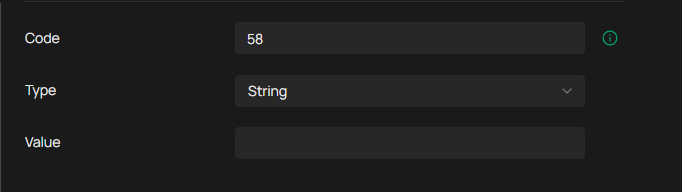
you can also try option 58 if you think it works, I don't know how to configure it but you can enter it on the controller under cusom dhcp option
- Copy Link
- Report Inappropriate Content
@Carey_2 This reply isn't really a solution.
Mr.S: When you set a fixed IP on a device, it becomes permanent.
Carey_2: That is NOT what is specified in the DHCP rfc. Let's be careful with terms.
o "fixed IP" is not a term in my question and nowhere in 7212 UI either, as far as I know. I exclude it because Omada doesn't define it.
o Omada UI does define Reserved Addresses the user can specify.
o The UI says NOTHING about lease duration for leases to a Reserved Address.
o But It is an unfortunate fact that the 7212 firmware forces on you infinite lease duration for any Reserved Address.
o Another undefined term floating around is "static" IP addresses. I don't use this term either, because people unjustifyably mix
it up with Reserved, a term that is properly defined by Omada.
Mr.S: I don't think the devices get updated IP until there is a restart of the device that has a fixed IP
Carey_2: That is correct; that's what infinite duration lease means: the device never requests a new IP.
Mr.S: I assume you have cameras that get power from the switch on many poe swithers you have the option to restart powe on a port
Alternatively restart the entire switch and the devices will get the new IP address.
Carey_2: No, all of my devices get hard-wired power, and I use no switches and no PoE. If you look at my original question, I say
" the only way to get them to release their IP addresses is to power cycle them which means crawling around the attic or
power cycling my entire building". That statement is true and complete. I do not have any other option you may think up such as PoE and switches.
Mr.S: you can also try option 58 if you think it works, I don't know how to configure it but you can enter it on the controller under cusom dhcp option
Carey_2: If you read my original post, " DHCP Option 58 might solve this but neither I nor Business support knows if or how that can
be programmed into my Gateway " you'll see that your suggestion is something I have already been considering but is presently not
understood by anyone including Omada support.
- Copy Link
- Report Inappropriate Content
To help assist and streamline the identification of the behavior, we recommend sending an email to forumsupport.usa@tp-link.com with the following information:
Subject: [Forum Escalation][ID ] (Summarize the User Reported Behavior briefly)
Forum Nickname: [User Provided]
Thread URL:
Model&Version:
Description: [User Provided]
Any Other Relevant Information (Logs, Config Files, Images, etc.): [User Provided]
Once sent, a ticket will be created in our support system, and a member of the team will follow up to gather more information or troubleshoot a cause.
- Copy Link
- Report Inappropriate Content
The device reserves address entries with an infinite lease time by default, and this cannot be controlled through options or other parameters.
- Copy Link
- Report Inappropriate Content
Information
Helpful: 0
Views: 379
Replies: 4
Voters 0
No one has voted for it yet.