
Fallaback dns feature (LAN redundancy order)

Good morning and Merry Christmas to everyone,
I looked around and ddin't see any posts related to my topic, either on the controller user manual not the forums. I would like to know if there is a setting for fallback dns, and what/how is the working order, ie, 1) LAN DNS (1st IP and if not working then the 2nd IP will be used (LAN redunduncy), if not then 2) WAN DNS, if not then external DNS server, etc.
Thanks in advance
V/r
Toni
- Copy Link
- Subscribe
- Bookmark
- Report Inappropriate Content

@ceejaybassist DNS doesn't really work like that. "Primary" and "Secondary" are imaginary terms as far as most OS go.
The OS may try any of the DNS servers in its DNS settings based on an algorithm which varies by OS - for example, what happened the last time it did a DNS lookup, response times for either address etc. It will use whatever response it gets first - including "no such hostname". Yes, sometimes the first server listed is tried first, but that is not always the case.
I would not recommend using a mix of LAN and WAN DNS servers for any clients, unless you don't have any local DNS records resolving to local addresses. And if you are doing any kind of security or ad-blocking via DNS don't expect it to work if you set a "fallback" DNS server that is configured differently.
Set all my local clients to use only a LAN DNS, and then those LAN DNS servers use public DNS servers to resolve anything they can't resolve locally. If you are worried about redundancy you need multiple LAN DNS servers.
You can also set more than two DNS server addresses to use in most OS either locally or via DHCP, which again aren't always used in the order they are entered.
- Copy Link
- Report Inappropriate Content

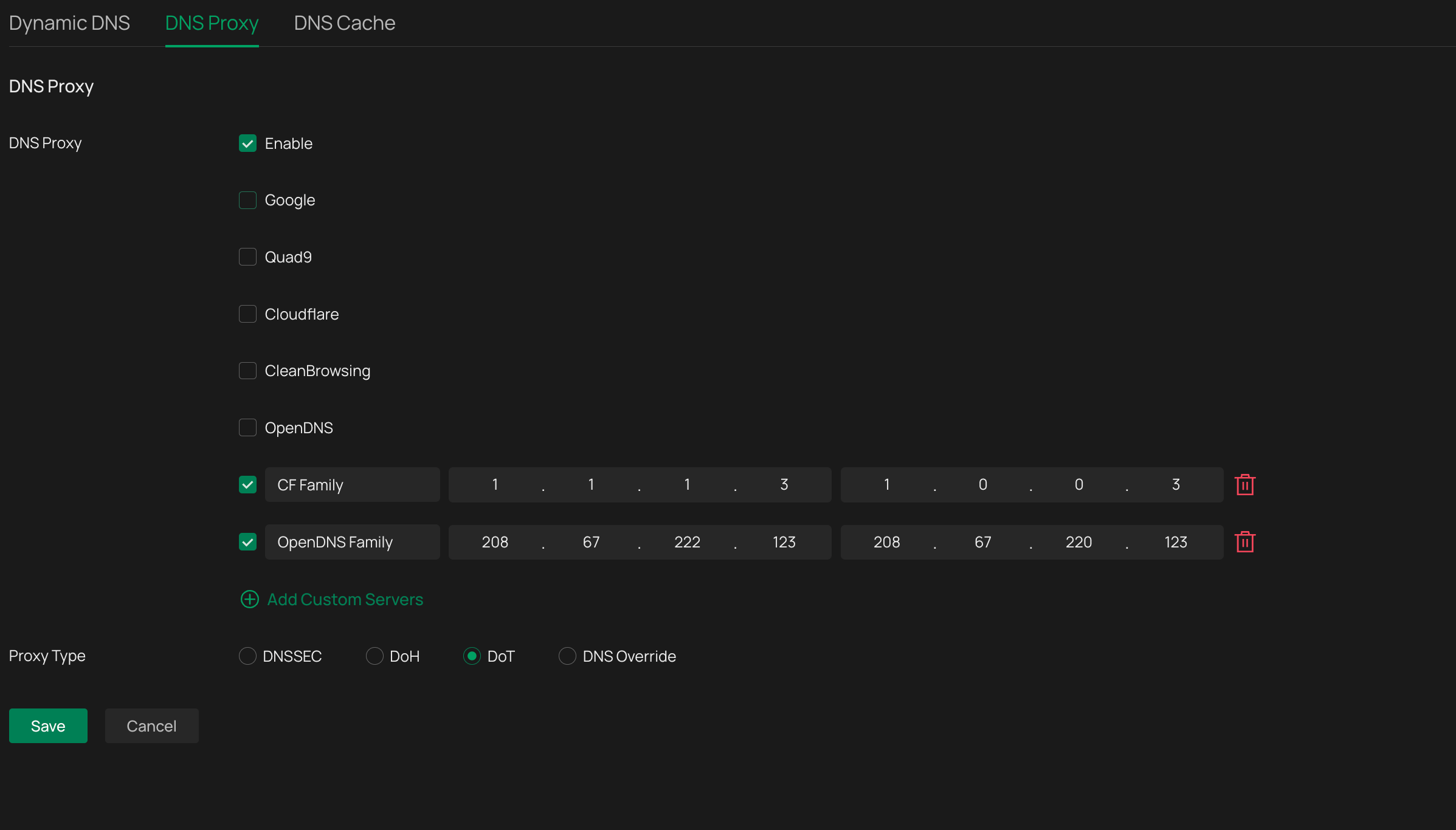
Its actually possible to set up to a maximum of 4 DNS resolvers if you have an omada gateway and set the DNS Proxy to use DoT, then point all LAN clients DNS to the IP of the gateway on whatever vlan they use
- Copy Link
- Report Inappropriate Content

There is the primary and secondary DNS servers in the LAN settings.
Though, I think, these are not "true" fail-over, because both of them are still querying your requests whenever you visit a website.
But if the primary goes down, the DNS requests will automatically be forwarded to the secondary.
- Copy Link
- Report Inappropriate Content
@ceejaybassist DNS doesn't really work like that. "Primary" and "Secondary" are imaginary terms as far as most OS go.
The OS may try any of the DNS servers in its DNS settings based on an algorithm which varies by OS - for example, what happened the last time it did a DNS lookup, response times for either address etc. It will use whatever response it gets first - including "no such hostname". Yes, sometimes the first server listed is tried first, but that is not always the case.
I would not recommend using a mix of LAN and WAN DNS servers for any clients, unless you don't have any local DNS records resolving to local addresses. And if you are doing any kind of security or ad-blocking via DNS don't expect it to work if you set a "fallback" DNS server that is configured differently.
Set all my local clients to use only a LAN DNS, and then those LAN DNS servers use public DNS servers to resolve anything they can't resolve locally. If you are worried about redundancy you need multiple LAN DNS servers.
You can also set more than two DNS server addresses to use in most OS either locally or via DHCP, which again aren't always used in the order they are entered.
- Copy Link
- Report Inappropriate Content
Its actually possible to set up to a maximum of 4 DNS resolvers if you have an omada gateway and set the DNS Proxy to use DoT, then point all LAN clients DNS to the IP of the gateway on whatever vlan they use
- Copy Link
- Report Inappropriate Content
Information
Helpful: 0
Views: 3
Replies: 0
Voters 0
No one has voted for it yet.