Upgrade network design using VLAN

Upgrade network design using VLAN

Upgrade network design using VLAN
Yesterday
Model: OC200  
Hardware Version: V2
Firmware Version: 2.22.10 (34511)

Hello,


My network includes OMADA router, OC200 hardware controller, some switches and EAPs. OMADA version is 6.0.0.34.


Currently I've got an unique LAN, management, 192.168.10.1/24 with DHCP server enabled, on VLAN 10.

Every devices and clients get their IP address on this unique network/VLAN, with some DHCP reservations for TP-LINK devices.


With the current web interface, VLAN Type is set to "Single".


I'd like segregate / tag network traffic using other VLAN numbers, for Office, IoT, CCTV assets.


I thought about changing VLAN type from "Single to "Multiple" but it seems impossible within OMADA web interface. Maybe that's not the best option. I'm not confortable with this feature/name.


From your experience, how could I achieve segregation?


O2o.


  0      
  0      
#1
Options
5 Reply
Re:Upgrade network design using VLAN
Yesterday - last edited Yesterday

  @O2o 

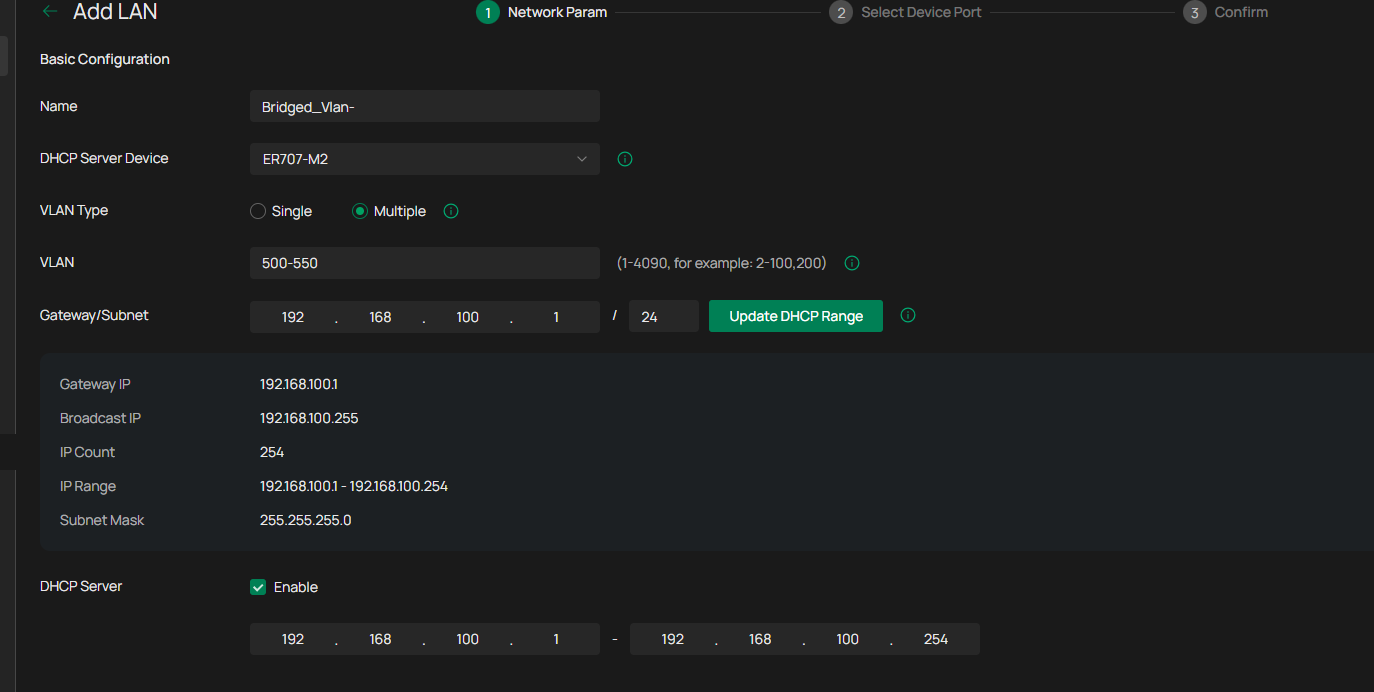
Multiple is something called bridged vlan, it means that all vlan share the same ip network and that there is full blocking between vlan in the same bridge,
bridged vlan can still communicate with other vlans like for example single vlan. very nice if you are going to create many vlans that are not going to talk to each other.

you create it this way


  1  
  1  
#2
Options
Re:Upgrade network design using VLAN
Yesterday

  @O2o 


here is a guide you can look at


https://community.tp-link.com/en/business/forum/topic/650256

  1  
  1  
#3
Options
Re:Upgrade network design using VLAN
Yesterday

  @O2o 


If you want seperate vlans for different things, then just add new vlans and use either vlan isolation or gateway.switch ACLs to isolate them as needed.  Trunk the vlan tags down through trunk ports and set as native vlans on ports as needed.  Its very easy

  1  
  1  
#4
Options
Re:Upgrade network design using VLAN
Yesterday

Thanks you both for your replies that make sense.


Let me ask if TP-Link provides any blueprints for standard use-cases including comprehensive OMADA configuration?

  0  
  0  
#5
Options
Re:Upgrade network design using VLAN
23 hours ago

  @O2o 


There is no definitive answer on how to set up a network, but you can find some information and FAQs that you can look at here.


https://www.omadanetworks.com/en/


  1  
  1  
#6
Options