
Omada Software Controller Portal Google OAuth wrong port in redirect URL

Hi there,
I run omada software controller on proxmox lxc. It is behind nginx reverse proxy. It runs great and I'm happy with it.
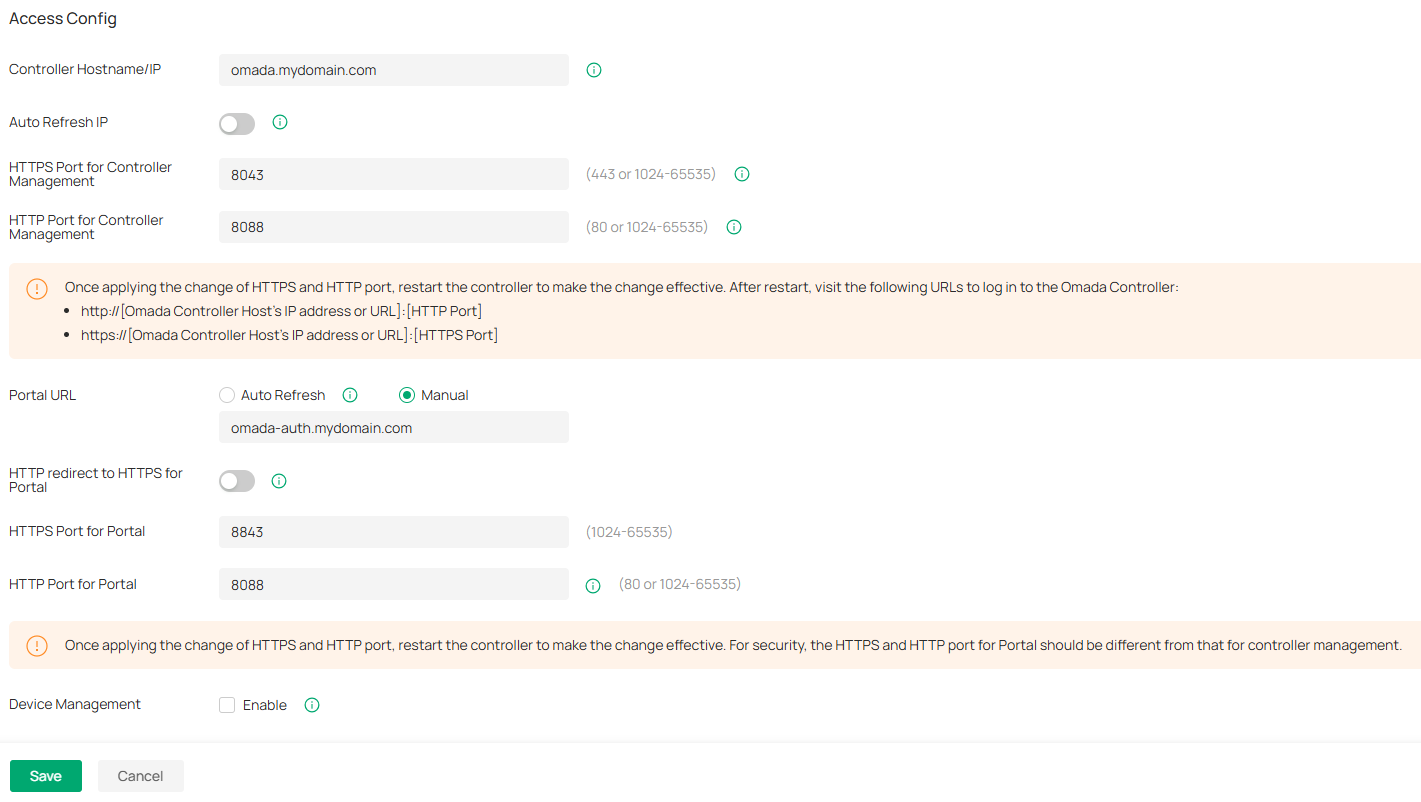
I'm trying to setup Portal authentication with google oauth (followed https://www.omadanetworks.com/en/support/faq/4381/) and getting redirect url port wrong set by omada. Here are my system settings:
mydomain - is edited for security reasons.
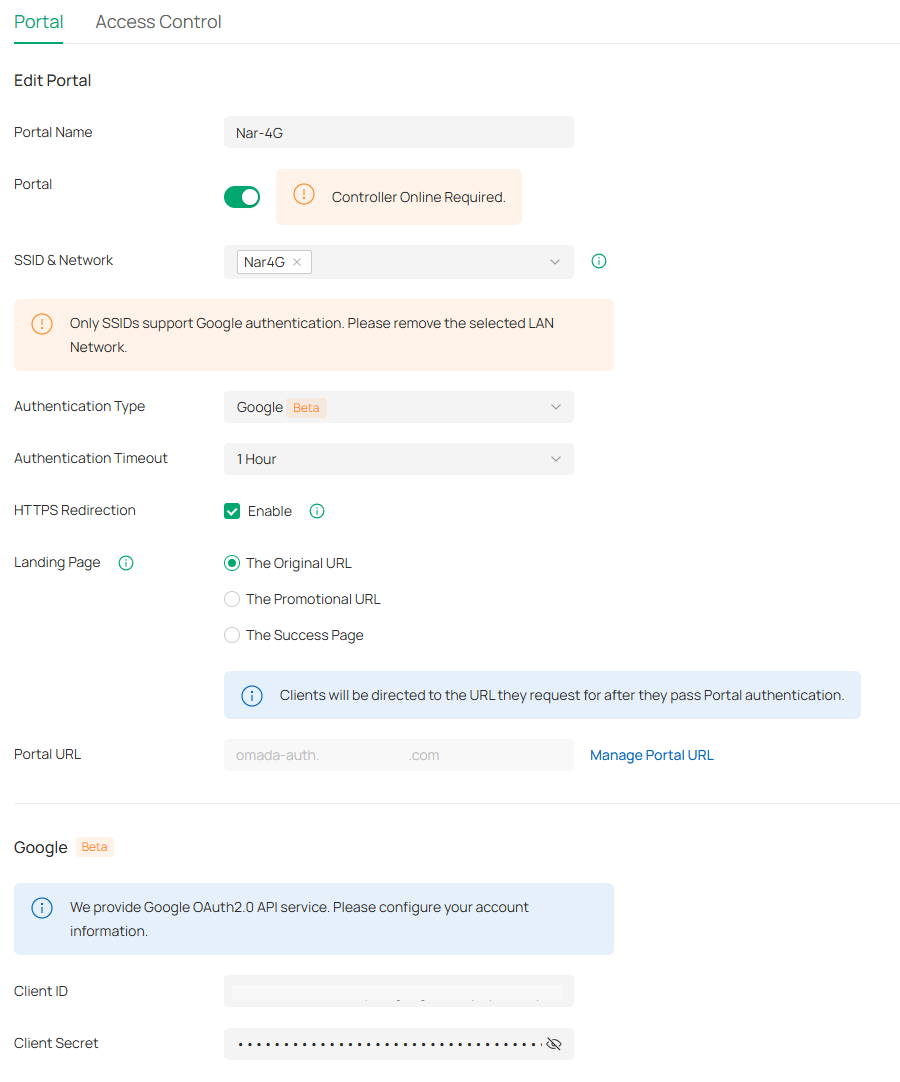
Portal is setup with Google OAuth, client id and secret are entered:
Trying to connect a client however the redirect url that omada sends is pointing at port 443 and I'm wondering why? My authorized redirect url in google cloud project is set to https://URL:8843 as per the FAQ, and is forwarded in the router and reverse proxy to point at omada controller port 8843.
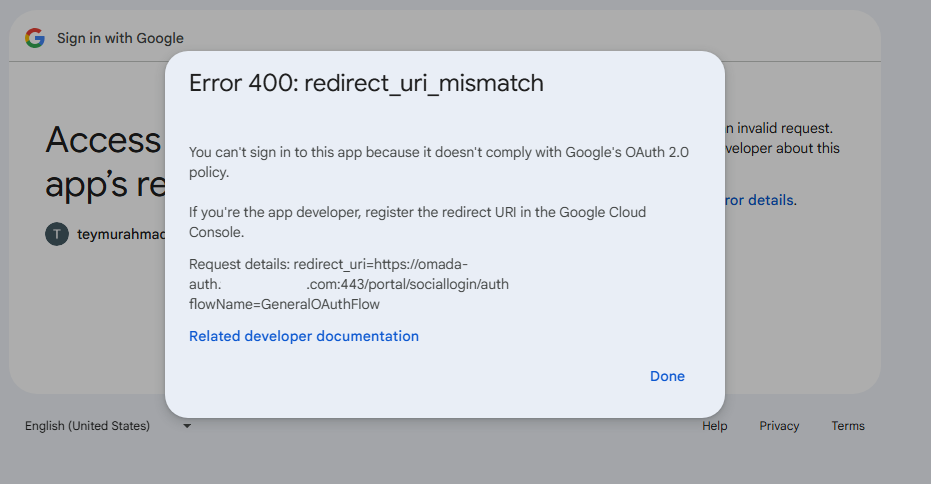
has anybody seen this before? I understand that Portal auth via google is in beta. How do I work around this? Thank you in advance.
Teymur
- Copy Link
- Subscribe
- Bookmark
- Report Inappropriate Content


Hi @teymur88
Sorry for the late reply.
Extract the port from the client’s request to access the Portal and use it as the port in the redirect URL when redirecting the client to Google. Google checks if this redirect URL matches the one set in its developer platform. The error occurs because this port does not match the configured one. Usually, if the port for accessing the Portal is set to 8843, the client will send a request to the Controller on port 8843, and that port will be included in the redirect URL. However, if NAT is configured with a port mapping from external port 443 to Controller port 8843, the Controller will retrieve port 443 from the request and use it in the redirect URL.
That is to say: you need to configure the port number in Google to match the external port number that the Controller is mapped to via NAT.
- Copy Link
- Report Inappropriate Content
Hi @teymur88
Thanks for posting here.
Does the portal URL you configured map to a public or private IP address? If it is mapped to a public IP address that does not forward traffic on port 8843 (required for Portal authentication) to the Controller, this situation will occur.
You can replace the URL with an IP address to see if it resolves the problem.
- Copy Link
- Report Inappropriate Content
Hi @Vincent-TP
Thanks for your reply. Portal URL https://omada-auth.mydomain.com resolves to a public IP address when queried from outside my home network, and to a private IP address when queried from inside my network.
1) When queried from outside it resolves to my Public IP which then on the router is port forwarded to reverse proxy and then from reverse proxy the traffic is sent to omada controller.
2) When queried from inside it resolved to Private IP address of the reverse proxy which then from reverse proxy the traffic is sent to omada controller.
My only question is why the port is getting changed. I don't have port 443 anywhere in the omada config, where does it take that from?
- Copy Link
- Report Inappropriate Content
Hi @teymur88
Sorry for the late reply.
Extract the port from the client’s request to access the Portal and use it as the port in the redirect URL when redirecting the client to Google. Google checks if this redirect URL matches the one set in its developer platform. The error occurs because this port does not match the configured one. Usually, if the port for accessing the Portal is set to 8843, the client will send a request to the Controller on port 8843, and that port will be included in the redirect URL. However, if NAT is configured with a port mapping from external port 443 to Controller port 8843, the Controller will retrieve port 443 from the request and use it in the redirect URL.
That is to say: you need to configure the port number in Google to match the external port number that the Controller is mapped to via NAT.
- Copy Link
- Report Inappropriate Content
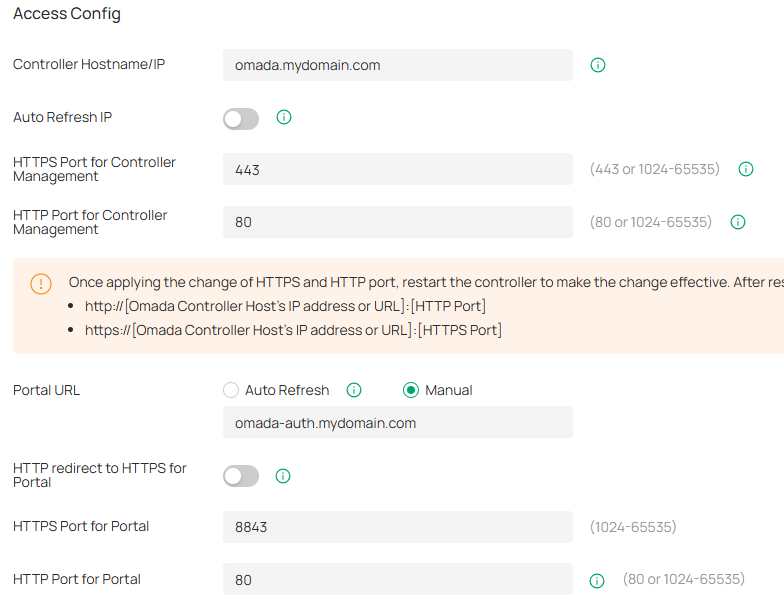
@Vincent-TP Thanks for your reply. I continued troubleshooting this since then and I believe I've come to the working combination. I've set the below settings. (see the pic). This is what now happens when the client connects:
- Client connects to WiFi
- Client is forwarded to https://omada-auth.mydomain.com/blablabla. (Notice it connects to port 443 even though in the config it states port 8843. Reverse proxy forwards that traffic to the controller ip port 8843 using https. I don't understand the logic here. How this even works. Why the portal page the client is forwarded to uses port 443, when in the config it is set to use 8843. The portal app on the controller is actually listening on 8843.
root@omada:~# netstat -anptu|grep omada
tcp 0 0 0.0.0.0:9098 0.0.0.0:* LISTEN 229/omada
tcp 0 0 0.0.0.0:8843 0.0.0.0:* LISTEN 229/omada
tcp 0 0 0.0.0.0:443 0.0.0.0:* LISTEN 229/omada
tcp 0 0 0.0.0.0:80 0.0.0.0:* LISTEN 229/omada
- The only way I can explain this is that my reverse proxy is set to redirect http to https and the client is first forwarded to port 80 which is then redirected to port 443, and since the controller is set to listen on port 80 for the portal as well - this combination works ok.
- Client clicks/taps continue with google and the is forwarded to the google sign in page.
- Client signs in no problem.
Regards
Teymur
- Copy Link
- Report Inappropriate Content
Information
Helpful: 0
Views: 837
Replies: 4
Voters 0
No one has voted for it yet.