
Compatibility issue: VIGI C540 V2 (FW 2.2.0) not certified by VIGI NVR1004H-4P(UN) (FW 1.2.3)

Hello everyone,
I have a compatibility issue between a VIGI camera and a VIGI NVR.
NVR: VIGI NVR1004H-4P(UN)
Firmware: 1.2.3 Build 251119 Rel.70321n
Camera: VIGI C540 V2.0
Firmware: 2.2.0 Build 250904 Rel.65207n
The camera was updated via the official TP-Link VIGI mobile app.
After the update, the NVR shows “Device is not certified” and cannot connect to the camera.
Important details:
- The camera firmware 2.2.0 was suggested in-app but is not published on the official TP-Link download page.
- Downgrade from 2.2.0 to 1.x is blocked and not possible through the UI.
- The camera now becomes unusable with this NVR.
Has anyone encountered this?
Is there a known way to downgrade the camera, or is there an upcoming NVR firmware that supports 2.2.0?
Thank you.
- Copy Link
- Subscribe
- Bookmark
- Report Inappropriate Content
Hi @Vincent-TP
Thank you for your reply.
I checked the credentials directly in the camera’s web interface.
It turned out that after the firmware update, the camera’s HTTPS port was changed from 443 to a different value.
The NVR expects the camera on port 443. After setting the camera back to port 443, the NVR connected normally and the “Device is not certified” error disappeared.
Suggestion for improvement:
In this scenario, the error message “Device is not certified” is misleading.
A more accurate message would help avoid confusion during troubleshooting.
- Copy Link
- Report Inappropriate Content


Hi @Papi12
Thanks for posting here.
“Device is not certified.”
This error message indicates that the NVR applied the wrong account and password to the cameras. Please try to manage them and re-enter the account.
Or you can reset one camera and use the default account to manage it, the error should not occur.
- Copy Link
- Report Inappropriate Content
Thank you for your reply.
The account and password are correct. The issue only occurs with VIGI C540 V2 firmware 2.2.0.
I also have two VIGI C350 1.0 cameras with firmware 2.2.1, which work fine with the same NVR.
This suggests that the problem is not related to login credentials, but rather a firmware whitelist / compatibility issue between the C540 V2 2.2.0 and NVR1004H-4P(UN) v1.2.3.
- Copy Link
- Report Inappropriate Content
Hi @Papi12
Thanks for the reply.
This firmware does not have this known issue. Actually, this error typically occurs after modifying the account password. Is it possible that another administrator changed the account password?
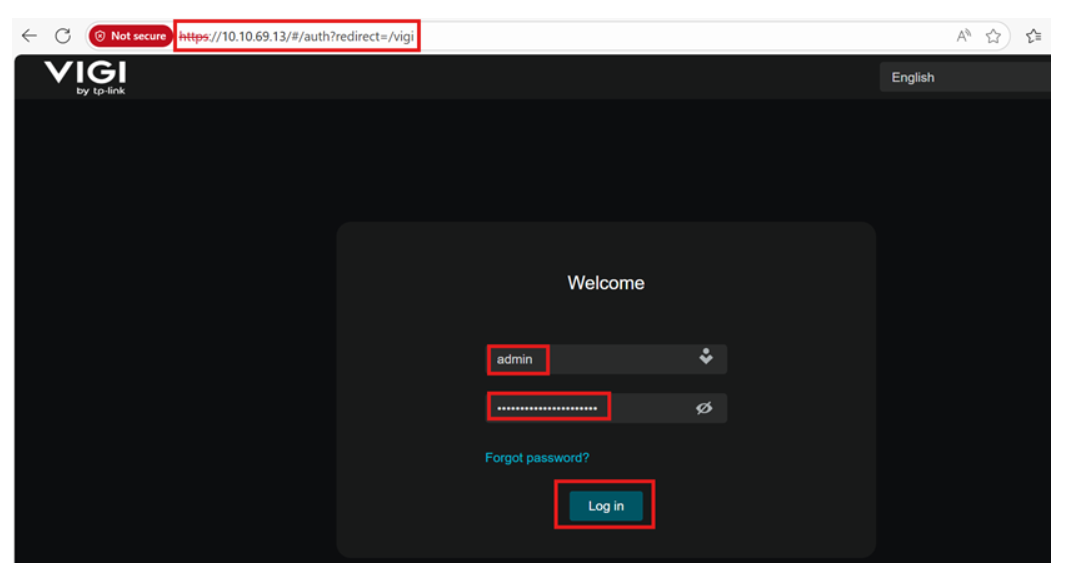
If it’s inconvenient for you to perform a reset test, we suggest trying to access the camera’s WEB interface to see if you can log in successfully with this account.
To access the camera's web interface, you can use its IP address. Ensure your computer and the VIGI camera are on the same network, or that the PC can otherwise reach the camera's IP address.
- Copy Link
- Report Inappropriate Content
Hi @Vincent-TP
Thank you for your reply.
I checked the credentials directly in the camera’s web interface.
It turned out that after the firmware update, the camera’s HTTPS port was changed from 443 to a different value.
The NVR expects the camera on port 443. After setting the camera back to port 443, the NVR connected normally and the “Device is not certified” error disappeared.
Suggestion for improvement:
In this scenario, the error message “Device is not certified” is misleading.
A more accurate message would help avoid confusion during troubleshooting.
- Copy Link
- Report Inappropriate Content
Hi @Papi12
Thanks for sharing the solution.
Suggestion for improvement:
In this scenario, the error message “Device is not certified” is misleading.
A more accurate message would help avoid confusion during troubleshooting.
>>I will forward this feedback to the relevant team. Thanks for your suggestion.
We would like to test more about this situation. Would you please give us the following info:
1. What's the firmware version of the camera before this update?
2. Which port number did it changed to?
- Copy Link
- Report Inappropriate Content
Hi @Vincent-TP
I don’t remember the exact firmware version before the update.
The cameras are regularly kept up to date, so it was likely the latest available version at that time, but I can’t confirm the exact build number.
The camera IP address was: xxx.xxx.xxx.91 (last octet: 91).
Before the firmware update, the HTTPS port was 443.
After the update, the HTTPS port was automatically changed to 91, which matches the last octet of the IP address.
The port was not changed manually.
- Copy Link
- Report Inappropriate Content
Hi @Papi12
Thank you very much for the information you provided. We have tested it locally many times, but were unable to reproduce the issue. The occurrence of this phenomenon is related to specific network configurations or environments, making it difficult to pinpoint the exact cause at the moment.
However, we will keep an eye on this feedback. Thanks again for your feedback.
- Copy Link
- Report Inappropriate Content
Information
Helpful: 0
Views: 658
Replies: 7
Voters 0
No one has voted for it yet.