
How to configure DHCP server with range?
How to configure DHCP server with range?

Hello,
what is a seemingly easy question has become somewhat more complicated than expected on Omada. I have a switch and two APs on Omada.
Additionally, there is a home router (AVM FritzBox, IP 192.168.0.1) currently serving as the gateway and DHCP server.
I would like to move more functionality to the Omada devices, starting with moving DHCP server to the switch. DHCP on the FritzBox is now deactivated.
In Omada, I find two settings related to DHCP (cloud controler):
First, on the device itself, configured like:
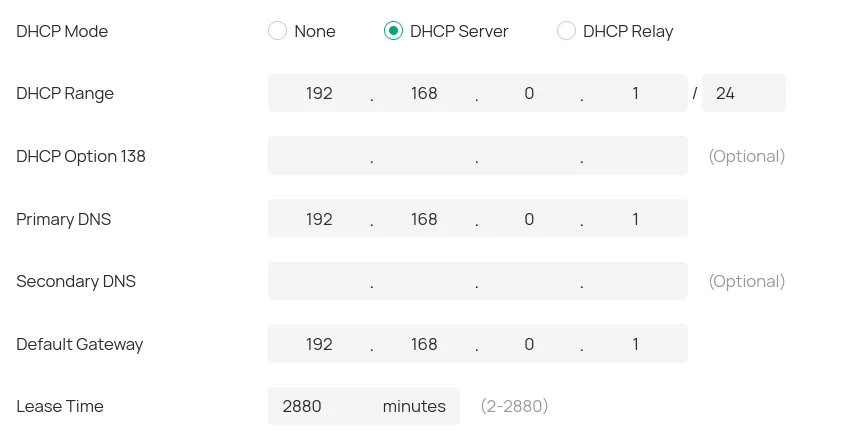
Most notably, the DHCP range is missing resp. is just a subnet setting. Where can I set the DHCP pool size?
It seems that I can do in the second DHCP setting: Network Config -> LAN -> my only VNET:
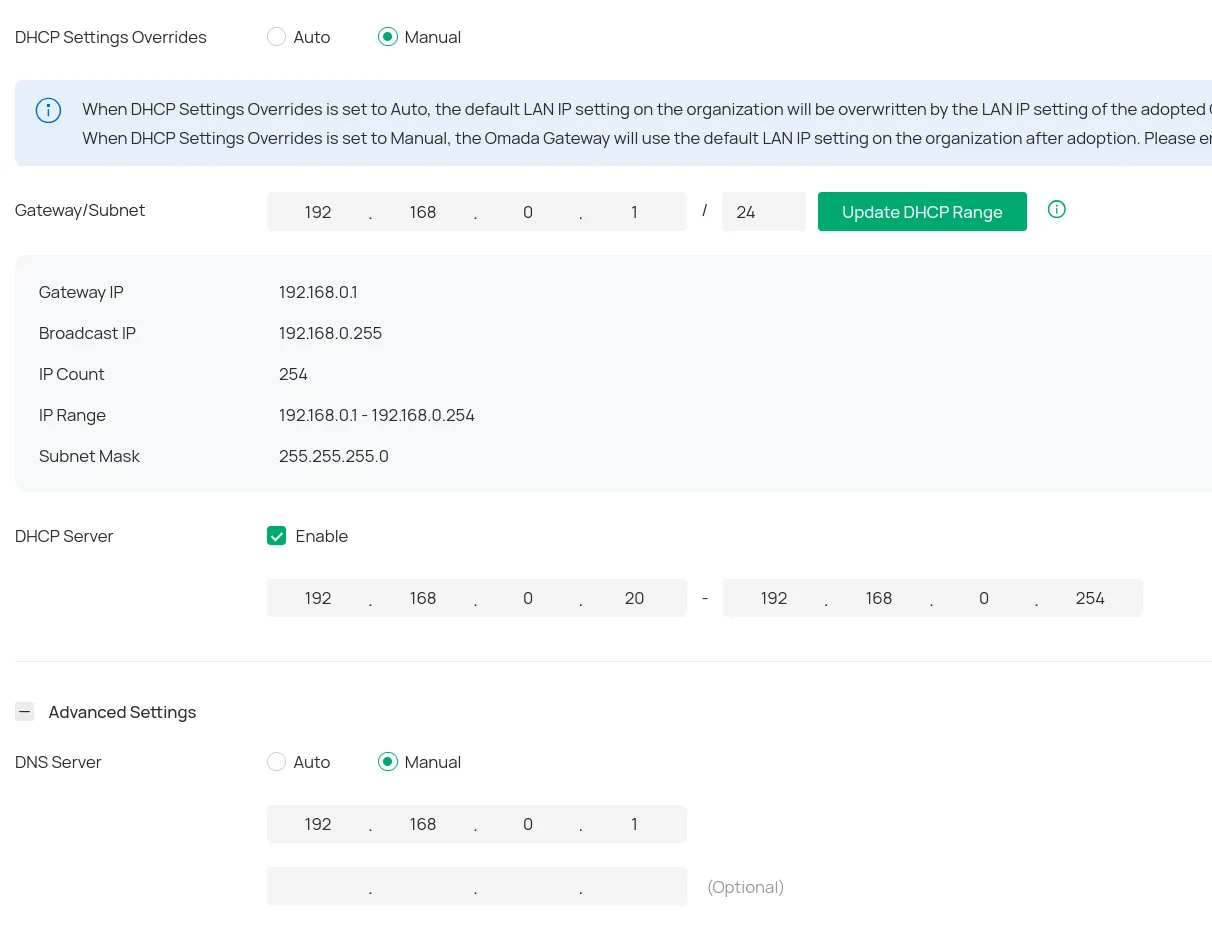
My observations so far:
- both settings need to be enabled (settings overrides to manual, mode to server) in order to have any DHCP server listening on the network
- The range in the second screenshot is ignored, I receive IP addresses outside this range, starting from 192.168.0.2
Can someone help me, how these two settings interact? How to correctly configure the DHCP server on the switch, so that it obeys the range I set.
Thanks!
- Copy Link
- Subscribe
- Bookmark
- Report Inappropriate Content


@Horus107 Upon checking with my engineers, this functionality will be available in controller version 6.1.x.x; the pre-release firmware is available here:
Get the Latest Omada SDN Controller Releases Here - Subscribe for Updates - Business Community
- Copy Link
- Report Inappropriate Content
@Horus107 The range in the second screenshot should be what controls the pool. Have you tried forcing the devices in question to release their existing IPs and renew for one in the pool? Easiest to do so if the devices in questions are PCs. (If they are, I would also double check for a static IP mapping.)
- Copy Link
- Report Inappropriate Content
@NeilR_M Yes, I tried to renew:
$ dhclient -d -v wlan0
Listening on LPF/wlan0/dc:a6:32:d6:87:28
Sending on LPF/wlan0/dc:a6:32:d6:87:28
Sending on Socket/fallback
DHCPDISCOVER on wlan0 to 255.255.255.255 port 67 interval 3
DHCPOFFER of 192.168.0.4 from 192.168.0.2
DHCPREQUEST for 192.168.0.4 on wlan0 to 255.255.255.255 port 67
DHCPACK of 192.168.0.4 from 192.168.0.2
.2 is the switch, .4 is not in the range set.
- Copy Link
- Report Inappropriate Content
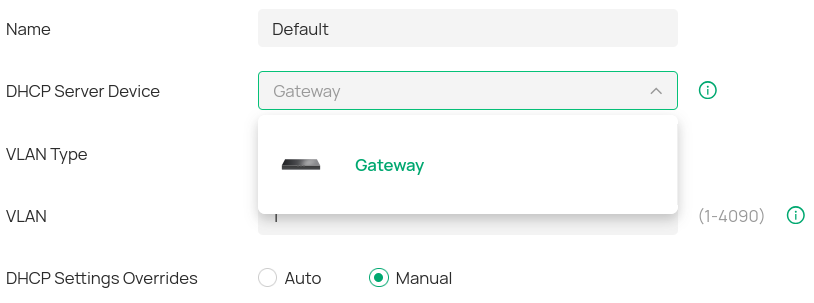
@Horus107 On your LAN settings, what device is set as the DHCP server device?
- Copy Link
- Report Inappropriate Content
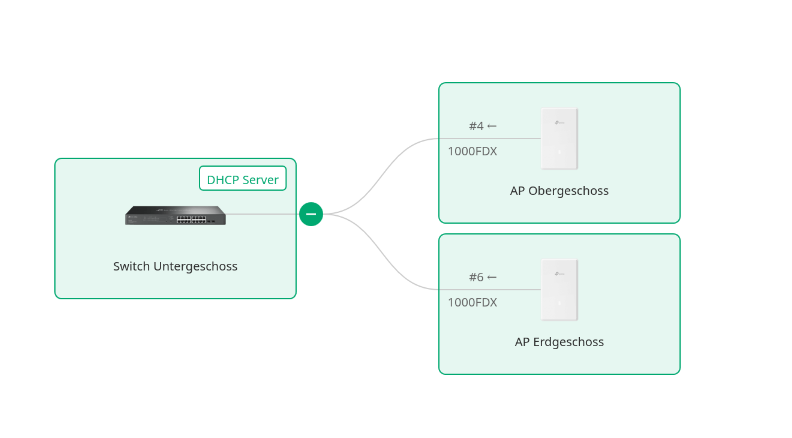
@NeilR_M It's Gateway. Which is technically not correct, as the switch is not the gateway, but it is the only option:
also, in the VLAN overview, the switch is marked as DHCP server:
Best Thanks!
- Copy Link
- Report Inappropriate Content
@Horus107 I was able to test on a switch here in our office as well and confirmed this behavior. I'll be passing this along to my engineers to see if they can figure out a solution or if they can confirm that this feature does not exist. Thanks for your patience.
- Copy Link
- Report Inappropriate Content
@Horus107 Upon checking with my engineers, this functionality will be available in controller version 6.1.x.x; the pre-release firmware is available here:
Get the Latest Omada SDN Controller Releases Here - Subscribe for Updates - Business Community
- Copy Link
- Report Inappropriate Content
@Horus107 Thanks for the research! As I am using the cloud controller, I guess I just have to wait for it to be released someday?
- Copy Link
- Report Inappropriate Content
@Horus107 Yes, however, the cloud controller will automatically update for you once the firmware is fully released.
- Copy Link
- Report Inappropriate Content
Is it possible that DHCP reservations are not working correctly?
I have assigned a fixed IP:
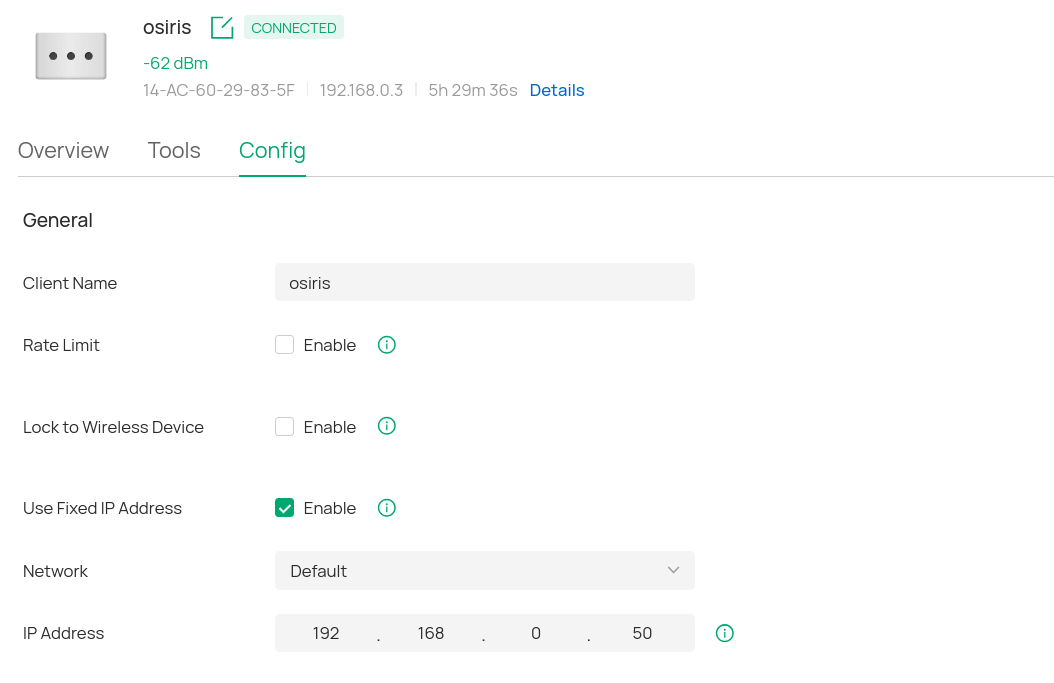
checked the MAC address:
$ ip link
2: wlp1s0: <BROADCAST,MULTICAST,UP,LOWER_UP> mtu 1500 qdisc noqueue state UP mode DORMANT group default qlen 1000
link/ether 14:ac:60:29:83:5f brd ff:ff:ff:ff:ff:ff
altname wlx14ac6029835f
and renewed the lease:
$ dhclient -d -v wlp1s0
Internet Systems Consortium DHCP Client 4.4.3-P1
Copyright 2004-2022 Internet Systems Consortium.
All rights reserved.
For info, please visit [...]
Listening on LPF/wlp1s0/14:ac:60:29:83:5f
Sending on LPF/wlp1s0/14:ac:60:29:83:5f
Sending on Socket/fallback
DHCPDISCOVER on wlp1s0 to 255.255.255.255 port 67 interval 5
DHCPOFFER of 192.168.0.25 from 192.168.0.2
DHCPREQUEST for 192.168.0.25 on wlp1s0 to 255.255.255.255 port 67
DHCPACK of 192.168.0.25 from 192.168.0.2
bound to 192.168.0.25 -- renewal in 66297 seconds.
The switch is .2, therefore it's acting as DHCP server correctly. But the fixed IP address seems to be ignored.
Can you check? Thanks a lot!
- Copy Link
- Report Inappropriate Content
@Horus107 DHCP reservations are not supported when using a switch as the DHCP server in Controller mode. However, in Standalone mode, the Manual Binding feature emulates the functionality.
- Copy Link
- Report Inappropriate Content
Information
Helpful: 0
Views: 1966
Replies: 12
Voters 0
No one has voted for it yet.