
CAPTIVE PORTAL

Good morning, I have a problem accessing the captive portal with Android.
Scenario:
1- Omada OC300 controller installed at our headquarters with a private IP address, the public IP address of which is a full NAT with ACLs for known networks (customer site).
2- The switches and access points connect correctly to the controller as per the manual and are taken over by it.
3- I configured a hotspot access point and associated voucher on one of the two SSIDs.
4- The SSL certificate was correctly configured for https access.
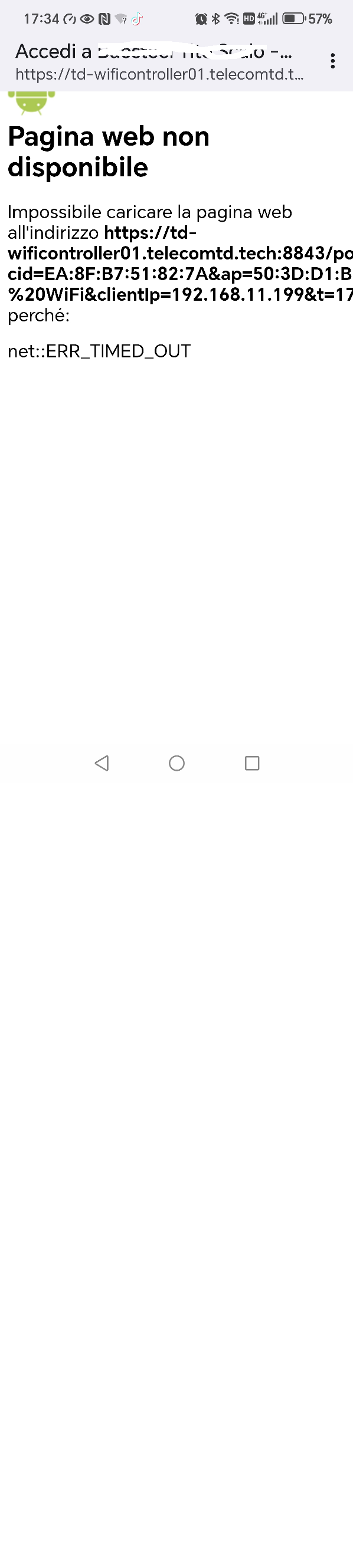
When I connect to the captive portal network with an Android device (version 16 or r15), the page remains blank, returning the controller's URL link. If I connect to another network via Wi-Fi and copy the link into any browser, the captive portal page is reached correctly.
Tests performed on a PC and an iOS device revealed no issues. Therefore, I confirm the problem is on Android devices. How can I resolve this issue without affecting the Android device?
- Copy Link
- Subscribe
- Bookmark
- Report Inappropriate Content
Hi Vincent, the problem was caused by the TPLINK Archer 1210V router I use to access the internet. Replacing it with a Zyxel solved the problem.
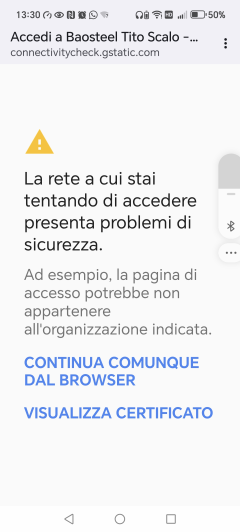
I'd like to know if I can resolve the certificate error by accessing the portal. I've already created a valid certificate for controller access at https://td-wificontroller01.telecomtd.tech. I'm attaching the certificate error.
Thank you.
Best regards
- Copy Link
- Report Inappropriate Content


Hi @MaximilianC
Thanks for posting here. To better understand the situation, please share with us the following info:
1. A screenshot of your controller's Device page, which will help us identify the specific hardware and firmware versions of the SDN devices you are using.
2. A screenshot of the mentioned blank page.
3. When did the issue first occur? Since installation, or was it working before and suddenly stopped?
4. Does this affect all Android phones?
- Copy Link
- Report Inappropriate Content
H
sorry for the delay, but I reassembled the scenario today.
I attach the system data of the OC300.
The problem occurred during installation and I don't know how to fix it. I tried 3 Android smartphones and 1 Android tablet, and they all behave the same way.
Below you can see the smartphone screen when it tries to connect to the portal

- Copy Link
- Report Inappropriate Content
Hi @MaximilianC
Thanks for the reply.
Please share with us the Devices page, as below:

We would like to know the device models and the firmware you are using. Thanks.
- Copy Link
- Report Inappropriate Content

- Copy Link
- Report Inappropriate Content
Thank you so much for taking the time to post the issue on the TP-Link community!
To better assist you, I've created a support ticket via your registered email address and escalated it to our support engineer to look into the issue. The ticket ID is TKID260141639. Please check your email box and ensure the support email is well received. Thanks!
Once the issue is addressed or resolved, please update this topic thread with your solution to help others who may encounter the same problem as you did.
Many thanks for your excellent cooperation and patience!
- Copy Link
- Report Inappropriate Content
Hi Vincent, the problem was caused by the TPLINK Archer 1210V router I use to access the internet. Replacing it with a Zyxel solved the problem.
I'd like to know if I can resolve the certificate error by accessing the portal. I've already created a valid certificate for controller access at https://td-wificontroller01.telecomtd.tech. I'm attaching the certificate error.
Thank you.
Best regards
- Copy Link
- Report Inappropriate Content
Hi @MaximilianC
Thanks for sharing the solution.
You may refer to the following link:
How to Configure HTTPS Certificate to Avoid “Untrusted Certificate” Error
- Copy Link
- Report Inappropriate Content
Information
Helpful: 0
Views: 714
Replies: 7
Voters 0
No one has voted for it yet.