
Early Access ER7212PC V1 (Built-in Omada SDN Controller 6.0) Pre-release (Closed)


This Article Applies to
ER7212PC_V1_1.4.1 pre-release (Built-in Omada SDN Controller 6.0)
Overview
We hope to offer you a chance to experience the new features added in the Controller 6.0 in advance, and also give us TP-Link the opportunity to fully test the firmware in your real network environment and scenarios before the official release. All feedback is welcome, including letting us know about successful upgrades.
Release Notes
Version Info
The version of the Controller is fully applied to the Omada APP of version 5.0.x.
Supported Device Models
- Added support for Access Points: EAP 787 v0.
- Added support for Gateway: ER701-5G-Outdoor v1.0, DR3650v(EU)1.20、ER706W-4G(EU)20、ER706WP-4G(EU) 1.20、ER706WP-4G(US)1.26、ER8411(UN)1.20、DR3220v-4G(EU)1.20、DR3650v-4G(EU)1.20、ER7206(UN)30、ER7406(UN)1.20、ER706W(EU/US)1.30、ER706W-4G(US)1.30、ER605(UN)30、ER707-M2(UN)1.30、ER7412-M2(UN)1.30
New features
-
Added support for displaying VLAN information, offline devices, and isolated devices in the topology view in Site View > Dashboard > Topology.
- Added offline-client support, a unified export button, and advanced search (online/offline) in the Client list; removed Past Connection and Known Client pages from Insights.
- Optimized Client Details layout with new Overview, Connection Logs, Tools, and Config tabs in Site > Clients > Client Details.
- Added support for a client online-timeline in the Client Details view in Site View > Client > Overview.
- Added support for a Connection Logs timeline in Site View > Client > Connection Logs.
- Added support for wireless client device-type, vendor, model, OS, and version identification in Global > Settings > Controller Settings > Services, with results shown in the Client List and Details pages (AP 6.0 firmware, Cloud Access required).
- Added support for LAN Isolation configuration, a new VLAN setting designed for networks where an Omada Gateway serves as the DHCP Server Device, enabling segment isolation and editing based on this configuration in Site > Network Config > LAN > Isolation Settings and in Site > Network Config > LAN > VLAN > Add/Edit for Gateway devices running firmware version 5.15.
- Added support for a topology link diagram in Device > Device Details > Overview.
- Added support for an online/offline timeline in Device > Device Details > Overview.
- Optimized Device Details layout with new log and tools modules in Device > Device Details.
- Optimized EAP/Bridge AP Details layout with updated config and statistics modules in Device > AP Details, and fixed mesh traffic chart accuracy in Device > AP Details > Statistics.
- Optimized Switch Details layout with expanded statistics and streamlined config access in Device > Switch Details.
- Optimized Gateway Details layout with new network view and config modules, plus added Transmission settings, in Device > Gateway Details.
- Added support for OUI-Based VLAN on Switch 6.0 firmware in Site > Network Config > Transmission > OUI Based VLAN.
- Added support for custom DHCP Option on Switch 6.0 firmware in Device > Switch Details > Config > VLAN Interface > DHCP Server and Site > Network Config > LAN > VLAN > Add/Edit.
- Added support for advanced Multicast configuration on Switch 6.0 firmware, integrating VLAN, switch, and port associations and enabling IGMP/MLD Snooping options, in Global > Network Config > Network Settings > LAN > Multicast and Device > Ports > Config > Multicast Fast Leave / Device Config > Switch > Switch Ports > Port Profile > Multicast Fast Leave.
- Added support for STP Security on Switch 6.0 firmware in Site > Switch Details > Port Config and Device Config > Switch Ports > Port Settings / Port Profile.
- Added support for /31 subnet masks on VLAN interfaces on Switch 6.0 firmware in Site > Switch Details > VLAN Interface and Site > Network Config > LAN > VLAN > Add/Edit.
- Added support for Storm-Control with ratio configuration on Switch 6.0 firmware in Site > Switch Details > Port Config > Bandwidth Control and Device Config > Switch Ports > Port Profile > Bandwidth Control.
- Optimized LACP behavior so member ports remain blocked until aggregation succeeds, shown in Device > Details > Ports List.
- Added support for interference detection in Device > AP Details > Statistics > Interference Detection and Site > Network Tools > Interference Detection.
- Added support for configuring Enhanced Open MLO SSID in Site > Network Config > Network Settings > WLAN, allowing MLO to be enabled when the encryption is set to None, effective for WiFi 7 devices.
- Added support for stream-mode packet capture, also known as remote real-time packet capture, in AP Details > Tools > Packet Capture and in Site > Network Tools > Packet Capture. This feature allows users to remotely monitor AP device packet capture interfaces via Wireshark, displaying captured packets in real time to meet the needs of scenarios requiring live traffic analysis.
- Added support for adopting the Gateway 5G ODU model ER701-5G-Outdoor v1.0; configurations for IP-Passthrough mode reside in Device > Details, while standard routing mode settings are in Site View and Device > Device Details.
- Added support for EoGRE Tunnel in Device Config > EAP > EoGRE Tunnel to enable SSID extension across physical locations.
- Added support for custom logo uploads in voucher printing in Configuration > Hotspot > Voucher Groups > Create/Edit Voucher Pattern and Voucher Group > Edit Voucher.
- Added support for the “Apply to all portals” option and daily usage limit for local users in Configuration > Hotspot > Local User.
- Added support for overriding default LAN DHCP settings during adoption in Network Config > Network Settings > LAN > Default.
- Added support for user-invitation emails in 23 languages, auto-aligned with the user’s locale.
- Added a new port 29817 for device management. Please ensure that this port is open in your firewall settings.
Enhancements
- Reorganized the Settings menu into Network Config and Device Config and added site-level configuration in the Device Details page.
- Optimized UI with refreshed theme colors, tables, forms, icons, and charts
- Optimized VLAN configuration process in Network Config > Network Settings > LAN. a) Streamlined setup into three steps: Network Parameter, Select Device Port, and Confirm/Apply. b) Adjusted the modification process to align with the new setup steps. c) Enhanced the network display interface with UI improvements.
- Optimized Switch Port configuration by replacing Profile-based Native/Tag/Untag settings with per-port private configuration and introduced cross-device bulk management of Tag, Network, and Profile settings in Device Config > Switch Ports > Port Settings.
- Optimized Dashboard chart library with new Overview, Topology, Client, and Traffic tabs, including AP Density & Activity charts in Site View > Dashboard.
- Optimized Statistics menu, moving metrics to Dashboard, Reports, and details pages. The position changes of the original content are as follows:
Original Location
New Location
Performance
Device Details
Switch Statistics
Switch Details > Port
- Optimized Insights menu by: a) Adjusting the menu structure to separate operational data from statistical chart data. b) Merging statistical charts for a unified display. c) Placing configuration records on their respective settings pages. The position changes of the original content are as follows
Original Location
New Location
Session Limit
Gateway Details > Network View > Session Limit
Known Clients
Clients
Past Connections
Clients
Past Portal Authorizations
Hotspot > Authorized Clients
Switch Status
Configuration > Device Config > Switch > Switch Ports
Port Forwarding Status
Gateway Details > Network View > Port Forwarding Status
VPN Status
Configuration > Network Config > VPN > VPN Status
Routing Table
Gateway/Switch Details > Network View > Routing Table
Dynamic DNS
Gateway Details > Config > Advanced > DNS
Rogue APs
Network Tools > Interference Detection
Threat Management
Gateway Details > Config > Network Security > IDS/IPS
QoS Data
Gateway Details > Network View > QoS Data
- Optimized Reports framework with customizable tabs, card visibility/sort order in Site View > Insights > Reports.
- Optimized Logs by adding 30-day historical data filters in Logs > Alerts and Logs > Events, and relocating Audit Logs in Logs > Audit Logs, device-type filters in Logs > Settings > Alerts/Events > Content Settings, and Remote Logging in Logs > Settings > Advanced.
- Optimized Rogue AP into Network-wide Interference Detection for batch scans and per-device results in Site > Network Tools > Interference Detection.
- Optimized wireless routing by displaying accurate maximum associated clients in Device > Wireless Router Details > Config > Wireless > Advanced and adding PPSK scaling in Network Config > Profile > PPSK.
- Optimized table persistence to save user-defined pagination across sessions in Devices, Logs, Clients, and Device Config > Switch Ports > Port Settings.
- Added inline explanations for each permission item via tool tips in Role Permission Configuration.
- Added display of the public IP for pending devices in Device List > Controller Connection IP.
- Added Device Reconnected log type and offline-duration tracking in Site > Logs > Events > Device.
- Added support for Switch syslog forwarding in Logs > Settings > Advanced when Client Details Logs is enabled.
- Optimized default RSTP and loopback-detection settings in Device > Switch Details > Config > Services > Loopback Control.
- Added edge-port risk warnings on STP configuration in Device > Switch Details > Port Config, in Device Config > Switch Ports > Port Settings, and in Device Config > Switch Ports > Port Profile.
- Optimized Switch onboarding by enabling adoption via custom management VLAN and auto-syncing related VLAN Interface, Port, and Static Route configurations in Device > Switch Details.
- Added routing table and OSPF neighbor display in Device > Switch Details > Network View.
- Optimized VLAN Interface capacity beyond 16 entries, device-dependent, in Device > Switch Details > VLAN Interface.
- Added support for gateway capability warnings in Network Config > VPN, in Network Config > Security > URL Filtering > Gateway Rules, in Network Config > Security > Firewall > Attack Defense, in Device > Gateway > MAC Filtering, in Device > Gateway > Dynamic DNS, and in Device > Gateway > IPTV.
- Optimized Portal IP auto-refresh behavior with manual input box in Global > Settings > System Settings > Access Config and in Site > Network Config > Authentication > Portal.
- Added support for batch-adopt result pop-ups in Global > Device List > Add Device > Auto Find and in Site > Device List > Batch Action > Batch Adopt.
- Optimized VLAN range expansion to 1-4094 for Switch/third-party devices and restricted to 1-4090 when Gateway or its LAN port is selected in Network Config > Network Settings > LAN.
- Added support for site search in Global > Settings > Export Data.
Bug fixed
- Fixed load-balance ratio anomalies by auto-recommending optimal weights on WAN port changes in Network Config > Network Settings > Internet.
- Fixed wired/wireless traffic statistics inaccuracy and added Internet WAN-traffic charts in Reports > Summary > Traffic > All Network, in Dashboard > Traffic > Traffic (All Network), Reports > Summary > Traffic > Internet, and in Dashboard > Activity.( Traffic display may differ before and after controller upgrade)
- Fixed SSID Summary Report missing traffic data for some APs in Report > Wireless > Top 20 SSIDs (Traffic).
- Fixed Dashboard traffic chart inconsistency between “yesterday” and “last 24 h” selections in Report.
- Fixed search functionality for specific module tabs.
- Fixed SSL VPN certificate export failure when site name contains special characters in Settings > VPN > VPN Settings > VPN > SSL VPN.
- Fixed duplicate descriptions on the ALG introduction page in Transmission > NAT > ALG.
- Fixed iOS Omada App overwriting Local User name and phone fields in Hotspot > Local User.
- Fixed Open API documentation mismatch for Get site switch 802.1x setting by removing the “switches” parameter in Online Open API Document > Authentication > Get site switch 802.1x setting.
- Fixed CVE-2025-25193 by upgrading Netty version to mitigate DoS attack risk.
Notes
- The Omada SDN Controller can only manage certain devices running the supported firmware. Please confirm that your device is compatible with the SDN Controller.
- To strengthen overall security, we recommend upgrading all devices to the latest firmware.
- Added a new port 29817 for device management. Please ensure that this port is open in your firewall settings.
Firmware Download
Before the Upgrade
(1) Please be sure you have read the Beta Test Agreement before upgrading the Pre-release firmware!
(2) For the sake of insurance, it's always recommended to save a copy of the controller Backup Config file before upgrading or downgrading.
(3) You may follow the following guide to upgrade your Omada Controller. How to Upgrade or Downgrade Omada SDN Controller.
Firmware Download Link
-
Direct Download
ER7212PC_v1_1.4.1 (pre-release version) > Built-in Omada SDN Controller 6.0
ER7212PC_v1_1.4.0 (pre-release version) > Built-in Omada SDN Controller 6.0
Additional Information
If somehow you encounter an issue during or after the controller upgrade, it's suggested to contact us with the following info:
- Omada Controller version (previous and current)
- Device Model(s), Hardware and Firmware versions
- (if possible) A copy of the Log file and Backup Config file
If you decide to downgrade the controller before reporting the issue to TP-Link, it's suggested to save a copy of the current Log file and Backup Config file before you do that, which could help to investigate and address the issue quickly.
>> How to get the Log file and Backup Config file for Omada SDN Controller:
-
If your Windows software controller failed to get launched, please locate the controller installation path for the Log file.
-
If it's not a launch issue, you can export the Log file and Backup Config file in the local network.
-
For Omada Controller v5.8 or later version,
In the Global View, go to Settings > Maintenance > Backup & Restore > Retained Data Backup, select Settings Only, then click Export for the Backup Config file. On the same page, scroll down for Export for Support, click Export Running Logs for desensitized Log file.
-
For Omada Controller v5.6 or v5.7,
Go to Settings > Maintenance > Backup & Restore > Retained Data Backup, select Settings Only, then click Export for the Backup Config file. On the same page, scroll down for Export for Support, click Export Running Logs for desensitized Log file.
-
For Omada Controller v5.5 or previous version,
Go to Settings > Maintenance > Backup & Restore > Retained Data Backup, select Settings Only, then click Export for the Backup Config file . Go to Settings > Services > Export Data > Running Log to export the Log file.
-
Update Log
Apr 30th, 2026
Remove the download link. To download the latest version, please go to the official website.
Feb 12nd, 2026
Update the following firmware:
ER7212PC_v1_1.4.1 (pre-release version) > Built-in Omada SDN Controller 6.0
Update note: fixed some known issues.
Jan 22nd, 2026
Provide the following controller firmware for early access.
ER7212PC_v1_1.4.0 (pre-release version) > Built-in Omada SDN Controller 6.0
Recommended Threads
TP-Link Early Access Program Is Now Available!
Get the Latest Omada SDN Controller Releases Here - Subscribe for Updates
Experience the Latest Omada EAP Firmware - Trial Available Here, Subscribe for Updates!
Get the Latest Firmware Releases for Omada Routers Here - Subscribe for Updates
- Copy Link
- Subscribe
- Bookmark
- Report Inappropriate Content
I'm now having more significant issues, as the SG2008P switch on fw version 3.20.17 Build 20260121 Rel.53429 is not controllable by the ER7212PC's controller and, after a reset, cannot be set up properly at all (doesn't recognise VLANs outside of the default Mgt VLAN, etc) - clients on the switch are given IP addresses from the Mgt VLAN pool rather than their DHCP-reserved ones in the correct VLAN, etc.
The release note for the firmware version of the SG2008P switch (version 3.20.17 Build 20260121 Rel.53429) advises that controller version 6.1 be used, but the controller version in ER7212PC firmware version 1.4.1 Build 20260205 Rel.41033 is only 6.0.0.39 - could this be an issue?
- Copy Link
- Report Inappropriate Content

@Vincent-TP Is there a timeline for the release of Controller 6.1 for ER7212PC v1?
- Copy Link
- Report Inappropriate Content
Hi @Type17
Thanks for the feedback.
As you posted two weeks ago, the switches worked well after a reset and re-adopt.
To confirm, when did the new issue first occur? Before it occurs, did you change any settings?
Type17 wrote
I'm now having more significant issues, as the SG2008P switch on fw version 3.20.17 Build 20260121 Rel.53429 is not controllable by the ER7212PC's controller and, after a reset, cannot be set up properly at all (doesn't recognise VLANs outside of the default Mgt VLAN, etc) - clients on the switch are given IP addresses from the Mgt VLAN pool rather than their DHCP-reserved ones in the correct VLAN, etc.
The release note for the firmware version of the SG2008P switch (version 3.20.17 Build 20260121 Rel.53429) advises that controller version 6.1 be used, but the controller version in ER7212PC firmware version 1.4.1 Build 20260205 Rel.41033 is only 6.0.0.39 - could this be an issue?
- Copy Link
- Report Inappropriate Content
Regarding information such as firmware release plans, feature addition schedules, and product lifecycles for various models, unfortunately, the community team does not have access to specific plans in advance. Compared to the official website, we can only learn about whether a firmware version is scheduled for community pre-release about 1-2 weeks earlier. Beyond that, we have no further information. For more detailed updates, we recommend keeping an eye on the official website. I appreciate your understanding.
dragon16z wrote
@Vincent-TP Is there a timeline for the release of Controller 6.1 for ER7212PC v1?
- Copy Link
- Report Inappropriate Content
@Vincent-TP Apologies for the delayed reply, but in the end I ordered and installed an SG2210P to replace the SG2008P, as I also needed more PoE ports for some extra CCTV cameras. (plus, having SFPs on both the router and switch now mean an extra available Ethernet port on both devices)
I had similar issues with the new switch issuing Mgt VLAN IP addresses to any clients plugged into it, or not allowing any DHCP issuing or routing if the ports were changed to one of the non-Mgt VLANs.
A forced provisioning of the Router (ER7212PC, so built-in controller) finally fixed this after a lot of playing about and experimentation - the migration to Controller V6 has not been smooth for me, although the new GUI is a great improvement.
I'm not yet sure about the SG2008P's firmware level, and whether it works with controller version 6.0.0.39, as I have taken it offline for now, and I'm not in the mood to alter anything after the last few days' hassles.
- Copy Link
- Report Inappropriate Content
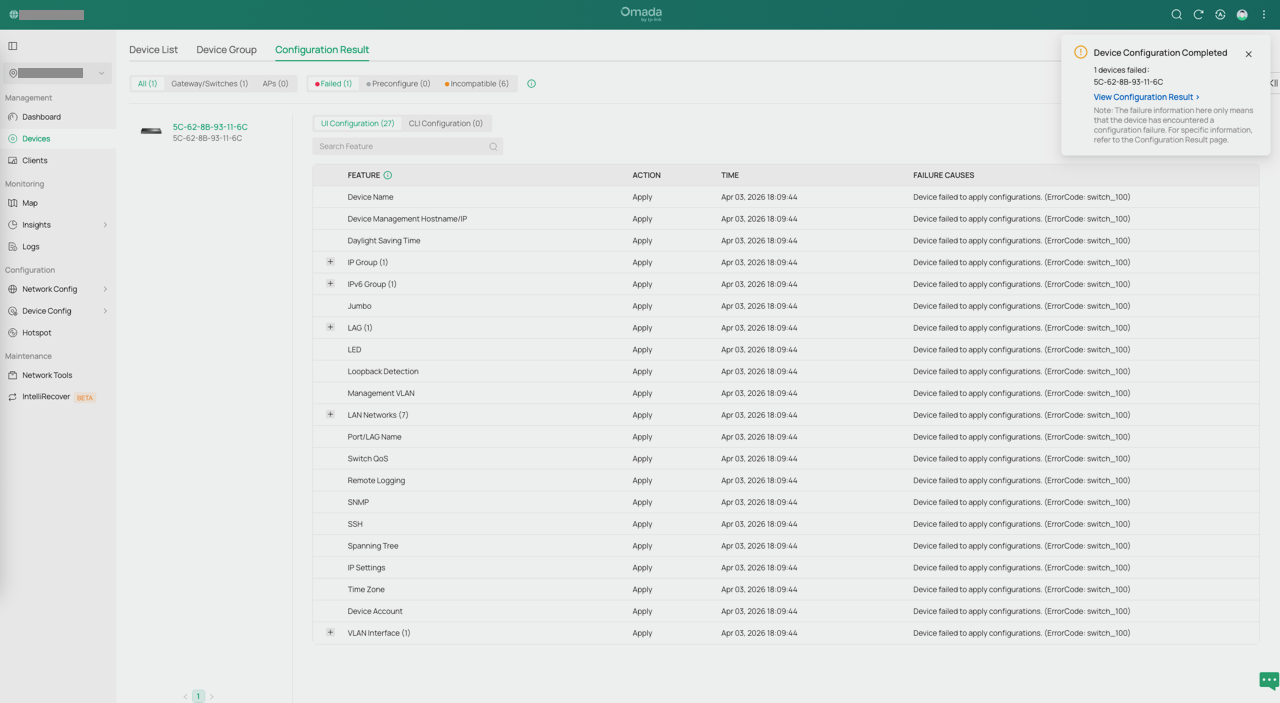
@Type17 Despite my post above, I was curious, so I plugged in and adopted the SG2008P, and it failed on all 24 configuration aspects, all with the same error "Device failed to apply configurations. (ErrorCode: switch_100)".
In answer to your question in post #35 about what was changed, I first upgraded the Router/Controller to Controller v6.0.0.39 and the switch wasn't behaving well (can't remember the exact issues at this stage). It now looks like if I had forced a re-provision of the Router at that stage, things might have been ok, but it didn't seem logical that forcing a provision on the router would improve the switch's behaviour.
To address the switch's issues, I upgraded it to the latest f/w version, but forgot to check whether the exact version of controller v6 was compatible - it looks like the ER7212P's v6.0.0.39 is not compatible with fw version SG2008P(UN)_V3.20_3.20.17 Build 20260121 (it does recommend controller v6.1), as the "Device failed to apply configurations. (ErrorCode: switch_100)" errors are still happening when trying to adopt the SG2008P, despite fixing the issues with the new SG2210P switch by force-provisioning the router/controller.
I can't roll back the firmware on the SG2008P (controller can't control it properly), so if I want to use this switch with my current Omada setup, I'll have to wait until the ER7212P's controller version is upgraded to v6.1+
PS: The new switch is a h/w version 5.20, loaded with f/w version 5.20.6 Build 20250117 Rel.60471, which only needs controller version 5.14, so it works fine.
- Copy Link
- Report Inappropriate Content
Hi @Type17
Thanks for the update.
Your assumption is correct—such error messages may appear when using newer switch firmware updates on controller 6.0.0.39. However, you should still be able to successfully adopt the device. May I ask if you have successfully adopted the SG2008P in the end?
as the "Device failed to apply configurations. (ErrorCode: switch_100)" errors are still happening when trying to adopt the SG2008P,
>>>Do you have the screenshots of the errors?
Before you trying to adopt the switch this time, did you factory reset the switch SG2008P?
How does it plugged to the ER7212PC?
Type17 wrote
@Type17 Despite my post above, I was curious, so I plugged in and adopted the SG2008P, and it failed on all 24 configuration aspects, all with the same error "Device failed to apply configurations. (ErrorCode: switch_100)".
In answer to your question in post #35 about what was changed, I first upgraded the Router/Controller to Controller v6.0.0.39 and the switch wasn't behaving well (can't remember the exact issues at this stage). It now looks like if I had forced a re-provision of the Router at that stage, things might have been ok, but it didn't seem logical that forcing a provision on the router would improve the switch's behaviour.
To address the switch's issues, I upgraded it to the latest f/w version, but forgot to check whether the exact version of controller v6 was compatible - it looks like the ER7212P's v6.0.0.39 is not compatible with fw version SG2008P(UN)_V3.20_3.20.17 Build 20260121 (it does recommend controller v6.1), as the "Device failed to apply configurations. (ErrorCode: switch_100)" errors are still happening when trying to adopt the SG2008P, despite fixing the issues with the new SG2210P switch by force-provisioning the router/controller.
I can't roll back the firmware on the SG2008P (controller can't control it properly), so if I want to use this switch with my current Omada setup, I'll have to wait until the ER7212P's controller version is upgraded to v6.1+
PS: The new switch is a h/w version 5.20, loaded with f/w version 5.20.6 Build 20250117 Rel.60471, which only needs controller version 5.14, so it works fine.
- Copy Link
- Report Inappropriate Content
@Vincent-TP Yes, the SG2008P was adopted successfully, despite the configuration result errors but I forgot it/removed it from the network, as the new SG2210P is more suitable for client requirements (40 clients, including 7 PoE ones, 4 EAPs). It will return to service if the network expands further.
I did factory reset it, and had also successfully set it running it in standalone mode, although that wasn't going to be suitable as there would have been a lot of additional configuration required.
It was connected to the ER7212PC with a known-good Ethernet cable, and the devices recognized each other and assigned the ports as an uplink.
Before the update to Controller v6, the ER7212PC and SG2008P had worked together flawlessly for a few years.
Here's a screenshot of the failed configuration result, although it was adopted:
- Copy Link
- Report Inappropriate Content
Hi @Type17
Thank you for your reply. After verification, this is indeed a minor issue with the Omada V6.0 version. The controller has issued entry-based configurations to the device, and although the results all showed as failures, some were actually successful. This issue has been resolved in version 6.1. However, it is currently unclear when the ER7212PC V1 will be updated to version 6.1. For now, we recommend that you ignore this.
Type17 wrote
@Vincent-TP Yes, the SG2008P was adopted successfully, despite the configuration result errors but I forgot it/removed it from the network, as the new SG2210P is more suitable for client requirements (40 clients, including 7 PoE ones, 4 EAPs). It will return to service if the network expands further.
I did factory reset it, and had also successfully set it running it in standalone mode, although that wasn't going to be suitable as there would have been a lot of additional configuration required.
It was connected to the ER7212PC with a known-good Ethernet cable, and the devices recognized each other and assigned the ports as an uplink.
Before the update to Controller v6, the ER7212PC and SG2008P had worked together flawlessly for a few years.
Here's a screenshot of the failed configuration result, although it was adopted:
- Copy Link
- Report Inappropriate Content
Information
Helpful: 5
Views: 10958
Replies: 39
Voters 1
