
Early Access EAP7xx Fully Adapted to Omada 6.2 Pre-release Firmware (Closed)


This Article Applies To:
EAP723 V1, Fully Adapted to Omada SDN Controller v6.2 or above;
EAP770 V2, Fully Adapted to Omada SDN Controller v6.2 or above;
EAP772-outdoor V1, Fully Adapted to Omada SDN Controller v6.2 or above;
EAP772 V2, Fully Adapted to Omada SDN Controller v6.2 or above;
EAP787 V1, Fully Adapted to Omada SDN Controller v6.2 or above;
EAP720 V1, Fully Adapted to Omada SDN Controller v6.2 or above;
EAP723 V2, Fully Adapted to Omada SDN Controller v6.2 or above;
EAP725-Wall V1, Fully Adapted to Omada SDN Controller v6.2 or above;
EAP775-Wall V1, Fully Adapted to Omada SDN Controller v6.2 or above;
Note
To update to this pre-release version, please make sure your device version is not lower than the version listed below:
EAP723 V1: 1.3.2 Build 20250901 Rel. 52255
EAP770 V2: 1.3.2 Build 20250901 Rel. 52255
EAP772-outdoor V1: 1.3.2 Build 20250901 Rel. 52255
EAP772 V2: 1.3.2 Build 20250901 Rel. 52255
EAP787 V1: 1.1.2 Build 20251013 Rel. 32717
EAP720 V1: 1.1.2 Build 20250901 Rel. 74897
EAP723 V2: 1.1.2 Build 20250901 Rel. 74897
EAP725-Wall V1: 1.1.2 Build 20250901 Rel. 74897
Release Notes:
New Features
- Added the Omada Config tool for batch configuration of Omada devices.
- Added portal authentication/deauthentication buttons to the client list in the web interface.
- Added CLI commands to support iPerf3 speed tests.
-
Added brute-force attack prevention for AP adoption via the controller.
-
Added the Load Balancing feature.
- Added the 6 GHz PPSK feature.
-
Added the time window setting for Adaptive WLAN Optimization.
-
Added the Wi-Fi Calling feature.
-
Added the NAT Traversal feature.
Enhancement
- Optimized device cloud upgrade timeout scenarios, supporting breakpoint resume functionality.
- Optimized AP LAN port status display on the controller.
- Optimized system stability.
- Optimized the client list display on the web interface, adding the guest client list.
- Optimized the LAN port status display for APs.
- Adjusted the Band Steering function to only apply to the SSID level.
- Added support for displaying the time of the latest GPS location acquisition on the controller.
Bugs Fixed
- Fixed the issue where the ACL allow list for inter-terminal communication was not effective when guest networks were enabled.
- Fixed topology display anomalies in some scenarios.
- Fixed anomalies in data statistics for certain wired scenarios.
- Fixed the issue where guest clients could not access the portal logout page.
- Fixed the issue where wired terminals still appeared online after being offline for 5 minutes.
- Fixed the issue where PPSK configuration changes did not take effect promptly on controllers earlier than V5.14.
- Fixed some known issues.
Beta Firmware Download
Attention
Please be sure you have read the Beta Test Agreement before upgrading the Beta firmware!
EAP723_v1_1.5.0_20260414 (pre-release version)
EAP770 _v2_1.5.0_20260414 (pre-release version)
EAP772-outdoor _v1_1.5.0_20260414 (pre-release version)
EAP772 _v2_1.5.0_20260414 (pre-release version)
EAP787 _v1_1.5.0_20260414(pre-release version)
EAP720 _v1_1.3.0_20260414 (pre-release version)
EAP723 _v2_1.3.0_20260414 (pre-release version)
EAP725-Wall_v1_1.3.0_20260414 (pre-release version)
EAP775-Wall_v1_1.5.0_20260414 (pre-release version)
EAP723_v1_1.5.0_20260316-rel11609(pre-release version)
EAP770 _v2_1.5.0_20260316-rel11609(pre-release version)
EAP772-outdoor _v1_1.5.0_20260316-rel11609(pre-release version)
EAP772 _v2_1.5.0_20260316-rel11609(pre-release version)
EAP787 _v1_1.5.0_20260316-rel11609(pre-release version)
EAP720 _v1_1.3.0_20260316-rel6471(pre-release version)
EAP723 _v2_1.3.0_20260316-rel6471(pre-release version)
EAP725-Wall_v1_1.3.0_20260316-rel6471(pre-release version)
EAP775-Wall_v1_1.5.0_20260316-rel11609(pre-release version)
EAP723_v1_1.5.0_20260121-rel65599(pre-release version)
EAP770 _v2_1.5.0_20260121-rel65599(pre-release version)
EAP772-outdoor _v1_1.5.0_20260121-rel65599(pre-release version)
EAP772 _v2_1.5.0_20260121-rel65599(pre-release version)
EAP787 _v1_1.5.0_20260121-rel65599(pre-release version)
EAP720 _v1_1.3.0_20260121-rel65599(pre-release version)
EAP723 _v2_1.3.0_20260121-rel65599(pre-release version)
EAP725-outdoor_v1_1.3.0_20260121-rel65599(pre-release version)
EAP725-Wall_v1_1.3.0_20260121-rel65599(pre-release version)
Notes:
(1) Your device’s configuration won’t be lost after upgrading.
(2) The above firmware is fully adapted to Omada SDN Controller v6.2 and above.
(3) This pre-release firmware can be applied to all versions (EU/US/AU/CA/etc).
Update Log
13th May, 2026
Removed the download links. For the latest firmware, please go to TP-Link Official website.
15th Apr, 2026
Update the pre-release link to the following:
EAP723_v1_1.5.0_20260414 (pre-release version)
EAP770 _v2_1.5.0_20260414 (pre-release version)
EAP772-outdoor _v1_1.5.0_20260414 (pre-release version)
EAP772 _v2_1.5.0_20260414 (pre-release version)
EAP787 _v1_1.5.0_20260414(pre-release version)
EAP720 _v1_1.3.0_20260414 (pre-release version)
EAP723 _v2_1.3.0_20260414 (pre-release version)
EAP725-Wall_v1_1.3.0_20260414 (pre-release version)
EAP775-Wall_v1_1.5.0_20260414 (pre-release version)
Update Content:
Added some new features and enhancements. For details, please check the blue part of the release notes.
16th Mar, 2026
Update the pre-release link to the following:
EAP723_v1_1.5.0_20260316-rel11609(pre-release version)
EAP770 _v2_1.5.0_20260316-rel11609(pre-release version)
EAP772-outdoor _v1_1.5.0_20260316-rel11609(pre-release version)
EAP772 _v2_1.5.0_20260316-rel11609(pre-release version)
EAP787 _v1_1.5.0_20260316-rel11609(pre-release version)
EAP720 _v1_1.3.0_20260316-rel6471(pre-release version)
EAP723 _v2_1.3.0_20260316-rel6471(pre-release version)
EAP725-Wall_v1_1.3.0_20260316-rel6471(pre-release version)
EAP775-Wall_v1_1.5.0_20260316-rel11609(pre-release version)
Update Note:
Fixed some known bugs.
30th Jan, 2026
Remove the download link of EAP725-outdoor.
23rd Jan, 2026
Provide the pre-release link:
EAP723_v1_1.5.0_20260121-rel65599(pre-release version)
EAP770 _v2_1.5.0_20260121-rel65599(pre-release version)
EAP772-outdoor _v1_1.5.0_20260121-rel65599(pre-release version)
EAP772 _v2_1.5.0_20260121-rel65599(pre-release version)
EAP787 _v1_1.5.0_20260121-rel65599(pre-release version)
EAP720 _v1_1.3.0_20260121-rel65599(pre-release version)
EAP723 _v2_1.3.0_20260121-rel65599(pre-release version)
EAP725-outdoor_v1_1.3.0_20260121-rel65599(pre-release version)
EAP725-Wall_v1_1.3.0_20260121-rel65599(pre-release version)
Feedback
Any further feedback on the new firmware, please feel free to comment below or start a new thread from HERE.
To get better assistance, you may check Tips For Efficiently Reporting an Issue In The Community.
When reporting an issue, especially it's about a firmware upgrade, it's suggested to include the following info:
- Management mode (Controller or Standalone)
- Device Model(s) and Hardware
- Device Firmware (previous and current)
Thank you in advance for your great cooperation and support.
Recommended Threads
Experience the Latest Omada EAP Firmware - Trial Available Here, Subscribe for Updates!
Current Available Solutions to Omada EAP Related Issues [Constantly Updated]
Get the Latest Omada SDN Controller Releases Here - Subscribe for Updates
- Copy Link
- Subscribe
- Bookmark
- Report Inappropriate Content

- Copy Link
- Report Inappropriate Content

- Copy Link
- Report Inappropriate Content
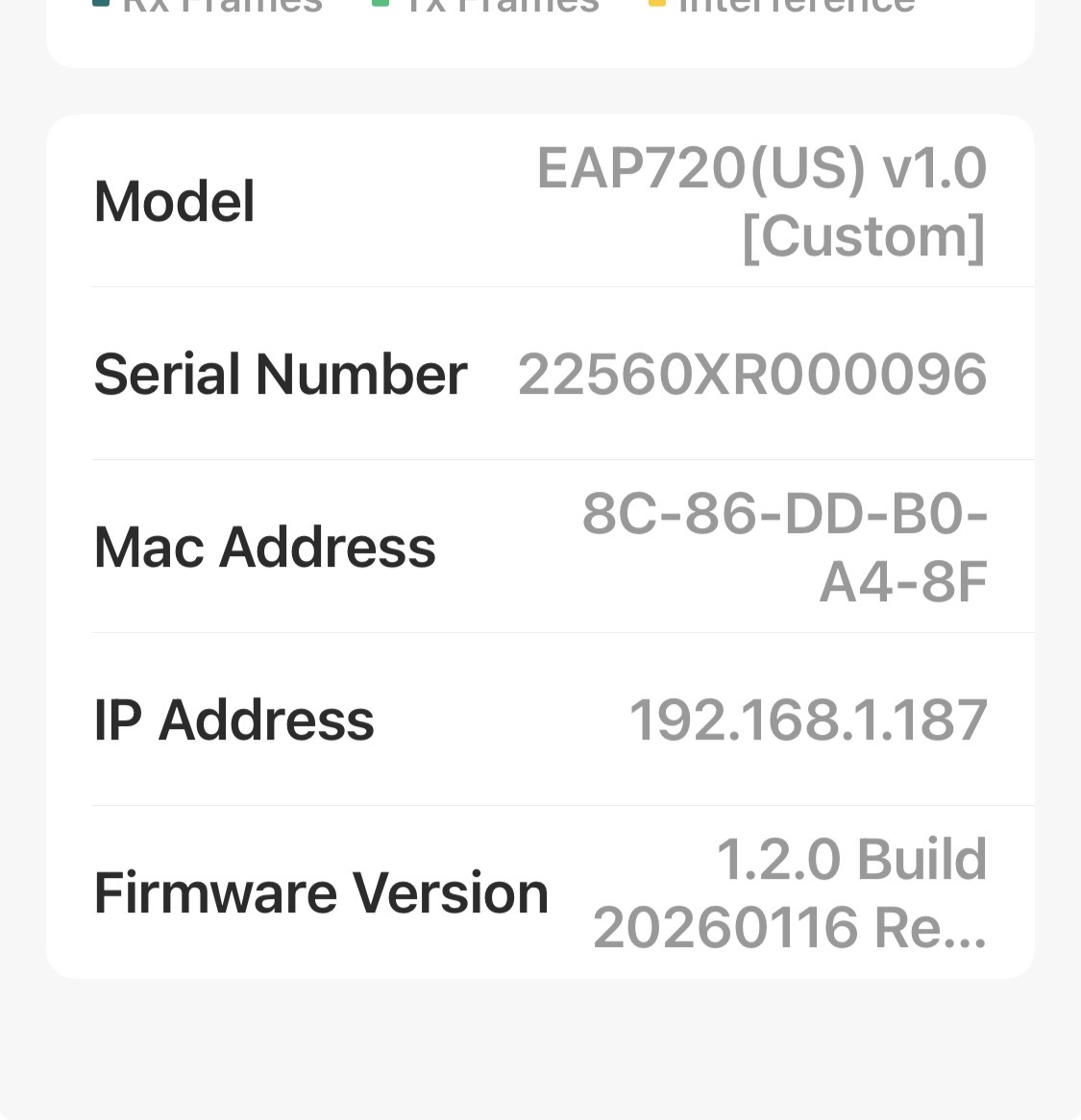
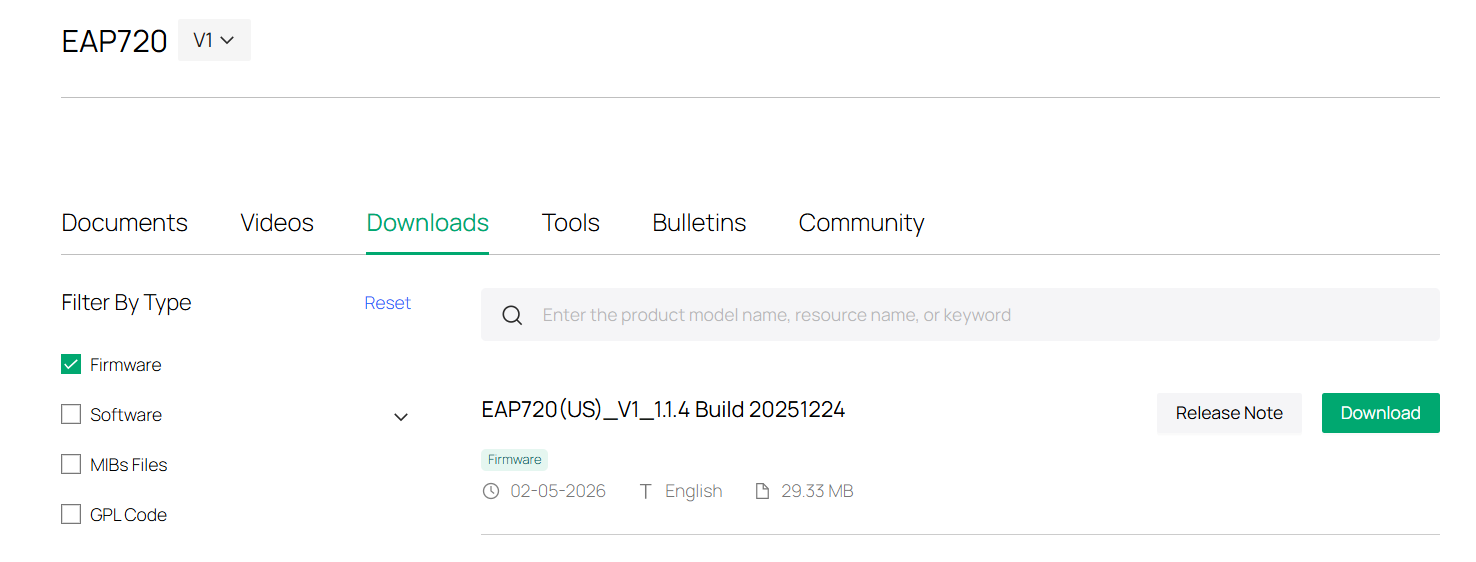
ok it looks like there is something buggy with the version you have. try and downgrade to 1.1.4 and then you can upgrade to 1.3.0 beta.
https://support.omadanetworks.com/us/product/eap720/v1/?resourceType=download
- Copy Link
- Report Inappropriate Content
@MR.S hi
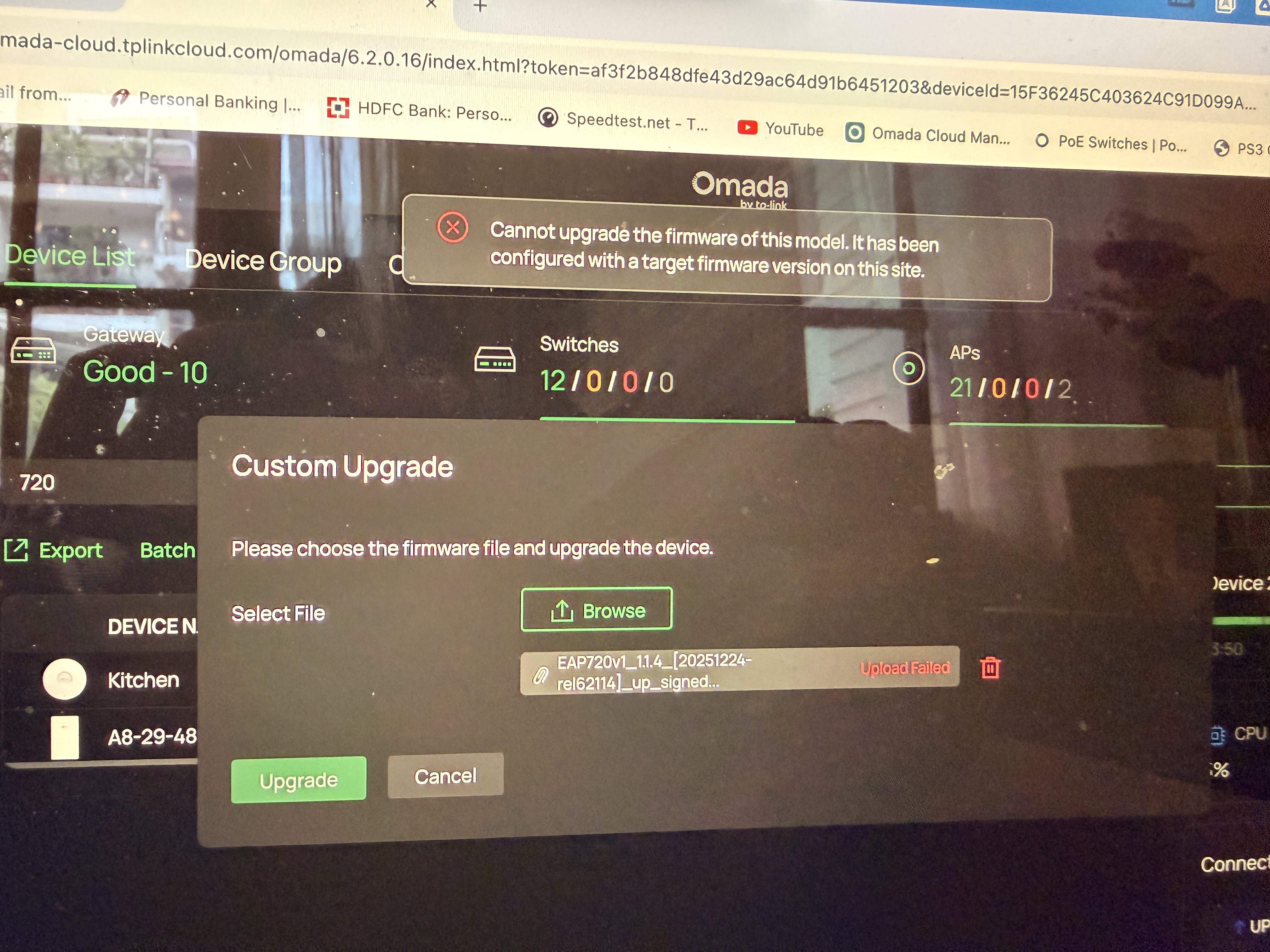
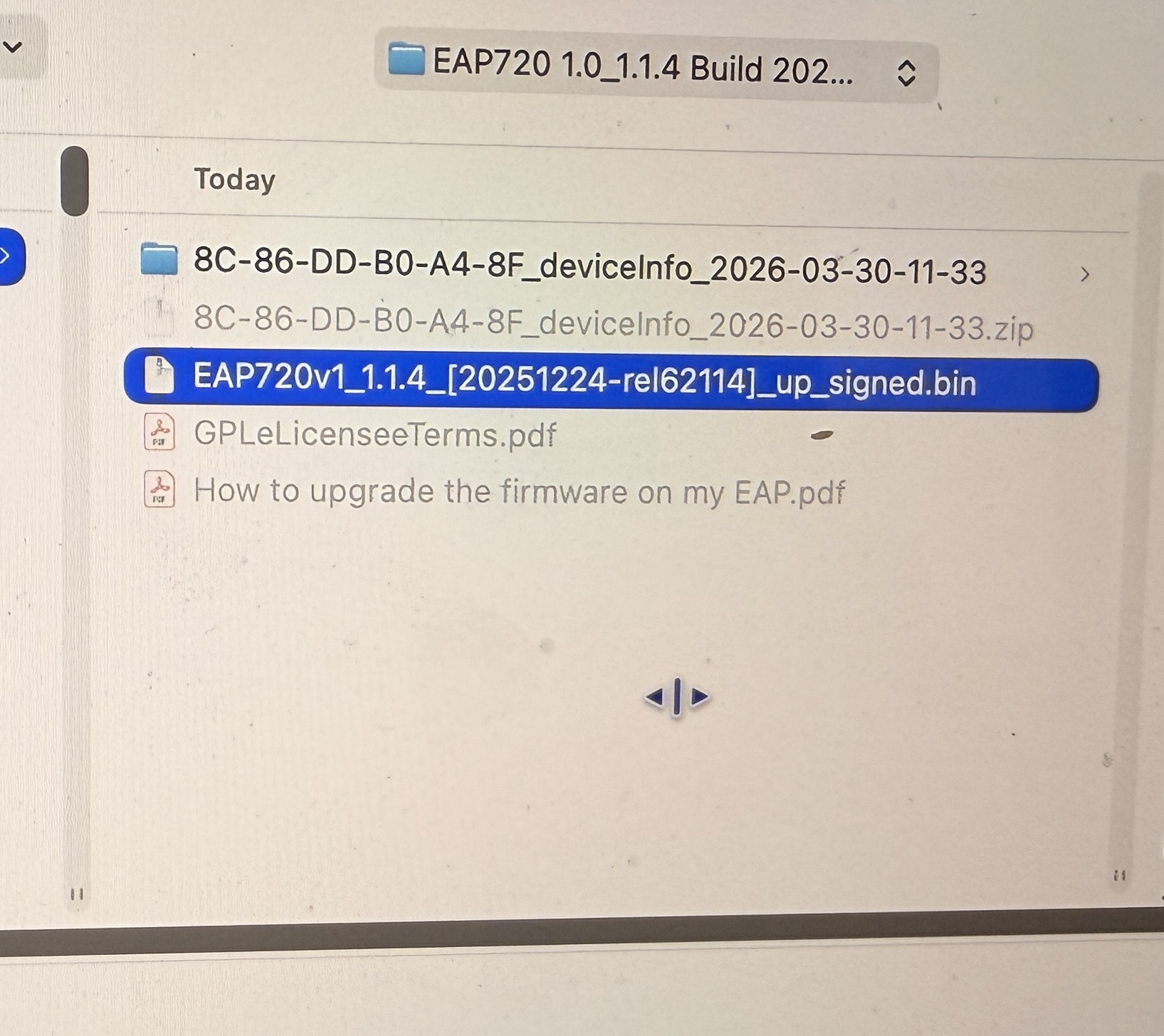
I had thought of that too and tried downgrading to 1.1.4 but getting the same error, what's the best way to downgrade my EAP to 1.1.4 from 1.2.0 ? I using the manual upgrade through the controller. Is that the correct way? Ask because I have never downgrade a FW before. Thanks
- Copy Link
- Report Inappropriate Content
yes you can downgrade from controller. there is usually no problem. have you extracted the zip file before trying to install new firmware?
- Copy Link
- Report Inappropriate Content
- Copy Link
- Report Inappropriate Content
OK, then I don't have any more tips, then the omada team will have to look into the problem
- Copy Link
- Report Inappropriate Content
Thank you for all your help but the problem was from my end, last time when I update my 720 I must has done set the upgrade rule and locked the AP to site, that's why issue was occurring, I have deleted that rule, but now it giving another other saying device offline, anyway I'll try connecting to the controller locally and try again. Thanks one again.
- Copy Link
- Report Inappropriate Content
- Copy Link
- Report Inappropriate Content

- Copy Link
- Report Inappropriate Content
Information
Helpful: 1
Views: 9508
Replies: 48
Voters 0
No one has voted for it yet.