
DNS Lookup Bug in Device Network Check

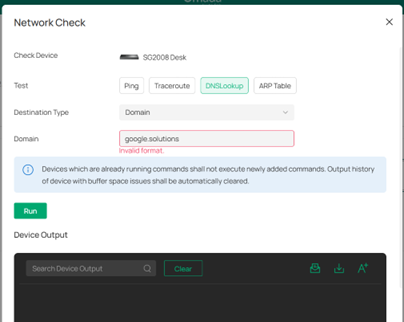
In testing the Tools for switches and access points, one of the options available is Network Check. In the Network Check window one of the options is DNS Lookup. Entering a domain name with a common TLD (such as dot com, dot net, etc.) works OK. When entering a domain name with newer TLDs (such as xxx.services or xxx.solutions), an invalid format message is displayed as shown below:
- Copy Link
- Subscribe
- Bookmark
- Report Inappropriate Content


Hi @jra11500
Thanks for posting here.
xxx.services or xxx.solutions are not common domains.
What kind of domain names are they? What IP address will they resolve to? A public one or private one?
- Copy Link
- Report Inappropriate Content
xxx.services and xxx.solutions may not be very common or well known but they are top level domains. I personally have jra.services and jra.solutions as registered domain names and their websites are accessible on the internet. All browsers work fine when using these TLDs as well as DNS tools such as nslookup.
- Copy Link
- Report Inappropriate Content
Thank you for your reply.
I have noted and reported it to the relevant team. Future versions will use broader validation rules. Please pay attention to future firmware updates.
Side Note: I had moved this post to the Requests & Suggestions block to gather more voters. Please don't forget to cast your vote.
- Copy Link
- Report Inappropriate Content
- Copy Link
- Report Inappropriate Content
Information
Helpful: 1
Views: 403
Replies: 4
Voters 1