
ER707-M2 cannot be adopted in Omada Controller – firmware deadlock / TFTP recovery not triggering

Hi all,
I’m running into a blocking issue with a TP-Link Omada ER707-M2 and I’m hoping for confirmation or guidance from TP-Link staff or other users.
Context:
- ISP: Delta (Netherlands)
- ISP modem/router: Nokia XS-2426G-B
- Bridge mode is not available on the ISP device
- Intended setup: ISP modem → ER707-M2 (DMZ) → Omada network
Problem:
The ER707-M2 contains old firmware (v1.0.2).
I am running Omada Controller 5.14.x, which no longer supports legacy gateway agents.
As a result:
- The ER707 appears as “Pending” in Omada
- Adoption always fails
- Standalone web UI is accessible but upgrading to a compatible firmware is not possible
This creates a firmware deadlock:
- Omada cannot adopt the gateway because the agent is too old
- The gateway cannot be upgraded to a newer firmware via Omada
What I already tried:
- Multiple factory resets
- Standalone configuration
- Fully isolated setup (direct PC ↔ ER707, no ISP modem)
- Attempted firmware upgrade via web UI
- Attempted TFTP recovery using ER707-M2 firmware v1.2.3:
- Static IP on PC (192.168.0.66)
- Correct firmware filename (er707.bin)
- Direct LAN connection
- Firewall and VPN adapters disabled
- Reset button held during power-on (15–30 seconds)
(- Adoption attempts with the ER707 connected to the LAN via an Omada switch, not directly in front of or behind the ISP router)
TFTP issue:
- The ER707 never sends a TFTP read request.
- No request is observed on the TFTP server, even in a fully isolated environment.
(First time I tried this though, but I surely followed all steps with full focus and attention).
Additional note:
- The default LAN IP of the ER707 overlaps with my ISP router’s LAN IP which complicates initial access but this does not seem to be the root cause.
The issue persists even when completely isolated.
Questions:
1. Is this a known issue with early ER707-M2 firmware batches?
2. Is there any alternative recovery method besides TFTP?
3. Should this unit be considered non-recoverable and eligible for RMA?
The device has been lying around for around 25 months but it has never been put into production and is effectively new.
In parallel: I have also contacted the reseller to ask whether this can be resolved via warranty or goodwill but I wanted to check here as well whether this is a known issue and whether there is any official recovery path for this situation.
The rest of my Omada setup (APs, switches and controller) has been running fine so far (really great, actually).
Hopefully I can get this ER707 up and running soon, as I’m planning to further extend my network with additional switches, cameras and NVRs, including dedicated IoT and camera/ surveillance VLANs in the near future.
Thanks in advance for any insights.
Kind regards
- Copy Link
- Subscribe
- Bookmark
- Report Inappropriate Content

I have two such routers, the same hardware version, I have not encountered any such problems.
Try running it in stand alone without internet, since there is overlap on lan and wan it is a good idea. Change the lan ip to something other than the default. Plug in the internet, try updating.
Do you have the controller locally or is it remote? I don't know what you mean by agent? Is that the controller you are referring to? If you have version 5.14 it should work with the latest router firmware.
It is not certain that you can jump straight to the latest firmware, try to go step by step and read the release note on each upgrade package.
- Copy Link
- Report Inappropriate Content


Hi @Nvb2
Thanks for posting here.
To update the firmware of the ER707-M2, here is the suggestion:
1. Please use this setup:
Fully isolated setup (direct PC ↔ ER707, no ISP modem)
2. Update the firmware version by version, that is:
1.0.2 > 1.1.0 > 1.2.0 > 1.3.0 > 1.3.0;
3. Try with different web browsers, incognito mode of the browsers.
If it still fails, please let us know the error message and the status at the end.
BTW, what type of controller are you using? hardware controller or software controller? v5.14.x is old. Why do you keep the old version? You may also update the controller to the latest 6.1.x.
- Copy Link
- Report Inappropriate Content
I have two such routers, the same hardware version, I have not encountered any such problems.
Try running it in stand alone without internet, since there is overlap on lan and wan it is a good idea. Change the lan ip to something other than the default. Plug in the internet, try updating.
Do you have the controller locally or is it remote? I don't know what you mean by agent? Is that the controller you are referring to? If you have version 5.14 it should work with the latest router firmware.
It is not certain that you can jump straight to the latest firmware, try to go step by step and read the release note on each upgrade package.
- Copy Link
- Report Inappropriate Content
Hi @Nvb2
Thanks for posting here.
To update the firmware of the ER707-M2, here is the suggestion:
1. Please use this setup:
Fully isolated setup (direct PC ↔ ER707, no ISP modem)
2. Update the firmware version by version, that is:
1.0.2 > 1.1.0 > 1.2.0 > 1.3.0 > 1.3.0;
3. Try with different web browsers, incognito mode of the browsers.
If it still fails, please let us know the error message and the status at the end.
BTW, what type of controller are you using? hardware controller or software controller? v5.14.x is old. Why do you keep the old version? You may also update the controller to the latest 6.1.x.
- Copy Link
- Report Inappropriate Content
Vincent-TP wrote
Hi @Nvb2
Thanks for posting here.
To update the firmware of the ER707-M2, here is the suggestion:
1. Please use this setup:
Fully isolated setup (direct PC ↔ ER707, no ISP modem)
2. Update the firmware version by version, that is:
1.0.2 > 1.1.0 > 1.2.0 > 1.3.0 > 1.3.0;
3. Try with different web browsers, incognito mode of the browsers.
If it still fails, please let us know the error message and the status at the end.
BTW, what type of controller are you using? hardware controller or software controller? v5.14.x is old. Why do you keep the old version? You may also update the controller to the latest 6.1.x.
Thanks for the suggestion — this actually helped a lot!
Running the ER707-M2 fully standalone, without WAN connected and changing the LAN IP first to avoid subnet overlap was the key.
After that performing the firmware upgrade step by step resolved the deadlock completely.
For reference, this is the upgrade path that worked for me (ER707-M2 v1.6 hardware):
-
Started from v1.0.2 (factory firmware)
-
Upgraded to v1.1.0 (20230609)
-
Then v.1.2.0
-
Then v1.2.1 (20240109)
-
Finally v1.2.3 (20240822)
(I skipped v1.2.2 on purpose because I read those were not needed/ could be skipped).
After completing these upgrades in standalone mode the router rebooted cleanly and WAN connectivity worked as intended.
Didn't have time yet to do the adaption by Omada controller yet but will try this soon after work.
Want to check first my 2FA set-up (for some reason I got 2 authenticator accounts running instead of 1),
..some issue caused by me going into wrong environment and creating a new site after I lost connection to my old one which was still existing.
And to get back to your question: "what type of controller are you using?" --> OC200
Appreciate the help! Thanks again!
- Copy Link
- Report Inappropriate Content
MR.S wrote
I have two such routers, the same hardware version, I have not encountered any such problems.
Try running it in stand alone without internet, since there is overlap on lan and wan it is a good idea. Change the lan ip to something other than the default. Plug in the internet, try updating.
Do you have the controller locally or is it remote? I don't know what you mean by agent? Is that the controller you are referring to? If you have version 5.14 it should work with the latest router firmware.
It is not certain that you can jump straight to the latest firmware, try to go step by step and read the release note on each upgrade package.
I posted reaction in depth to Vincent. But wanted to get back to you also:
Your suggestion solution worked so thanks a lot!
- Running it stand alone and doing firmware upgrade in steps fixed the problem.
Right now im running it by OC200 (which can be accesed both local and remotely).
- Copy Link
- Report Inappropriate Content
Hi @Nvb2
Great to hear that the firmware udpate issue has been resolved! If you encounter any further problems or have additional questions when adopting the device, feel free to reach out. We're here to help! 😊
- Copy Link
- Report Inappropriate Content
Vincent-TP wrote
Hi @Nvb2
Great to hear that the firmware udpate issue has been resolved! If you encounter any further problems or have additional questions when adopting the device, feel free to reach out. We're here to help! 😊
Thanks for this offer, as of yesterday I got stuck again.. Let me explain my performed steps:
-
ER707 firmware recovery and upgrade
-
Upgraded the ER707 step-by-step to the latest firmware.
-
Firmware upgrade issues were resolved.
-
ER707 operated normally in standalone mode after the upgrade.
-
--- this is where we left of:
-
Initial adoption attempt
-
Successfully adopted the ER707 gateway into Omada.
-
But existing Omada switch(es) and APs consistently failed adoption (stuck on Adopting or Adopt Failed).
-
Gateway showed as Connected while other devices failed.
-
-
Controller logs / configuration results
-
Omada Configuration Result page showed failed configuration entries.
-
Blue information banner displayed:
“The OLT does not support Configuration Result query currently. You can go to the OLT configuration page to check its configurations.”
-
Logs indicated repeated adoption/inform failures.
-
Im not sure if warning above was main reason of adaption failure.. i think those were linked to communication/ IP range issue tbh.
-
So my idea was to: Forget the ER707 to ensure removal of any previous controller bindings, cached inform URLs, or subnet-related state, allowing a clean reconfiguration from a known baseline (see next steps)..
-
-
-
Forget device action
-
Performed “Forget Device” on the ER707.
-
ER707 was removed from the controller and factory-reset automatically.
-
-
Standalone reconfiguration of ER707
-
Reconfigured ER707 in standalone mode.
-
LAN IP set to
192.168.1.1with subnet mask255.255.255.0. -
DHCP enabled and verified (client received
192.168.1.xaddress). -
WAN intentionally kept disconnected during further adoption attempts.
-
-
Re-adoption attempt using OC200
-
Attempted to re-adopt ER707, switch, and APs using an OC200 hardware controller.
-
OC200 was factory-reset multiple times (10–15 seconds).
-
OC200 was powered via ETH1 using PoE from the switch (no external power adapter available).
-
-
OC200 direct connection tests
-
To isolate the issue, ETH2 of the OC200 was directly connected to a PC for testing,
while ETH1 remained connected to the switch for PoE power. -
Multiple reset and reconnect attempts were performed in this configuration.
-
-
OC200 connectivity issue
-
OC200 never appeared in the ER707 DHCP client list.
-
OC200 web interface was not reachable on any expected IP address.
-
Power and Ethernet LEDs on OC200 indicated normal operation (power on, link/ activity present).
-
-
Current state
-
ER707 functions correctly in standalone mode.
-
LAN and DHCP functionality are confirmed working.
-
Adoption cannot proceed because the OC200 does not obtain or expose an IP address after reset.
-
Network was reverted to the ISP modem for operational stability (because I need proper network to work from home, so ER707 is temp disconnected now).
-
Took me pretty long time to get through all these steps yesterday evening, went right to bed after.
Later today I want to check if I can fix the problem: not being able to find the OC200..
But any tips or additional explanations are welcome.
Thanks once again!
- Copy Link
- Report Inappropriate Content
Following up on my previous post:
After full reset and setting OC200 with fresh config and new site most went well except for the adoption of the ER707.
I ran into issues related to subnet changes. The main confusion was that the OC200 forces the gateway’s LAN subnet even if the ER707 was manually configured beforehand (wasn't aware of this process in the beginning). Because of that the ER707 kept switching subnets during adoption.
Once I realized the LAN subnet must be defined in the controller first and let the ER707 inherit it during adoption everything lined up. After that the OC200 became reachable again, devices adopted correctly and all became up and running correctly.
Network is stable now. At this point im still considering which hardware to invest in for expanding the network, especially a 2.5 GbE, outgoing-PoE, Smart/ Managed and fanless (=must) switch and haven’t yet decided on which cameras or NVR to go with — I’m particularly interested in understanding the differences in management and integration between Omada-compatible camera ecosystems versus alternative brands before committing.
1) One question tho about the fanless switch:
"Do you by any chance know how heat might affect the switch’s lifespan when installed in a closed cabinet (meter cabinet) with little to no airflow and whether adding a couple of fans for air circulation inside the cabinet would be sufficient? Like the Omada by TP-Link SG2210XMP-M2 (or any other alternative with same functionalities is welcome).
- Copy Link
- Report Inappropriate Content
Hi @Nvb2
Thanks for the update, and glad to hear that you have finally adopted the gateway.
Regarding the switch installation issue you mentioned, I do not recommend proceeding with it.
In a closed cabinet with minimal airflow, heat buildup will significantly shorten the switch’s lifespan and increase the risk of early failure, especially when using a PoE power supply.
PoE power supply itself generates a significant amount of heat. When a switch simultaneously powers multiple high-power devices (such as APs and cameras), its internal DC-DC conversion module generates substantial heat. Under poor heat dissipation conditions, the PoE circuit may trigger overheating protection, shut down the power supply, or be damaged.
This is not a matter of “whether” it will cause damage, but rather “how severe and how quickly” the impact will be.
I suggest considering alternatives, such as installing the switch in a well-ventilated location, selecting a switch with built-in fans, or implementing additional cooling measures.
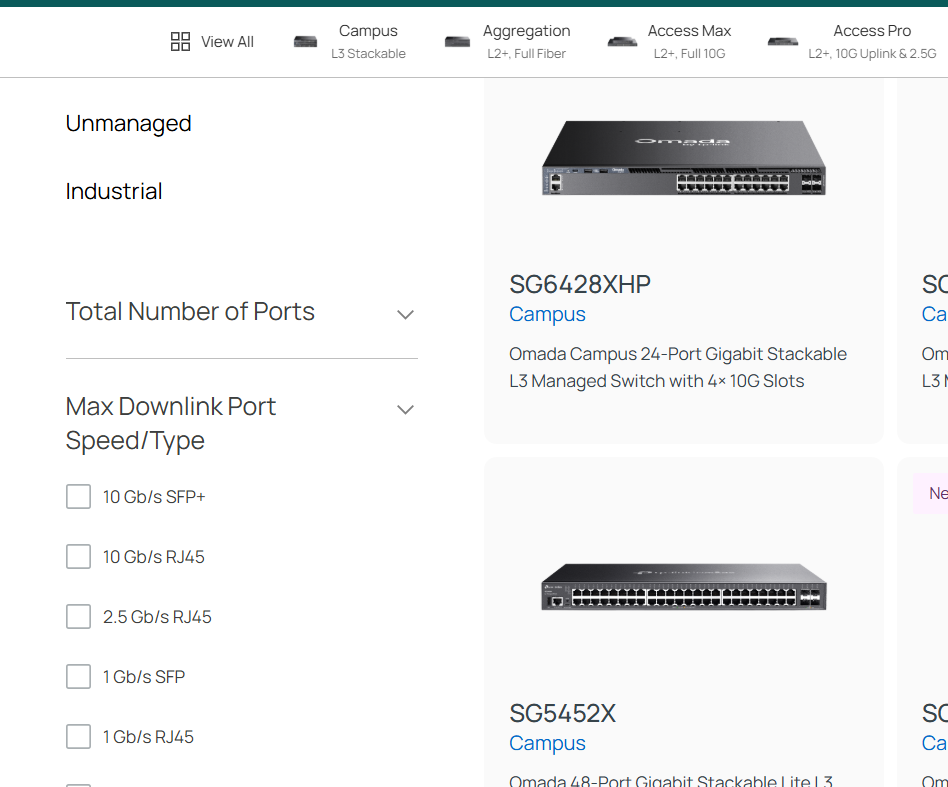
To select a switch, you can use the filter feature on the side:
https://www.omadanetworks.com/en/business-networking/all-omada-switch/
- Copy Link
- Report Inappropriate Content
Vincent-TP wrote
Hi @Nvb2
Thanks for the update, and glad to hear that you have finally adopted the gateway.
Regarding the switch installation issue you mentioned, I do not recommend proceeding with it.
In a closed cabinet with minimal airflow, heat buildup will significantly shorten the switch’s lifespan and increase the risk of early failure, especially when using a PoE power supply.
PoE power supply itself generates a significant amount of heat. When a switch simultaneously powers multiple high-power devices (such as APs and cameras), its internal DC-DC conversion module generates substantial heat. Under poor heat dissipation conditions, the PoE circuit may trigger overheating protection, shut down the power supply, or be damaged.
This is not a matter of “whether” it will cause damage, but rather “how severe and how quickly” the impact will be.
I suggest considering alternatives, such as installing the switch in a well-ventilated location, selecting a switch with built-in fans, or implementing additional cooling measures.
To select a switch, you can use the filter feature on the side:
https://www.omadanetworks.com/en/business-networking/all-omada-switch/
I appreciate the clarification regarding the thermal risks, especially in relation to PoE load and internal DC-DC conversion heat.
Based on your feedback, I will reconsider the installation approach. I am now looking into improving airflow inside the meter cabinet by installing ventilation grilles (both lower and upper sections) and creating active airflow using a few separate low-noise fans mounted inside the cabinet itself.
About two years ago I initially chose a switch with a built-in fan. However that model produced a constant noticeable humming noise which could clearly be heard through the wall in the living room and became quite disruptive. From what I understand this was a known issue with that model. There were some unofficial modifications suggested online (such as replacing or soldering in a quieter fan), but I preferred not to pursue hardware modifications.
That experience is the main reason I was particularly interested in a fanless solution this time.
My hope is that improving the cabinet’s ventilation and implementing controlled airflow will provide sufficient cooling while maintaining a quiet environment. If you have any specific airflow recommendations or minimum ventilation guidelines, I would greatly appreciate your advice.
I have two additional practical questions to ensure I fully understand the specifications of the switch & temperature:
-
Could you please confirm whether the maximum recommended ambient operating temperature for the SG2210XMP-M2 is indeed 40°C? I would like to verify that the official operating range is 0–40°C and understand whether exceeding this ambient temperature would immediately affect warranty or long-term reliability.
-
Is there currently any way to monitor the internal temperature of this switch via software (for example through the Omada Controller, web interface, etc?
- Copy Link
- Report Inappropriate Content
Hi @Nvb2
It is not recommended to operate the device outside the specified ambient temperature range, as doing so would void the warranty and adversely affect the device’s performance and functionality. Implementing ventilation measures should significantly help with heat dissipation, but many factors make it difficult to provide a definitive answer.
Based on your description, I would suggest considering a non-PoE switch without a fan, as it generates much less heat. Then use a DC power cable to supply power to devices requiring PoE.
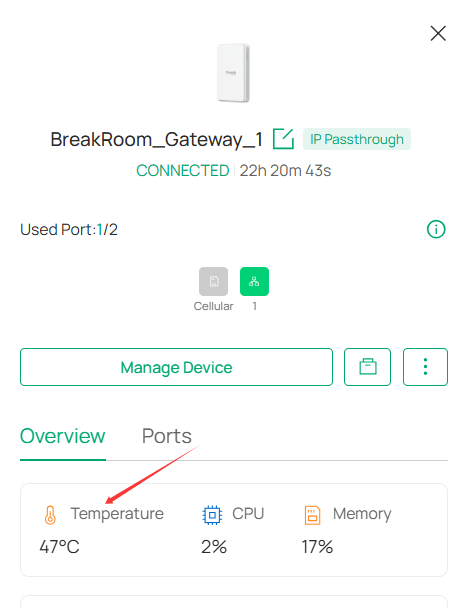
Is there currently any way to monitor the internal temperature of this switch via software (for example through the Omada Controller, web interface, etc?
>>>Yes, you can monitor devices' temperature on Omada V6 controller interface:
- Copy Link
- Report Inappropriate Content
Information
Helpful: 0
Views: 1309
Replies: 10
Voters 0
No one has voted for it yet.