
ER605 V2 2.3.0 to 2.3.3 firmware upgrade fails
ER605 V2 2.3.0 to 2.3.3 firmware upgrade fails

Hi,
Went to upgrade my ER605 V2 from 2.3.0 to 2.3.3 and it failed.
Checked a thread on this forum and it mentioned to go to 2.3.2 first. This appeared to fail, but router says 2.3.2 is current version.
Try a rollback and see this " This model in the selected site has already specified a firmware version. "
Then as it appears 2.3.2 is the current, attempted an upgrade to 2.3.3. Fails with " This model in the selected site has already specified a firmware version. "
No idea where to go from here. How do I get to 2.3.3 ??
- Copy Link
- Subscribe
- Bookmark
- Report Inappropriate Content


Hi @Zathras
Sorry for the late reply.
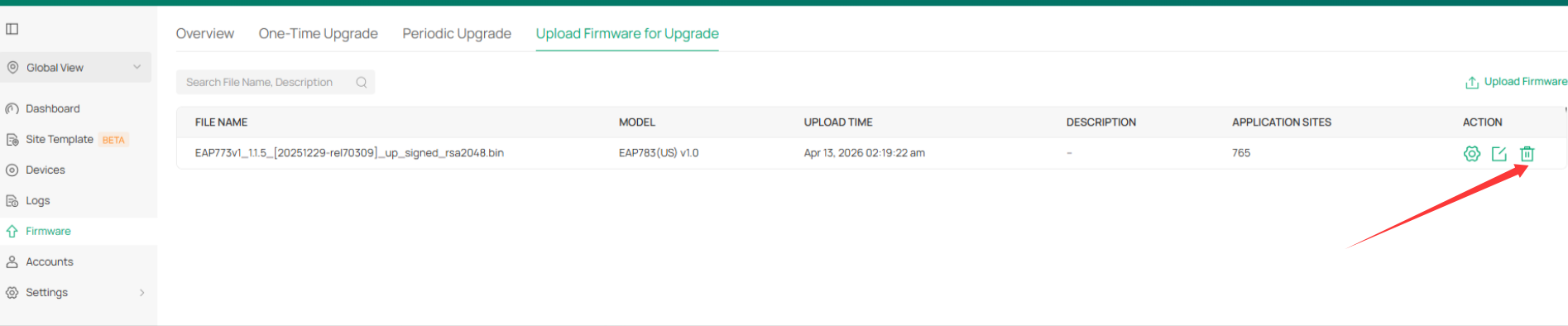
The error message indicates that there is an entry for the ER605 on this page. Please go to this page and have a check, if there is, you may delete that entry and try to update again. It should work.
- Copy Link
- Report Inappropriate Content

Hi @Zathras
Thanks for posting in our business forum.
May I know if you manage this ER605 via Omada Controller? What is the version of your Controller?
Can you check the current firmware version of ER605 at Devices page?
How did you update the ER605? In the same local network or remotely?
It would be much appreciated if you can provide us with any screenshot of the error when you tried to update the firmware to 2.3.3.
- Copy Link
- Report Inappropriate Content
Hi @Hank21
OC-200 Controller 2.0 - 6.1.0.19 - 2.23.10 Build 20260117 Rel.60507
ER605 2.0 - 2.3.2 Build 20251029 Rel.12727
Yes, the ER605 was updated locally via Omada Controller web UI. ER605, OC-200 & PC all on same network.

The red '1' just points to the Falied Device list.
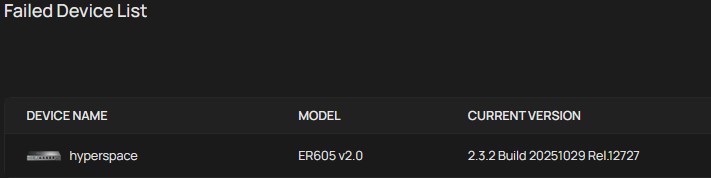
Logging into the controller, the new firmware notice pops up, indicating ER605 v2.3.3 is available.
Try to upgrade and this error pops up:

Release note says " Only the firmware version number and signature algorithm are different from version 2.3.2 Build 20251029 Rel.12727. "
I guess that's why it doesn't want to go to v2.3.3 ?
- Copy Link
- Report Inappropriate Content
Hi @Zathras
Thanks for the valuable feedback.
It seems that there is an upgrade schedule.
To check this, can you go to Global View>Firmware and check the upgrade schedules? Or if possible, you can try to manually update the 2.3.3 version by uploading the local file and see if this works.
- Copy Link
- Report Inappropriate Content
Manually update firmware, yes I tried that too. At the time it did not wan to play the game.
However, I tried it again today. Lo and behold it went through without a hitch.
I do believe all electronic devices have a mind of their own ......
- Copy Link
- Report Inappropriate Content
Hi @Zathras
As we discussed before, please go to Global View>Firmware and check if there is any settings. If so, please disable or delete the rules to check the firmware update again.
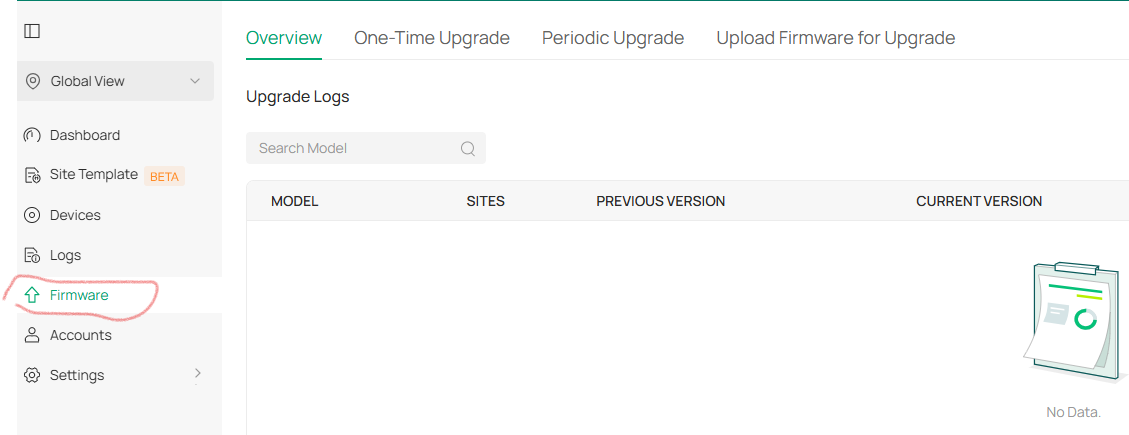
If the issue still persists, please try to contact the local support and provide with the forum ID.
- Copy Link
- Report Inappropriate Content
What is the purpose of your last message?
My previous message said " However, I tried it again today. Lo and behold it went through without a hitch. "
So obviously it worked fine.
Also, to note. There is nowhere on the firmware page to " disable or delete the rules ".
- Copy Link
- Report Inappropriate Content
Hi @Zathras
Sorry for the late reply.
The error message indicates that there is an entry for the ER605 on this page. Please go to this page and have a check, if there is, you may delete that entry and try to update again. It should work.
- Copy Link
- Report Inappropriate Content
- Copy Link
- Report Inappropriate Content

@Zathras Not sure why ER605 V2 firmware upgrade is getting stuck like that, looks like version mapping issue in the controller. Maybe try removing device from site and re-adopting before upgrading again. Also check if any auto firmware policy is locking 2.3.2 as “current”. Hope this gets sorted soon, same issue seen in some cases with G555 Online.
- Copy Link
- Report Inappropriate Content
As mentioned several times since February 2026, issue is fixed. The upgrade finally went through.
Topic needs to be closed.
- Copy Link
- Report Inappropriate Content
Information
Helpful: 0
Views: 2171
Replies: 12
Voters 0
No one has voted for it yet.