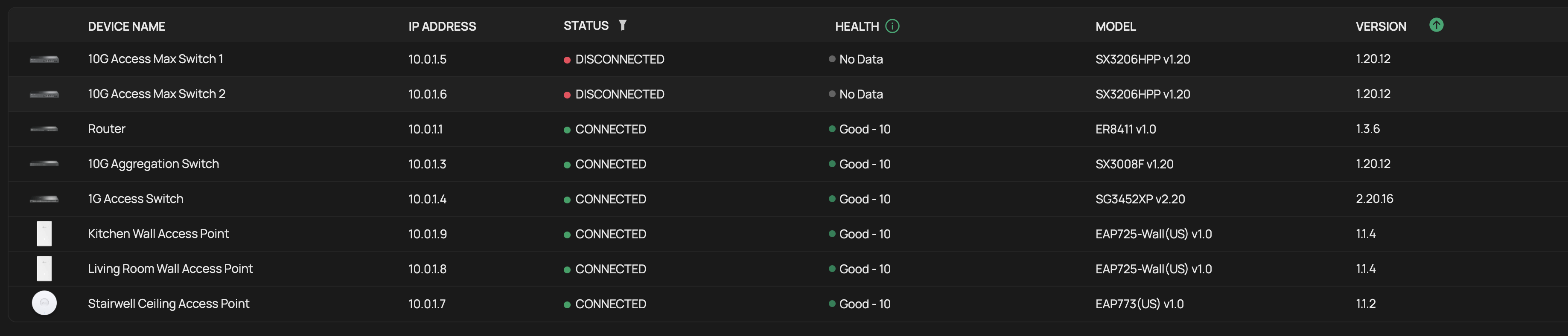
Devices showing as disconnected in OC400

Devices showing as disconnected in OC400

Devices showing as disconnected in OC400
2 weeks ago - last edited 2 weeks ago
Model: OC400  
Hardware Version: V1
Firmware Version: 1.10.10 Build 20260117 Rel.82617 (Stable)


Devices are randomly going to disconnected status. The switches never recover by themselves, I had one of the access points recover without intervention. Network is otherwise healthy, traffic is flowing. The only way to bring them back is to reboot the actual devices. Rebooting the gateway or the OC400 make no difference. I even had the gateway show disconnected the other day and had to remotely power cycle through my UPS to have it show up again (keep in mind it was working fine even though it showed as disconnected).



  0      
  0      
#1
Options
4 Reply
Re:Devices showing as disconnected in OC400
2 weeks ago

Hi  @dinosaurscuba 


Thanks for posting here.


The above is an explanation of the “disconnected” status.

Since the device’s network was not affected during the disconnect, the issue likely lies in communication between the device and the OC400 (purely internal).

You may troubleshoot from the OC400 end, for example, replace the OC400's network cable, relocate the OC400, etc.

  0  
  0  
#2
Options
Re:Devices showing as disconnected in OC400
2 weeks ago

  @Vincent-TP since this doesn't affect all devices at the same time I doubt it is a connection/network cable issue.... and if I can log into the OC400 to see the devices status, I don't see how it could be a network cable issue  

  0  
  0  
#3
Options
Re:Devices showing as disconnected in OC400
a week ago

Hi  @dinosaurscuba 


Thanks for the reply.

For this type of issue, the first step is to verify connectivity to the OC400. To pinpoint the exact cause, it’s essential to analyze it alongside your network topology and the actual environment. 

We recommend submitting a support ticket via email for efficient assistance.
Please include the following information in the email:
1. This Forum ID 856810;
2. your community nickname;
3. The topology of the network
4. The config file of the controller.

  0  
  0  
#4
Options
Re:Devices showing as disconnected in OC400
2 hours ago

  @dinosaurscuba 


Did you ever find out what was causing this?  I have an OC300 and experienced something similar.  Here is the thread.


1x ER7406 1x OC300 4x SG2008 1x EAP610 3x EAP650-Desktop 1x EAP772-Outdoor
  0  
  0  
#5
Options