
After updating EAP772 firmware to 1.1.4 wireless devices lose internet connection
After updating EAP772 firmware to 1.1.4 wireless devices lose internet connection

After updating firmware to 1.1.4 Build 20251030 Rel. 5764, my wireless devices lose internet connection when not in active use (same behavior is happening on 1.1.5 Build 20251230 Rel. 39992).
After my mobile device is not used for a certain period of time and I wake it up, it does not have an internet connection, via its wireless connection to EAP772, and switches to mobile data, then after a couple of seconds it detects internet on my wifi network and switches back. My internet connection is fine for my wired devices at the same time the issue happens for wifi devices, so that excludes any upstream issues.
Has any new setting been introduced with the new firmware that can cause this symptom?
I am unable to revert to firmware version 1.0.14 to verify that it fixes the issue, is there a way it can be done?
- Copy Link
- Subscribe
- Bookmark
- Report Inappropriate Content
I can report that my issue has been fixed by downgrading the firmware to 1.0.14 Build 20240801, I have received a custom downgrade firmware from the support team and then I installed the already mentioned version. The good news is that when I upgraded again to the latest firmware 1.1.5 Build 20251230 Rel. 39992 the issue is no longer reproducible.
- Copy Link
- Report Inappropriate Content


Hi @Sarex
Thanks for posting here.
Does this occur on all of your wireless clients? Please also list some of wifi clients you are using.
If you connect one of the affected Wi-Fi clients to another Wi-Fi network, will the same thing occur?
- Copy Link
- Report Inappropriate Content
@Vincent-TP I have not observed it on laptops, only on mobile devices like the Pixel 7 and iPhone 16 pro.
I have not observed the same happening when connecting the Pixel 7 to another wifi network, but I hadn't had the opportunity to test it for an extended period.
- Copy Link
- Report Inappropriate Content
Hi @Sarex
Thanks for the reply.
The EAP772 recent firmware update did not include changes in this regard.
After the device has been in a prolonged sleep state, the Wi-Fi chip may enter a deep power-saving mode (such as the WLAN sleep strategy), which can cause it to be unable to respond to network requests immediately upon waking up. The system may then mistakenly interpret this as “no internet” and automatically switch to mobile data. It is recommended that you continue to monitor the situation.
- Copy Link
- Report Inappropriate Content
@Vincent-TP I narrowed it down to the "Unscheduled Automatic Power Save Delivery" setting.
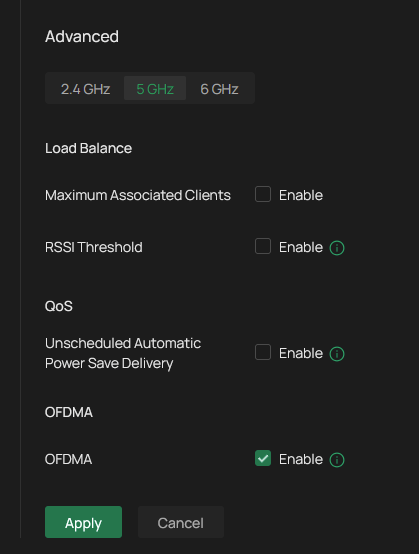
Turning this off resolved the issue, but this feauture worked before the new firmware update.
- Copy Link
- Report Inappropriate Content
@Vincent-TP It has started happening again with that setting turned off too. So it's not due to "Unscheduled Automatic Power Save Delivery" setting...
- Copy Link
- Report Inappropriate Content
Hi @Sarex
Thanks for that info.
Have you checked the phones' related settings, such as power-saving mode? Is this issue bound to occur, or is it a random, occasional phenomenon?
Sarex wrote
@Vincent-TP It has started happening again with that setting turned off too. So it's not due to "Unscheduled Automatic Power Save Delivery" setting...
- Copy Link
- Report Inappropriate Content
@Vincent-TP No apparent power saving settings are turned on. Initially I would have said that it occurs after prolonged periods of rest, but at this point I would say it's random as sometimes it doesn't happened at all during the day and sometimes it happens multiple times even after a short period of rest.
Worth noting is that I swapped two EAP772 with each other to rule out hardware issues and I have observed no difference.
- Copy Link
- Report Inappropriate Content

- Copy Link
- Report Inappropriate Content
@RF_Dude which setting is that? Much appriciated for the help.
- Copy Link
- Report Inappropriate Content
Seems there is no specific option for that other than simply splitting the bands in to separate SSIDs. I created a new one with MLO and will try that, if that doesn't work I will do 5ghz only and see if it makes a difference.
@Vincent-TP correction on one of the devices. It is an Iphone 15 pro, not 16 pro.
- Copy Link
- Report Inappropriate Content
Information
Helpful: 1
Views: 1238
Replies: 19
Voters 0
No one has voted for it yet.