
Add ability to view EAP access point Ethernet link speed via OC200 Omada interface

When an EAP access point (e.g. EAP225) is being administered by my OC200 controller, there doesn't seem to be a way to monitor the Ethernet link speed through the Omada interface unless you are using a TP-link managed switch. I have searched exhaustively to find the same link speed information for the EAP225 via the Omada interface, but it just does not seem to be there unless you are using a TP-link managed switch and accessing the speed of the link from the switch side. Without a TP-link managed switch, the only way I have found to determine the link speed is to "Forget" the device and then access it directly after it has been forgotten by the controller. In the EAP225's direct interface the Ethernet link speed is included in the Device Information under the Status heading as shown below:
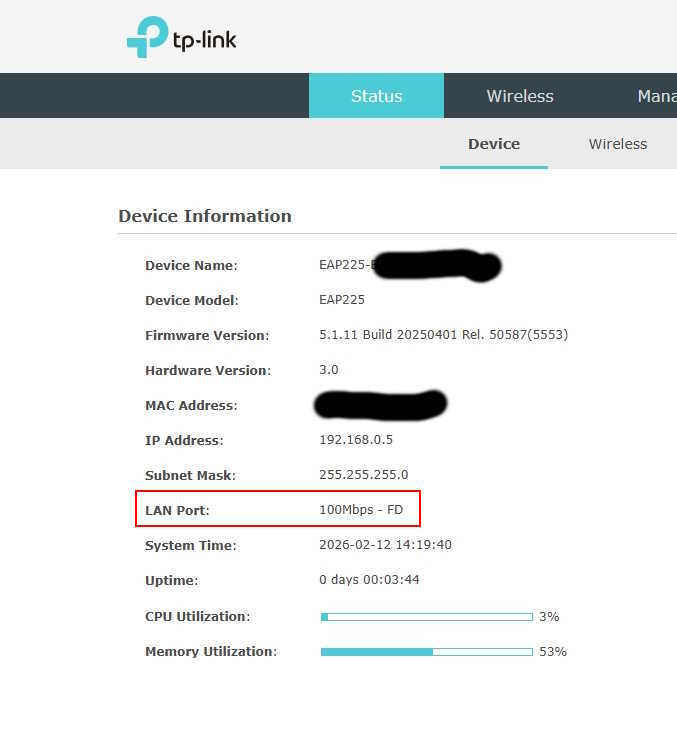
Is there any reason the same link speed information cannot be included in the OC200 Omada interface, even when the EAP is connected via third party switch or unmanaged switch?
- Copy Link
- Subscribe
- Bookmark
- Report Inappropriate Content

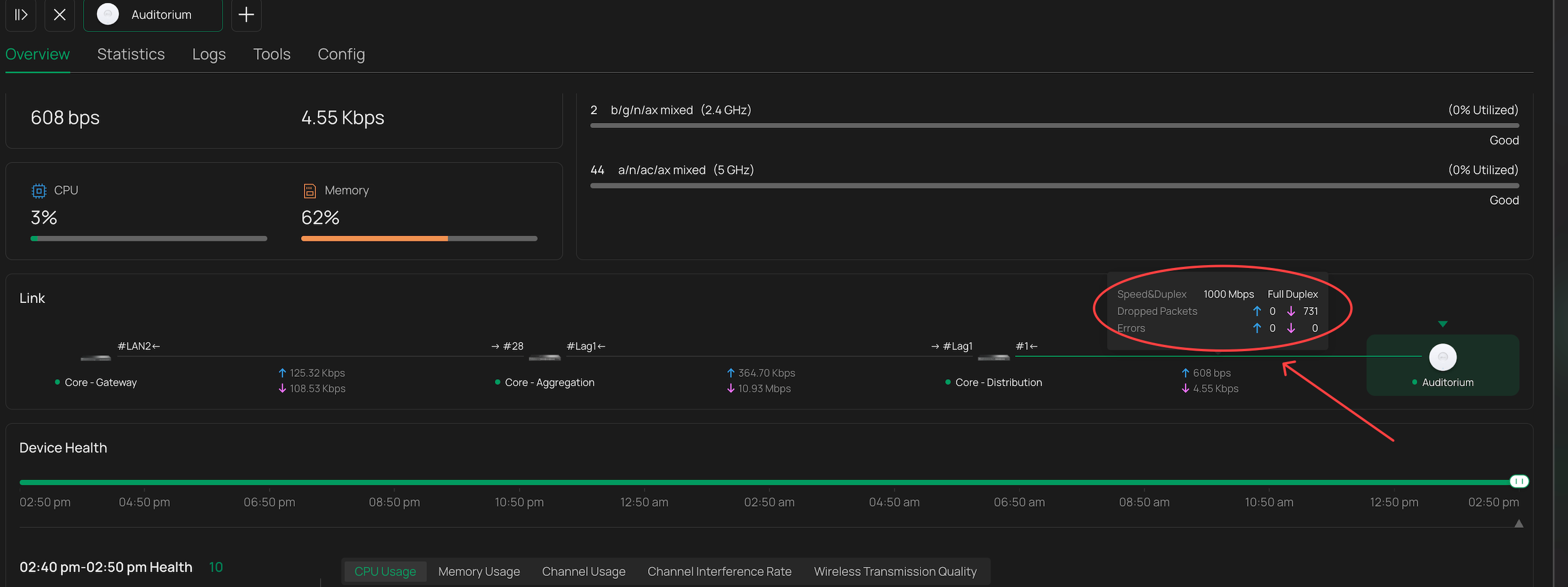
If you open up the manage device page of the EAP, overview tab, and hover over the link line in this area, it should give you the popup and show link speed
- Copy Link
- Report Inappropriate Content
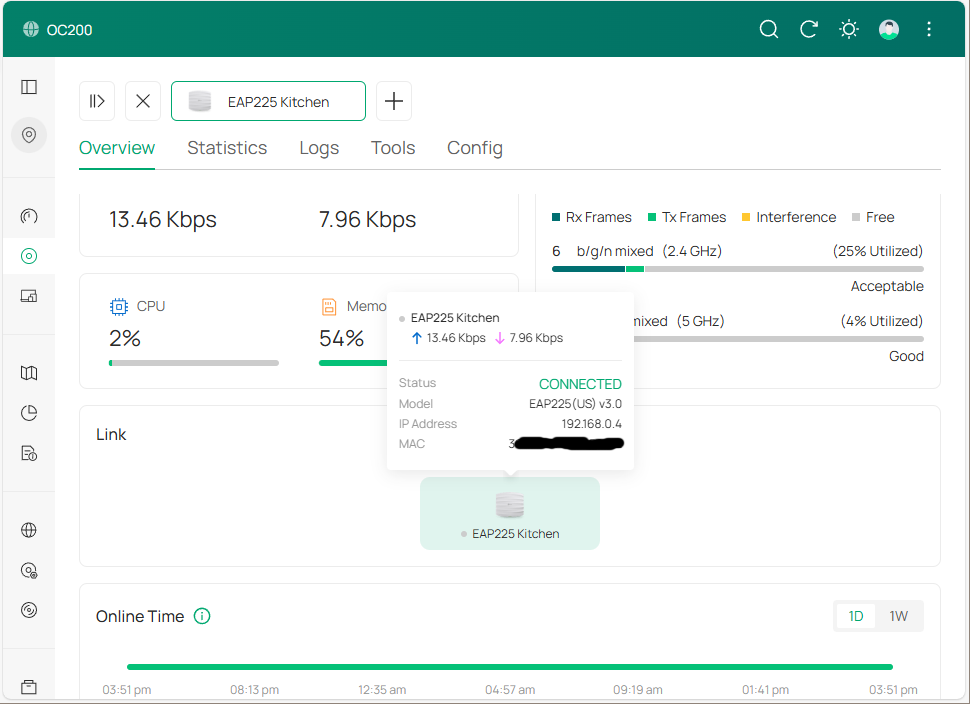
I'm pretty sure the links you show above won't show up if the EAP is not connected through an Omada managed switch. I have an unmanged POE switch and all I see is what's shown below. When I hover over the EAP225 icon in the "Link" section, it shows nothing about the speed of the Ethernet link. No other links are shown in the diagram.
- Copy Link
- Report Inappropriate Content
Ah, i didnt know that, i only have omada switches going to EAPs.
It does seem an oversight, there is no other way i can see to determine the link speed. The link speeds indicated on Topology wont help either, if you are using an unmanaged switch every client/device on it will be displayed with the same link speed as the uplink TO the unmanaged switch, since the controller only knows the link speed up to that point
- Copy Link
- Report Inappropriate Content
Hello @alexonski
Hello, I have a similar problem: https://community.tp-link.com/en/business/forum/topic/859368
I voted for this post.
Pavel
- Copy Link
- Report Inappropriate Content

as per my linked post this used to work in previous versions (5.**) but now it doesn't and is very annoying, please fix this
- Copy Link
- Report Inappropriate Content

hi all,
I've observer similar issue with my EAP615-WALL EAPs - they have 4 ETH ports: ETH0 PoE Uplink and ETH1-3 downlinks.
Unfortunately in the Controller you can see/configure only the downlink ports - the ETH0 is nowhere to find (see my post here) nor recognized by LLDP on manager´d switch.
- Copy Link
- Report Inappropriate Content
- Copy Link
- Report Inappropriate Content
@alexonski Regarding ways to address this, my recommendation would be to maintain the behaviour of the Omada Mobile App (and previously 5.x) which is:
- When the uplink is connected, put an entry in the uplink devices for "Unknown Device" when you cannot detect what type of device the AP is connected to.
- When clicking on the unknown device you can pop display only local information (i.e. the uplink speed/duplex) with nothing about the "unknown device".
- Copy Link
- Report Inappropriate Content
@alexonski
Hi, The same problem occurred here when updating to the new 6xx version of the controller; the negotiated speed via cable no longer appears for any AP. When contacting TP-Link support, I was informed that it would only appear with an Omada switch connected, but that doesn't make sense since it appeared without the switch in version 5xx. And what happens when using a PoE power supply? It's very complicated, TP-Link. We request this feature again. I currently have 392 APs in various locations, and it's difficult to access each AP individually via SSH and run commands.
- Copy Link
- Report Inappropriate Content

Hello, we are experiencing this issue here as well. In version 5.xx, it was possible to check the uplink speed of the access points through the controller. With the update to version 6.xx, this functionality has been lost.
Currently, the information is only displayed for access points connected to Omada switches. Those powered via PoE injector do not show this data, which significantly hinders troubleshooting.
We urgently need a fix.
- Copy Link
- Report Inappropriate Content
Information
Helpful: 8
Views: 1614
Replies: 10
Voters 8






