
NTP server change causes switch disconnection issue
NTP server change causes switch disconnection issue

After changing the NTP server in the controller, all of the network SG2008 switches are now displaying DISCONNECTED in the Devices list. In the site's topology map they are also showing as being not connected. This can't be true as all network clients are working OK.
In my network there are 2 core switches with 2 switches downstream from one of the core switches. Oddly, the EAPs connected to the downstream switches are still showing as CONNECTED and everything is working as expected.
I'm not sure how to fix this issue without downing the network completely and rebooting everything. Suggestions ??
- Copy Link
- Subscribe
- Bookmark
- Report Inappropriate Content


Hi all, the reported issue is fixed by the latest pre-release firmware of the switches.
Below are the posts:
Omada SG_2 Series Pre-Release FW for SDN Controller 6.1.X.X (Released on March, 5th, 2026)
Omada SG_3 Series Pre-Release FW for SDN Controller 6.1.X.X (Released on March, 5th, 2026)
Omada SG_SL/SX/TL Series Pre-Release FW for SDN Controller 6.1.X.X (Released on March, 5th 2026)
Thank you for all your feedback.
- Copy Link
- Report Inappropriate Content

@jra11500 What firmware version are you running for the switches? Also, just to isolate the issue, if you remove the NTP server from the controller, do the switches show online again?
- Copy Link
- Report Inappropriate Content
The switches are using the latest firmware (4.20.17 Build 20260121 Rel.53429). Removing or changing back to the old NTP server did not fix the problem. Rebooting the controller also did not solve the problem. The odd thing is that all the downstream access points were shown as connected. Traffic through the switches was normal and all clients in the Clients window were also shown as connected. A screenshot of the Devices window is shown below.
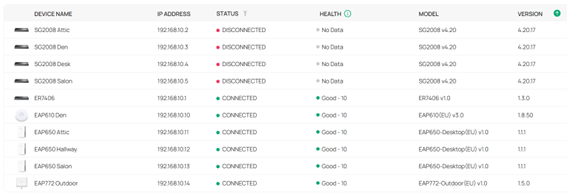
I did get things working again this morning by power cycling the two core switches. After that, the downstream switches did come back online after a short period. Later, I again changed the NTP server and everything occurred all over again. Like before, doing a power down/power up on the two core switches fixed everything. I have just configured a Synology NAS to be the local time server and after configuring the controller to use the local NTP server, the issue did not happen.
- Copy Link
- Report Inappropriate Content
@jra11500 I see, what NTP server were you trying to use before configuring the NAS as the time server? It's strange that the issue does not show up when using a local server.
- Copy Link
- Report Inappropriate Content
I was using the Cloudfare time server before trying to change to the Google time server. The FQDNs for the servers were used in the controller setting. The IP address of the local NTP server is being used now.
The reason for the original change was that I noticed in the NAS devices that I was still using the Google server. For some reason, the NAS does not sync with Cloudfare and so I decided to no longer use Cloudfare in the controller. Hence, I made the change to Google and that's when things went wrong.
- Copy Link
- Report Inappropriate Content

Are you using the gateway as DNS proxy/cache? and what DNS server is set in the management vlan interface of the switches?
- Copy Link
- Report Inappropriate Content
Update:
UK pool NTP servers work normally.
Cloudflare NTP works normally
Internal NTP works normally
Google NTP (time.google.com) does cause switch disconnection - they go "Configuring" for about 5 minutes then go into disconnected state. This happens if the switch is getting DNS directly externally (DNS set as 1.1.1.1 on switch interface) or from the gateway proxy
It may be something strange about google NTP - they use "Leap Smeared Time"
-ST
- Copy Link
- Report Inappropriate Content
I am not using the gateway as a proxy. The DNS server for the management VLAN is the gateway address and the DNS servers on the WAN interface are 1.1.1.1 and 1.0.0.1.
I am glad someone else was able to confirm this issue is happening. For now, I will continue to use a local NTP server that avoids Cloudfare and Google. The local time server (on a Synology NAS) doesn't like Cloudfare and the controller doesn't like Google. I am syncing the local time server with pool.ntp.org and everything is working smoothly.
This thread might be related. The switch disconnects were solved by disabling 802.1X and the Radius server. I did have 802.1X enabled for testing as I just installed a new outdoor access point but ran into problems with the downstream cameras not connecting. I did not have time to investigate further and disabled 801.1X but I overlooked disabling the Radius server. Since disabling the Radius server, I have not tested anything. Perhaps I'll do that when time permits and the network can go down.
- Copy Link
- Report Inappropriate Content

- Copy Link
- Report Inappropriate Content
- Copy Link
- Report Inappropriate Content

@Vincent-TP
We do not use Google TimeServer and have the same problem.
- Copy Link
- Report Inappropriate Content
Information
Helpful: 0
Views: 890
Replies: 15
Voters 0
No one has voted for it yet.