Omada SG_SL/SX/TL Series Pre-Release FW for SDN Controller 6.1.X.X (Released on March, 11th 2026)

Omada SG_SL/SX/TL Series Pre-Release FW for SDN Controller 6.1.X.X (Released on March, 11th 2026)

Omada SG_SL/SX/TL Series Pre-Release FW for SDN Controller 6.1.X.X (Released on March, 11th 2026)
2025-12-31 06:06:09 - last edited Yesterday

This Article Applies to


SL2428P(UN) 6.20
SX3008F(UN) 1.20
SX3016F(UN) 1.20
SX3032F(UN) 1.0
SX3206HPP(UN) 1.20
SX3832(UN) 1.0
SX3832MPP(UN) 1.0
TL-SG2428P(UN) 4.0
TL-SG3428MP(UN) 5.0
TL-SG3452P(UN) 3.0


If your model is not listed, it is not supported in this batch. Please leave the model and version in the comment section; 


Release Notes


Bug Fixes:

1. Fixed the issue of wired client loss in abnormal scenarios. 


Firmware Download


Before the Upgrade

(1) Please be sure you have read the Beta Test Agreement before upgrading the Beta firmware!

(2) You may follow the following guide to upgrade your Omada devices. How to Upgrade/Downgrade Omada Switches


Firmware Download Link


SL2428P V6.20 V6.20.20

SX3008F V1.20 V1.20.18

SX3016F V1.20 V1.20.18

SX3032F V1 V1.0.17

SX3206HPP V1.20 V1.20.18

SX3832 V1 V1.0.14

SX3832MPP V1 V1.0.13

TL-SG2428P V4 V4.0.28

TL-SG3428MP V5 V5.0.27

TL-SG3452P V3 V3.0.24


Notes:


(1) The above firmware is applied to matching hardware.

(2) Your device’s configuration won’t be lost after upgrading.


Additional Information


All feedback is welcome, including letting us know about successful device upgrades.

If somehow you encounter an issue during or after the upgrade, it's suggested to contact us with the following info:

  • Omada Controller version if you have any.
  • Device Firmware version with Build number (previous and current)


If your model gets bricked during the firmware upgrade, you may follow the guide below to recover the firmware.

Configuration Guide How to Upgrade/Downgrade Omada Switches


Update Log


March, 11th, 2026

Release of this article.


Recommended Threads


Get the Latest Firmware Releases for Omada Routers Here - Subscribe for Updates

Get the Latest Omada SDN Controller Releases Here - Subscribe for Updates

Experience the Latest Omada EAP Firmware - Trial Available Here, Subscribe for Updates!

Current Available Solutions to Omada Router Related Issues [Actively Updated, Post for Subscription]


  0      
  0      
#1
Options
4 Reply
Re:Omada Switch Pre-Release Firmware Adapting to Omada SDNC 6.1.X.X (Released on December 31th, 2025)-3
2025-12-31 16:18:59

  @Ethan-TP 


All my switches have been updated to this batch.  All my siwtches created ACL and IP Group configuration failures after the update.  "Apply Again" didnt clear them, but i was able to completely clear them by doing a Force Provision on every switch after the upgrade was complete.


This may be of use for other users


-ST

  3  
  3  
#2
Options
Re:Omada SG_SL/SX/TL Series Pre-Release FW for SDN Controller 6.1.X.X (Released on January 28th 2026)
2026-01-28 06:24:56

Experience the Latest Omada Switch Firmware - Trial Available Here, Subscribe for Updates!

  0  
  0  
#3
Options
Re:Omada SG_SL/SX/TL Series Pre-Release FW for SDN Controller 6.1.X.X (Released on January 28th 2026)
2026-02-02 09:22:16

  @Ethan-TP 

Hi everyone,

I'm experiencing a persistent and very annoying issue with my TL-SG3428MP v5.0 managed by a Software Controller (v6.1.x) on Raspberry Pi 4b. This has happened on multiple firmware versions, including 5.0.23, 5.0.24, and the latest 5.0.25.

The main problem is that remote firmware updates are impossible because the switch never comes back online on its own. After the automatic reboot following an update, I wait for over 15 minutes, but the device remains unresponsive. I have to be physically present to perform this manual routine:

  1. Automatic Reboot (Post-update): Switch stays offline indefinitely.

  2. First Manual Reset: Only after this reset does the switch finally become visible via LAN.

  3. Second Manual Reset: I have to reset it again for the Controller to finally recognize it and for it to be visible via WLAN.

It seems the switch gets stuck in a boot loop or provisioning error right after any firmware flash. Has anyone else seen this on v5.0 hardware? It’s frustrating because I cannot maintain the network remotely.

ER605 v2.0 | TL-SG3428MP v5.0 (PoE+) | 3x EAP653 v1.0 | 1x EAP613 v1.0 | Omada Controller on RPi 4b | Full PoE Power
  0  
  0  
#4
Options
Re:Omada SG_SL/SX/TL Series Pre-Release FW for SDN Controller 6.1.X.X (Released on March, 5th 2026)
Friday

  @Ethan-TP 

Hello,

I am reporting a major inconsistency in the firmware versioning for TL-SG3428MP v5.0.

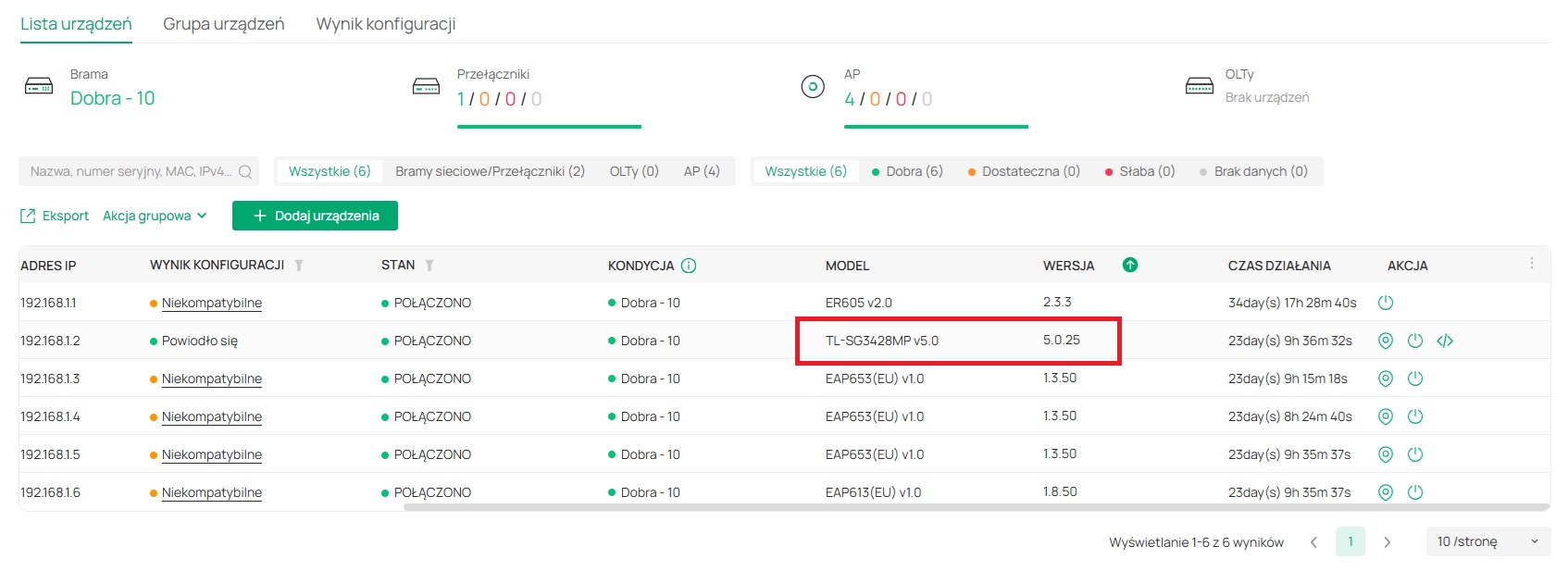
  1. Currently, my switch is running v5.0.25 (Stable), released in February 2026.

  2. Surprisingly, the "Beta" tab still shows an older version v5.0.24 from December 2025.


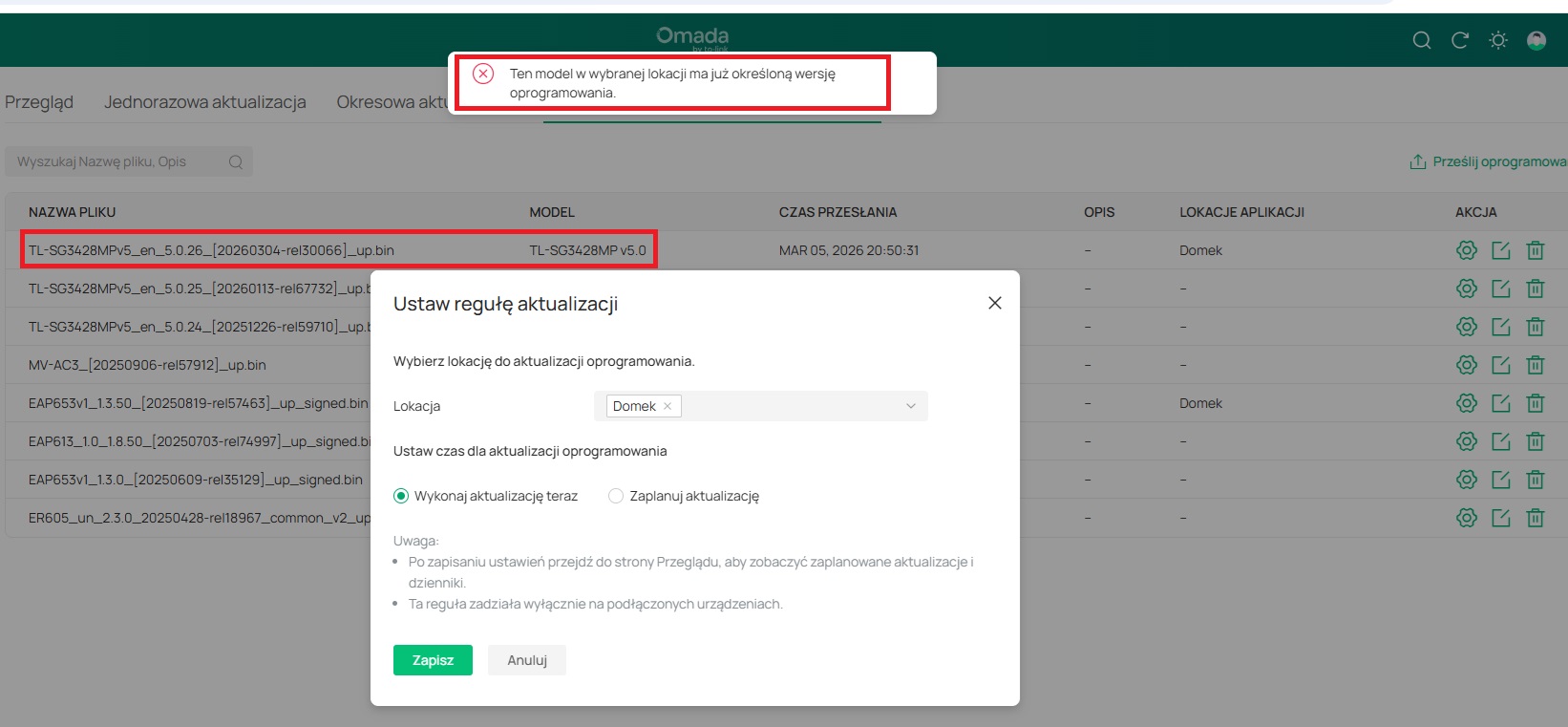
3. When I try to manually upload the new v5.0.26 (Build 20260304) found on the community forum, the Omada Controller blocks it with the error: "This model in the selected  location already has a specified software version."

It seems the Controller's upgrade rules are misconfigured, treating v5.0.25 as the ultimate version and refusing to recognize v5.0.26 as a valid update.


ER605 v2.0 | TL-SG3428MP v5.0 (PoE+) | 3x EAP653 v1.0 | 1x EAP613 v1.0 | Omada Controller on RPi 4b | Full PoE Power
  0  
  0  
#5
Options