Connectivity Problems

Connectivity Problems

Connectivity Problems
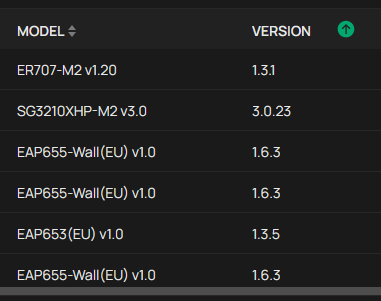
2 weeks ago - last edited Yesterday
Model: EAP655-Wall  
Hardware Version: V1
Firmware Version: 1.6.3 Build 20251107 Rel. 41729

Yesterday i got problems with one of my EAP655-Wall.


It started with all Clients disconnecting from WLAN. EAP was not reachable.


Then this happend. 0.251 is the fallback IP.

 
AP-DG  got IP address 192.168.0.13/255.255.255.0.
Device IP Changed Mar 23, 2026 12:43:37
AP-DG  got IP address 192.168.0.251/255.255.255.0.
Device IP Changed

Mar 23, 2026 12:43:29


Alerts: AP-DG reported monitor link down due to failure of TCP connection to the Controller on port 29817. Please check the network connectivity.


I thought it maybe cause by overheating. So i opened the terminal -> enable -> show temperature 0 -> 71


It would be nice if the temperature would be part of the overview in omada. The health was still 100% even a real problem existed. this could be improved too.


in 45 min three more restarts happens, till it was stable again.


Hardware fault or controller fault?


omada is running in a docker container. ( 6.1.0.19)

  0      
  0      
#1
Options
1 Accepted Solution
Re:Connectivity Problems-Solution
Yesterday - last edited Yesterday

Hi  @pustekuchen 


Thanks for the info.


We recommend installing the equipment in a well-ventilated location. High temperatures may cause the device to restart, and prolonged exposure to high temperatures could affect its lifespan.


Below FAQ for your reference:

Is it normal if my TP-Link devices feels warm?

Recommended Solution
  0  
  0  
#6
Options
5 Reply
Re:Connectivity Problems
a week ago

Hi  @pustekuchen 

May I ask your network topology to begin with? How is this EAP powered?

Do you have other EAP655-Wall and are they working fine? If so, can you try to switch the location of this EAP with other working EAP for a comparison test?

When the issue happens, is the EAP unreachable means the clients cannot ping this EAP's IP?


Best Regards! >> Omada EAP Firmware Trial Available Here << >> Get the Latest Omada SDN Controller Releases Here << *Try filtering posts on each forum by Label of [Early Access]*
  0  
  0  
#2
Options
Re:Connectivity Problems
a week ago

Hi  @pustekuchen 


Thanks for posting here.

To confirm, how did you find the EAP restart? did its LED restart? or from the uptime? or what else?


How did you power on the EAP655-wall? if via a POE switch, please also give us the model number. THanks.

  0  
  0  
#3
Options
Re:Connectivity Problems
Thursday

  @Hank21 


All APs are powered over POE by SG3210XHP. 


Yes the other EAP works fine. I did not changed the location of the EAPs. 

Yes the EAP is completely unreachable.


  0  
  0  
#4
Options
Re:Connectivity Problems
Thursday - last edited Thursday

@Vincent-TP 

I recognized it by missing wlan connection of my devices and interruption. The AP is in located in a cabinet. After improving the airflow / opening the door the problem dissapear after some time. The cabinet is closed again and since this day no outtage reappeared.

  0  
  0  
#5
Options
Re:Connectivity Problems-Solution
Yesterday - last edited Yesterday

Hi  @pustekuchen 


Thanks for the info.


We recommend installing the equipment in a well-ventilated location. High temperatures may cause the device to restart, and prolonged exposure to high temperatures could affect its lifespan.


Below FAQ for your reference:

Is it normal if my TP-Link devices feels warm?

Recommended Solution
  0  
  0  
#6
Options