
vpn over internet er605

Hello everyone,
I recent bought an er605 vpn router. Before i used a wifi router with dmz to the wan port of it. I was changing my network sow i changed the wifi router for the er605.
Like always again from my modem dmz to the wan port of the er605.
I use an qnap nas where i store backups of my websites from directadmin. Sow in the er605 give a static ip adres to the NAS en routed de ftp to it.
Like done according this site Port Forwarding on TP-Link ER605 - Business Community
But when i do a portcheck de ftp port keeps closed
dont understand what i am doing wrong. Now back to the old router and the ftp is open in the portcheck. My internal ips are 172.16.16.x with subnet 255.255.255.0 can that be problem these are the same as i used in my old router.
Anyone who can help
- Copy Link
- Subscribe
- Bookmark
- Report Inappropriate Content

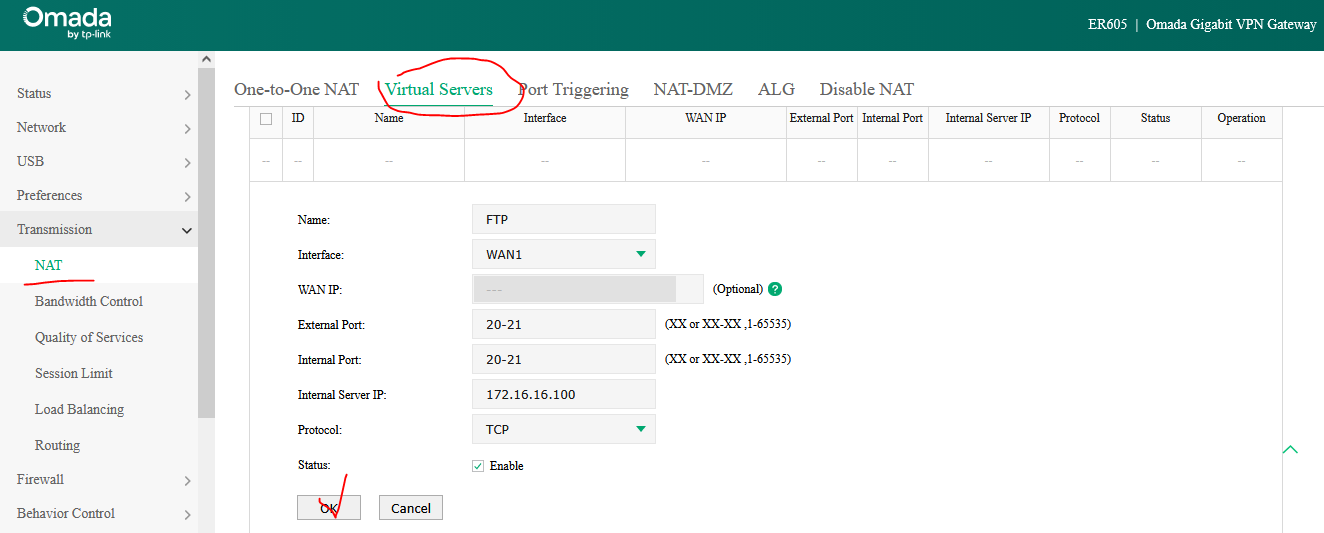
For FTP server in Active mode, er605 Virtual Server should look like this:
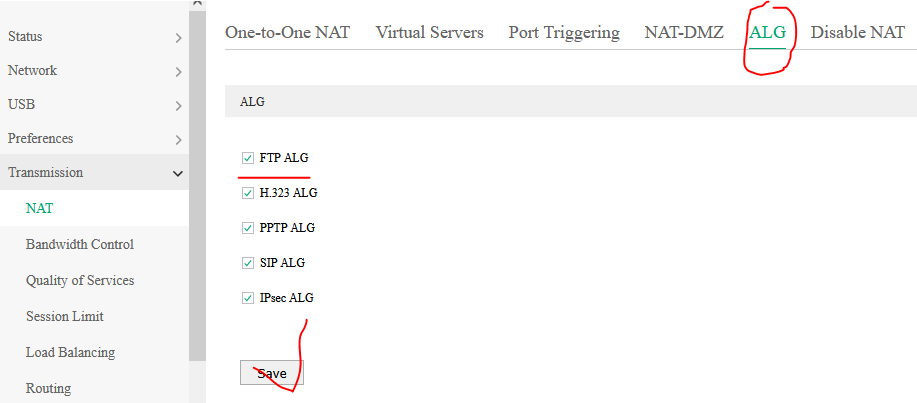
If you want to use the FTP server in Passive mode, in addition to TCP port 21, you should enable the FTP ALG as well:
- Copy Link
- Report Inappropriate Content
Do you still use your old wireless router in your current network topology (along with er605) ?
If you do, just change it's working mode to an access point - thus you'll avoid the double NAT for devices connected to the old roter.
Here's am example of how to configure an FTP server with Synology NAS.
- Copy Link
- Report Inappropriate Content
could this be the problem i changed the dmz from the old mac adres to the new one and restarted the modem afterwards.
- Copy Link
- Report Inappropriate Content
The DMZ on your modem shoud be configured with the er605 WAN IP address. Describe your network topology in more details.
- Copy Link
- Report Inappropriate Content
Yes I know have a modem on 192.168.2.254 it gives an ip static to the wan port of the er605 192.168.2.7. Sow in the modem the DMZ is set to the static ip 192.168.2.7 that's the wan port. Th er605 has on the other side ip 172.16.16.1 subnet 255.255.255.0 the nas has adres 172.16.16.100 sow in the er 605 port 21 to the nas 182.16.16.100 which is also static
- Copy Link
- Report Inappropriate Content
You're gonna need some more ports opened on the er605 router.
FTP (File Transfer Protocol) uses two distinct channels: a command port (21) for instructions and a data port (typically 20) for actual file transfers.
In Active mode, the server connects from port 20 to the client, while Passive mode uses random high ports (>1024) to bypass firewalls.
There's a blue hyperlink in my first post - you can check how this was implemented on a Synology NAS (in Passive mode).
- Copy Link
- Report Inappropriate Content
I will have a look saw in the previous router indeed a forward 20,21 to 21 nas
tried that but did not work maybe have to separate them.
- Copy Link
- Report Inappropriate Content
For FTP server in Active mode, er605 Virtual Server should look like this:
If you want to use the FTP server in Passive mode, in addition to TCP port 21, you should enable the FTP ALG as well:
- Copy Link
- Report Inappropriate Content


- Copy Link
- Report Inappropriate Content
Information
Helpful: 0
Views: 473
Replies: 8
Voters 0
No one has voted for it yet.