Bug Report: ER605 v2 - SNMP Incoherency and Data Merging during WAN Failover

Bug Report: ER605 v2 - SNMP Incoherency and Data Merging during WAN Failover

Bug Report: ER605 v2 - SNMP Incoherency and Data Merging during WAN Failover
3 weeks ago
Model: ER605 (TL-R605)  
Hardware Version: V2
Firmware Version: 2.2.5 Build 20240522 Rel.75860

There is a critical discrepancy in how the SNMP agent reports interface statistics (IF-MIB) when the router enters Link Backup (Failover) mode. Currently, the router fails to maintain independent traffic accounting for physical ports during an emergency switch-over.

Observed Anomalous Behavior:

  1. Traffic Misassignment: When the Primary WAN (Port 1) goes offline, the router correctly routes traffic through the Backup WAN1 (Port 2). However, the SNMP agent begins reporting the Backup WAN1's traffic under the Primary WAN's index (1026) instead of its own physical index (1038).

  2. Loss of Granularity: Data counters for the Backup Port (1038) remain static or show negligible values, while the Primary Port index (which is physically disconnected/offline) acts as a "logical aggregator" for all global outbound traffic.

  3. Severe Update Latency: During failover, the SNMP ifInOctets and ifOutOctets counters update with extreme delay (often exceeding 120 seconds) and fail to reflect the actual throughput (e.g., a 180MB download is reported as <1MB).

Required Fix / Feature Request: It is essential that a future firmware update ensures strict physical port isolation for SNMP counters. Specifically:

  • Independence: Traffic data must be exposed separately for each physical port at all times. The SNMP agent must not "merge" or "redirect" traffic statistics of the Backup WAN into the Primary WAN’s OID/Index during failover.

  • Real-time Accuracy: IF-MIB counters must reflect the real-time bitstream of the physical silicon port, regardless of the logical routing state (Failover/Load Balance).

  • Consistency: If 100MB passes through the physical pins of Port 2, those 100MB must appear under Index 1038, even if Port 1 is designated as the "Default Gateway."

Impact: The current behavior makes professional network monitoring (via Zabbix, PRTG, or custom scripts) impossible. Network administrators cannot accurately track data usage on backup lines (which often have data caps) because the router "hides" this traffic within the offline primary interface's counters.

0
0
#1
10 Reply
Re:Bug Report: ER605 v2 - SNMP Incoherency and Data Merging during WAN Failover
3 weeks ago

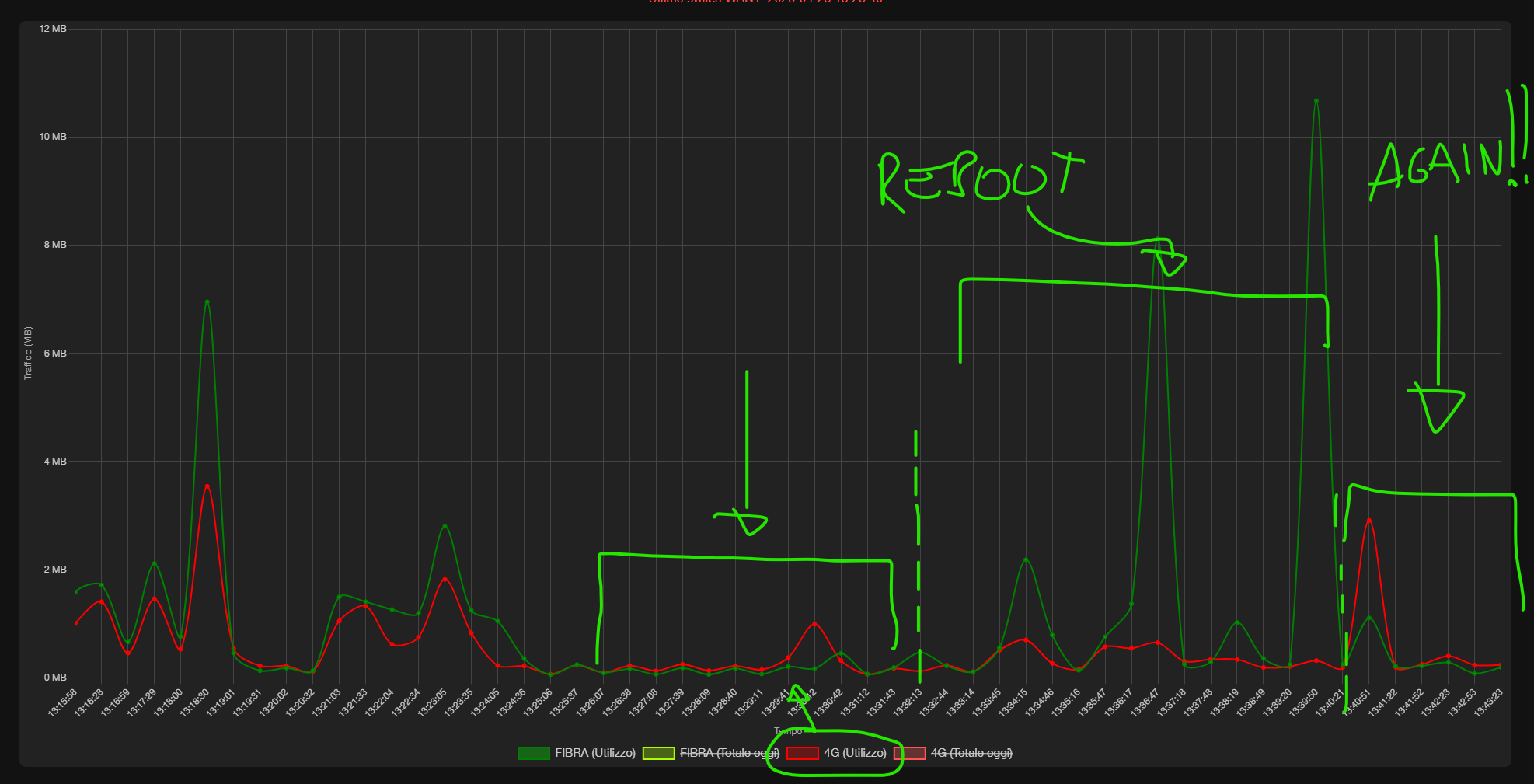
As shown in the screenshot, Port 1(WAN) is Offline and Port 2 (WAN1) is Online, yet SNMP continues to report traffic on Port 1's index while Port 2 remains at zero. This proves the MIB database mapping is broken during Failover.


0
0
#2
Re:Bug Report: ER605 v2 - SNMP Incoherency and Data Merging during WAN Failover
3 weeks ago
0
0
#3
Re:Bug Report: ER605 v2 - SNMP Incoherency and Data Merging during WAN Failover
2 weeks ago - last edited 2 weeks ago

Hi  @DraftmanCorp 


Thanks for posting here.

The firmware for the ER605 is not the latest. Please first update it to the latest and see if the situation persists:

https://support.omadanetworks.com/en/product/er605/v2/?resourceType=download


When did you first notice this situation? Did it work correctly before?

0
0
#4
Re:Bug Report: ER605 v2 - SNMP Incoherency and Data Merging during WAN Failover
2 weeks ago

  @Vincent-TP 

I noticed the issue specifically during a Fiber outage while the router was in Link Backup (Failover) mode.

Previously, when both WANs were 'Online', the SNMP readings were correct and independent (Fiber on index 1026, 4G on index 1038).

The anomaly starts only when the Primary WAN goes 'Offline'. At that exact moment, the SNMP agent stops updating the Backup WAN index (1038) and starts merging all the backup traffic into the Primary WAN index (1026). This is clearly a logical mapping error in the SNMP daemon during the transition to Failover state.

0
0
#5
Re:Bug Report: ER605 v2 - SNMP Incoherency and Data Merging during WAN Failover
a week ago - last edited a week ago

Hi  @DraftmanCorp 


Thanks for the reply.


To confirm, you have updated the firmware to the latest one and the situation persists, right?


Apart from ifInOctets and ifOutOctets counters, did you check other counters? if yes, please also give us the OID. Thanks.


0
0
#6
Re:Bug Report: ER605 v2 - SNMP Incoherency and Data Merging during WAN Failover
Saturday - last edited Sunday

i have (sorry) 2.3.2 Build 20251029 and no update find for my model v2 since november 2025. I notice another bug (serious). I use the WAN as the primary router and WAN1 as the backup, using the rules you see in the image. However, this happens: every now and then, the router forces the use of WAN1, and there's no way to get it back to using the WAN. Be careful: even if I reboot the router connected to WAN1, the ER605 remains "waiting" for the WAN1 router to come back online. IN ALL THAT TIME, IT DOESN'T RETURN TO USING THE WAN, even though the router connected to the WAN has been online and working for HOURS, according to the logs. This is very, very annoying. The only way I can get the ER605 v2 to use the WAN again is to reboot it.


My goal is simple, and according to the ER605 v2 router manual, this device allowed me to achieve this feature:

I needed a router with failover functionality: the main WAN line connected to a fiber router was always active, and in the event of a failover, WAN1 was used with a 4G backup router.

At first, I noticed something was wrong, and I could tell by the browsing speed (4G doesn't exceed 6Mbps). This was NOT working well, so I implemented an SNMP server to monitor traffic on the two WAN/WAN1 ports so I could be notified when WAN1 was being used. But even with the SNMP service, I didn't get any results. There are several very serious bugs in this router.

0
0
#7
Re:Bug Report: ER605 v2 - SNMP Incoherency and Data Merging during WAN Failover
Monday

Hi  @DraftmanCorp 


Please ensure that your controller firmware is up to date first. We often address certain issues through firmware updates.

The official latest one is 2.3.3, and recently, we have also released a pre-release firmware:

ER605 V2 2.4.0 Build 20260417 Pre-Release Firmware (Released on Apr 24th, 2026)


The feature you require is relatively fundamental and well-established, and it generally works without problems.

0
0
#8
Re:Bug Report: ER605 v2 - SNMP Incoherency and Data Merging during WAN Failover
Monday

  @DraftmanCorp 

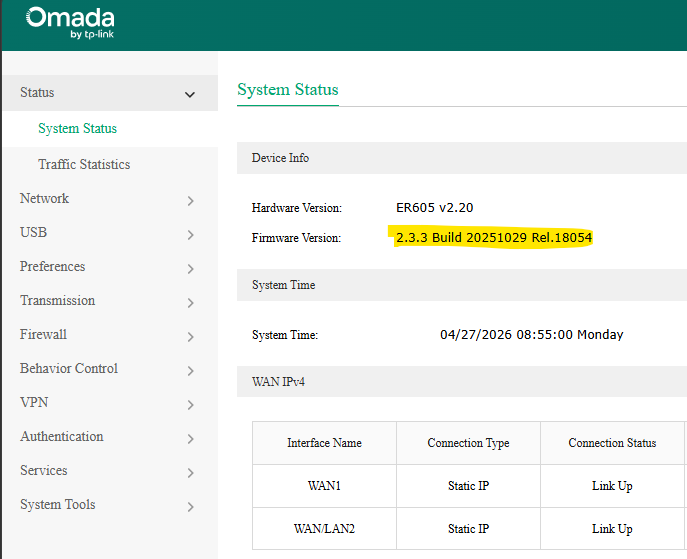
But it came out the same day, I must have missed it. Okay, I updated the firewall to version 2.3.3 build 20251029 rel.18054.
Unfortunately, the only changelog for this version compared to my previous one is: "1. Use a more secure signature algorithm to enhance device security." and nothing else.

I'll wait and see what happens. If so, I'll report it again and ask you to let the developers know what's needed for a fix.


thanks for now.


0
0
#9
Re:Bug Report: ER605 v2 - SNMP Incoherency and Data Merging during WAN Failover
23 hours ago - last edited 23 hours ago

  @Vincent-TP Here we are, just a short time later. Once again, the ER605 V2 switched traffic to WAN/LAN1 for no apparent reason and hasn't switched back. Furthermore, SNMP reading hasn't changed compared to the previous firmware. See how the backup WAN/LAN1 follows the WAN? Something's wrong, folks. Please report this specific issue.

in the attachment the full log of wans status (UP/DOWN) where you can see that the primary WAN is never gone down. 


Serious: The router sets WAN/LAN1 as primary for no reason, even if I reboot the 4G router connected to WAN/LAN1, the ER605 router temporarily sets the primary WAN in use, BUT as soon as the 4G router comes back online it resets it as primary, this thing does not make sense.

File:
log_2026-04-28.zipDownload
0
0
#10
Re:Bug Report: ER605 v2 - SNMP Incoherency and Data Merging during WAN Failover
7 hours ago

Hi  @DraftmanCorp 


Thank you so much for taking the time to post the issue on the TP-Link community!
I have forwarded your case to the support team; someone will contact you via your registered email address. The case ID is #100305. It may take around 2 business days.

Please check your inbox and confirm that the support email was received. Thanks!


Once the issue is resolved, please update this thread with your solution to help others who may encounter the same problem.
Many thanks for your excellent cooperation and patience!

0
0
#11