
Inconsistency in "Lock to Wireless Device": Gateway Wi-Fi (ER706W) missing from list

I have a LAN configured using an ER706W(Japan), an ES206XPP-M2, and an EAP655(Japan).
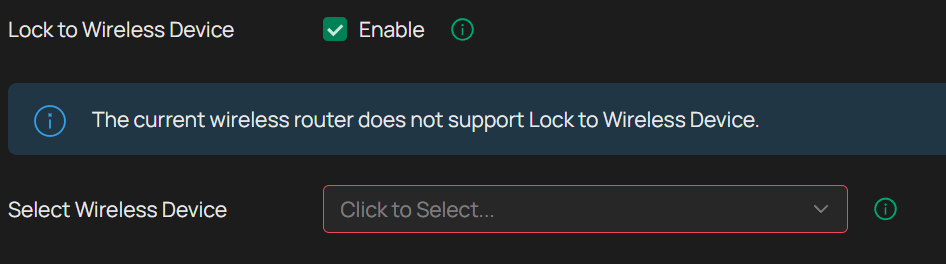
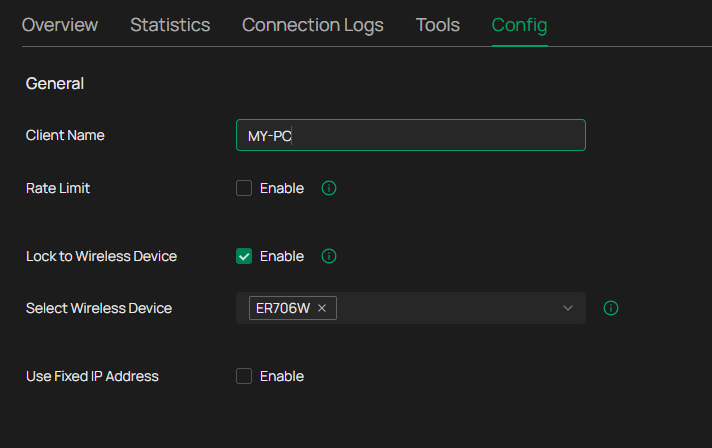
While the "Lock to Wireless Device" feature—which allows you to lock a client to a specific Wi-Fi device—is useful, the ER706W does not appear as an option when using this feature.
Even though there are clearly two APs on the network, the fact that this feature cannot be applied to a gateway with Wi-Fi functionality feels inconsistent.
Note: Due to national regulations, the firmware for non-Japan regions cannot be installed to Japanese version devices.
- Copy Link
- Subscribe
- Bookmark
- Report Inappropriate Content


Hi @zodiaq
Thanks for posting here.
Japanese wireless regulations differ from those of the EU, and routers with wireless functionality also have their own dedicated versions.
Therefore, the EN version of the firmware cannot be updated. Please wait for a firmware update to support this feature. Thank you!
https://community.tp-link.com/en/business/forum/topic/860984?replyId=1680196
- Copy Link
- Report Inappropriate Content

- Copy Link
- Report Inappropriate Content
@MR.S Thank you for the reply.
I completely forgot to attach the screenshot.
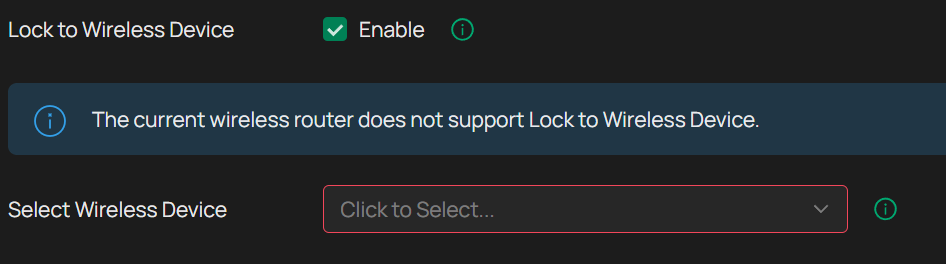
The firmware for Japan region is still 1.1.12. LAN DNS is also not available yet...
- Copy Link
- Report Inappropriate Content
I don't think routers are region specific? Maybe these are because of wifi. I don't know, but the firmware I'm using is version 1.2.8 EU, the controller is the latest EA version which is 6.2.10.11
- Copy Link
- Report Inappropriate Content
I see Japan has the EU version, go to this link to download the latest version.
https://support.omadanetworks.com/en/product/er706w/v1/?resourceType=download
- Copy Link
- Report Inappropriate Content
you need to read the release note, you may have to upgrade in several steps since you are so far behind with the firmware
- Copy Link
- Report Inappropriate Content
@MR.S
I tried to install it when I raised another thread about LAN DNS (LAN DNS availability for ER706W(JP) - Business Community), but unfortunately upgrading the firmware was refused.
- Copy Link
- Report Inappropriate Content
It's going a bit fast here so we're writing past each other  you'll probably have to upgrade in several steps, so see the release note for what the minimum version is to upgrade.
- Copy Link
- Report Inappropriate Content
Hi @zodiaq
Thanks for posting here.
Japanese wireless regulations differ from those of the EU, and routers with wireless functionality also have their own dedicated versions.
Therefore, the EN version of the firmware cannot be updated. Please wait for a firmware update to support this feature. Thank you!
https://community.tp-link.com/en/business/forum/topic/860984?replyId=1680196
- Copy Link
- Report Inappropriate Content
Information
Helpful: 0
Views: 157
Replies: 8
Voters 0
No one has voted for it yet.