
Bug: WebAPI bug in /{omadacId}/api/v2/sites/{siteId}/clients

Hello,
I hope this is the correct place to post about this bug in the web api.
The Omada Controller Web API in version 6.2.0.17 has a bug in endpoint /{omadacId}/api/v2/sites/{siteId}/clients
The parameter filters.active does return a general error (500) from the endpoint. This was noticed because of an issue with the third party Home Assistant TP-Link Omada component and reported and debugged here at github in the zachcheatham/ha-omada repo issue #157
The openapi endpoint still works with the filters.active parameter and returns a list of all the active clients so this is only in the web api.
I'll post the error log separately since for some reason it thinks there are links inside.
Thank you
- Copy Link
- Subscribe
- Bookmark
- Report Inappropriate Content


Hi @ccMatrix
Thanks for the info.
The Web API is an interface for the Client module. Starting from version 6.0, the local controller’s own Client module will no longer call this Web API but will instead invoke the corresponding Open API. If you are calling the interface to obtain Client information, please use the corresponding Open API to meet your needs, and ensure it syncs with the client module's calls on the controller side.
- Copy Link
- Report Inappropriate Content
I've uploaded the error log to pastebin with id Qe0e1Uw2
Since I can neither post the error log here nor the link to it I don't see any other way than this. Hope you can find it if you need it.
- Copy Link
- Report Inappropriate Content
Hi @ccMatrix
Thanks for posting here.
We can't access Pastebin. To get the error logs, I have created a support ticket, and the ID is TKID260439700.
Please check your email inbox and get back to us. Thanks.
- Copy Link
- Report Inappropriate Content
@Vincent-TP I've received the mail and sent you the log and also the link to the github issue where some people already tried to find out what the source of the issue might be. Hope this helps in quickly finding and hopefully fixing the problem. Thanks.
- Copy Link
- Report Inappropriate Content
Hi @ccMatrix
Thanks for the info.
The Web API is an interface for the Client module. Starting from version 6.0, the local controller’s own Client module will no longer call this Web API but will instead invoke the corresponding Open API. If you are calling the interface to obtain Client information, please use the corresponding Open API to meet your needs, and ensure it syncs with the client module's calls on the controller side.
- Copy Link
- Report Inappropriate Content

@Vincent-TP What is the corresponding Open API? Can you please link me documentation for the API that is appropriate for my controller version?
Controller version: 6.2.0.17 (local, self-hosted)
We tested the Open API /clients endpoint using OAuth2 client credentials authentication. Token acquisition works, and other
endpoints work fine — but /clients returns "General error" in every variation.
What works:
- POST /openapi/authorize/token?grant_type=client_credentials → errorCode: 0, valid access token returned
- GET /openapi/v1/{omadacId}/sites?page=1&pageSize=10 → errorCode: 0, returns site data
- GET /openapi/v1/{omadacId}/sites/{siteId}/devices?page=1&pageSize=5 → errorCode: 0, returns all 11 devices with full details
What fails: All of these return {"errorCode": -1, "msg": "General error."} with HTTP 200:
- GET /openapi/v1/{omadacId}/sites/{siteId}/clients?page=1&pageSize=5
- GET /openapi/v1/{omadacId}/sites/{siteId}/clients?page=1&pageSize=5&filters.active=true
- GET /openapi/v1/{omadacId}/sites/{siteId}/clients?pageSize=5&page=1
Both Authorization: AccessToken=<token> and Authorization: Bearer <token> header formats were tried. The AccessToken= format reaches
the endpoint (returns the errorCode -1 JSON). The Bearer format returns a different error about token expiry, suggesting it's a
valid auth path but may handle token format differently.
Conclusion: The /clients "General error" bug affects both the Web API (/api/v2/sites/{siteId}/clients) and the Open API (
/openapi/v1/{omadacId}/sites/{siteId}/clients) on Controller 6.2.0.17. The TP-Link recommendation to "use the Open API" does not
resolve the issue on this version.
- Copy Link
- Report Inappropriate Content
- Copy Link
- Report Inappropriate Content
Hi @jar349
For software controllers, you will find the OpenAPI document from Global View, Settings > Platform Integration > OpenAPI:
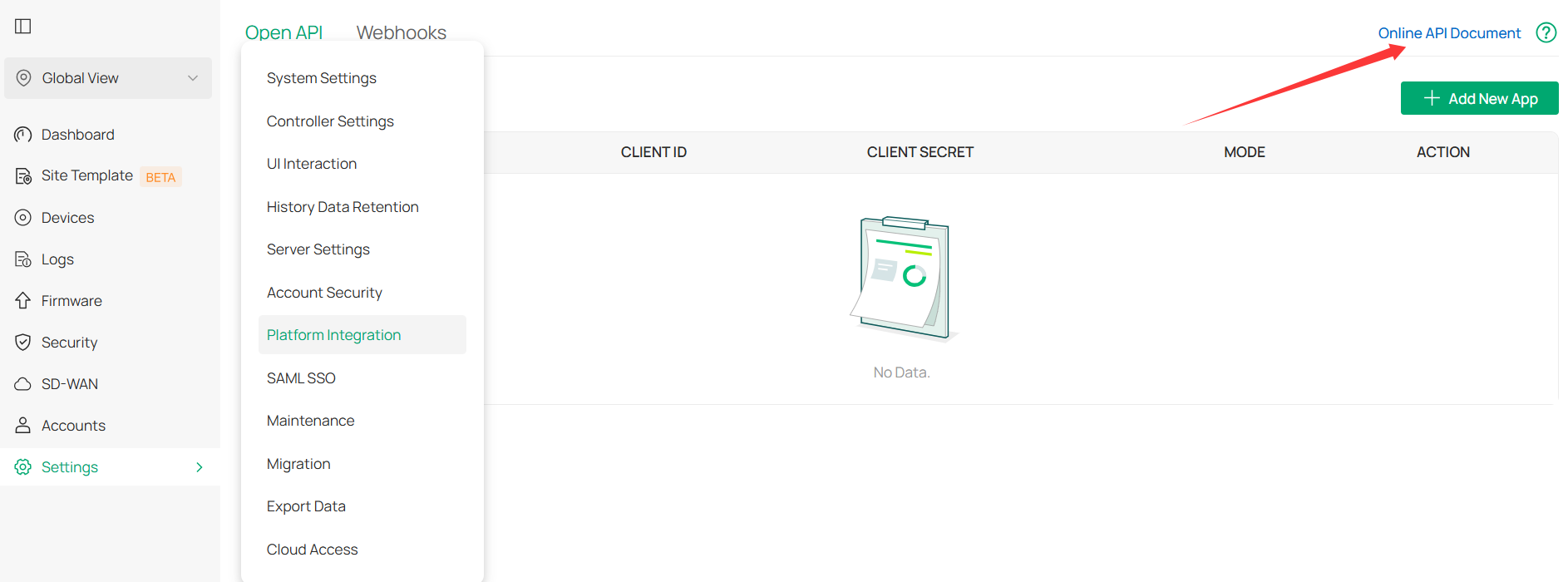
If still the same, please start a new thread to discuss your case separately.
- Copy Link
- Report Inappropriate Content
Information
Helpful: 2
Views: 175
Replies: 7
Voters 0
No one has voted for it yet.