
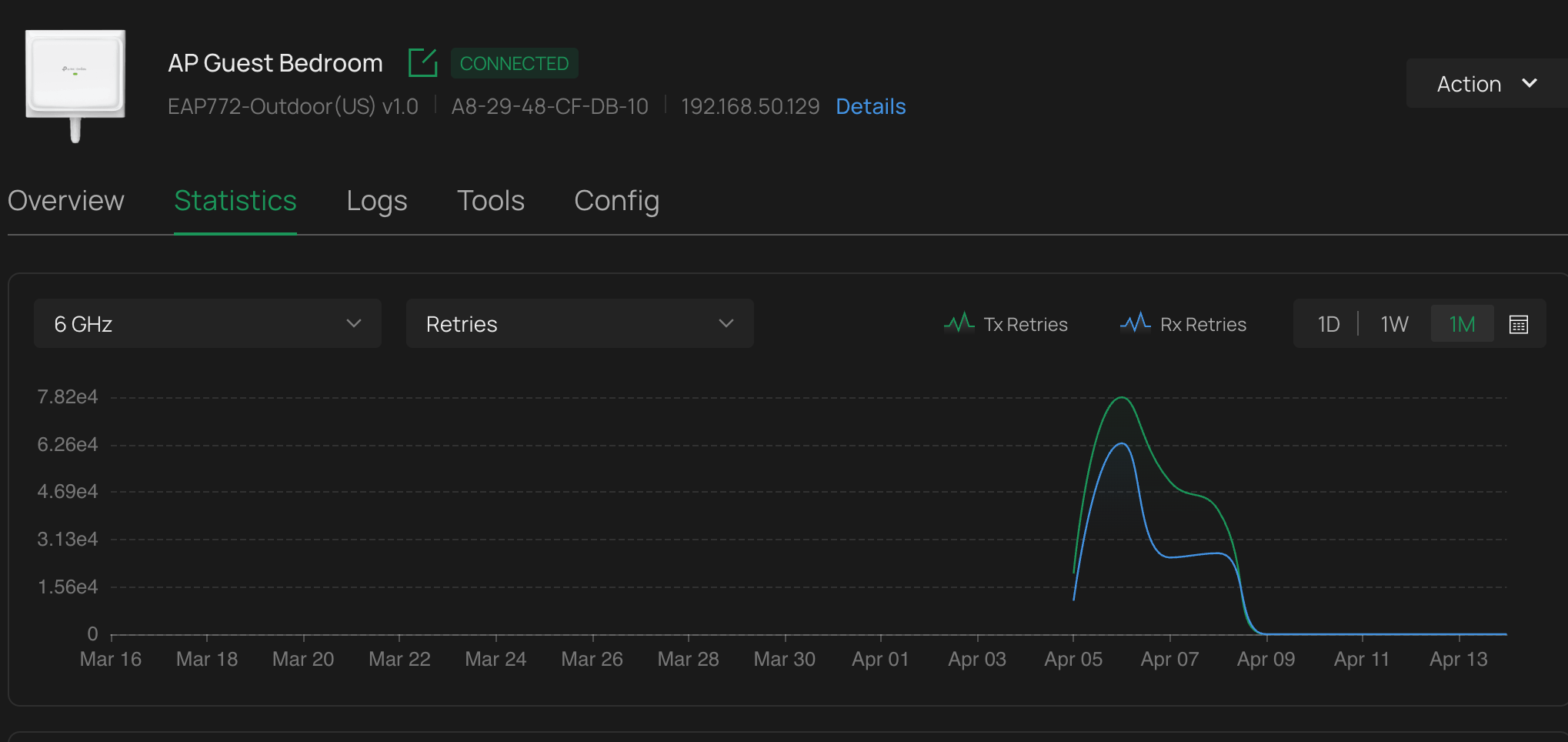
WHat could cause all these errors on an EAP772?

I have this AP in the attic, face down on the dry wall. Its sitting on 2 1" x 1" pieces of wood for airflow. All the insulation is cleared away. I have 3 other APs around the house all on non overlapping channels. Will reflections from the drywall cause errors and subsequent retries?
- Copy Link
- Subscribe
- Bookmark
- Report Inappropriate Content


Hi @Galt
Thanks for posting here.
Physical layer and environmental factors are the main causes of occasional, random retransmissions:
Signal Attenuation and Path Loss:
Device movement or subtle environmental changes cause momentary fluctuations in signal strength, dropping it below the receiver sensitivity.
Multipath Effects and Rayleigh Fading:
One of the primary causes. Signals arriving at the receiver via multiple paths through reflection and diffraction may interfere destructively due to phase differences, causing deep fading and a sudden sharp decline in signal quality. This is particularly common and random in mobile environments.
Interference:
- Co-channel interference: Nearby Wi-Fi networks or Bluetooth devices using the same frequency band cause transient collisions.
- Non-Wi-Fi interference: 2.4 GHz noise from devices such as microwaves, wireless cameras, Zigbee devices, or fluorescent lights.
- Adjacent-channel interference: Energy leakage from neighboring channels into the current channel.
Obstacles and Material Absorption:
Sudden movement of people or objects (e.g., metal, load-bearing walls, water) into the transmission path causes momentary signal blockage.
How to Determine Whether It Is an “Occasional” or “Systemic” Issue?
- Occasional retransmissions: Retransmission rate is relatively low (e.g., < 5–10%) and fluctuates significantly over time. Symptoms include occasional lags, slight crackling in voice calls, or brief buffering during video playback--this is your case.
- Systemic retransmissions: Retransmission rate remains consistently high (> 20%), indicating persistent issues such as severe interference, device failure, or extremely weak signals.
Occasional fluctuations and retransmissions in wireless transmissions are unavoidable. If no significant wireless connectivity issues are observed, it is advisable to disregard them.
- Copy Link
- Report Inappropriate Content

@Galt Drywall shouldn't be the cause; if anything I would test the connectivity of devices connected to that EAP. If the signal is weak, that would explain the high retry rate.
What is the reason you chose this outdoor AP for your guest bedroom?
- Copy Link
- Report Inappropriate Content
@NeilR_M Texas Heat - attic could see 140 degree temps in august, your indoor units are not rated for that. The connectivity is prett ygood as we are using the guest bedroom temporaily while we remodel so we are directly below the AP on a 10ft ceiling. Thanks for replying.
- Copy Link
- Report Inappropriate Content
@Galt Sounds like Texas haha. Are you experiencing any loss of network connectivity? Is there any network interference detected?
- Copy Link
- Report Inappropriate Content
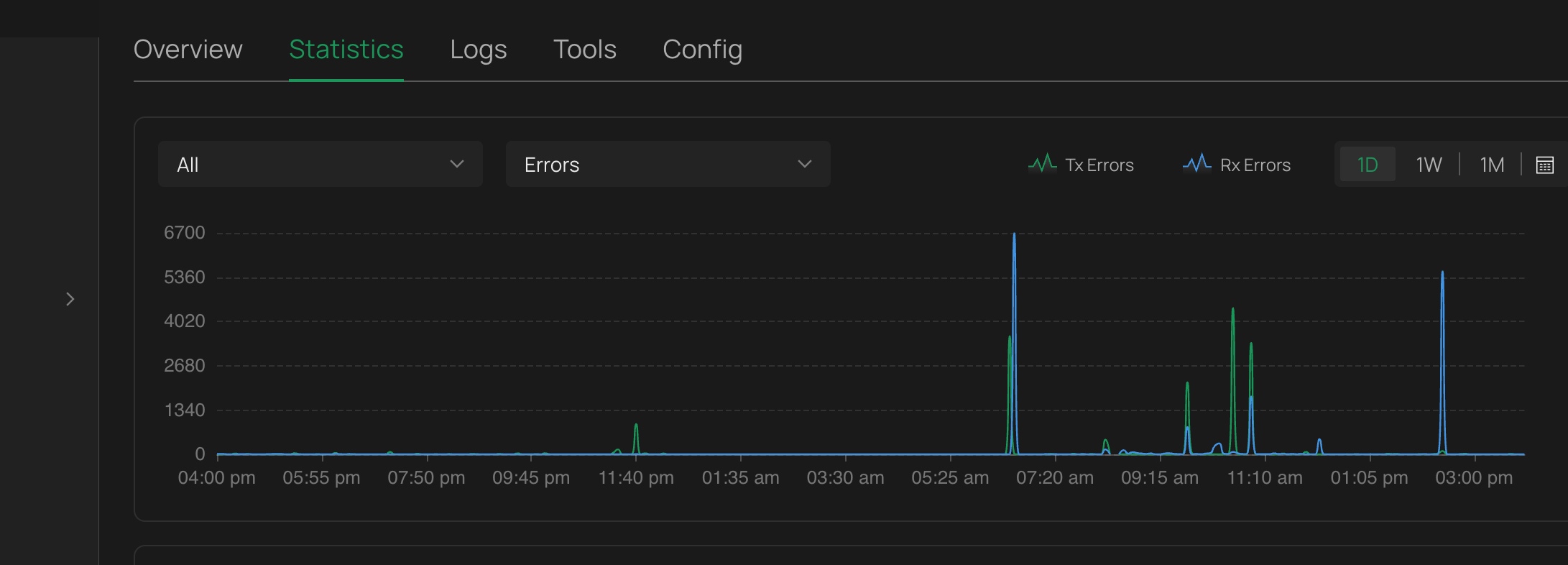
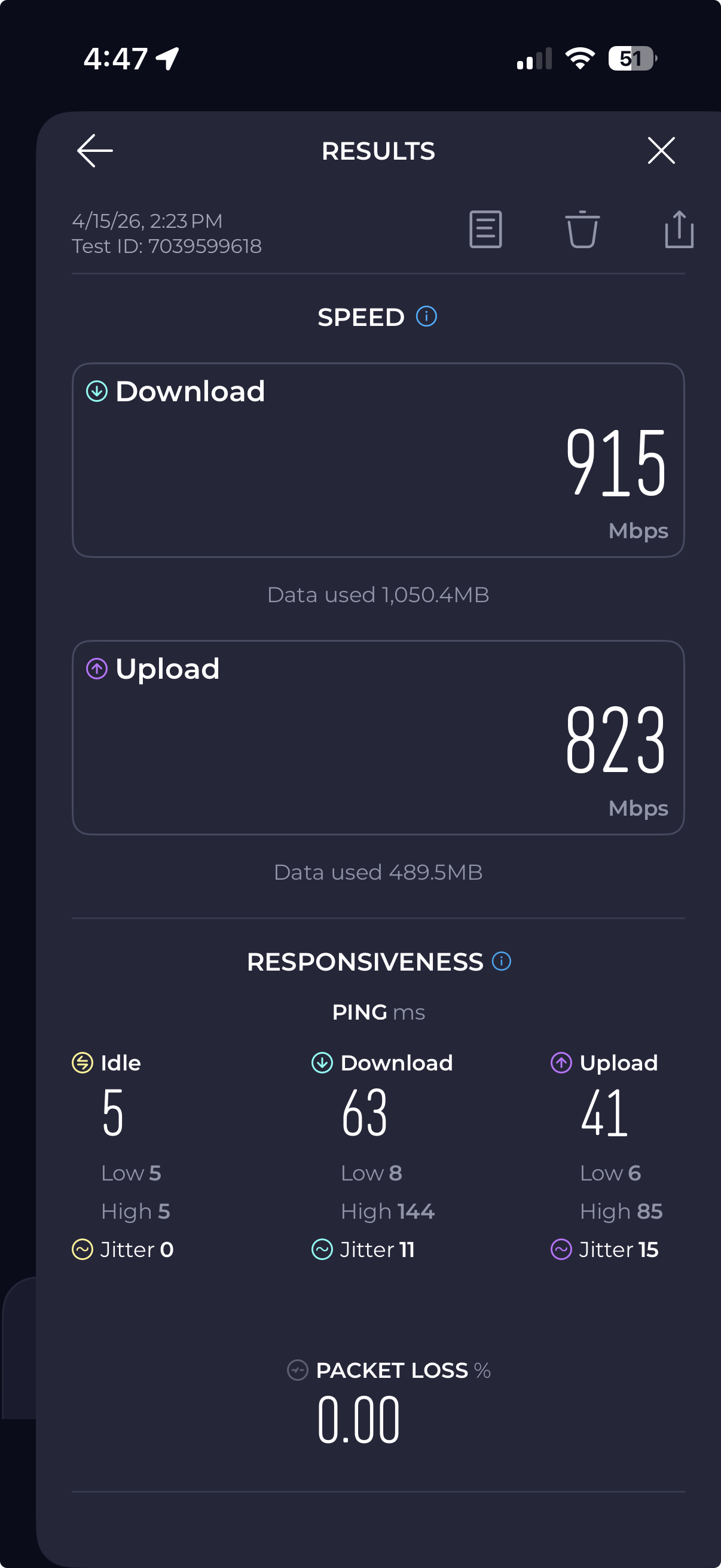
@NeilR_M Well I've confirmed that I have no interfering channels from other aps as ive managed the channel width on all bands to allow me non overlapping channels. This is the only AP i have 6Ghz running right now. I'm monitoring channel errors. For example this graph below, that peak to the right is about 2:30pm. The same time i stood in front of the AP and did a speed test with my iphone 16. ookla screen shot below the OC220 screen shot. BTW it would be nice to be able to download all the AP wireless config into an excel then upload the same after editing....
- Copy Link
- Report Inappropriate Content
@Galt You can always just back up the config before making any changes and restore later if that's what you're after when it comes to EAP configs...if you're managing with an Omada Controller you can even save them in a central location. Is it possible to test without the EAP being up against the drywall and see if you get the same errors? Since the device has omnidirectional antennas having it upright instead of flat against the drywall shouldn't affect the connection at all.
- Copy Link
- Report Inappropriate Content
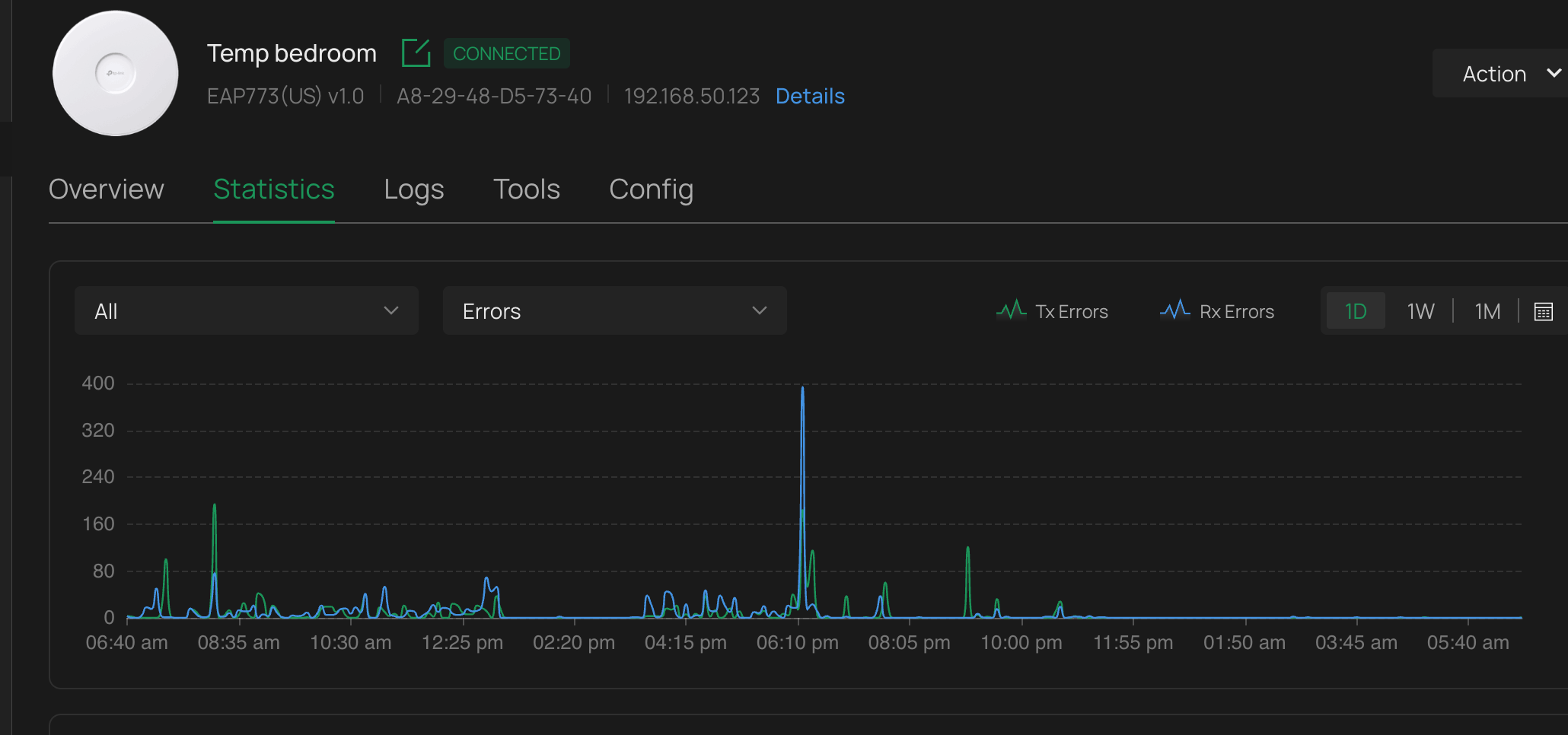
@NeilR_M Funny you should ask that. I'm running an experiment with a EAP773 that's just sitting on the bedroom drawer. I turned off the radios in the attic. I will monitor the errors for this setup. I did another interference scan and confirmed that there are no interfering channels from other APs. On the config stuff what would be nice is a single way to see all the wireless configs for all the APs at once so its easier to manage all channel assignments. I will continue to monitor for errors over the next few days,
- Copy Link
- Report Inappropriate Content
@Galt well i monitored the errors received for the test setup. As you can see on the vertical axis the scale has come down dramatically. I'm going to turn off this AP and turn on the one in the attic and let it run for 24 hrs to compare. No channel interface from other APs exist
- Copy Link
- Report Inappropriate Content
Hi @Galt
Thanks for posting here.
Physical layer and environmental factors are the main causes of occasional, random retransmissions:
Signal Attenuation and Path Loss:
Device movement or subtle environmental changes cause momentary fluctuations in signal strength, dropping it below the receiver sensitivity.
Multipath Effects and Rayleigh Fading:
One of the primary causes. Signals arriving at the receiver via multiple paths through reflection and diffraction may interfere destructively due to phase differences, causing deep fading and a sudden sharp decline in signal quality. This is particularly common and random in mobile environments.
Interference:
- Co-channel interference: Nearby Wi-Fi networks or Bluetooth devices using the same frequency band cause transient collisions.
- Non-Wi-Fi interference: 2.4 GHz noise from devices such as microwaves, wireless cameras, Zigbee devices, or fluorescent lights.
- Adjacent-channel interference: Energy leakage from neighboring channels into the current channel.
Obstacles and Material Absorption:
Sudden movement of people or objects (e.g., metal, load-bearing walls, water) into the transmission path causes momentary signal blockage.
How to Determine Whether It Is an “Occasional” or “Systemic” Issue?
- Occasional retransmissions: Retransmission rate is relatively low (e.g., < 5–10%) and fluctuates significantly over time. Symptoms include occasional lags, slight crackling in voice calls, or brief buffering during video playback--this is your case.
- Systemic retransmissions: Retransmission rate remains consistently high (> 20%), indicating persistent issues such as severe interference, device failure, or extremely weak signals.
Occasional fluctuations and retransmissions in wireless transmissions are unavoidable. If no significant wireless connectivity issues are observed, it is advisable to disregard them.
- Copy Link
- Report Inappropriate Content
Information
Helpful: 0
Views: 399
Replies: 8
Voters 0
No one has voted for it yet.