Authpoint SSO with Omada Software Controller / Temporary user is not within the validity period

Authpoint SSO with Omada Software Controller / Temporary user is not within the validity period

Authpoint SSO with Omada Software Controller / Temporary user is not within the validity period
2026-04-16 13:44:53 - last edited 2026-04-28 11:39:13
Hardware Version: V20
Firmware Version: 6.2.0.17

Hello

We manage our customers though our own Omada Software controller.

we use watchguard authpoint through our organization.

when i try to integrate the controller witch AuthPoint through SAML, i get the message : 

{"errorCode":-30199,"msg":"Temporary user is not within the validity period."}


I've seen the other thread, and the solution that the saml users must be part of only one group. this is absolutely not possible for a MSP company.


how could we possibly solve it? is it possible to see on the controller logs which group is presented by the users? is it possible to force an attribute on Watchguard Authpoint?


thanks for your help


best regards


Yvan


0
0
#1
1 Accepted Solution
Re:Authpoint SSO with Omada Software Controller / Temporary user is not within the validity period-Solution
2026-04-21 01:02:14 - last edited 2026-04-28 11:39:13

 Hi ,@Ivanovv 
Thank you for posting on our business forum.

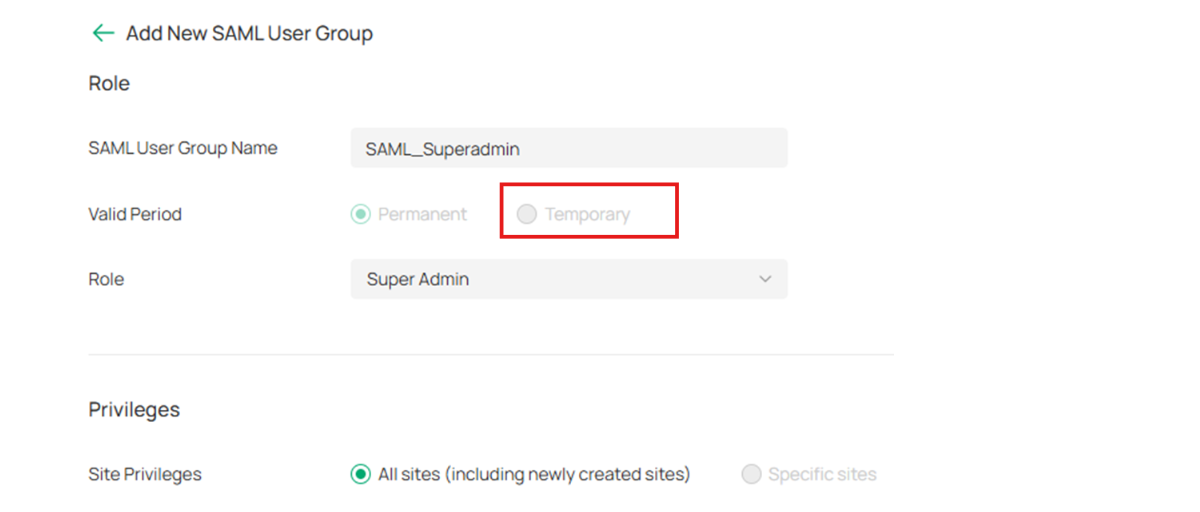
We noticed the error message you encountered indicates the user is outside the validity period. Could you please confirm whether you selected the temporary user option during your SAML SSO setup, and configured a valid active time period for the account?


Below is the relevant configuration guide for your reference:How to Configure SAML SSO on Omada Controller | Omada Network Support

Could you please re-attempt the setup per the guide and check if the issue still persists? A gentle reminder: if you need permanent single sign-on access for the user, please select the corresponding permanent validity option during configuration.


Recommended Solution
0
0
#2
1 Reply
Re:Authpoint SSO with Omada Software Controller / Temporary user is not within the validity period-Solution
2026-04-21 01:02:14 - last edited 2026-04-28 11:39:13

 Hi ,@Ivanovv 
Thank you for posting on our business forum.

We noticed the error message you encountered indicates the user is outside the validity period. Could you please confirm whether you selected the temporary user option during your SAML SSO setup, and configured a valid active time period for the account?


Below is the relevant configuration guide for your reference:How to Configure SAML SSO on Omada Controller | Omada Network Support

Could you please re-attempt the setup per the guide and check if the issue still persists? A gentle reminder: if you need permanent single sign-on access for the user, please select the corresponding permanent validity option during configuration.


Recommended Solution
0
0
#2