
Telekom VOIP Settings

Hallo,
ich habe Probleme einen Telekom VoIP Account in Betrieb zunehmen. Habe testweise einen easybell Account erfolgreich testen können, doch eine Telekom Nummer registriert sich nicht.
Hat Jemand damit Erfahrungen gemacht und kann helfen?
Der Telefonie-Anbieter wird von TP-Link in den Anbieterprofilen mitgeliefert. Ich habe also keine eigene Vorlage erstellt.
- Copy Link
- Subscribe
- Bookmark
- Report Inappropriate Content


To better assist in your case, we have now created a ticket on your behalf and the ticket ID is TKID260501352.
Please check your mail box and ensure the support ticket is well received.
Alternatively, you can contact your local support team and get the support promptly. Contact | TP-Link
Thanks!
- Copy Link
- Report Inappropriate Content
Thanks for reaching out to TP-Link Business Forums.
You can refer to this How to Configure VoIP on Omada Router - Business Community
If you fail to configure VoIP feature, please let us know the error message.
Hope it may help.
- Copy Link
- Report Inappropriate Content
@Gabriel-TP
Thank you for your reply. But we are working with the omada controller.
At the Stand Alone mode it works fine, but not with Omada controlled mode.
Grettings
- Copy Link
- Report Inappropriate Content
If you manage the gateway in Controller mode, you can refer to the User Guide - Chapter 5.8 Configure VoIP Settings on Page 118-130: Omada SDN Controller_V6.2_User Guide | Omada Network Support
- Copy Link
- Report Inappropriate Content
@Gabriel-TP
Thank you for your advice. I can read and understand the manual, but the error is not in front of the PC, but is Omada itself.
- Copy Link
- Report Inappropriate Content
Could you please upload some screenshot of your settings and the error messages so we can know it better?
- Copy Link
- Report Inappropriate Content
Please
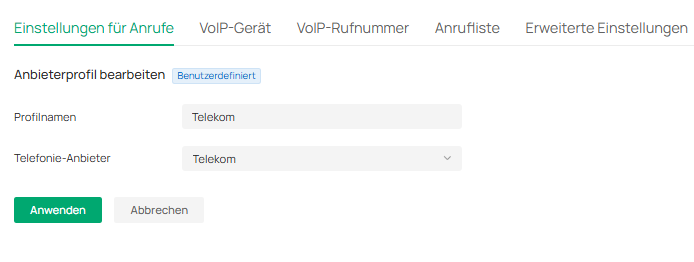
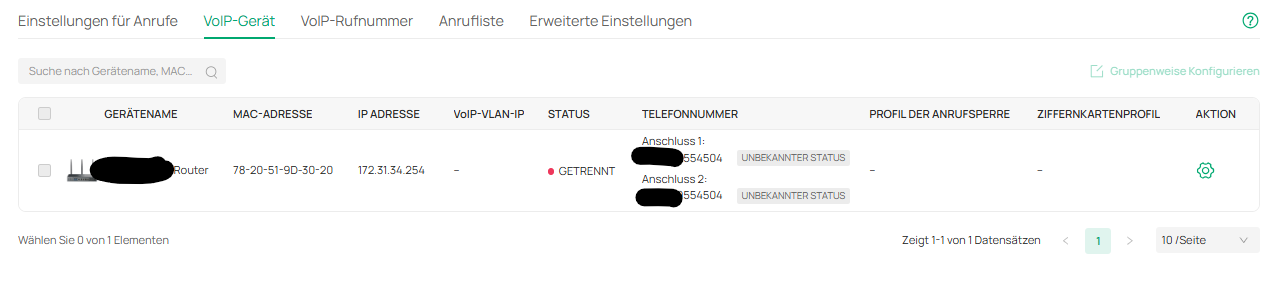

I have testet successfully the login data...
Sometimes the stauts says "nicht registriert = not connectet"
- Copy Link
- Report Inappropriate Content
To better assist in your case, we have now created a ticket on your behalf and the ticket ID is TKID260501352.
Please check your mail box and ensure the support ticket is well received.
Alternatively, you can contact your local support team and get the support promptly. Contact | TP-Link
Thanks!
- Copy Link
- Report Inappropriate Content
Information
Helpful: 0
Views: 258
Replies: 7
Voters 0
No one has voted for it yet.