Low Wi‑Fi throughput on EAP670 (stuck at ~26 MB/s) despite 2.5G/10G backbone

Low Wi‑Fi throughput on EAP670 (stuck at ~26 MB/s) despite 2.5G/10G backbone

Low Wi‑Fi throughput on EAP670 (stuck at ~26 MB/s) despite 2.5G/10G backbone
a week ago - last edited Friday
Model: EAP670  
Hardware Version: V1
Firmware Version: 1.3.7

Hi everyone,

I’m experiencing unexpectedly low Wi‑Fi performance with my EAP670 and would appreciate any insights from the community. I’ll keep this as short and clear as possible.

---

1. Hardware & Firmware Versions

  • Omada Controller OC200: 2.25.11
  • Gateway ER8411: 1.3.6
  • EAP670: 1.3.7
  • Switch: ZX300S‑16T2XS (16×2.5G + 2×10G SFP+)
  • Client device: MacBook Pro (Wi‑Fi 6, 2×2 “Tahoe” chipset)

---

2. Network Topology

  • ER8411 ↔ Switch via 10G SFP+
  • EAP670 ↔ Switch via 2.5G RJ45
  • Server ↔ Switch via wired connection
  • All cables tested and working properly
  • Wired LAN performance is perfect

Backbone is 10G + 2.5G, no bottlenecks on the wired side.

---

3. The Issue

When transferring files from a wired server to the MacBook over Wi‑Fi, I consistently get:

  • ~26 MB/s (~208 Mb/s)

This is far below what I would expect from an EAP670 + Wi‑Fi 6 client on 80 MHz.

---

4. Wi‑Fi Configuration (EAP670)

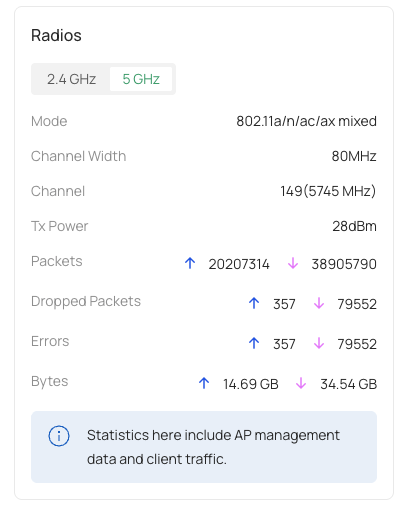
  • Band: 5 GHz
  • Channel: 149
  • Channel width: 80 MHz
  • TX power: 25 dBm
  • Security: WPA3‑Personal
  • No bandwidth limits configured
  • AP uplink confirmed at 2.5G

---

5. Measurements

  • PHY TX rate (Omada): ~290 Mb/s
  • macOS “Transmit Rate” shows similar values
  • Throughput (~208 Mb/s) matches the low PHY rate

However, with this hardware combination, I would normally expect:

  • PHY: 600–1200 Mb/s
  • Real throughput: 400–800 Mb/s (50–100 MB/s)

So the Wi‑Fi link is clearly modulating much lower than it should.

---

6. What I’ve Already Checked

  • AP is definitely linking at 2.5G
  • Switch ↔ ER8411 link at 10G
  • Cables remade and tested
  • Tests performed close to the AP
  • Reviewed features like:
    • Airtime Fairness
    • Band Steering
    • Minimum RSSI
    • Fast Roaming
  • No wired bottlenecks anywhere

---

7. My Question

Why would the EAP670 + MacBook Pro (Wi‑Fi 6, 2×2) be stuck around 290 Mb/s PHY, even with:

  • 80 MHz channel width
  • Channel 149
  • Strong signal
  • Clean 2.5G uplink
  • Latest firmware on all devices
  • WPA3‑Personal enabled

Has anyone seen similar behavior on the EAP670?

Could WPA3 be impacting PHY rates on this model?

Any recommended settings for channel, TX power, or advanced features?

Thanks in advance for any help or suggestions.

0
0
#1
1 Accepted Solution
Re:Low Wi‑Fi throughput on EAP670 (stuck at ~26 MB/s) despite 2.5G/10G backbone-Solution
Friday - last edited Friday

  @Vincent-TP 
Thanks for the support. I discovered the problem: I was previously using an ER7206 as the gateway and migrated to an ER8411, which inherited all the previous configurations. After many attempts, I decided to rebuild my wireless network from scratch; that solved the issue and everything returned to the expected speeds.

Recommended Solution
1
1
#4
4 Reply
Re:Low Wi‑Fi throughput on EAP670 (stuck at ~26 MB/s) despite 2.5G/10G backbone
a week ago

Hi  @Randson 


Thanks for posting here.

Where did you get the PHY speed? Is it from the MacBook or from the controller interface? Please share a screenshot of the page with us.


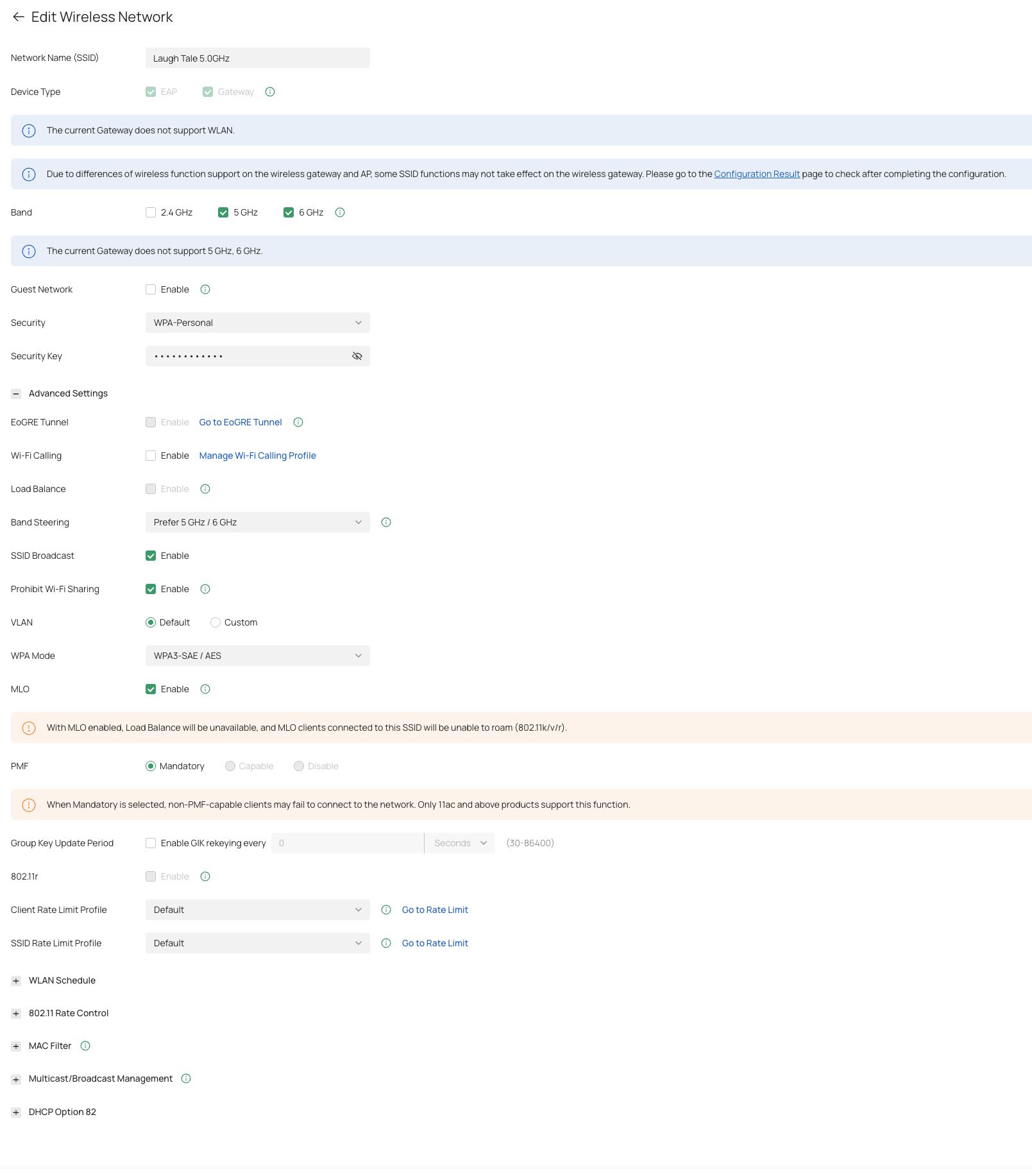
In addition, please share some screenshots of the SSID config page.


In the meantime, you can test the real link speed by iperf. Below is a guide. Please test and let us know the result:

How to use iPerf to test the speed between the EAP and the wireless client

0
0
#2
Re:Low Wi‑Fi throughput on EAP670 (stuck at ~26 MB/s) despite 2.5G/10G backbone
Friday - last edited Friday

  @Vincent-TP 

Sorry for the late reply — it was a busy week, and thanks for offering to help.

The SSID configuration is shown in the attached screenshot. I couldn’t run iPerf directly on the EAP because the device drops into the proprietary EAP> CLI and does not expose a normal shell to install or run additional binaries.

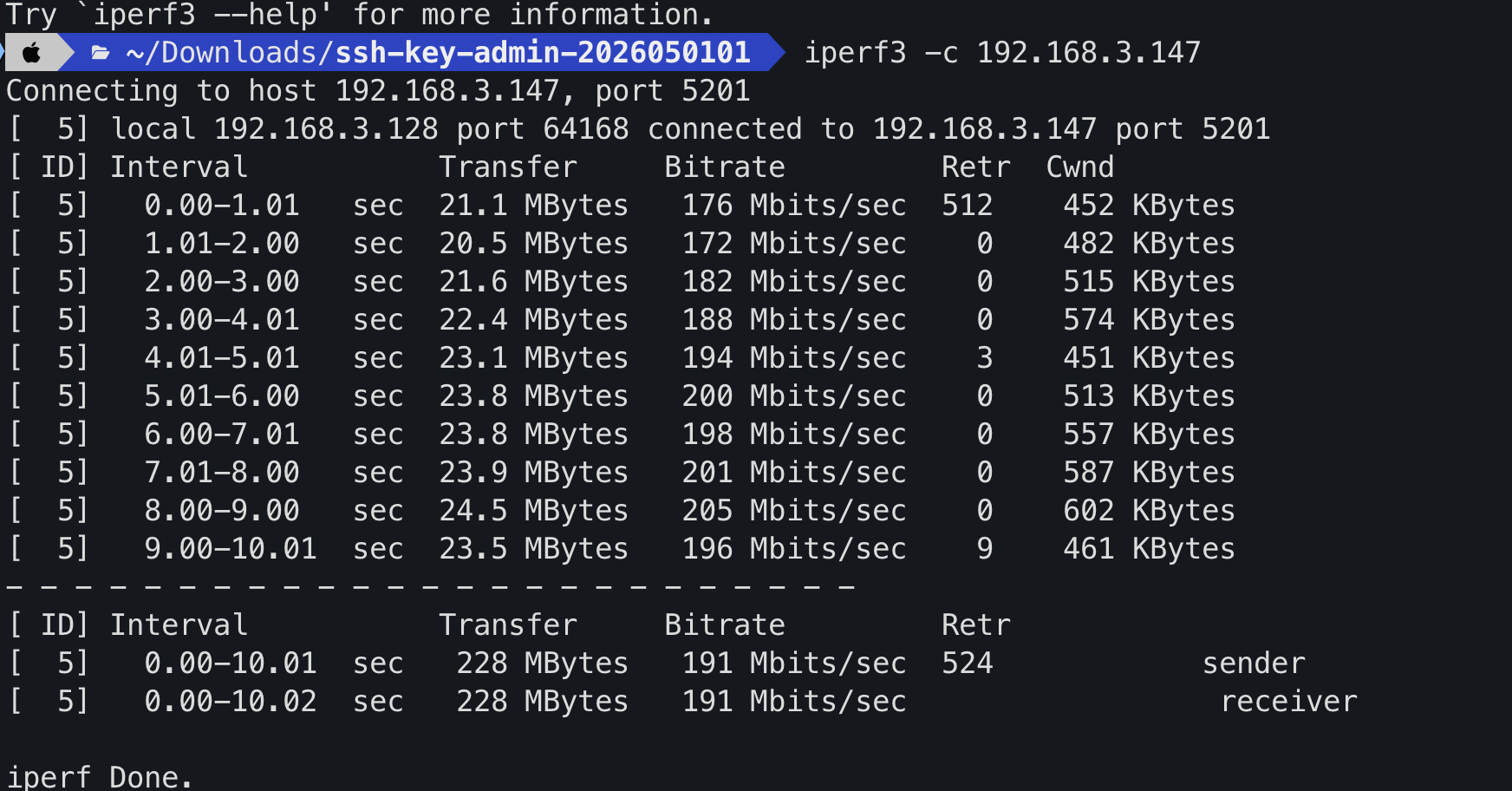
To test throughput I installed iPerf3 on a local NAS and used the NAS as the iPerf server; I ran the client from my laptop. That produced usable results; running iPerf directly on the EAP was not possible with the current firmware/CLI.

iPerf3 results are basically the same as the transfer tests I ran between my PC and the NAS and as my internet speed tests. Note: my home internet used to work correctly at some point. I suspect there may be an issue with firmware 1.3.7, but I haven’t been able to downgrade yet to test that.

If you’d like, I can share the exact iPerf commands I used and the NAS configuration details, or run additional tests and post the results.


1
1
#3
Re:Low Wi‑Fi throughput on EAP670 (stuck at ~26 MB/s) despite 2.5G/10G backbone-Solution
Friday - last edited Friday

  @Vincent-TP 
Thanks for the support. I discovered the problem: I was previously using an ER7206 as the gateway and migrated to an ER8411, which inherited all the previous configurations. After many attempts, I decided to rebuild my wireless network from scratch; that solved the issue and everything returned to the expected speeds.

Recommended Solution
1
1
#4
Re:Low Wi‑Fi throughput on EAP670 (stuck at ~26 MB/s) despite 2.5G/10G backbone
Yesterday

Hi  @Randson 


Great to hear that the issue has been resolved! Thank you so much for sharing the solution.

If you encounter any further problems or have additional questions, feel free to reach out. We're here to help! 😊

0
0
#5