ER7206 New scale for Load Balancing Weight

ER7206 New scale for Load Balancing Weight

ER7206 New scale for Load Balancing Weight
Monday - last edited Wednesday
Model: ER7206 (TL-ER7206)  
Hardware Version: V2
Firmware Version: 2.3.1 Build 20260325 Rel.78157

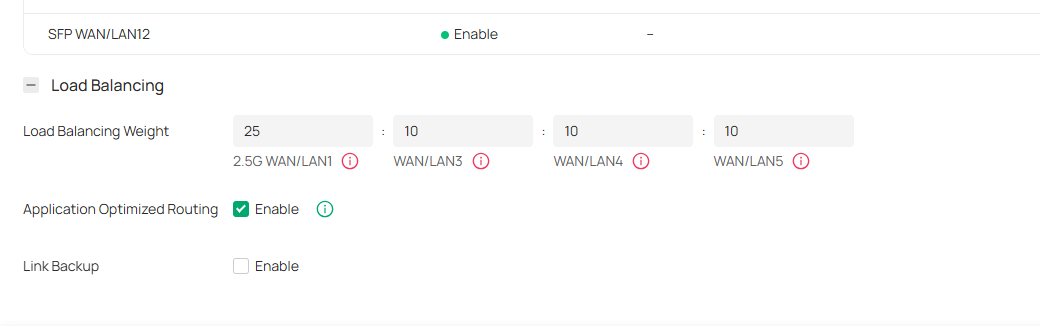
I want to know the scale for the ratio of network traffic that each WAN port carries. By default, all WAN was assigned with a 10.


Is it from 1 to 10? 10 has more sessions assigned than 1? I can't find it in documentation.


Thanks in advance for your orientation.

0
0
#1
1 Accepted Solution
Re:ER7206 New scale for Load Balancing Weight -Solution
Tuesday - last edited Wednesday

Hi @KenoUno 

Thanks for reaching out to TP-Link Business Forums.


By default, all WAN should be assigned with 1 (for a gig port). However, in some other cases like ER7412-M2, the default ratio will be set to 25:10 (a 2,5G port vs a 1G port).

You can customize the settings based on the actual ISP bandwidth, e.g., 2:1 (ISP 1 for 200Mbps and ISP 2 for 100Mbps).

The larger the value, the more traffic it will carry.

Recommended Solution
1
1
#2
1 Reply
Re:ER7206 New scale for Load Balancing Weight -Solution
Tuesday - last edited Wednesday

Hi @KenoUno 

Thanks for reaching out to TP-Link Business Forums.


By default, all WAN should be assigned with 1 (for a gig port). However, in some other cases like ER7412-M2, the default ratio will be set to 25:10 (a 2,5G port vs a 1G port).

You can customize the settings based on the actual ISP bandwidth, e.g., 2:1 (ISP 1 for 200Mbps and ISP 2 for 100Mbps).

The larger the value, the more traffic it will carry.

Recommended Solution
1
1
#2