
WiFi Calling Works, but Does Not Log
WiFi Calling Works, but Does Not Log

I have an Omada OC300 controller managed network with the ER7412-M2 gateway. I have configured a WiFi calling profile for AT&T and assigned it to my primary SSID. Wifi calling works and it did before I did this, but I cannot see it logging anything in the WiFi Calling Summary. OC300 is on version 6.2.10.111.34.11 Build 20260408 Rel.58628. I have 9 access points scattered throughout the house and attached workshop and barn.
Any suggestions on what I should check?
Here is the wifi calling profile for AT&T.
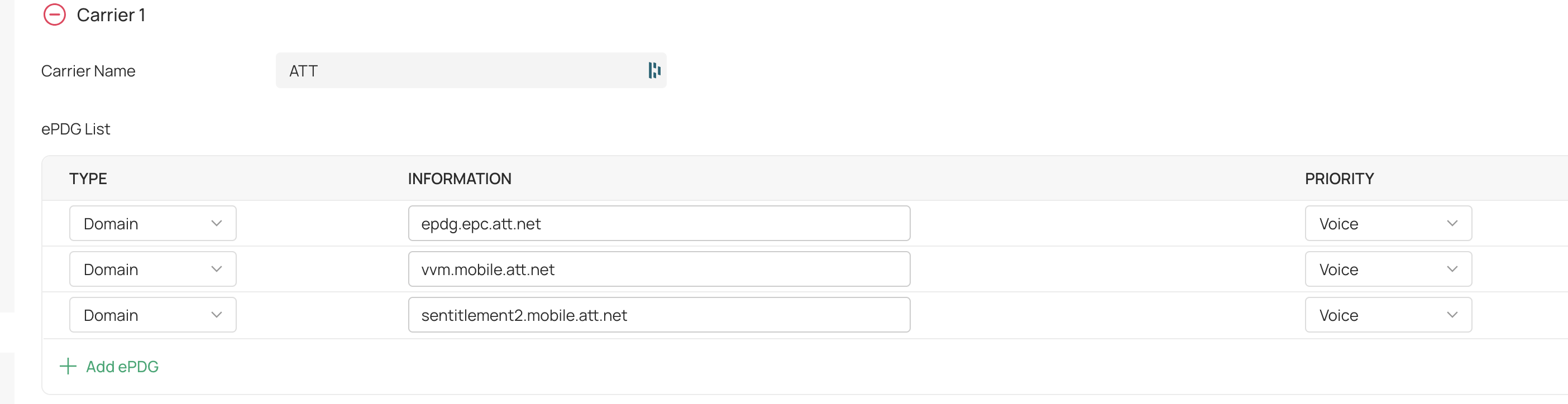
I also configured NAT port forwarding rules for each of my WAN providers for UDP Ports 500, 4500 and TCP 143 to the public address of each WAN provider. Did not make a difference.
- Copy Link
- Subscribe
- Bookmark
- Report Inappropriate Content


@BulldogEngineer There shouldn't be a delay; it might have been the AP needing to grab its config from the controller? Did any reboots occur?
Either way, glad to see that it's logging calls now. Also, I removed your picture, as it included your device serial number and MAC address.
- Copy Link
- Report Inappropriate Content
@NeilR_M As part of my troubleshooting I rebooted access points, controller. It just started working. I made another call and it logged fine. Slight delay I would say.
Appreciate the help.
- Copy Link
- Report Inappropriate Content
@BulldogEngineer I just installed a new EAP775 wall plate and upgraded firmware to the latest 1.5 release. Wifi logging works on it as well, so looks like this issue is fixed on these newer access points. EAP772, EAP725 wall plate and now EAP775 wall plate all log wifi calling. Does not seem to work on EAP610, EAP615, or EAP655s though.
- Copy Link
- Report Inappropriate Content

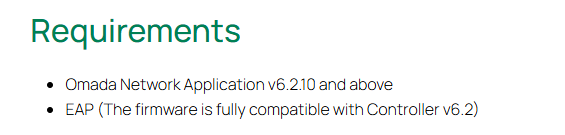
This WIFI Calling feature requires EAP fully adapted to V6.2 firmware. How to use Wi-Fi Calling in your Omada Ecosystem | Omada Network Support
As those EAPs like EAP655-Wall are not adapted to V6.2 yet, this functionality may not work on them temporarily.
- Copy Link
- Report Inappropriate Content
Information
Helpful: 0
Views: 713
Replies: 14
Voters 0
No one has voted for it yet.