
ISP IP on omada controlller

Hi guys,
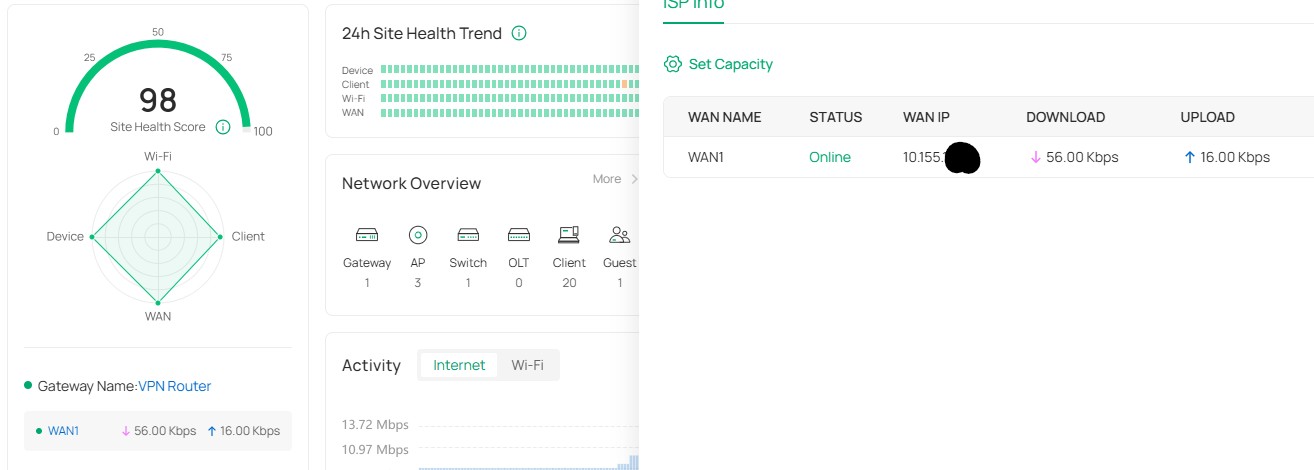
How can I see the ISP IP thru my omada controller, according to my ISP the IP I gave them is my internal IP and I know is not true.
If I click on the dashboard WAN1 it take me to ISP info and in there WAN IP. Is that one from ISP right?
- Copy Link
- Subscribe
- Bookmark
- Report Inappropriate Content


Hi @AngelaGarza
Thanks for posting here.
From your screenshot, it looks like the WAN1 port of the Omada gateway is connected to another router.
Because this router has NAT enabled, unless special settings are configured, the Omada gateway cannot obtain the upstream router’s WAN IP—i.e., the ISP IP you’re trying to find.
If you want to know your network’s public egress IP, the easiest way is to search Google for “what’s my IP”.
If you want the Omada gateway to use the ISP public IP address, you may configure the front router in bridge mode.
- Copy Link
- Report Inappropriate Content

- Copy Link
- Report Inappropriate Content
- Copy Link
- Report Inappropriate Content
Yes, if you have an ISP router connected to the Omada router, that could be true. I see you have a private IP on the WAN, but you haven't said anything about which router you have or how you have connected the router, so it's just a guess.
- Copy Link
- Report Inappropriate Content
Hi @AngelaGarza
Thanks for posting here.
From your screenshot, it looks like the WAN1 port of the Omada gateway is connected to another router.
Because this router has NAT enabled, unless special settings are configured, the Omada gateway cannot obtain the upstream router’s WAN IP—i.e., the ISP IP you’re trying to find.
If you want to know your network’s public egress IP, the easiest way is to search Google for “what’s my IP”.
If you want the Omada gateway to use the ISP public IP address, you may configure the front router in bridge mode.
- Copy Link
- Report Inappropriate Content
Information
Helpful: 0
Views: 112
Replies: 4
Voters 0
No one has voted for it yet.