Network configuration changes by itself

Network configuration changes by itself

Network configuration changes by itself
a week ago - last edited Saturday
Model: EAP650-Outdoor  
Hardware Version: V1
Firmware Version:

I have a mesh system including two buildings.  The connection across a parking lot is handled by two EAP650 Outdoor units, and there are local access points at both locations.


All access points are in Mesh configuration.  The connection between the two outdoor units is very good, with signal strength at about -60.  However, for unknown reasons the system changes to make the indoor AP at the second building take over the link, and then the outdoor unit simply acts as a local AP.  The signal strength then is about a -80, and the performance is terrible.


If I "forget" both access points, and then re-add them in the correct order-outdoor first, then indoor, everything will be fine for a while, but then for some unknown reason it will switch back, and the performance suffers.


Can anyone give me any idea why this is happening, and how to prevent it?  Is there a way to lock the connection between the two outdoor access points?  


Thanks for any suggestions.

0
0
#1
1 Accepted Solution
Re:Network configuration changes by itself-Solution
a week ago - last edited Saturday

Hi @rchalk 

Thanks for reaching out to TP-Link Business Forums.


Omada AP mesh network is programmed to constantly scan the environment and "optimize" the path based on a metric that includes signal strength (RSSI), channel interference, and current load. It's dynamic not static. When it detects the interruption, the mesh AP will switch to another nearby AP with a better signal.

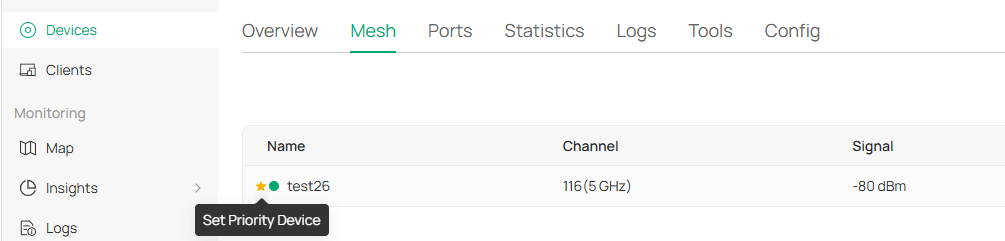
If you just want it to connect to a fixed AP, you can navigate to Site View > Devices > mesh AP > Mesh and set the corresponding AP as the priority AP.

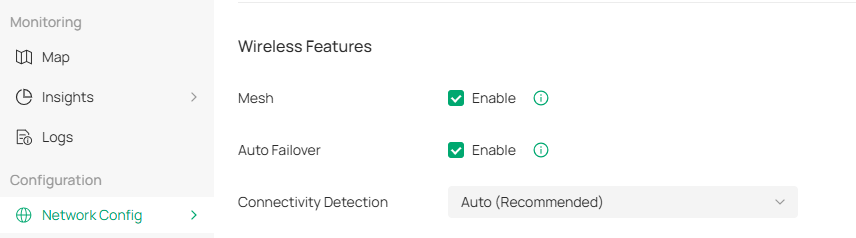
Also, you can navigate to Network Config > Site Settings > Wireless Features > Auto Failover and diable it.

However, please note that APs will not automatically connect to a new uplink AP if the original one fails. This would also cause network disruption.

Recommended Solution
0
0
#2
2 Reply
Re:Network configuration changes by itself-Solution
a week ago - last edited Saturday

Hi @rchalk 

Thanks for reaching out to TP-Link Business Forums.


Omada AP mesh network is programmed to constantly scan the environment and "optimize" the path based on a metric that includes signal strength (RSSI), channel interference, and current load. It's dynamic not static. When it detects the interruption, the mesh AP will switch to another nearby AP with a better signal.

If you just want it to connect to a fixed AP, you can navigate to Site View > Devices > mesh AP > Mesh and set the corresponding AP as the priority AP.

Also, you can navigate to Network Config > Site Settings > Wireless Features > Auto Failover and diable it.

However, please note that APs will not automatically connect to a new uplink AP if the original one fails. This would also cause network disruption.

Recommended Solution
0
0
#2
Re:Network configuration changes by itself
a week ago

  @Gabriel-TP Thank you for your suggestions.  I have made the appropriate settings changes.


0
0
#3