
Wifi on 6ghz

Hi
I have just added 2 EAP 775 wall to my network. I just want to know if an SSID is created only using 6Ghz. Should that work ? As I tired doing that but the SSID created with only 6ghz doesnt even show up in search when I am near 775 Eap. Thanks
- Copy Link
- Subscribe
- Bookmark
- Report Inappropriate Content


Hi everyone,
Thank you all for your attention to the issues discussed here.
Regarding the previously reported "insufficient power" issue, our team has identified the cause as abnormal display of certain fields in our App. We plan to roll out a fix for this issue in version V5.3 (please note that the actual release version may be adjusted according to practical situations).
As for reported 6GHz-related issues, our team has examined the performance of both the Controller and EAP devices, and confirmed that 6GHz configuration instructions from the Controller are delivered correctly, and EAP devices also can broadcast 6Ghz Singal. We have determined that the problem is most likely caused by end devices (such as mobile phones or computers): end devices do not support 6GHz due to firmware or hardware limitations.
If you are also encountering related issues, please refer to the troubleshooting steps below:
1.Please check whether the SSID of your EAP is broadcast normally. If you have two EAP devices, you can run interference detection in the Controller (Devices>EAP> Manage Device> Statistics)to check whether the other EAP can receive the 6GHz signal.
2.Try to set Beacon Interval to custom mode with a value of 100ms.
3.Verify whether your end device explicitly supports local 6GHz wireless regulations.
Thank you very much for your cooperation.
- Copy Link
- Report Inappropriate Content
@Nathan-TP thank you
also this is provably only for India user the only way I could make 6ghz work on my apple devices was by switching off Network and wireless option under system services. My windows 11 laptop picked up 6ghz straightaway after changing to intel Ax210 but for apple devices the above work around was the only option. Thanks team TPLINK.
- Copy Link
- Report Inappropriate Content

@Vishlamba You should be able to create an SSID with only the 6GHz band, yes. Is the device you are using to check capable of using 6GHz? Also, are you managing the EAPs with a controller? Has the config had time to apply to the EAPs?
- Copy Link
- Report Inappropriate Content
Hi, I am using iphone 17 pro max and 16 pro max to check 6Ghz SSID but it can't even see it, I am using a controller OC300 to manage all my APs. Yes it's been more then 12 hours since i created the SSID.
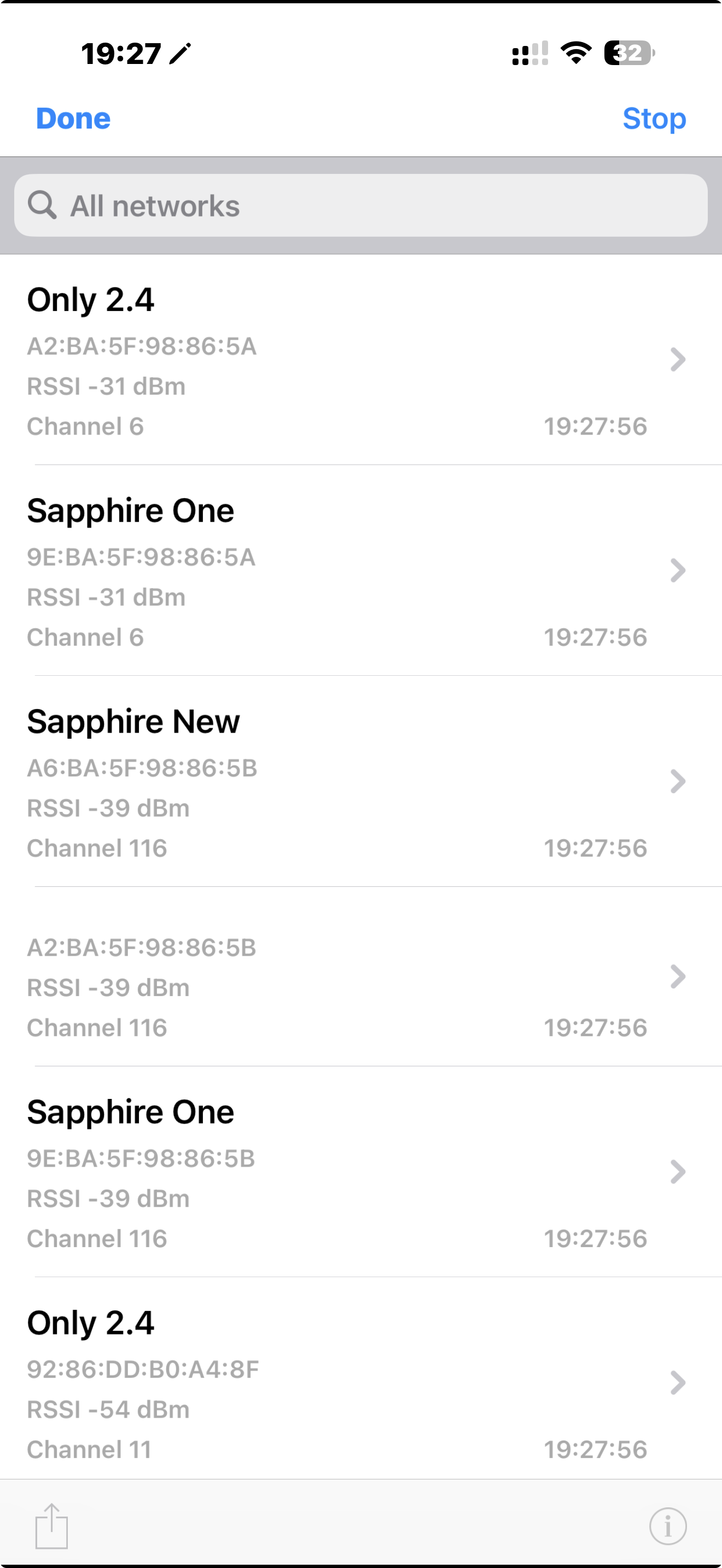
I have also tried using an app to see avaiable SSID near 775, not the 6Ghz SSID not shwoing Please see the Screen Shot attached,
Sapphire One is + 2.4/5Ghz/ 6 ghz
Sapphire New is 5 Ghz and 6 Ghz
Only 2.4 is 2.4 Ghz Only
and I made one naming only 6 Ghz, that doesnt show up ?
Thanks.
- Copy Link
- Report Inappropriate Content
Hi I also wanted to know if SG2428P switch can provide enough power to a Eap 775 wall ? and still waiting on the answer for 6ghz SSID solution ? Thanks
- Copy Link
- Report Inappropriate Content
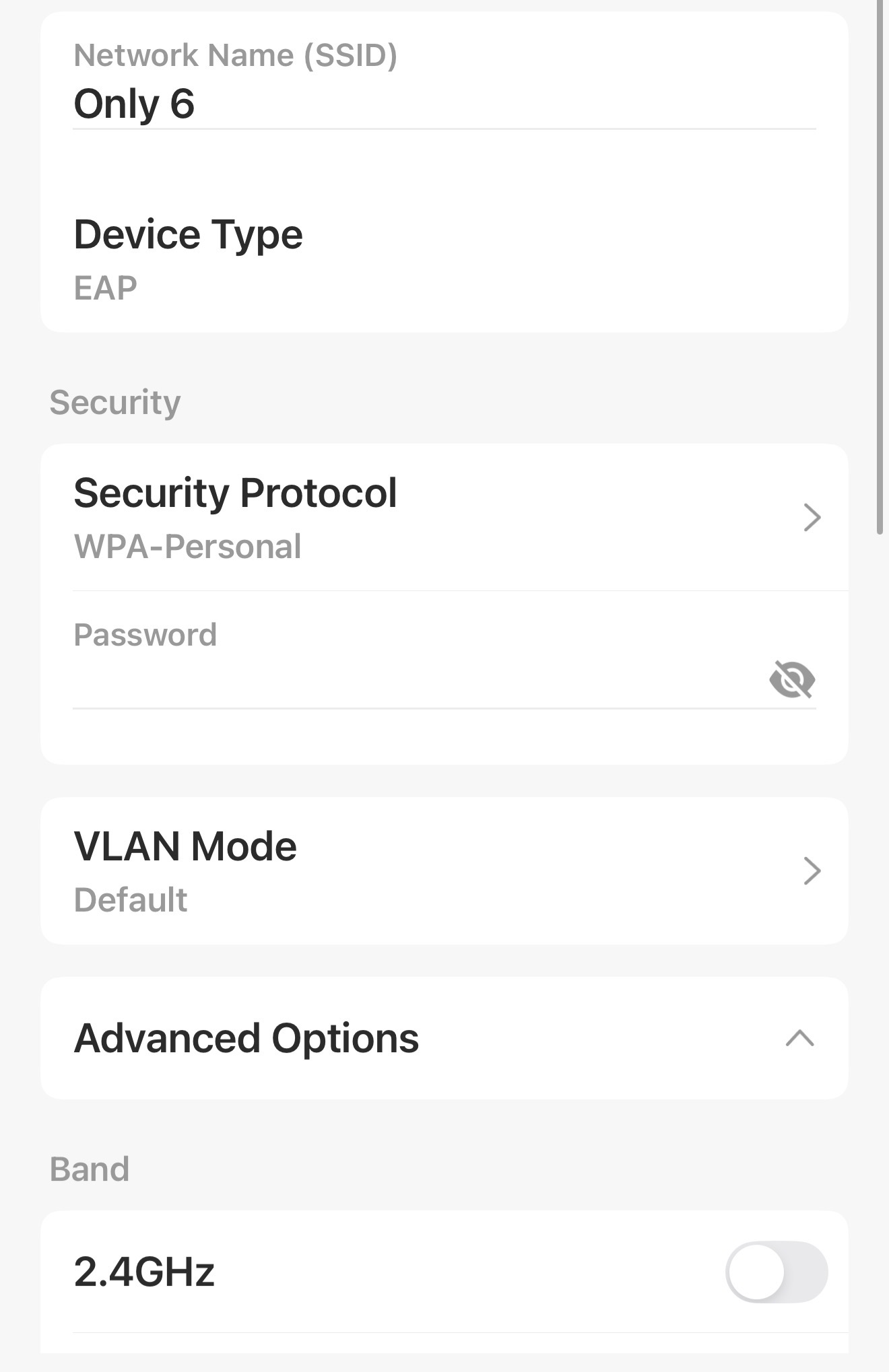
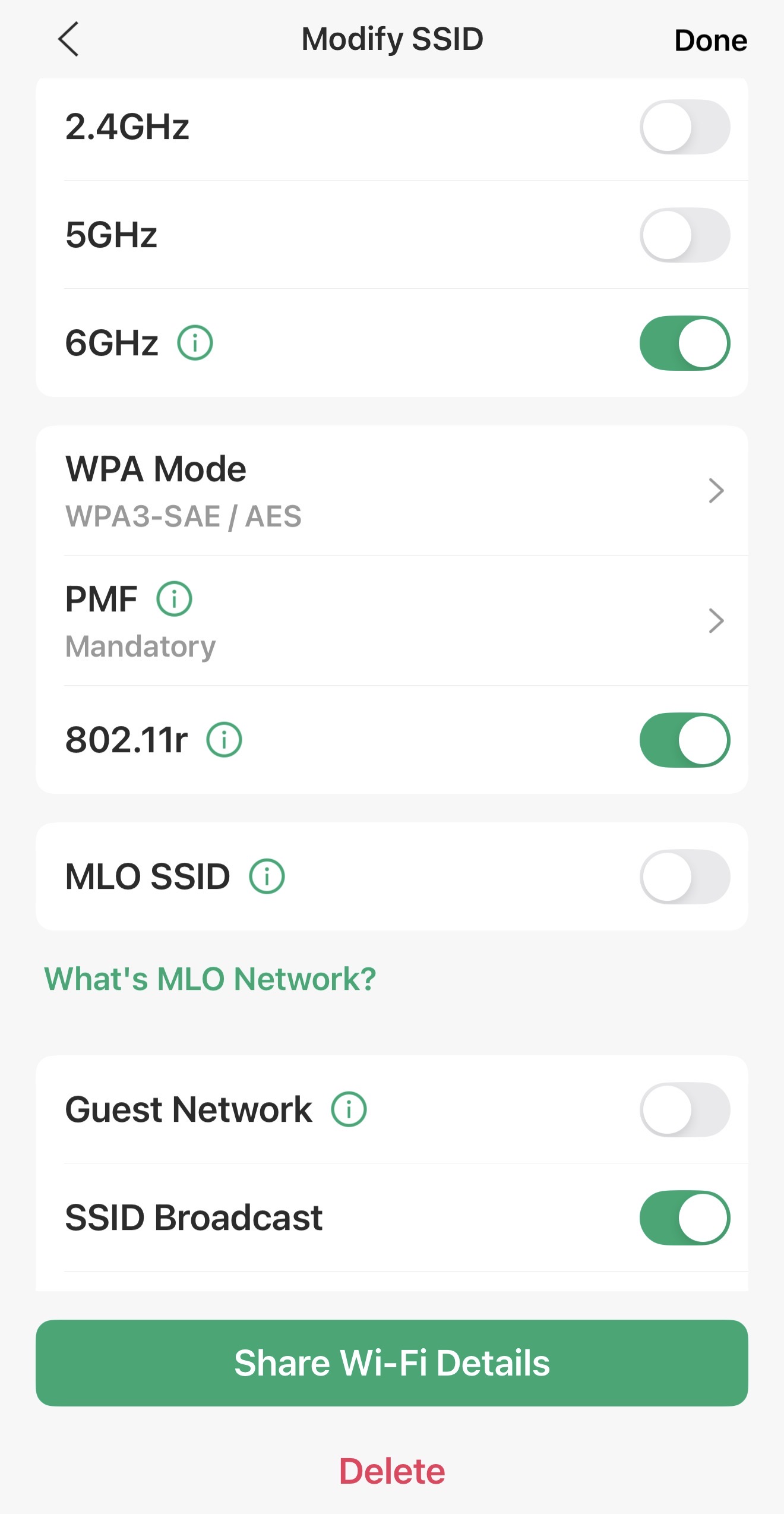
@Vishlamba Yes, it will be able to power it on. As for your 6GHz network not displaying, what are the security settings on the 6GHz SSID? I just tested with an EAP772 and confirmed with WPA-Personal + WPA3-SAE/AES as the WPA mode works just fine.
- Copy Link
- Report Inappropriate Content
@NeilR_M Hi
My security setting is the same WPA-Personal + WPA3-SAE/AES. Please see the screen shots attached. I can confirm after these settings also I cant see 6Ghz network it been a few days now that I am running this SSID. Thanks
- Copy Link
- Report Inappropriate Content
@Vishlamba Can you turn off 802.11r on that SSID and try again?
- Copy Link
- Report Inappropriate Content
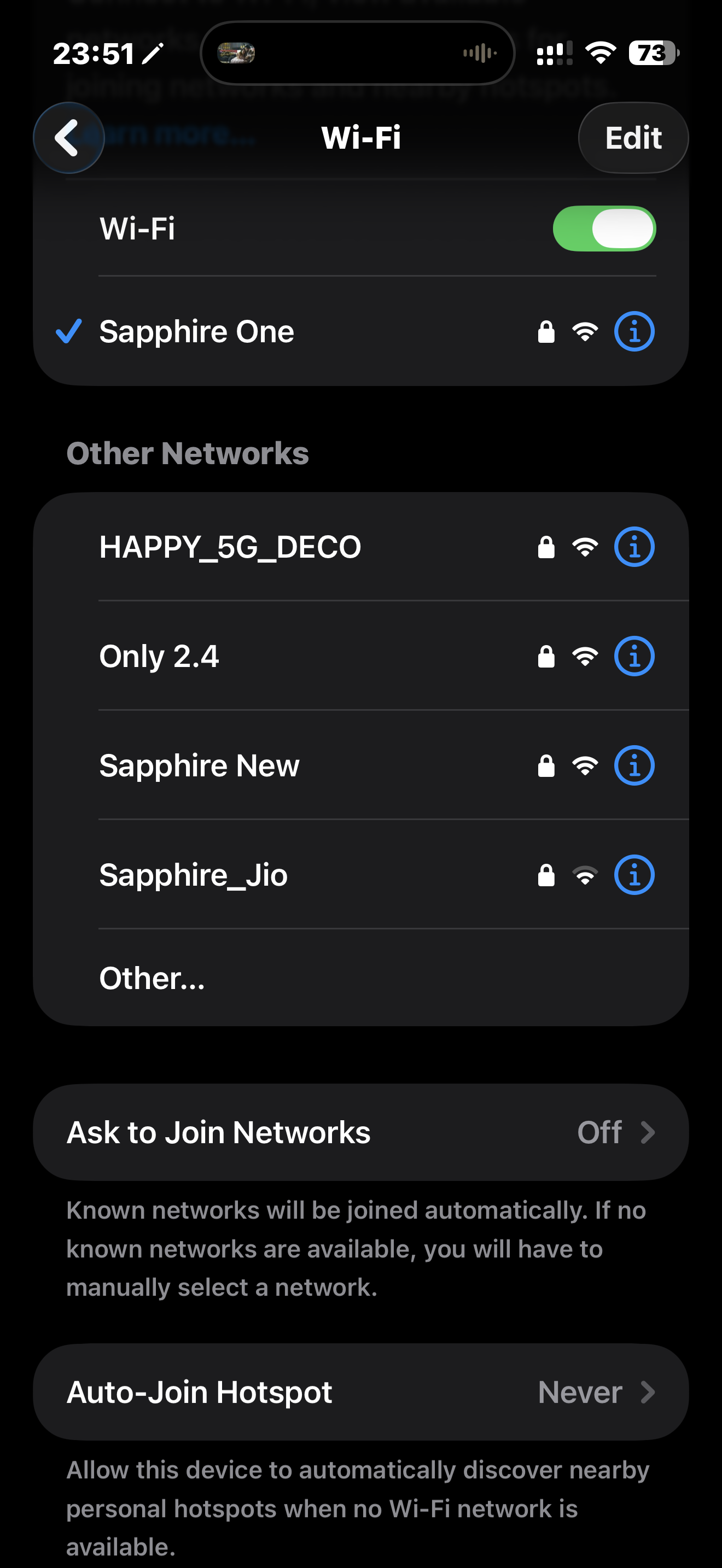
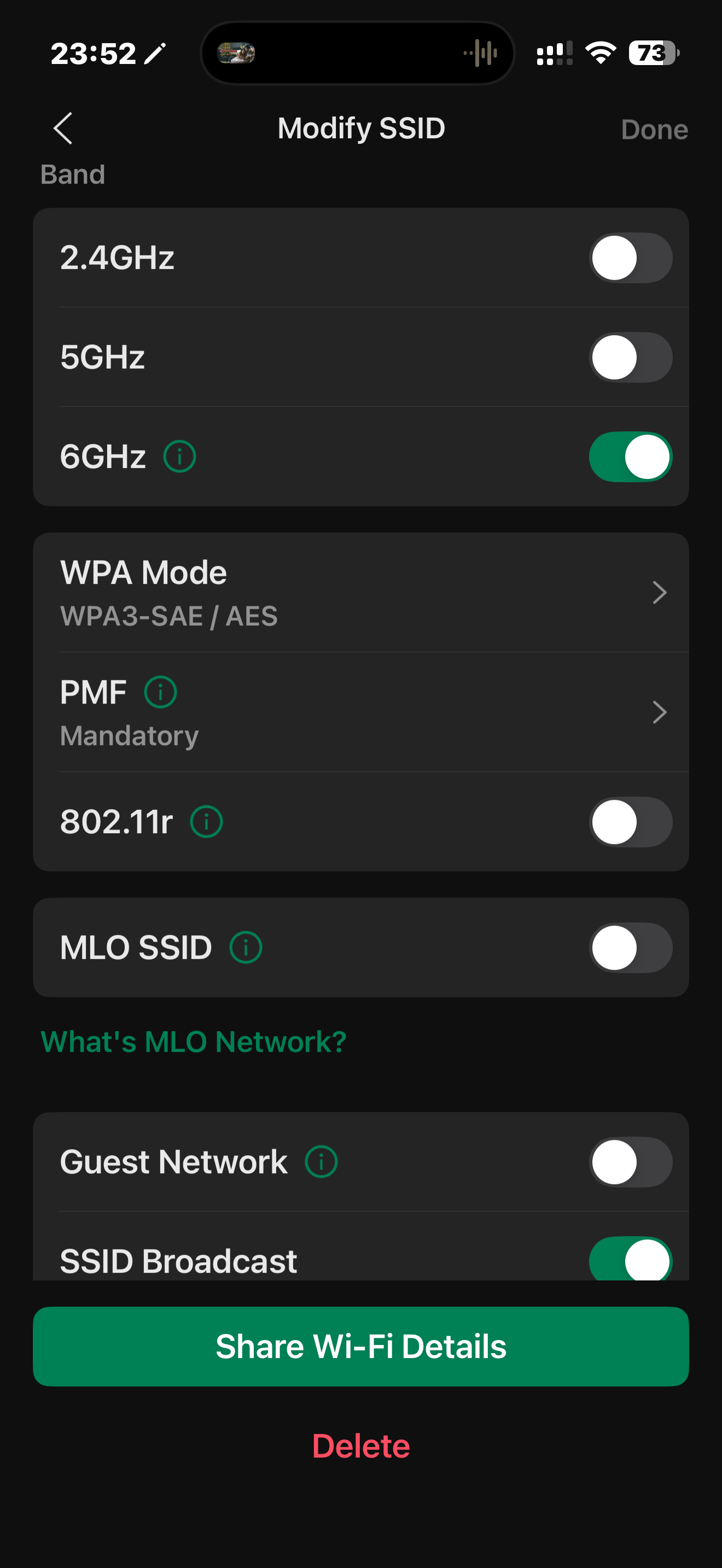
@NeilR_M hi
No luck switched off 802.11r, still can't see SSID. PFA screen shots can't see SSID Only 6
- Copy Link
- Report Inappropriate Content
@Vishlamba I'd factory reset the device and try again, unfortunately I don't have an EAP775-Wall on hand to test but other EAPs that support 6GHz have shown no issues showing a 6GHz SSID.
If it still has an issue after a factory reset + a firmware upgrade, I'd open a ticket with support here to see what else they can find: Contact Technical Support!
You can submit the ticket with the following information to move the process along smoothly.
Subject: [Forum Escalation][ID 863748]
Forum Nickname: Vishlamba
Thread URL: https://community.tp-link.com/en/business/forum/topic/863748
Model & Version: EAP775-Wall V1 Firmware Version 1.5.1
Description:
Any Other Relevant Information (Logs, Config Files, Images, etc.):
- Copy Link
- Report Inappropriate Content
Hi, @Vishlamba
To better assist you, I've created a support ticket via your registered email address and escalated it to our support engineer to look into the issue. The ticket ID is [TKID260556917], please check your email box and ensure the support email is well received. Thanks!
- Copy Link
- Report Inappropriate Content
- Copy Link
- Report Inappropriate Content
Information
Helpful: 0
Views: 1147
Replies: 25
Voters 0
No one has voted for it yet.