Troubleshooting SG3210XHP-M2 Ports Appear to Go Offline when Connected to SX3008F via DAC LAG

Troubleshooting SG3210XHP-M2 Ports Appear to Go Offline when Connected to SX3008F via DAC LAG

Troubleshooting SG3210XHP-M2 Ports Appear to Go Offline when Connected to SX3008F via DAC LAG
a week ago
Model: TL-SG3210XHP-M2  
Hardware Version: V2
Firmware Version: 2.0.10 Build 20250121 Rel.50059


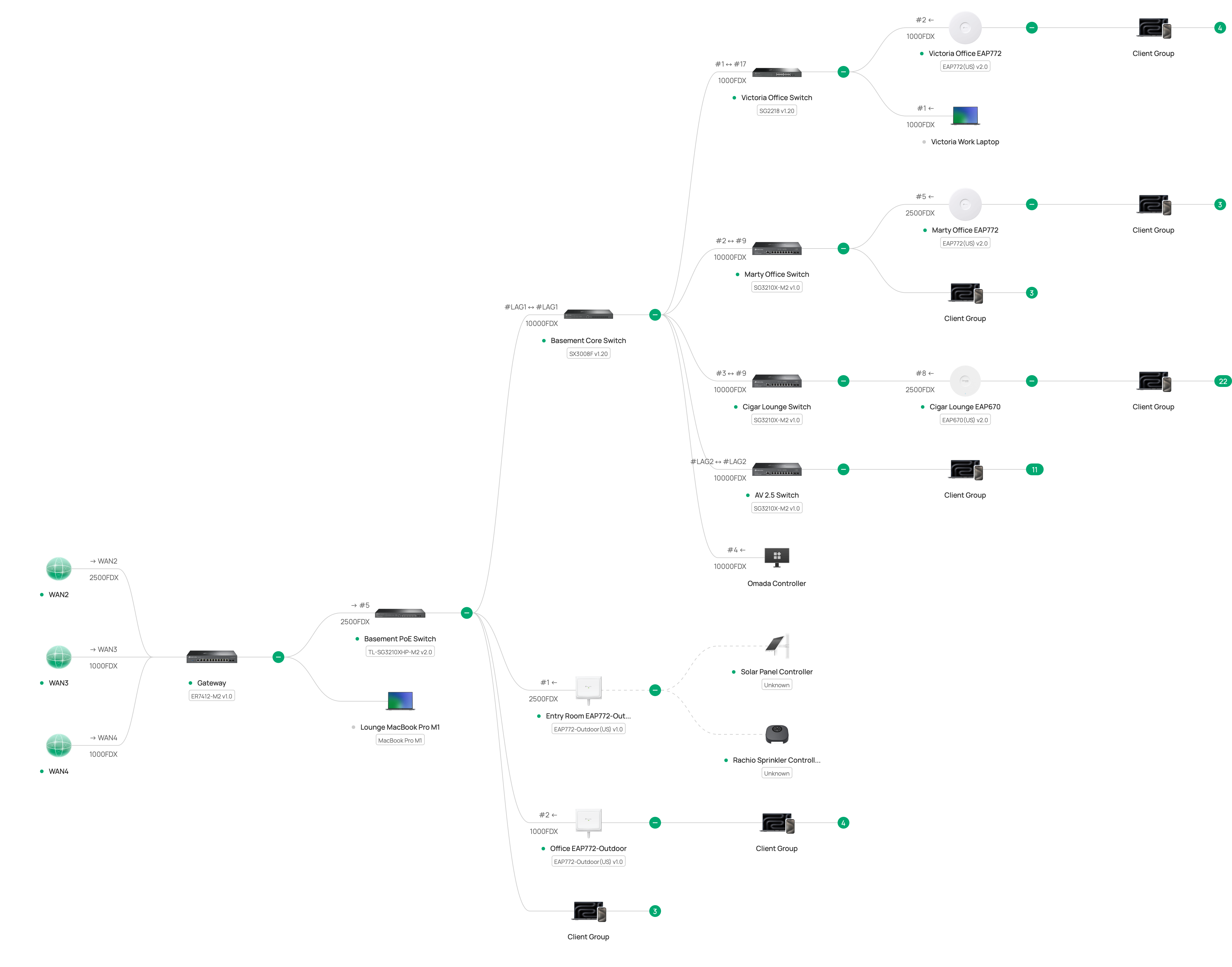
I have attached a topology and photograph below but the topology is a bit misleading. The problem started a week ago when I started using VLANs. Let me explain.


Before, the basic topology was as below, and worked well for several months.


PRIOR WORKING LAYOUT

3x ISPs <=1gb and 2.5 gb copper=> ER7412-M2 <=2.5gb copper=> SG3210X-M2 <=2x 10gb OS2 LAG=> SX3008F <=2x 10gb DAC LAG=> SG3210XHP-M2


Because I wanted to move the gateway to a rack away from the ISP modems, I created VLANs for the WANs: WAN1, WAN2, WAN3 and feed the gateway, which is now near the SG3210XHP-M2.


CURRENT PHYSICAL LAYOUT

3x ISPs <=1gb and 2.5 gb copper WAN1 WAN2 WAN3=>  SG3210X-M2 <=2x 10gb OS2 LAG=> SX3008F <=2x 10gb DAC LAG=> SG3210XHP-M2  <=1gb and 2.5gb copper WAN1 WAN2 WAN3 Default=> ER7412-M2


THE PROBLEM

After configuring the VLANs and relocating the gateway, everything worked well for several days and then everything appeared to go offline. The APs stopped working and the controller reported offline. I restarted devices until things started working again. Two days ago it happened again. At that time, I noticed that the SG3210XHP-M2 showed activity on all ports but the SX3008F showed no blinking lights for the LAG ports. I restarted the SX3210-M2, SX3008F, and the SG3210XHP-M2: the network came back. Today it happened again during work hours (which was very uncool). Again the SG3210XHP-M2 showed activity on all ports but the SX3008F showed no blinking lights for the LAG ports. I resatarted the SG3210XHP-M2 and the issue was resolved. I can find nothing in any of the logs. For now, I have unplugged one of the DACs between the SX3008F and the SG3210XHP-M2 in case this is LAG-related.


How can I troubleshoot this?


CURRENT TOPOLOGY
 

e932c0dca83b4f45be39f2fcff3e4079


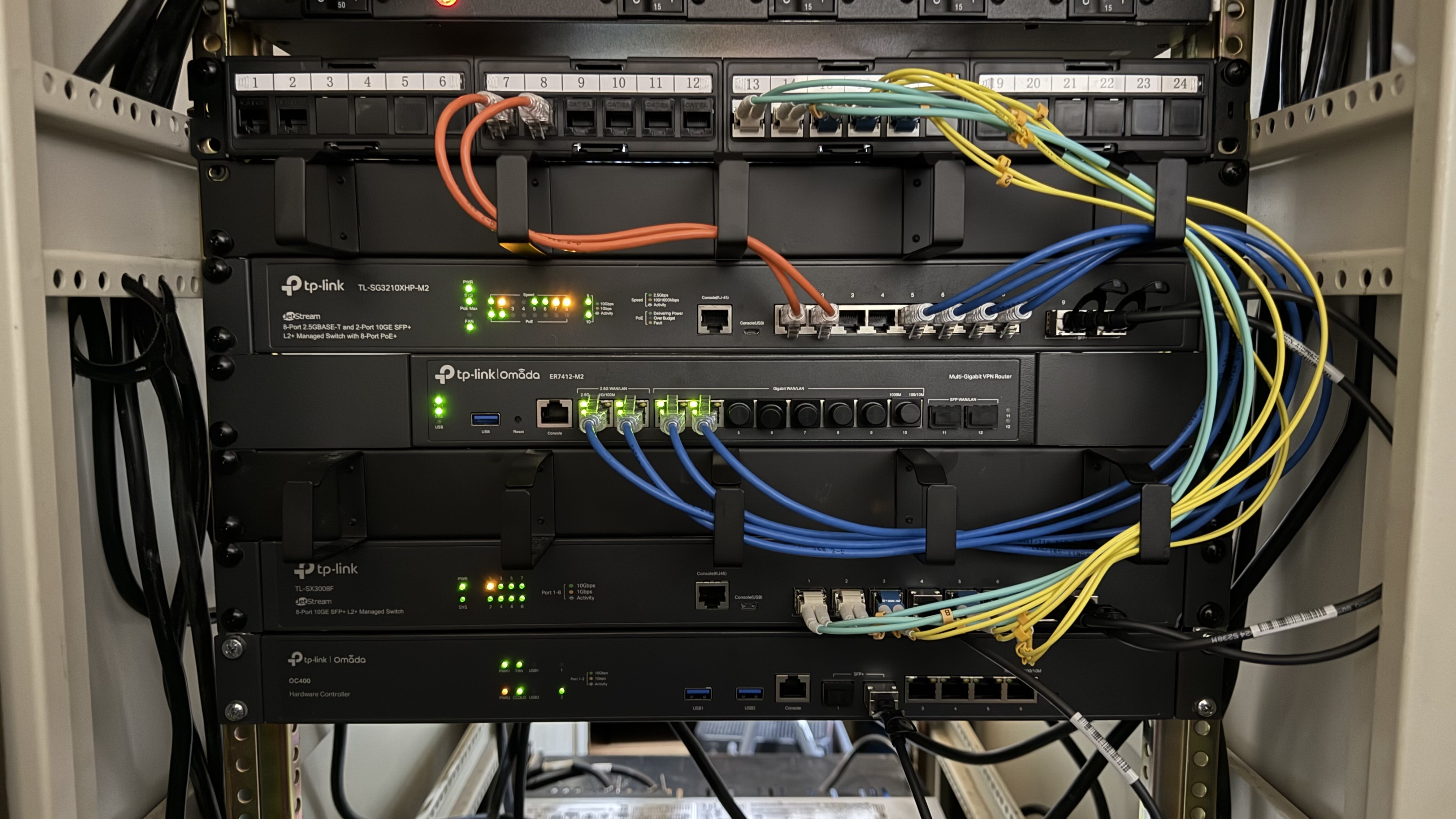
PHOTOGRAPH OF CURRENT LAYOUT


987dd084be6c43d2a1329b8c34a82a7c

0
0
#1
14 Reply
Re:Troubleshooting SG3210XHP-M2 Ports Appear to Go Offline when Connected to SX3008F via DAC LAG
a week ago

Hi  @Dr_Marty 


Thanks for posting here.

Based on your description, it seems the LAG line may be loose. If convenient, we recommend replacing the LAG cable.


To understand the situation better, I want to confirm some details:

1. After configuring the VLANs and relocating the gateway, everything worked well for several days and then everything appeared to go offline. The APs stopped working and the controller reported offline.

>>>Do you mean all SDN devices, including the gateway router, all the switches and all the connected EAPs? Or only the APs? If only APs, which APs are offiline?


2. I restarted devices until things started working again. Two days ago it happened again. At that time, I noticed that the SG3210XHP-M2 showed activity on all ports but the SX3008F showed no blinking lights for the LAG ports.

>>>Did you check the POE LEDs? Are they on or off at that time?


3. I restarted the SX3210-M2, SX3008F, and the SG3210XHP-M2: the network came back. Today it happened again during work hours (which was very uncool). Again the SG3210XHP-M2 showed activity on all ports but the SX3008F showed no blinking lights for the LAG ports. I resatarted the SG3210XHP-M2 and the issue was resolved.

>>>This time, you only need to restart SG3210XHP-M2? do you also start other switches?


4. From your topology, there should be two EAP772-outdoor plugged into the switch SG3210XHP-M2, but i don't see the cables. Did you unplug them when you take the photo? or the two EAP772-outdoor are plugged into another switch?


5. What's this devices?


It's also possible that the power supply for the switch SG3210XHP-M2 is unstable. How do you power on it?


0
0
#2
Re:Troubleshooting SG3210XHP-M2 Ports Appear to Go Offline when Connected to SX3008F via DAC LAG
a week ago

  @Vincent-TP Thank you for following up.


1. After configuring the VLANs and relocating the gateway, everything worked well for several days and then everything appeared to go offline. The APs stopped working and the controller reported offline.

>>>Do you mean all SDN devices, including the gateway router, all the switches and all the connected EAPs? Or only the APs? If only APs, which APs are offiline?


What I should have stated was that everything appeared to work but had no connectivity. Wireless devices would attach to the APs but could not communicate to anything else. I did not check wired devices but I could not reach the controller with a wireless device nor via the cloud. Next time I will try to reach the controller with a wired device.

2. I restarted devices until things started working again. Two days ago it happened again. At that time, I noticed that the SG3210XHP-M2 showed activity on all ports but the SX3008F showed no blinking lights for the LAG ports.

>>>Did you check the POE LEDs? Are they on or off at that time?


The POE LEDs were illuminated. All of the LEDs appeared to be normal on the POE switch.


3. I restarted the SX3210-M2, SX3008F, and the SG3210XHP-M2: the network came back. Today it happened again during work hours (which was very uncool). Again the SG3210XHP-M2 showed activity on all ports but the SX3008F showed no blinking lights for the LAG ports. I resatarted the SG3210XHP-M2 and the issue was resolved.

>>>This time, you only need to restart SG3210XHP-M2? do you also start other switches?


That is correct. Yesterday I restarted only the SG3210XHP-M2 and the entire network recovered.


4. From your topology, there should be two EAP772-outdoor plugged into the switch SG3210XHP-M2, but i don't see the cables. Did you unplug them when you take the photo? or the two EAP772-outdoor are plugged into another switch?


Ports 1 and 2 of the switch connect to ports 7 and 8 on the patch panel, which then connects to the EAP772-Outdoor APs.


5. What's this devices?


That is a patch panel. Ports 7 and 8 are copper as noted above. The remaining ports are glass, either OM3 or OS2.


It's also possible that the power supply for the switch SG3210XHP-M2 is unstable. How do you power on it?


The entire rack is powered by a 240 volt UPS.

0
0
#3
Re:Troubleshooting SG3210XHP-M2 Ports Appear to Go Offline when Connected to SX3008F via DAC LAG
a week ago

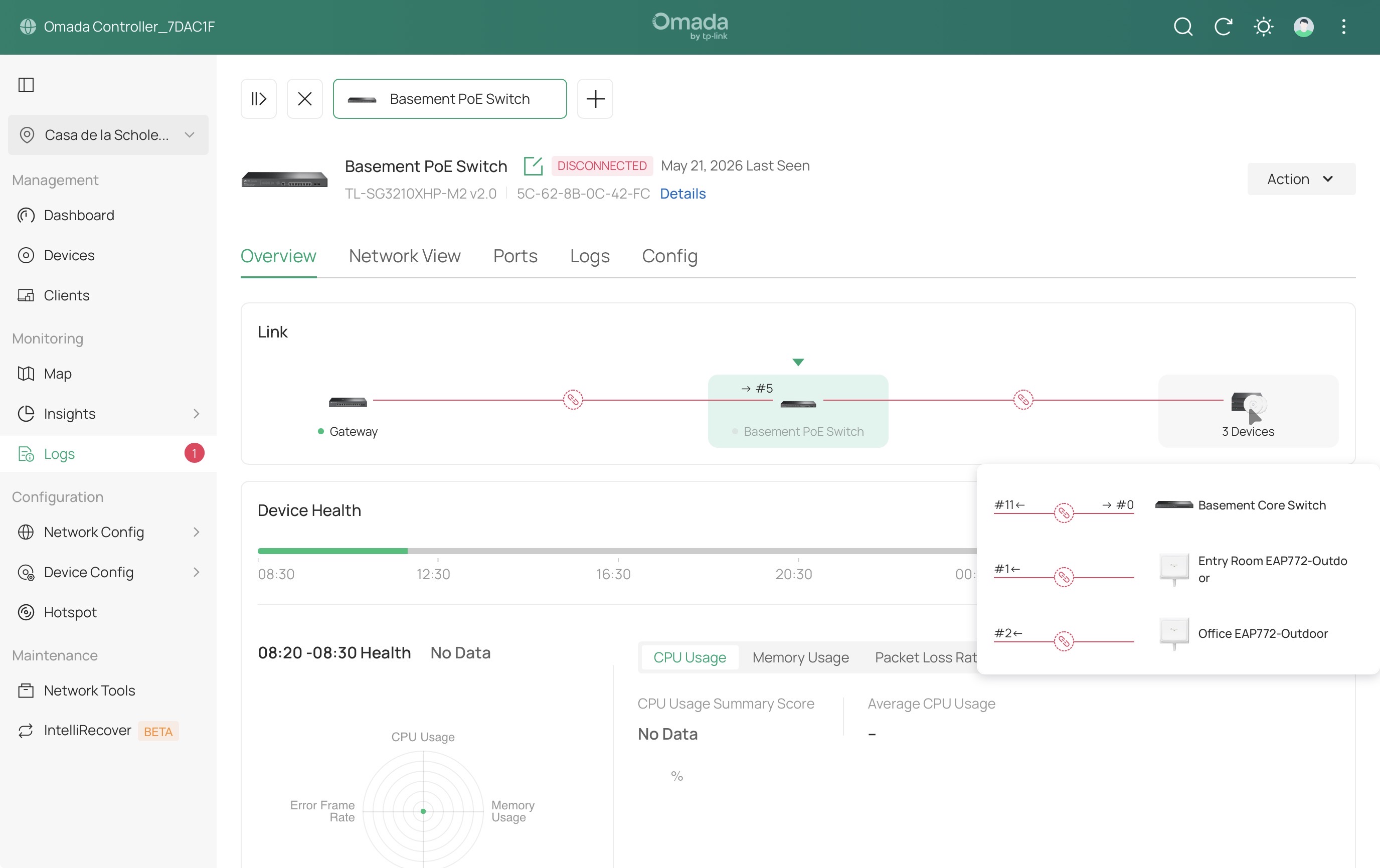
  @Vincent-TP It happened again yesterday afternoon and this morning. This morning I bypassed the SFP+ ports with a copper link. The switch continues to operate and I am up (at 1 gb instead of the 20 gb speed I had) but the switch is not responding to the controller. I opened an RMA request.

0
0
#4
Re:Troubleshooting SG3210XHP-M2 Ports Appear to Go Offline when Connected to SX3008F via DAC LAG
a week ago

Hi  @Dr_Marty 


Thank you for your response. Which switch are you planning to change?


Indeed, it is currently challenging to pinpoint the exact cause of the issue, but replacing the switch is also a viable option.

Looking forward to your update on the replacement's performance. Thanks.

Dr_Marty wrote

  @Vincent-TP It happened again yesterday afternoon and this morning. This morning I bypassed the SFP+ ports with a copper link. The switch continues to operate and I am up (at 1 gb instead of the 20 gb speed I had) but the switch is not responding to the controller. I opened an RMA request.


0
0
#5
Re:Troubleshooting SG3210XHP-M2 Ports Appear to Go Offline when Connected to SX3008F via DAC LAG
a week ago

  @Dr_Marty what DAC brand cable are you using ?


0
0
#6
Re:Troubleshooting SG3210XHP-M2 Ports Appear to Go Offline when Connected to SX3008F via DAC LAG
a week ago

  @Hobbs1210 I am using these.


https://www.amazon.com/dp/B01M09C9NZ

0
0
#7
Re:Troubleshooting SG3210XHP-M2 Ports Appear to Go Offline when Connected to SX3008F via DAC LAG
a week ago

  @Vincent-TP I requested RMA on the SG3210XHP-M2. It is the only device that needs to be reset and the only device not responding to the controller, despite still switching.

1
1
#8
Re:Troubleshooting SG3210XHP-M2 Ports Appear to Go Offline when Connected to SX3008F via DAC LAG
a week ago

  @Vincent-TP While I wait for the RMA process, is there any way to troubleshoot this? The switch is connected and switching, but unresponsive. If I reboot it, it will be fine, for a while.


0
0
#9
Re:Troubleshooting SG3210XHP-M2 Ports Appear to Go Offline when Connected to SX3008F via DAC LAG
a week ago

Hi  @Dr_Marty 


Currently, it appears that the switch’s network itself is unaffected; the issue is only with the communication between the controller.

May I ask whether the OC400 is connected directly to this switch or via the patch panel? It’s not very clear from the picture.

If possible, I recommend bypassing the patch panel. I even suspect that previous issues might have been due to it passing through this patch panel (just speculation, no conclusion yet).

Dr_Marty wrote

  @Vincent-TP While I wait for the RMA process, is there any way to troubleshoot this? The switch is connected and switching, but unresponsive. If I reboot it, it will be fine, for a while.


0
0
#10
Re:Troubleshooting SG3210XHP-M2 Ports Appear to Go Offline when Connected to SX3008F via DAC LAG
a week ago

  @Dr_Marty 


I would be tempted to reduce the 10gbit dac LAGS to a single link and see how the stability is, there could be some strangeness with DAC cables or something going on here as well.

0
0
#11